What is A-154 — Declaration and acknowledgement of paternity?
Form A-154, 'Yfirlýsing móður um faðerni barns og faðernisviðurkenning', lets a mother declare who the father of her child is and the father acknowledge it, so Registers Iceland (Þjóðskrá Íslands) can register the child's paternity. It's the route for parents who aren't married, and it can be used before the child is born as well as after.
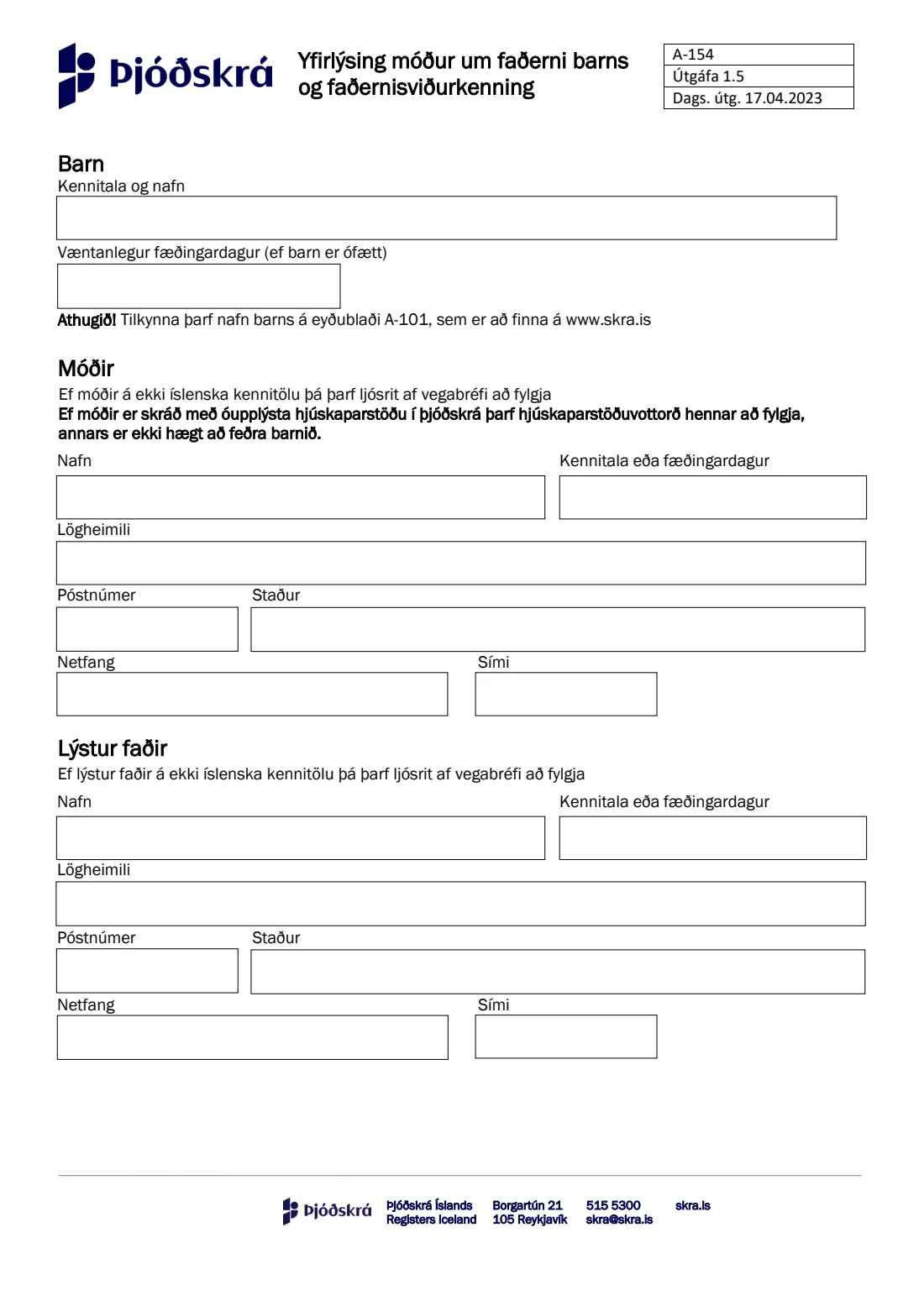
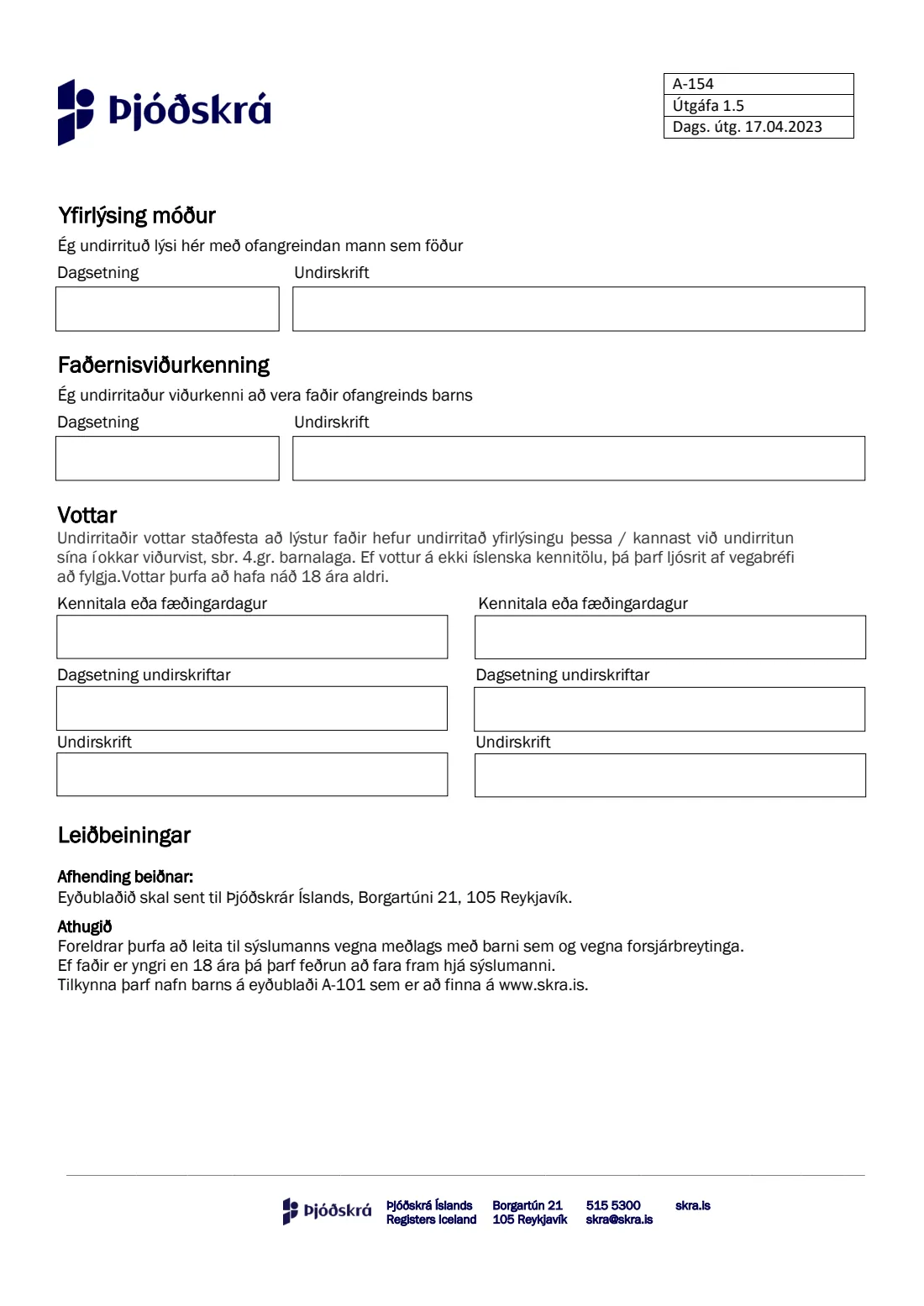
The form is two pages and in Icelandic only. Page one takes the child's kennitala and name (or the expected date of birth), then the mother's and the declared father's names, ID numbers or dates of birth, addresses and contact details. Page two carries the mother's declaration, the father's acknowledgement and two witnesses, who confirm that the father signed in their presence as section 4 of the Children Act requires. Registers Iceland's page says the parents and two witnesses fill in the form, which is free, and hand it in at Borgartún 21 in Reykjavík or email it to [email protected].
FileIt explains every box in English, checks each kennitala's check digit, and flags the cases the form rules out, such as a father or witness under 18. The answers print into Registers Iceland's own PDF, including names with letters such as ł, ś or ș that the PDF's font can't show, and the finished form is saved in your FileIt vault.
- Who fills it
- The child's mother and the declared father, plus two witnesses aged 18 or over
- Given to
- Þjóðskrá Íslands — Registers Iceland, Borgartún 21, 105 Reykjavík, or [email protected]
- Cost
- Free (gjaldfrjálst)
- Signatures
- Mother, father and two witnesses; the father signs in front of the witnesses
- Language
- Icelandic only (FileIt explains it in English)
- Edition
- A-154, Útgáfa 1.5, dated 17.04.2023
Who needs to fill out A-154 — Declaration and acknowledgement of paternity?
- Unmarried parents in Iceland who want the child's father registered with Registers Iceland.
- Expectant parents who want paternity recorded before the birth.
- Parents where one or both don't have an Icelandic kennitala: they give a date of birth and attach a copy of their passport.
- Not for a father under 18: the form and Registers Iceland's page say paternity must then be established through the District Commissioner (sýslumaður).
When to use A-154 — Declaration and acknowledgement of paternity
- Before or after the child's birth, when the parents agree who the father is.
- When the father can sign in front of two adult witnesses.
- Alongside, not instead of, form A-101, which is where the child's name is notified.
What you need before you start
- The child's kennitala and name, or, for an unborn child, the expected date of birth.
- The mother's and the father's full names, kennitala (or date of birth), registered address, post code and town, email and phone.
- Two witnesses aged 18 or over, with their kennitala or date of birth.
- A copy of the passport of anyone (parent or witness) without an Icelandic kennitala.
- If the mother's marital status is recorded as unknown in the registry: her marital-status certificate (hjúskaparstöðuvottorð).
What’s on A-154 — Declaration and acknowledgement of paternity
The 2023 edition has 2 pages. FileIt asks for it in 5 parts, and it is signed by Mother (móðir) and Declared father (lýstur faðir) and Witness 1 (vottur) and Witness 2 (vottur):
- Child (Barn)Mother (móðir)
- Mother (Móðir)Mother (móðir)
- Declared father (Lýstur faðir)Declared father (lýstur faðir)
- Declarations (Yfirlýsing móður · Faðernisviðurkenning)Mother (móðir)
- Witnesses (Vottar)Witness 1 (vottur)
How to fill out A-154 — Declaration and acknowledgement of paternity, step by step
1 Barn — Child
Say whether the child has been born. For a born child, give the kennitala and, if already registered, the name; FileIt prints them together in the 'Kennitala og nafn' box. For an unborn child, give the expected date of birth (Væntanlegur fæðingardagur). The name itself is notified separately on form A-101.
2 Móðir — Mother
The mother's name, kennitala or date of birth, legal domicile (lögheimili), post code, town, email and phone. Without an Icelandic kennitala, a copy of her passport goes with the form. The form warns that if her marital status is unknown in the registry, her marital-status certificate must be attached, or the child's paternity can't be registered.
3 Lýstur faðir — Declared father
The same details for the man the mother names as the father. Without an Icelandic kennitala, a copy of his passport goes with the form.
4 Yfirlýsing móður and Faðernisviðurkenning — Declarations
The mother declares the man named above to be the father; the father acknowledges he is the father of the child named above. Each signs and dates their part.
5 Vottar — Witnesses
Two witnesses confirm that the declared father signed the declaration, or acknowledged his signature, in their presence. Each gives a kennitala or date of birth, the date and a signature. Witnesses must be 18 or older, and one without an Icelandic kennitala attaches a copy of their passport.
Common mistakes to avoid
- Having the father sign without the two witnesses present. They confirm he signed in their presence.
- Using a witness under 18.
- Forgetting the passport copy for a parent or witness without an Icelandic kennitala.
- Leaving out the mother's marital-status certificate when her status is unknown in the registry. Without it, the child can't be given a father on the register.
- Expecting this form to register the child's name. That's form A-101.
- Expecting it to settle child support or custody. Parents go to the District Commissioner for those.
After you fill it out
Print the form. The mother, the father and both witnesses sign it, the father in front of the witnesses. Hand it in at Registers Iceland, Borgartún 21, 105 Reykjavík, or email it to [email protected], with any passport copies or certificate it needs.
Registers Iceland's page says a confirmation is sent by email, and if everything is in order the father is registered as the notification says. If anything is missing, they contact you by email. Most cases are handled within a few days.
A copy of the filled form stays in your FileIt vault.
Fill out A-154 — Declaration and acknowledgement of paternity online with FileIt
- Pick the person. Choose someone from People and FileIt fills in their name, date of birth, address and other details it already knows.
- Answer plain-language questions. One part of the form at a time, with the official help text beside each question — 24 fields in all. Your answers save as you go.
- Check the live preview. Watch your answers land on the real Þjóðskrá Íslands — Registers Iceland (ÞÍ) form, and let FileIt do any worksheet arithmetic.
- Generate the official PDF. FileIt prints your answers into the agency’s own PDF and files it in that person’s folder in your vault. Sign it, or send it for e-signature.
FileIt fills the form — it never files or submits anything for you. Deliver the finished form to whoever asked for it, the way the form’s instructions say.
Start A-154 — Declaration and acknowledgement of paternity now — it’s freeA-154 — Declaration and acknowledgement of paternity: frequently asked questions
What is form A-154?
Registers Iceland's form for the mother's declaration of paternity and the father's acknowledgement of paternity, used to register a child's father directly with the registry.
Can we do it before the baby is born?
Yes. The form has a box for the expected date of birth when the child is not yet born.
Why are witnesses needed?
Under section 4 of the Children Act (barnalög), the declared father signs in the presence of two witnesses, who confirm it with their own signatures. They must be 18 or older.
What if the father is under 18?
Then paternity has to be established through the District Commissioner (sýslumaður), not with this form.
Does it cost anything?
No. Registers Iceland lists the A-154 as free of charge.
How do I send it?
Hand it in at Borgartún 21, 105 Reykjavík, or email it to [email protected]. FileIt doesn't send it for you.
Can I fill in A-154 in English?
The form itself is only in Icelandic, but FileIt asks every question in English and prints your answers into Registers Iceland's official PDF, free on every FileIt account.
Official sources
- Blank form (PDF), published by Þjóðskrá Íslands — Registers Iceland (ÞÍ): https://www.skra.is/lisalib/getfile.aspx?itemid=bbd59862-ee69-11e8-9452-005056851dd2
- Official instructions and guidance: https://www.skra.is/umsoknir/eydublod-umsoknir-og-vottord/stok-vara/?productid=a685609c-ee69-11e8-9452-005056851dd2
- Edition shown on this page: A-154, Útgáfa 1.5, dags. útg. 17.04.2023 (checked 2026-09-28).
FileIt is not affiliated with or endorsed by Þjóðskrá Íslands — Registers Iceland (ÞÍ) or any government. This page explains the form in general terms and is not legal, tax or immigration advice. Always read the official instructions, and check that you are using the edition the recipient accepts. Page last reviewed 2026-09-28.