What is Kela SV 17e - parental allowance notification (cancel, give up days)?
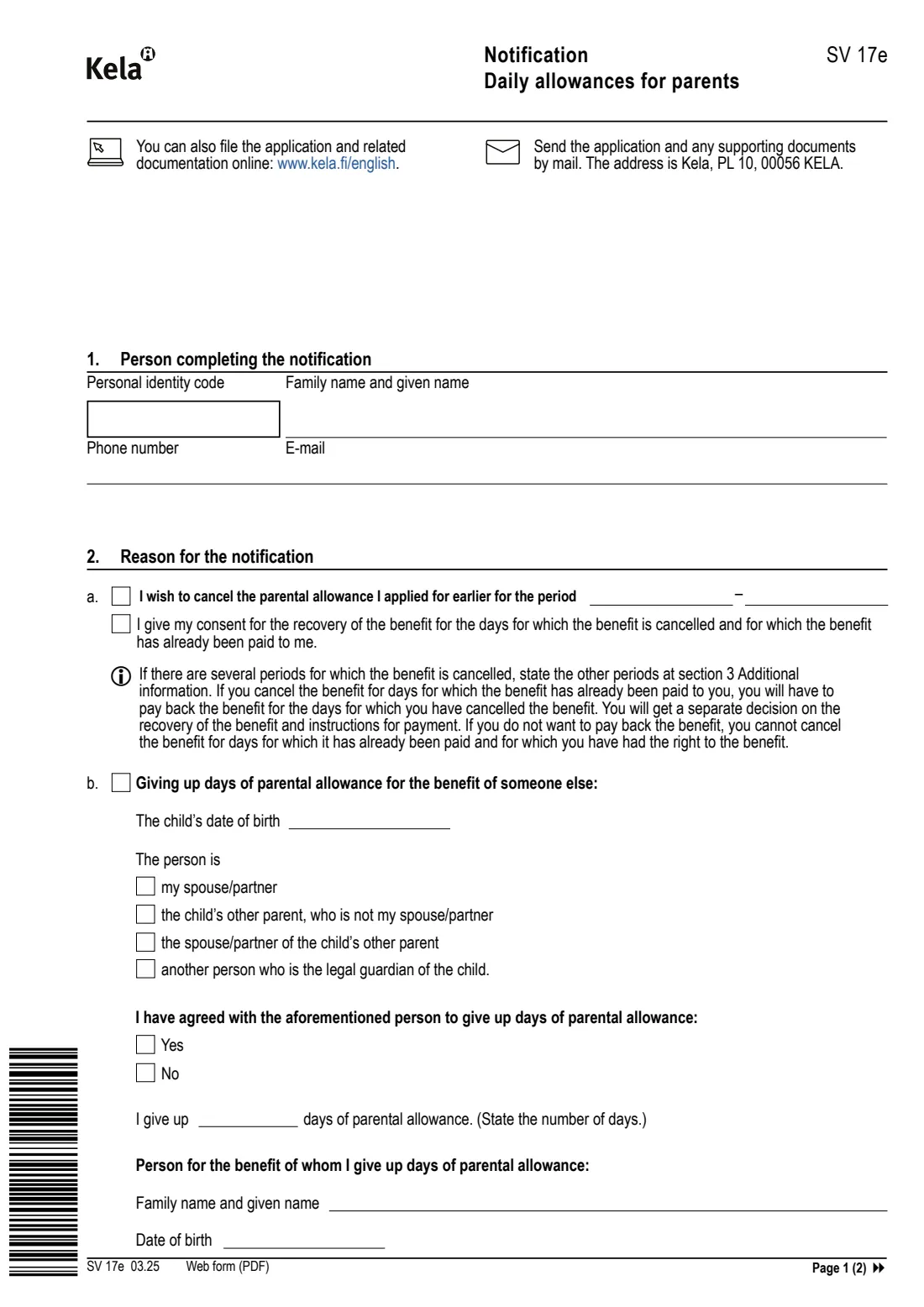
Form SV 17e is Kela's English notification about daily allowances for parents. You use it after you have applied for parental allowance (vanhempainraha), when something changes: you want to cancel a period you applied for, give up days of parental allowance for the benefit of your spouse or partner, the child's other parent or another guardian, cancel such a transfer you reported earlier, tell Kela about a benefit paid to you from abroad, or report another reason.
The form warns that if you cancel days for which the benefit has already been paid, you will have to pay it back, and you will get a separate decision on the recovery with payment instructions. If you don't want to pay it back, you cannot cancel days that have already been paid and for which you had the right to the benefit.
FileIt walks you through SV 17e in plain English, checks your personal identity code, and prints your answers into Kela's own two-page PDF, saved in your vault. As printed on the form, you can send it by post to Kela, PL 10, 00056 KELA, or file it online at www.kela.fi/english. FileIt never sends anything to Kela.
- Who fills it
- A parent who has applied for parental allowance from Kela
- Given to
- Kela — by post to PL 10, 00056 KELA, or online at www.kela.fi/english
- When
- When you cancel a period, give up or take back days, or get a benefit from abroad
- Signatures
- Signed by the parent making the notification
- Edition
- SV 17e 03.25
- Pages
- 2
Who needs to fill out Kela SV 17e - parental allowance notification (cancel, give up days)?
- Parents who applied for parental allowance and now want to cancel some or all of the period.
- Parents who want to give up days of their parental allowance to their spouse or partner, the child's other parent, that parent's spouse, or another legal guardian.
- Parents who reported a transfer of days earlier and now want to cancel it.
- Parents who receive a family or parental benefit from another country and must tell Kela about it.
When to use Kela SV 17e - parental allowance notification (cancel, give up days)
- After applying for parental allowance, when your plans change.
- Before the days you want to give up or cancel are paid, if you want to avoid paying back benefit already received.
- As soon as a benefit from abroad is granted to you.
- For anything else about your parental allowance, using 'Other reason' and section 3.
What you need before you start
- Your personal identity code, name, phone number and e-mail.
- The period you want to cancel.
- For giving up days: the child's date of birth, how the other person is related to the child, the number of days, and that person's name and date of birth.
- For a benefit from abroad: the paying institution, country, amount and date of granting, and the benefit decision to enclose.
What’s on Kela SV 17e - parental allowance notification (cancel, give up days)
The 2025 edition has 2 pages. FileIt asks for it in 8 parts, and it is signed by Parent:
- 1 Person completing the notificationParent
- 2a Cancelling parental allowance applied for earlierParent
- 2b Giving up days of parental allowance for the benefit of someone elseParent
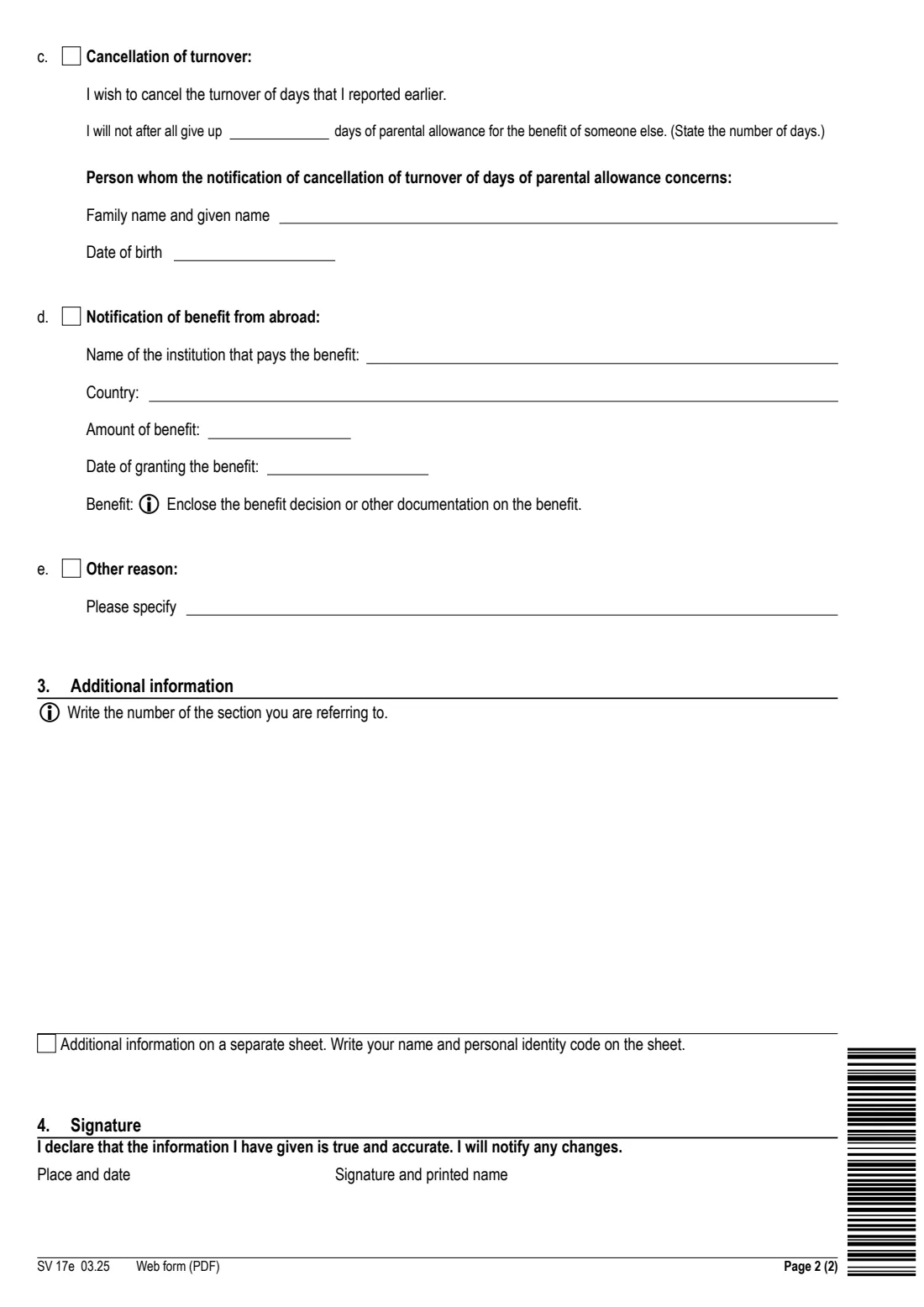
- 2c Cancellation of turnoverParent
- 2d Notification of benefit from abroadParent
- 2e Other reasonParent
- 3 Additional informationParent
- 4 SignatureParent
How to fill out Kela SV 17e - parental allowance notification (cancel, give up days), step by step
1 1. Person completing the notification
Your personal identity code, family name and given names, phone number and e-mail.
2 2a. Cancelling parental allowance
Tick the box and give the period you want to cancel. Tick the consent box if you agree that benefit already paid for those days is recovered. Extra periods go in section 3.
3 2b. Giving up days for someone else
Give the child's date of birth, say who the person is (your spouse or partner, the child's other parent, the other parent's spouse or partner, or another legal guardian), whether you have agreed this with them, how many days you give up, and their name and date of birth.
4 2c. Cancellation of turnover
To take back days you said you would give up: the number of days and the name and date of birth of the person concerned.
5 2d. Benefit from abroad
The institution that pays the benefit, the country, the amount and the date it was granted. Enclose the benefit decision or other documentation.
6 2e, 3 and 4. Other reason, additional information, signature
Describe any other reason, add details in section 3 (with the section number you refer to), then give the place and date and sign above your printed name.
Common mistakes to avoid
- Cancelling days that have already been paid without being ready to pay the benefit back.
- Giving up days without stating who the other person is and whether you have agreed it with them.
- Forgetting to enclose the decision on a benefit from abroad.
- Using SV 17e to apply for parental allowance in the first place — that is form SV 15e.
After you fill it out
Sign the form (by hand, or with FileIt's e-signature when you file it online).
Send it by post to Kela, PL 10, 00056 KELA, or file it online at www.kela.fi/english, with any enclosures. FileIt doesn't send it.
Keep the PDF in your FileIt vault; Kela sends a decision, including a separate one if benefit is recovered.
Fill out Kela SV 17e - parental allowance notification (cancel, give up days) online with FileIt
- Pick the person. Choose someone from People and FileIt fills in their name, date of birth, address and other details it already knows.
- Answer plain-language questions. One part of the form at a time, with the official help text beside each question — 31 fields in all. Your answers save as you go.
- Check the live preview. Watch your answers land on the real Social Insurance Institution of Finland (Kansaneläkelaitos / Kela) form, and let FileIt do any worksheet arithmetic.
- Generate the official PDF. FileIt prints your answers into the agency’s own PDF and files it in that person’s folder in your vault. Sign it, or send it for e-signature.
FileIt fills the form — it never files or submits anything for you. Deliver the finished form to whoever asked for it, the way the form’s instructions say.
Start Kela SV 17e - parental allowance notification (cancel, give up days) now — it’s freeKela SV 17e - parental allowance notification (cancel, give up days): frequently asked questions
What is Kela form SV 17e?
It is Kela's English notification about daily allowances for parents, used to cancel parental allowance, give up or take back days, report a benefit from abroad, or report another change.
Do I have to pay back benefit if I cancel days?
The form says that if you cancel days for which the benefit has already been paid, you will have to pay it back, and you will get a separate decision on the recovery. If you don't want to pay it back, you can't cancel days already paid for which you had the right to the benefit.
Who can I give days of parental allowance to?
The form lists your spouse or partner, the child's other parent who is not your spouse or partner, the spouse or partner of the child's other parent, or another person who is the child's legal guardian.
Where do I send SV 17e?
By post to Kela, PL 10, 00056 KELA, or online at www.kela.fi/english, as printed on the form.
Can I fill in SV 17e online?
Yes. FileIt lets you fill it in online for free and prints your answers into Kela's official PDF. You can sign it by hand or with FileIt's e-signature, then send it to Kela yourself.
Official sources
- Blank form (PDF), published by Social Insurance Institution of Finland (Kansaneläkelaitos / Kela): https://www.kela.fi/benefit-forms/SV17e.pdf
- Official instructions and guidance: https://www.kela.fi/on-parental-leave
- Edition shown on this page: SV 17e 03.25 (checked 2026-10-01).
FileIt is not affiliated with or endorsed by Social Insurance Institution of Finland (Kansaneläkelaitos / Kela) or any government. This page explains the form in general terms and is not legal, tax or immigration advice. Always read the official instructions, and check that you are using the edition the recipient accepts. Page last reviewed 2026-10-01.