What is SCO bank account for pension payments (form 200)?
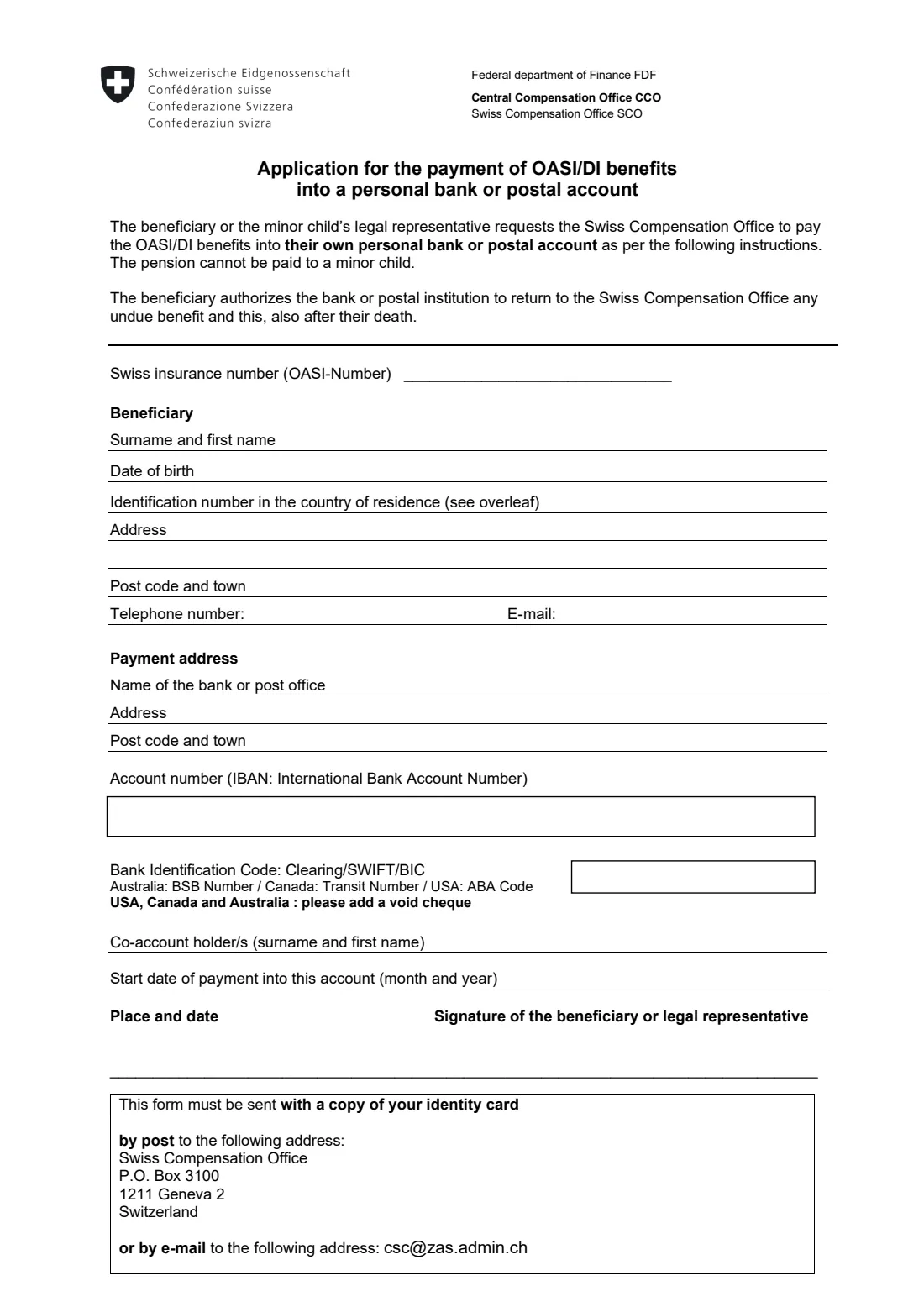
Form 200 is the Swiss Compensation Office's (SCO) application for having a Swiss old-age and survivors' pension (OASI, called AHV in German and AVS in French) or a disability pension (DI, IV/AI) paid into a personal bank or postal account. The SCO, part of the Central Compensation Office in Geneva, pays these pensions to people living outside Switzerland.
You give your Swiss insurance number, your name, date of birth and address, and then the payment details: the bank's name and address, the account number (IBAN) and the bank identification code (clearing, SWIFT or BIC; the BSB number in Australia, the transit number in Canada, the ABA code in the USA). By signing, the beneficiary also authorises the bank to return any benefit paid unduly to the SCO, even after the beneficiary's death.
FileIt prints your answers into the SCO's own PDF, checks the 13-digit insurance number and the IBAN's check digits, and can pre-fill your name and date of birth from the People records in your vault. The finished form is saved in that person's folder. You sign it and send it yourself; FileIt never sends it.
- Who fills it
- The pension beneficiary, or a minor child's legal representative
- Given to
- Swiss Compensation Office SCO, Geneva, by post or e-mail
- Attach
- A copy of your identity card; for accounts in the USA, Canada or Australia, a void cheque
- Signatures
- Beneficiary or legal representative
- Edition
- Form 200, English, no edition printed (PDF of February 2026)
- Pages
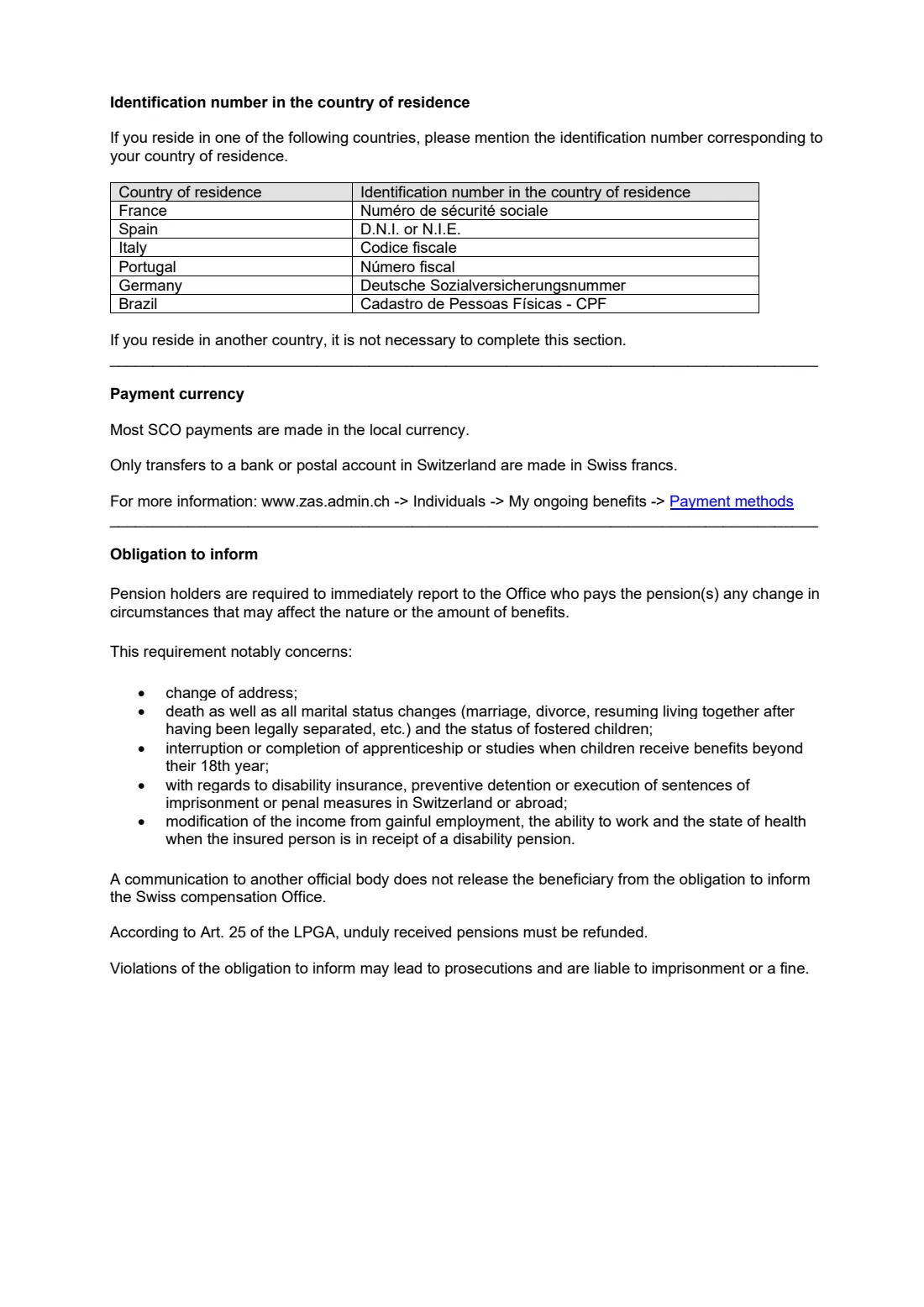
- 2 (page 2 is notes: identification numbers, payment currency, obligation to inform)
Who needs to fill out SCO bank account for pension payments (form 200)?
- People receiving a Swiss AHV/AVS old-age or survivors' pension, or an IV/AI disability pension, from the Swiss Compensation Office.
- Pensioners who are opening a new bank or postal account, or moving their pension to a different account.
- Pensioners who move to another country and want the pension paid into a local account there.
- Legal representatives of a minor child who receives a pension (the pension can't be paid to the minor child).
When to use SCO bank account for pension payments (form 200)
- When you first claim a pension from the SCO and need to say where it should be paid.
- Whenever your bank details change, such as a new bank, a closed account or a new IBAN.
- When you move abroad or return, since most SCO payments are made in the local currency and only transfers to accounts in Switzerland are made in Swiss francs.
- Keep your old account open until the first payment has reached the new one.
What you need before you start
- Your Swiss insurance number (13 digits, starting with 756).
- Your full name, date of birth and current address, with phone and e-mail if you want the SCO to be able to reach you.
- If you live in France, Spain, Italy, Portugal, Germany or Brazil, your identification number there (for example the French social security number, the Spanish D.N.I. or N.I.E., the Italian codice fiscale or the Brazilian CPF).
- The bank's name and address, your account number (IBAN) and the bank code (BIC/SWIFT or clearing; BSB, transit or ABA number outside Europe).
- The names of any co-account holders.
- A copy of your identity card, and a void cheque for an account in the USA, Canada or Australia.
What’s on SCO bank account for pension payments (form 200)
The 2026 edition has 2 pages. FileIt asks for it in 3 parts, and it is signed by Beneficiary or legal representative:
- The beneficiaryBeneficiary or legal representative
- Payment address (the bank or postal account)Beneficiary or legal representative
- Place and dateBeneficiary or legal representative
How to fill out SCO bank account for pension payments (form 200), step by step
1 Swiss insurance number
The 13-digit AHV/AVS number starting with 756. FileIt checks the check digit and prints it as 756.XXXX.XXXX.XX.
2 Beneficiary
Surname and first name, date of birth, identification number in your country of residence (only for the six countries listed on page 2), address, post code and town, telephone and e-mail. The form has no country line, so FileIt puts the country on the second address line.
3 Payment address
The name and address of the bank or post office, and its post code and town.
4 Account number and bank code
Your IBAN, printed in groups of four after its check digits are verified, or your account number where there's no IBAN. Then the clearing, SWIFT or BIC code, or the BSB, transit or ABA number.
5 Co-account holders and start date
Anyone who holds the account with you, and the month and year from which the pension should be paid into this account.
6 Place, date and signature
The beneficiary or legal representative signs next to the place and date.
Common mistakes to avoid
- Giving an account in someone else's name. The form asks for the beneficiary's own personal account, and a pension can't be paid to a minor child.
- Typing the IBAN wrongly. FileIt checks its check digits, but compare it with a bank statement too.
- Forgetting the copy of your identity card, or the void cheque for an account in the USA, Canada or Australia.
- Closing the old account before the first payment has reached the new one.
- Leaving out the start month, so the SCO doesn't know from when to use the new account.
After you fill it out
Sign the form and add a copy of your identity card (and a void cheque if your account is in the USA, Canada or Australia).
Send it by post to the Swiss Compensation Office, P.O. Box 3100, 1211 Geneva 2, Switzerland, or by e-mail to [email protected], the addresses printed on the form. FileIt never sends it for you.
Keep a copy in the pensioner's folder in your FileIt vault, together with the SCO's confirmation, so the family knows where the pension is paid.
Fill out SCO bank account for pension payments (form 200) online with FileIt
- Pick the person. Choose someone from People and FileIt fills in their name, date of birth, address and other details it already knows.
- Answer plain-language questions. One part of the form at a time, with the official help text beside each question — 22 fields in all. Your answers save as you go.
- Check the live preview. Watch your answers land on the real Central Compensation Office (CCO / ZAS / CdC) — Swiss Compensation Office (SCO / SAK / CSC) form, and let FileIt do any worksheet arithmetic.
- Generate the official PDF. FileIt prints your answers into the agency’s own PDF and files it in that person’s folder in your vault. Sign it, or send it for e-signature.
FileIt fills the form — it never files or submits anything for you. Deliver the finished form to whoever asked for it, the way the form’s instructions say.
Start SCO bank account for pension payments (form 200) now — it’s freeSCO bank account for pension payments (form 200): frequently asked questions
What is SCO form 200?
It is the Swiss Compensation Office's application for paying a Swiss AHV/AVS old-age or survivors' pension, or an IV/AI disability pension, into the beneficiary's own bank or postal account.
In which currency will my Swiss pension be paid?
Page 2 of the form says most SCO payments are made in the local currency, and only transfers to a bank or postal account in Switzerland are made in Swiss francs.
Can I send form 200 by e-mail?
Yes. The form says to send it with a copy of your identity card by post to the Swiss Compensation Office in Geneva or by e-mail to [email protected].
Do I need to give an identification number from my country?
Only if you live in France, Spain, Italy, Portugal, Germany or Brazil. Page 2 lists which number to give for each. Elsewhere you can leave it blank.
My account has no IBAN. What do I write?
Give your account number, and in the bank code box the BSB number (Australia), transit number (Canada) or ABA code (USA). For those three countries the form asks you to add a void cheque.
Can the pension be paid into a child's account?
No. The form says the pension cannot be paid to a minor child; the child's legal representative fills in and signs the form.
Can I fill in form 200 online?
Yes. FileIt lets you fill it in online and gives you the official PDF with your answers printed in, ready to sign and send.
Official sources
- Blank form (PDF), published by Central Compensation Office (CCO / ZAS / CdC) — Swiss Compensation Office (SCO / SAK / CSC): https://www.zas.admin.ch/dam/en/sd-web/PUYB-bZSYxTG/200_formulaire_bancaire_en.pdf
- Official instructions and guidance: https://www.zas.admin.ch/en/pdf-forms
- Edition shown on this page: Form 200, English (no edition printed; PDF dated 10 February 2026) (checked 2026-09-28).
FileIt is not affiliated with or endorsed by Central Compensation Office (CCO / ZAS / CdC) — Swiss Compensation Office (SCO / SAK / CSC) or any government. This page explains the form in general terms and is not legal, tax or immigration advice. Always read the official instructions, and check that you are using the edition the recipient accepts. Page last reviewed 2026-09-28.