What is IMM 5604?
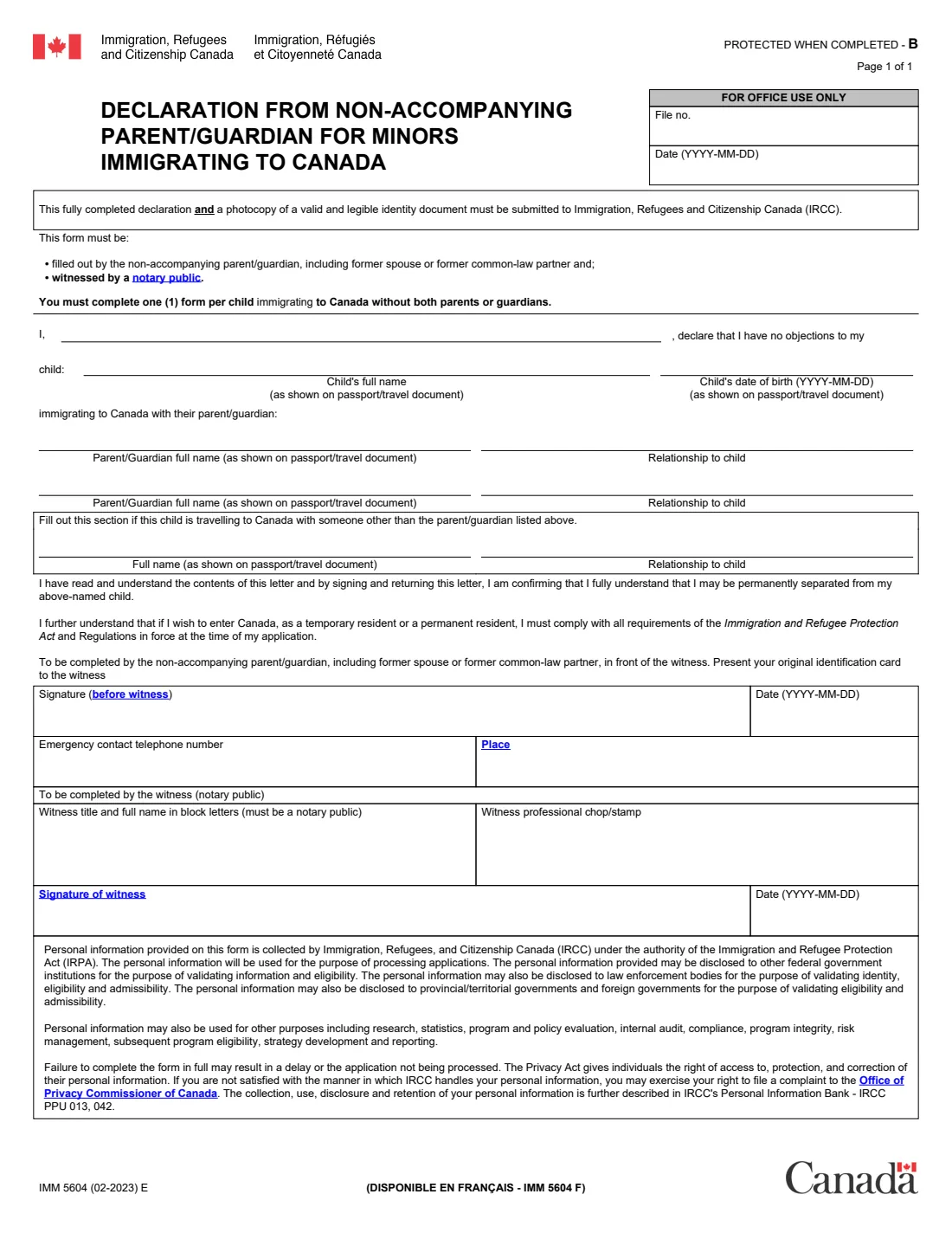
IMM 5604 is a one-page declaration from Immigration, Refugees and Citizenship Canada (IRCC). When a minor child immigrates to Canada without both parents or guardians, the parent or guardian who is not coming — including a former spouse or former common-law partner — declares that they have no objection to the child immigrating with the named parent or guardian. The current edition is IMM 5604 (02-2023) E; the French version is IMM 5604 F.
The form must be filled out by the non-accompanying parent or guardian and witnessed by a notary public, and IRCC asks for the completed declaration together with a photocopy of a valid, legible identity document of the person signing it. One form is needed for each child. By signing, the parent confirms that they understand they may be permanently separated from the child, and that they would have to meet Canada's immigration requirements themselves to come to Canada later.
FileIt lets you fill in IMM 5604 in plain language and prints your answers onto IRCC's own PDF, with names in any Latin script (accents, ł, ș and all) printed correctly. Your name can come from your People record in the FileIt vault, and the finished PDF is saved in the vault. FileIt never submits anything: you print the form, sign it in front of the notary, and include it with the child's application as the instructions say.
- Who fills it
- The parent or guardian who is not immigrating with the child
- Given to
- IRCC, with the child's immigration application
- How many
- One form per child immigrating without both parents or guardians
- Signatures
- Signed by hand in front of a notary public, who also signs, dates and stamps it
- Also send
- A photocopy of a valid, legible identity document of the person signing
- Edition
- IMM 5604 (02-2023) E
Who needs to fill out IMM 5604?
- A parent or legal guardian whose child is immigrating to Canada with the other parent or guardian, while they stay behind.
- A former spouse or former common-law partner who shares parental rights over a child who is moving to Canada.
- Families where the child will travel to Canada with someone other than the parent or guardian, such as a grandparent — the form has a section for that person.
- Not needed when both parents or guardians immigrate with the child.
When to use IMM 5604
- When the document checklist for the child's application to IRCC asks for a declaration from the non-accompanying parent or guardian.
- Before the application is submitted, so the signed and witnessed original can be included with it.
- Once for each child: a family with two children immigrating without one parent needs two forms.
What you need before you start
- Your full name.
- The child's full name and date of birth exactly as on their passport or travel document.
- The full name of the parent or guardian the child is immigrating with, as on their passport or travel document, and their relationship to the child (and a second one, if there is one).
- If the child travels with someone else: that person's full name and relationship to the child.
- An emergency contact telephone number and the place where you will sign.
- An appointment with a notary public, your original identification to show them, and a photocopy of a valid identity document to include.
What’s on IMM 5604
The 2023 edition has 1 page. FileIt asks for it in 2 parts:
- Your declarationNon-accompanying parent or guardian
- Signing before the notaryWitness (notary public)
How to fill out IMM 5604, step by step
1 Your declaration
"I, (your name), declare that I have no objections to my child (full name, date of birth) immigrating to Canada with their parent/guardian." Enter the child's name and date of birth exactly as they appear on the child's passport or travel document.
2 Who the child immigrates with
Give the full name, as on their passport or travel document, and the relationship to the child of the parent or guardian the child immigrates with. There is room for a second one. If the child is travelling to Canada with someone other than those people, fill in the next section with that person's name and relationship to the child.
3 Signature, date, telephone and place
You sign in front of the witness, after showing them your original identification card. Next to your signature go the date (YYYY-MM-DD), your emergency contact telephone number and the place where you sign. FileIt prints the date only if you give it; otherwise you write it on the day.
4 The notary's part
The notary public writes their title and full name in block letters, adds their professional chop or stamp, signs and dates the form. In FileIt the date and the notary's name are an optional part you can fill in if you already know them.
Common mistakes to avoid
- Signing the form before you are in front of the notary public.
- Using one form for several children — each child needs their own.
- Names or a date of birth that don't match the passport or travel document.
- Forgetting the photocopy of a valid identity document of the person signing.
- Leaving the emergency contact telephone number or the place blank.
After you fill it out
Print the PDF unsigned. Take it to a notary public with your original identification, and sign it in front of them; they complete and stamp the witness part.
Give the signed original, with a photocopy of your valid identity document, to the parent or guardian who is applying, so it can go with the child's application to IRCC as its instructions say. FileIt does not send it.
Keep a copy. FileIt saves the filled PDF in your vault; scanning the witnessed version into the same folder keeps a complete record.
Fill out IMM 5604 online with FileIt
- Pick the person. Choose someone from People and FileIt fills in their name, date of birth, address and other details it already knows.
- Answer plain-language questions. One part of the form at a time, with the official help text beside each question — 14 fields in all. Your answers save as you go.
- Check the live preview. Watch your answers land on the real Immigration, Refugees and Citizenship Canada (IRCC) form, and let FileIt do any worksheet arithmetic.
- Generate the official PDF. FileIt prints your answers into the agency’s own PDF and files it in that person’s folder in your vault.
FileIt fills the form — it never files or submits anything for you. Deliver the finished form to whoever asked for it, the way the form’s instructions say.
Start IMM 5604 now — it’s freeIMM 5604: frequently asked questions
What is IMM 5604?
It is IRCC's declaration in which a parent or guardian who is not going to Canada says they have no objection to their minor child immigrating to Canada with the other parent or guardian.
Does IMM 5604 need to be notarized?
Yes. The form says it must be witnessed by a notary public, who writes their name, signs, dates and stamps it.
Do I need one form per child?
Yes. The form says to complete one form per child immigrating to Canada without both parents or guardians.
What else must go with it?
A photocopy of a valid and legible identity document. The form says the declaration and that photocopy must both be submitted to IRCC.
Can I fill out IMM 5604 online?
Yes, with FileIt: you answer the questions online and FileIt prints them onto IRCC's official PDF. Signing still happens by hand in front of a notary.
Is there a French version?
Yes, IMM 5604 F.
Official sources
- Blank form (PDF), published by Immigration, Refugees and Citizenship Canada (IRCC): https://www.canada.ca/content/dam/ircc/documents/pdf/english/kits/forms/imm5604/01-02-2023/imm5604e.pdf
- Official instructions and guidance: https://www.canada.ca/en/immigration-refugees-citizenship/services/application/application-forms-guides/imm5604.html
- Edition shown on this page: IMM 5604 (02-2023) E (checked 2026-09-28).
FileIt is not affiliated with or endorsed by Immigration, Refugees and Citizenship Canada (IRCC) or any government. This page explains the form in general terms and is not legal, tax or immigration advice. Always read the official instructions, and check that you are using the edition the recipient accepts. Page last reviewed 2026-09-28.