What is IMM 5645?
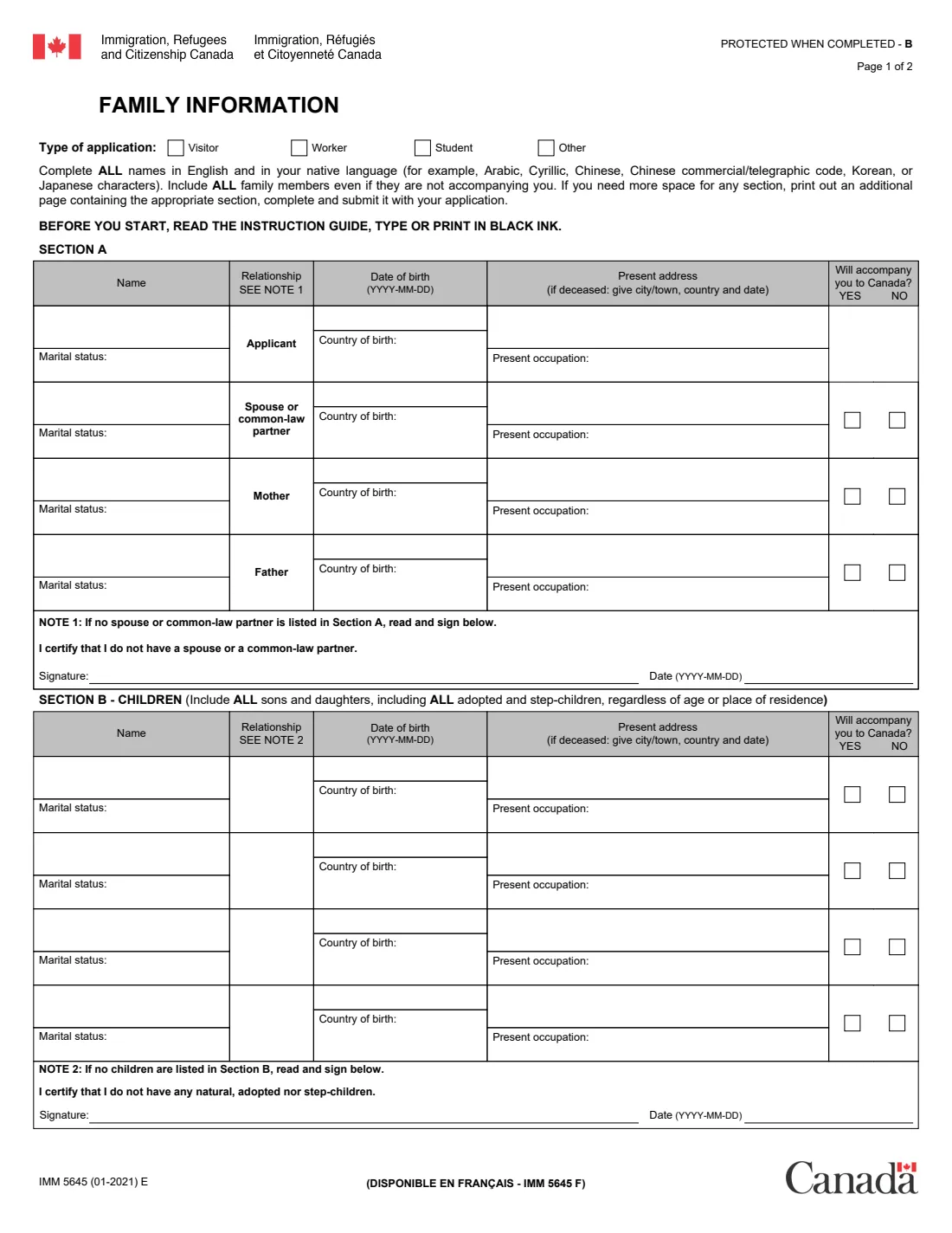
IMM 5645, Family Information, is a two-page form from Immigration, Refugees and Citizenship Canada (IRCC). At the top you tick the type of application it goes with — Visitor, Worker, Student or Other. The current edition is IMM 5645 (01-2021) E; the French version is IMM 5645 F.
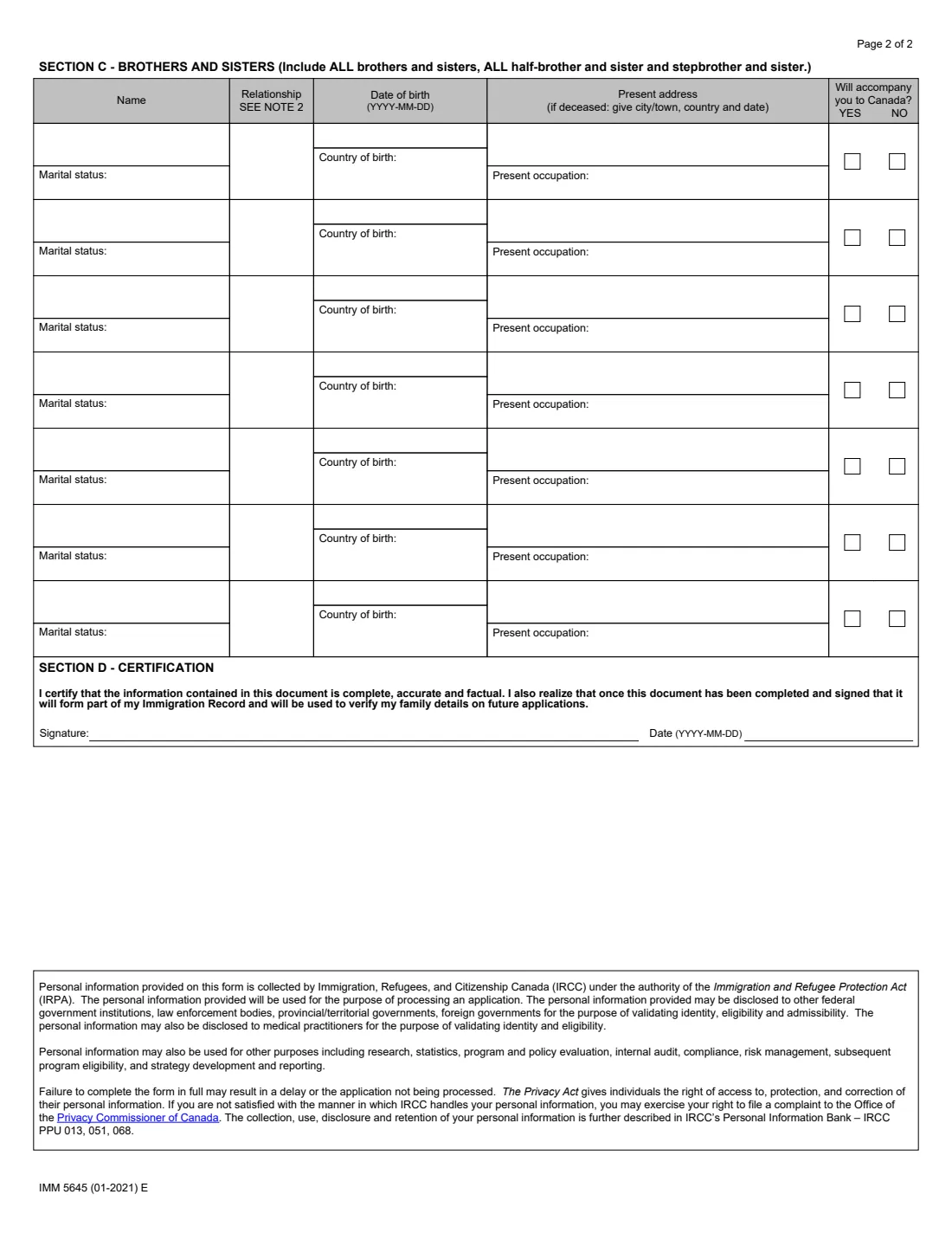
The form asks you to include ALL family members, even those who are not coming with you: in Section A yourself, your spouse or common-law partner, your mother and your father; in Section B all your sons and daughters, including adopted children and step-children, whatever their age or place of residence; and in Section C all your brothers and sisters, including half- and step-brothers and sisters. For each person it wants the name, relationship, date of birth, country of birth, present address (or, if they have died, the city or town, country and date), present occupation, marital status and whether they will accompany you to Canada. Section D is your certification that it is complete, accurate and factual, and that it becomes part of your immigration record.
FileIt lets you fill in IMM 5645 one person at a time, prints each answer neatly into its box on IRCC's own PDF — accented and Central European names included — and checks that long names and addresses fit. Your own name and date of birth can come from your People record in the FileIt vault, and the finished PDF is saved there. The form also asks for names in your native language (for example Arabic, Cyrillic or Chinese characters); FileIt prints the English (Latin-letter) names only, so you add the native-script names by hand. FileIt never submits anything to IRCC.
- Who fills it
- The applicant, listing their whole family
- Given to
- IRCC, with the application it belongs to (visitor, worker, student or other)
- Pages
- 2 — Section A (you, spouse, parents), B (children, 4 rows), C (brothers and sisters, 7 rows), D (certification)
- Signatures
- The applicant signs and dates Section D; also Note 1 if no spouse or partner, and Note 2 if no children
- Edition
- IMM 5645 (01-2021) E
Who needs to fill out IMM 5645?
- People applying to IRCC for a visitor visa, a study permit or a work permit whose document checklist asks for the Family Information form.
- Other IRCC applicants whose instructions ask for IMM 5645 — the form has an "Other" box for them.
- Anyone completing it must list their whole family: spouse or common-law partner, parents, all children and all brothers and sisters, even if none of them are coming to Canada.
When to use IMM 5645
- When the document checklist or instruction guide for your IRCC application lists IMM 5645.
- Before you submit the application, once you have every family member's details together.
- Again for a later application if your family details change — the form becomes part of your immigration record, and inconsistencies between applications can cause questions.
What you need before you start
- The type of application: visitor, worker, student or other.
- For you, your spouse or common-law partner, your mother and your father: full names as on their passports or identity documents, dates and countries of birth, marital status, present address and occupation.
- The same for every child — natural, adopted and step-children — and every brother and sister, including half- and step-siblings, with their relationship to you.
- For anyone who has died: the city or town, country and date of death.
- Whether each person will accompany you to Canada.
- Everyone's names in your native script, if different from the English spelling, to write in by hand.
What’s on IMM 5645
The 2021 edition has 2 pages. FileIt asks for it in 17 parts, and it is signed by Applicant:
- Your applicationApplicant
- Section A: You (the applicant)Applicant
- Section A: Spouse or common-law partnerApplicant
- Section A: Your motherApplicant
- Section A: Your fatherApplicant
- Section B: Child 1Applicant
- Section B: Child 2Applicant
- Section B: Child 3Applicant
- Section B: Child 4Applicant
- Section C: Brother or sister 1Applicant
- Section C: Brother or sister 2Applicant
- Section C: Brother or sister 3Applicant
- Section C: Brother or sister 4Applicant
- Section C: Brother or sister 5Applicant
- Section C: Brother or sister 6Applicant
- Section C: Brother or sister 7Applicant
- Section D: CertificationApplicant
How to fill out IMM 5645, step by step
1 Type of application
Tick Visitor, Worker, Student or Other. The form then asks you to complete all names in English and in your native language, include all family members even if they are not accompanying you, and to print an extra page with the right section if you run out of room.
2 Section A — you, your spouse or partner, and your parents
One row each for you (the applicant), your spouse or common-law partner, your mother and your father: name, date of birth (YYYY-MM-DD), country of birth, present address (if deceased: city or town, country and date), present occupation and marital status, and for everyone but you whether they will accompany you to Canada. If you have no spouse or common-law partner, Note 1 asks you to sign and date the certification "I certify that I do not have a spouse or a common-law partner".
3 Section B — children
Include all sons and daughters, including adopted and step-children, regardless of age or place of residence, with their relationship to you. There are four rows. If you have no children, Note 2 asks you to sign and date "I certify that I do not have any natural, adopted nor step-children".
4 Section C — brothers and sisters
Include all brothers and sisters, half-brothers and half-sisters, and step-brothers and step-sisters, with the same details. There are seven rows; use an extra page for more.
5 Section D — certification
Sign and date to certify that the information is complete, accurate and factual, and that you understand it forms part of your immigration record and will be used to verify your family details on future applications.
Common mistakes to avoid
- Leaving out family members who aren't coming to Canada — the form asks for ALL of them.
- Forgetting adopted children, step-children, half-siblings or step-siblings.
- Leaving a parent out because they have died — give the city or town, country and date of death instead of an address.
- Not signing Note 1 (no spouse or partner) or Note 2 (no children) when they apply.
- Names or dates of birth that differ from what you gave on other IRCC forms or earlier applications.
- Leaving out the native-script names the form asks for.
After you fill it out
Print the PDF, add native-script names by hand if your names are written in another script, and sign and date Section D (and Note 1 or Note 2 if they apply). FileIt can also send the Section D signature for eSignature.
Include the signed form with your application exactly as your IRCC instruction guide or document checklist says. FileIt does not submit it.
Keep the copy FileIt saves in your vault. Later IRCC applications ask for the same family details, and they should match.
Fill out IMM 5645 online with FileIt
- Pick the person. Choose someone from People and FileIt fills in their name, date of birth, address and other details it already knows.
- Answer plain-language questions. One part of the form at a time, with the official help text beside each question — 117 fields in all. Your answers save as you go.
- Check the live preview. Watch your answers land on the real Immigration, Refugees and Citizenship Canada (IRCC) form, and let FileIt do any worksheet arithmetic.
- Generate the official PDF. FileIt prints your answers into the agency’s own PDF and files it in that person’s folder in your vault. Sign it, or send it for e-signature.
FileIt fills the form — it never files or submits anything for you. Deliver the finished form to whoever asked for it, the way the form’s instructions say.
Start IMM 5645 now — it’s freeIMM 5645: frequently asked questions
What is IMM 5645 used for?
It lists your family members for IRCC. The form has boxes for visitor, worker, student and other applications, and IRCC uses it to verify your family details, now and on future applications.
Do I have to list family members who are not coming with me?
Yes. The form says to include all family members even if they are not accompanying you, and to include all children and all brothers and sisters, including half- and step-siblings.
What if a parent has died?
Still list them. In the address box give the city or town, country and date of death.
What if I have more than four children or seven brothers and sisters?
The form says to print an additional page containing the appropriate section, complete it and submit it with your application.
Do I need to write names in my native language?
The form asks for names in English and in your native language (for example Arabic, Cyrillic, Chinese or Korean characters). FileIt prints the English names; write the native-script names by hand after printing.
Can I fill out IMM 5645 online?
Yes, with FileIt: answer the questions online and FileIt prints them onto IRCC's official PDF for you to sign and include with your application.
Is there a French version?
Yes, IMM 5645 F.
Official sources
- Blank form (PDF), published by Immigration, Refugees and Citizenship Canada (IRCC): https://www.canada.ca/content/dam/ircc/documents/pdf/english/kits/forms/imm5645/01-01-2021/imm5645e.pdf
- Official instructions and guidance: https://www.canada.ca/en/immigration-refugees-citizenship/services/application/application-forms-guides/imm5645.html
- Edition shown on this page: IMM 5645 (01-2021) E (checked 2026-09-28).
FileIt is not affiliated with or endorsed by Immigration, Refugees and Citizenship Canada (IRCC) or any government. This page explains the form in general terms and is not legal, tax or immigration advice. Always read the official instructions, and check that you are using the edition the recipient accepts. Page last reviewed 2026-09-28.