What is AUT-01?
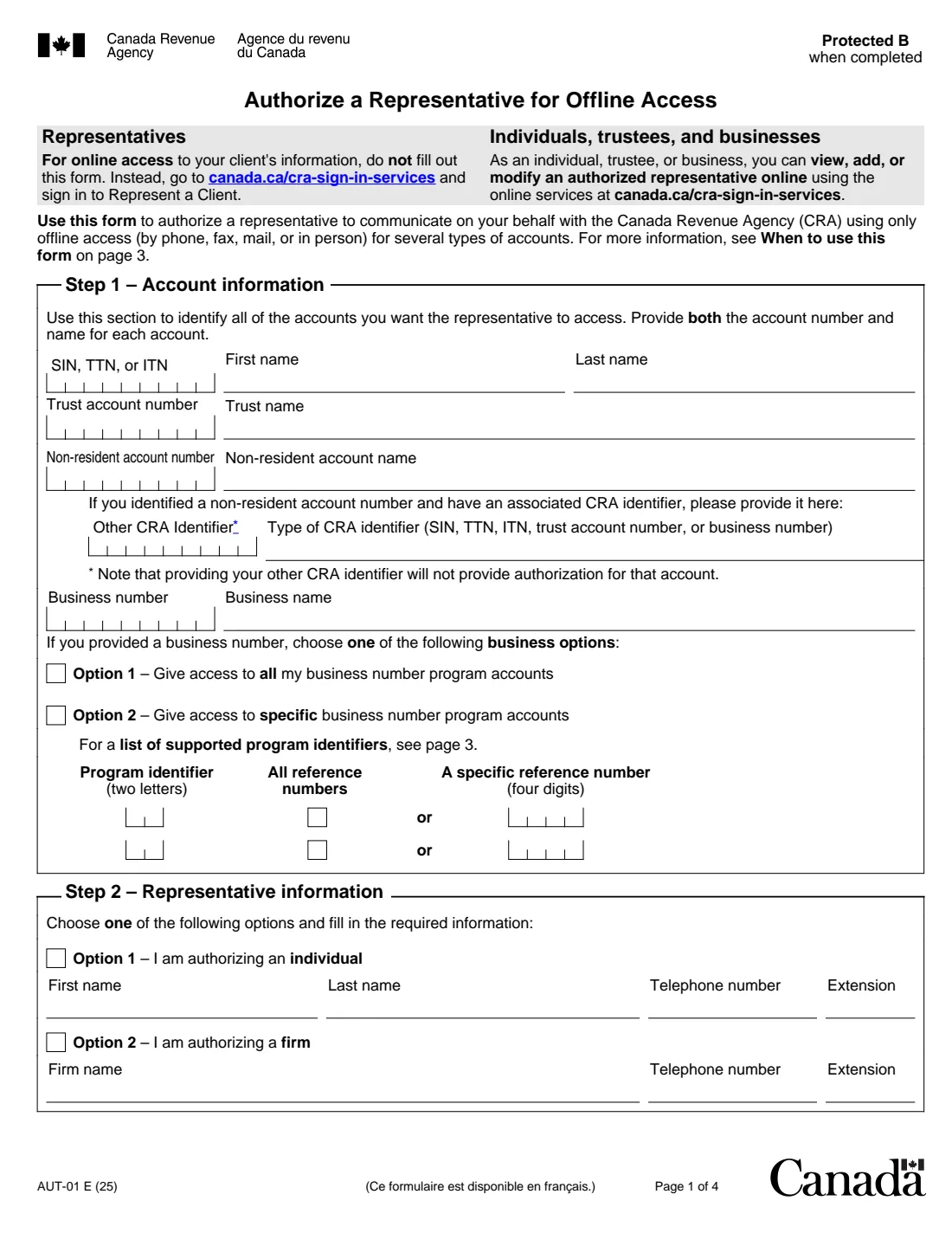
AUT-01, Authorize a Representative for Offline Access, gives someone permission to communicate with the Canada Revenue Agency (CRA) on your behalf. It covers individual tax and benefit accounts, trust accounts, non-resident accounts and business number program accounts, with offline access only — by phone, fax, mail or in person. The current edition is AUT-01 E (25).
If your representative needs online access, or will submit documents electronically, this isn't the form. The form points to the CRA sign-in services instead: you can add a representative yourself in My Account or My Business Account, and a representative can request access through Represent a Client.
FileIt walks you through each step, shows only the account types you choose, and prints your answers on the CRA's own PDF, including the comb boxes for account numbers and dates. It keeps the filled PDF in your vault. FileIt doesn't send anything to the CRA; you sign the form by hand and mail it.
- Who fills it
- The taxpayer, or someone with signing authority for the account (parent or guardian of a child under 16, legal representative, owner, officer or director)
- Given to
- Your CRA tax centre (Jonquière, Sudbury or Winnipeg), by mail
- When
- Within six months of signing, or the CRA won't process it
- Signatures
- Signed and dated by hand by the person with signing authority
- Edition
- AUT-01 E (25)
Who needs to fill out AUT-01?
- Individuals who want a family member, friend or accountant to be able to call or write to the CRA about their taxes and benefits.
- Parents or legal guardians of a taxpayer under 16, and legal representatives such as an executor, power of attorney or trustee.
- Trustees authorizing someone on a trust account, and non-residents on a non-resident account.
- Business owners, partners, officers of non-profit organizations and corporate directors or officers authorizing a representative on business number program accounts.
- Anyone whose representative only needs offline access — phone, fax, mail or in person.
When to use AUT-01
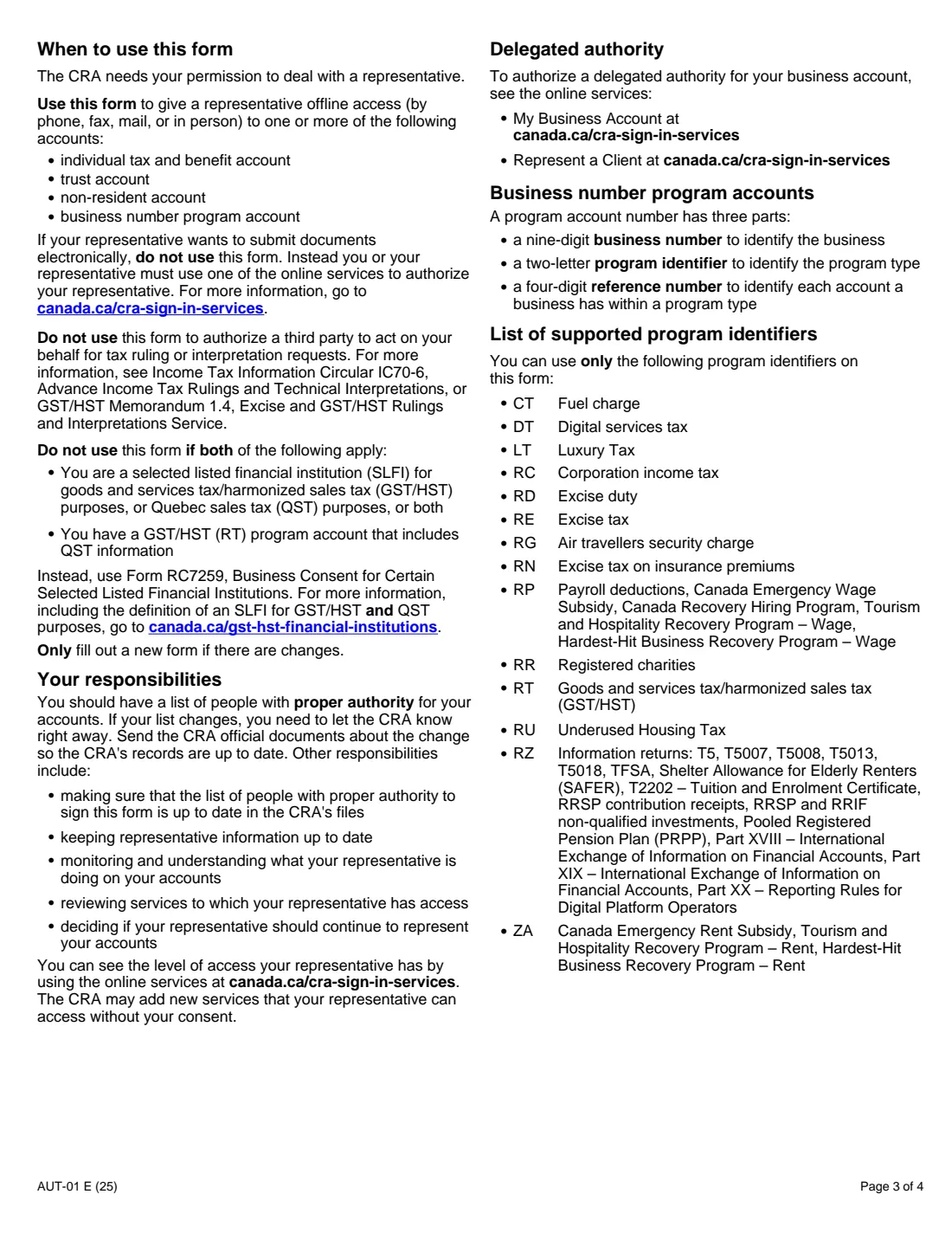
- When you want to name a new offline representative, or change one — the form says to fill out a new one only if there are changes.
- When you want the authorization to end on a set date (Step 4 is optional; without a date it lasts until cancelled).
- Not for tax ruling or interpretation requests, and not for a selected listed financial institution whose GST/HST account includes QST information (that is Form RC7259).
- To cancel an authorization, use the CRA sign-in services or Form AUT-01X instead.
What you need before you start
- The number and name of each account: SIN, TTN or ITN and name; trust account number (T + 8 digits) and trust name; non-resident account number (NR + 7 digits) and name; or business number and business name.
- For business accounts: whether to give access to all program accounts, or the two-letter program identifiers (such as RT for GST/HST or RP for payroll) and reference numbers.
- Your representative's name and phone number, or the firm's name and phone number.
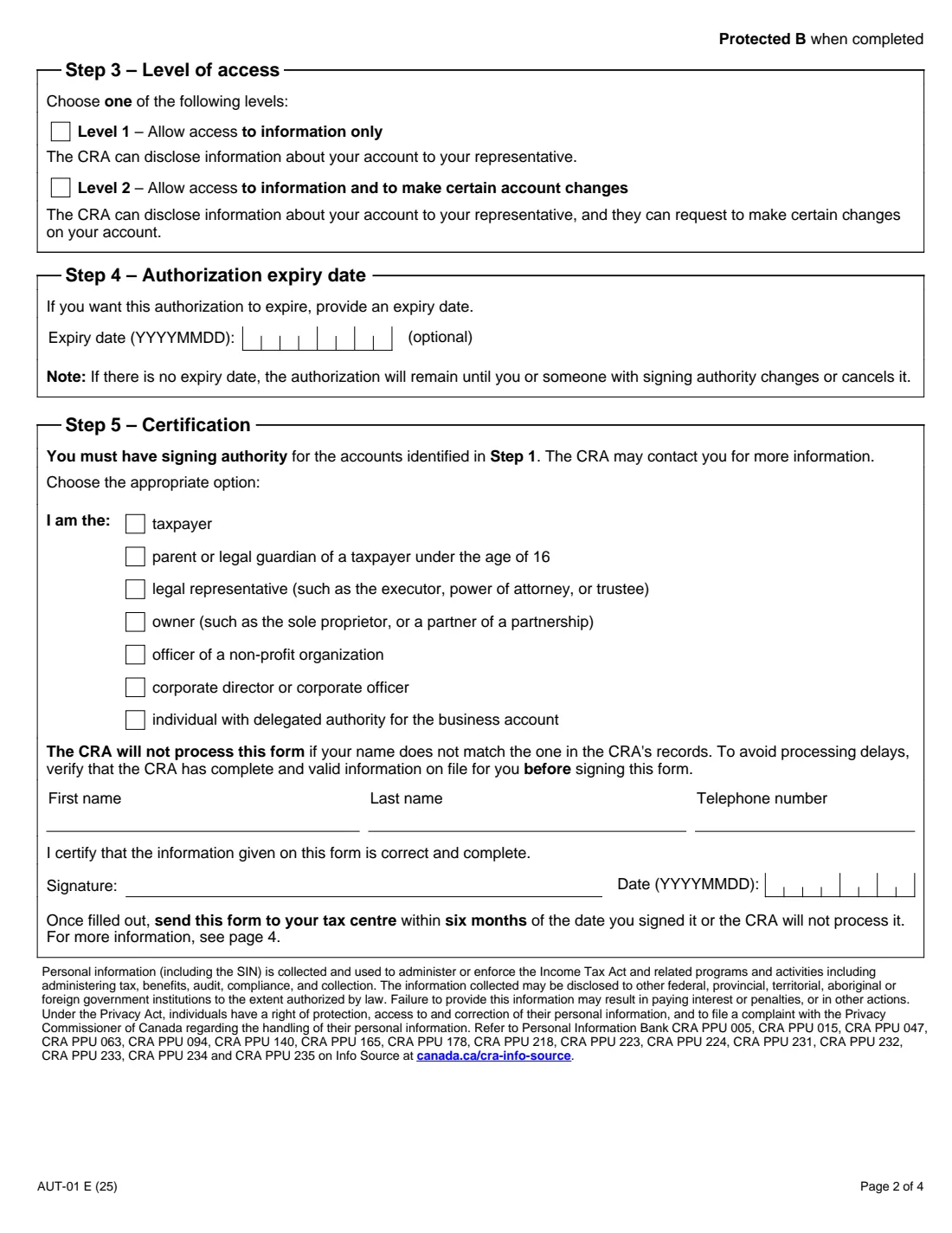
- The level of access you want to give, and an expiry date if you want one.
- Your own name and phone number exactly as the CRA has them — the CRA won't process the form if your name doesn't match its records.
What’s on AUT-01
The 2025 edition has 4 pages. FileIt asks for it in 8 parts:
- Before you startAccount holder
- Step 1 – Individual tax and benefit accountAccount holder
- Step 1 – Trust accountAccount holder
- Step 1 – Non-resident accountAccount holder
- Step 1 – Business number program accountsAccount holder
- Step 2 – Representative informationAccount holder
- Steps 3 and 4 – Level of access and expiryAccount holder
- Step 5 – CertificationAccount holder
How to fill out AUT-01, step by step
1 Step 1 – Account information
Identify every account the representative may access, giving both the number and the name. A non-resident account can also carry another CRA identifier, which doesn't give access to that other account. For a business number, choose Option 1 (all program accounts) or Option 2 (specific ones, by program identifier, with all reference numbers or one four-digit reference number).
2 Step 2 – Representative information
Choose Option 1 for an individual (first and last name, phone and extension) or Option 2 for a firm (firm name, phone and extension).
3 Step 3 – Level of access
Level 1 lets the CRA disclose information about your account to your representative. Level 2 also lets them ask for certain changes on your account.
4 Step 4 – Authorization expiry date
Optional. Without an expiry date, the authorization stays in place until you or someone with signing authority changes or cancels it.
5 Step 5 – Certification
Tick who you are (taxpayer, parent or guardian of a taxpayer under 16, legal representative, owner, officer of a non-profit, corporate director or officer, or someone with delegated authority), give your name and phone number, then sign and date.
Common mistakes to avoid
- Using AUT-01 when your representative needs online access — that's done through the CRA sign-in services.
- Giving an account number without its name, or the name without the number; the form asks for both.
- Signing without signing authority for every account listed, or with a name that doesn't match the CRA's records.
- Mailing it more than six months after signing — the CRA won't process it.
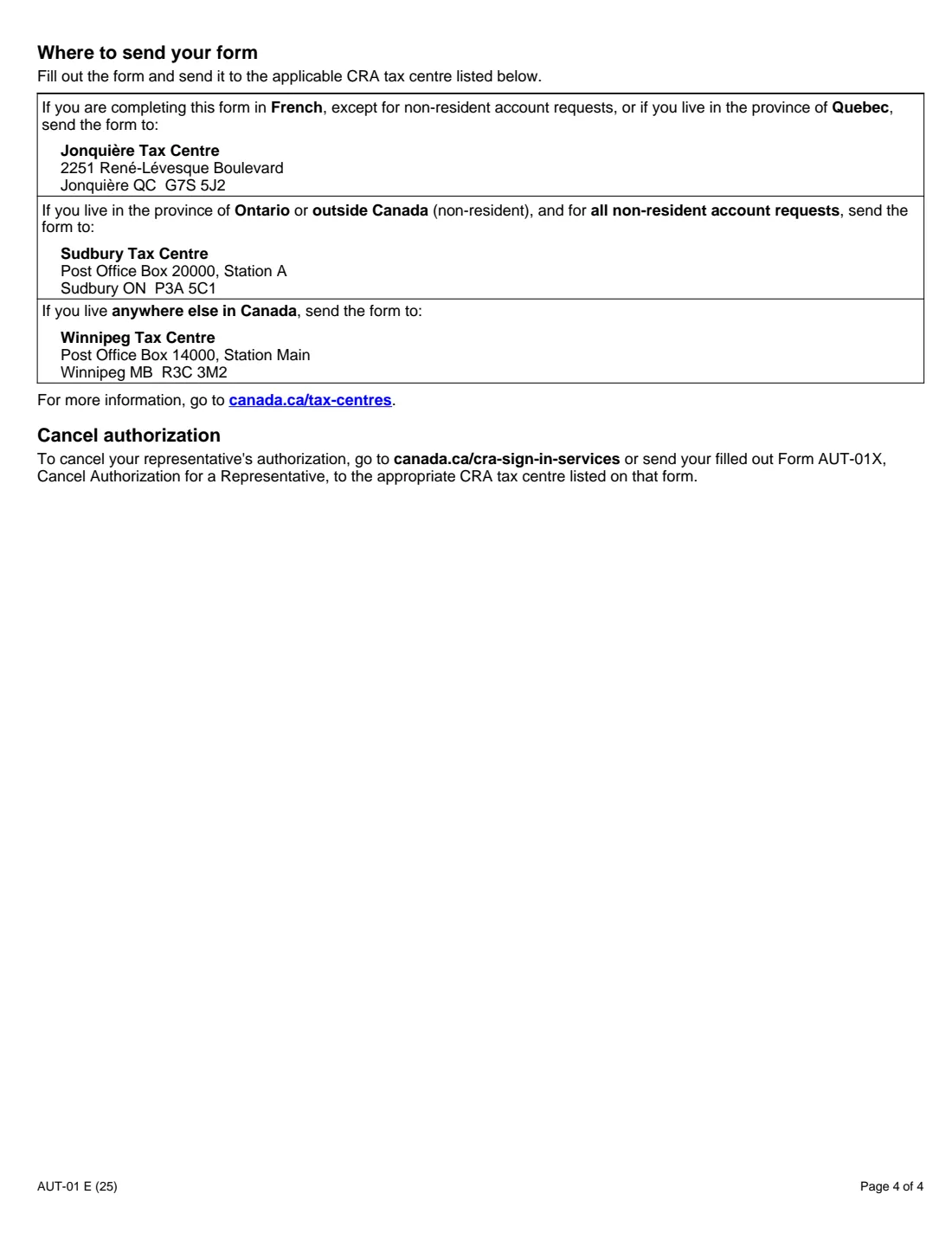
- Sending it to the wrong tax centre: page 4 lists Jonquière, Sudbury and Winnipeg and who uses each.
After you fill it out
Print the PDF, sign and date Step 5 by hand, and send it to the tax centre listed on page 4 within six months of signing. Jonquière is for forms completed in French (except non-resident accounts) and Quebec residents; Sudbury for Ontario, people outside Canada and all non-resident account requests; Winnipeg for everyone else.
Keep your list of people with authority up to date with the CRA, and review what your representative is doing on your accounts.
You can see a representative's access level in the CRA sign-in services. To cancel it, use those services or Form AUT-01X.
Fill out AUT-01 online with FileIt
- Pick the person. Choose someone from People and FileIt fills in their name, date of birth, address and other details it already knows.
- Answer plain-language questions. One part of the form at a time, with the official help text beside each question — 33 fields in all. Your answers save as you go.
- Check the live preview. Watch your answers land on the real Canada Revenue Agency (CRA) form, and let FileIt do any worksheet arithmetic.
- Generate the official PDF. FileIt prints your answers into the agency’s own PDF and files it in that person’s folder in your vault.
FileIt fills the form — it never files or submits anything for you. Deliver the finished form to whoever asked for it, the way the form’s instructions say.
Start AUT-01 now — it’s freeAUT-01: frequently asked questions
What is Form AUT-01 used for?
To authorize a representative to deal with the CRA on your behalf by phone, fax, mail or in person, for individual, trust, non-resident or business number accounts.
What is the difference between Level 1 and Level 2?
Level 1 lets the CRA share information about your account with your representative. Level 2 also lets them request certain changes on your account.
Does the authorization expire?
Only if you enter an expiry date in Step 4. Otherwise it stays until you or someone with signing authority changes or cancels it.
Can I give my accountant online access with AUT-01?
No. AUT-01 is for offline access only. For online access, authorize them through the CRA sign-in services, or they can request access in Represent a Client.
Where do I send AUT-01?
To Jonquière if you complete it in French (except non-resident accounts) or live in Quebec, to Sudbury if you live in Ontario or outside Canada or for any non-resident account, and to Winnipeg from anywhere else in Canada.
How do I cancel a representative?
Through the CRA sign-in services, or by sending Form AUT-01X, Cancel Authorization for a Representative, to the tax centre listed on that form.
Official sources
- Blank form (PDF), published by Canada Revenue Agency (CRA): https://www.canada.ca/content/dam/cra-arc/formspubs/pbg/aut-01/aut-01-fill-25e.pdf
- Official instructions and guidance: https://www.canada.ca/en/revenue-agency/services/forms-publications/forms/aut-01.html
- Edition shown on this page: AUT-01 E (25) (checked 2026-09-28).
FileIt is not affiliated with or endorsed by Canada Revenue Agency (CRA) or any government. This page explains the form in general terms and is not legal, tax or immigration advice. Always read the official instructions, and check that you are using the edition the recipient accepts. Page last reviewed 2026-09-28.