What is RC325?
RC325, Address and Telephone Number Change Request, is the Canada Revenue Agency (CRA) paper form for telling the CRA that you have moved or changed your phone numbers. The current edition is RC325 E (26); the French version is available under the same number. The form itself points out that you can also make the change online through the Change my address service in My Account, so RC325 is mainly for people who prefer paper, who don't use My Account, or who are acting as someone's legal representative.
Keeping your address current matters because the CRA uses it for your benefit and credit payments. The form says that telling the CRA in advance helps you avoid disruption to payments such as the GST/HST credit (and related provincial payments), the Canada child benefit (and related provincial or territorial payments), and Canada workers benefit advance payments.
FileIt lets you fill in RC325 in a guided web form and prints your answers onto the CRA's own fillable PDF, including the comb boxes for your social insurance number, postal codes and dates. Your name, initial and date of birth can be pre-filled from your People record in the FileIt vault, and the finished PDF is filed in your vault. FileIt never sends anything to the CRA: you sign the form by hand and mail it to the tax centre yourself.
- Who fills it
- An individual taxpayer, or their legal representative (executor, administrator, power of attorney or legal guardian)
- Given to
- The applicable CRA tax centre, by mail (Jonquière, Winnipeg or Sudbury — see canada.ca/cra-offices)
- When
- When your mailing address, home address or telephone numbers change — ideally in advance
- Signatures
- Signed and dated by hand by the taxpayer or legal representative (a parent if the taxpayer is under 16)
- Edition
- RC325 E (26)
Who needs to fill out RC325?
- Individuals who have moved, or are about to move, and want the CRA to have their new mailing or home address.
- People who have changed their home, work or other telephone numbers.
- Recipients of benefit and credit payments, such as the GST/HST credit or the Canada child benefit, who want payments and letters to follow them.
- Legal representatives — an executor or administrator, someone with power of attorney, or a legal guardian — updating a taxpayer's address.
- Parents signing for a taxpayer under 16, as the certification allows.
- Not for changing your name or date of birth, and not for anyone who has never filed an income tax and benefit return with the CRA.
When to use RC325
- Before or as soon as you move, so benefit payments and CRA mail aren't disrupted.
- When your mail should go somewhere other than your home — a PO box, a rural route, or care of another person or organization.
- When you move abroad and need to give an address outside Canada (the country, state and zip code line).
- When only your telephone numbers change — the form handles that on its own.
- If you'd rather do it online, the Change my address service in My Account is the alternative the form itself mentions.
What you need before you start
- Your social insurance number — or, if you don't have one, the individual tax number or temporary taxation number the CRA gave you.
- Your date of birth (used to identify you — this form can't change it).
- The mailing address the CRA currently has on file for you.
- Your new mailing address and the date it takes effect.
- Any new home, work or other phone numbers.
- If your home address differs from your mailing address: the home address on file, your new home address and your date of move.
- If you're a legal representative: a complete copy of the legal document that authorizes you, included or already sent to the CRA.
What’s on RC325
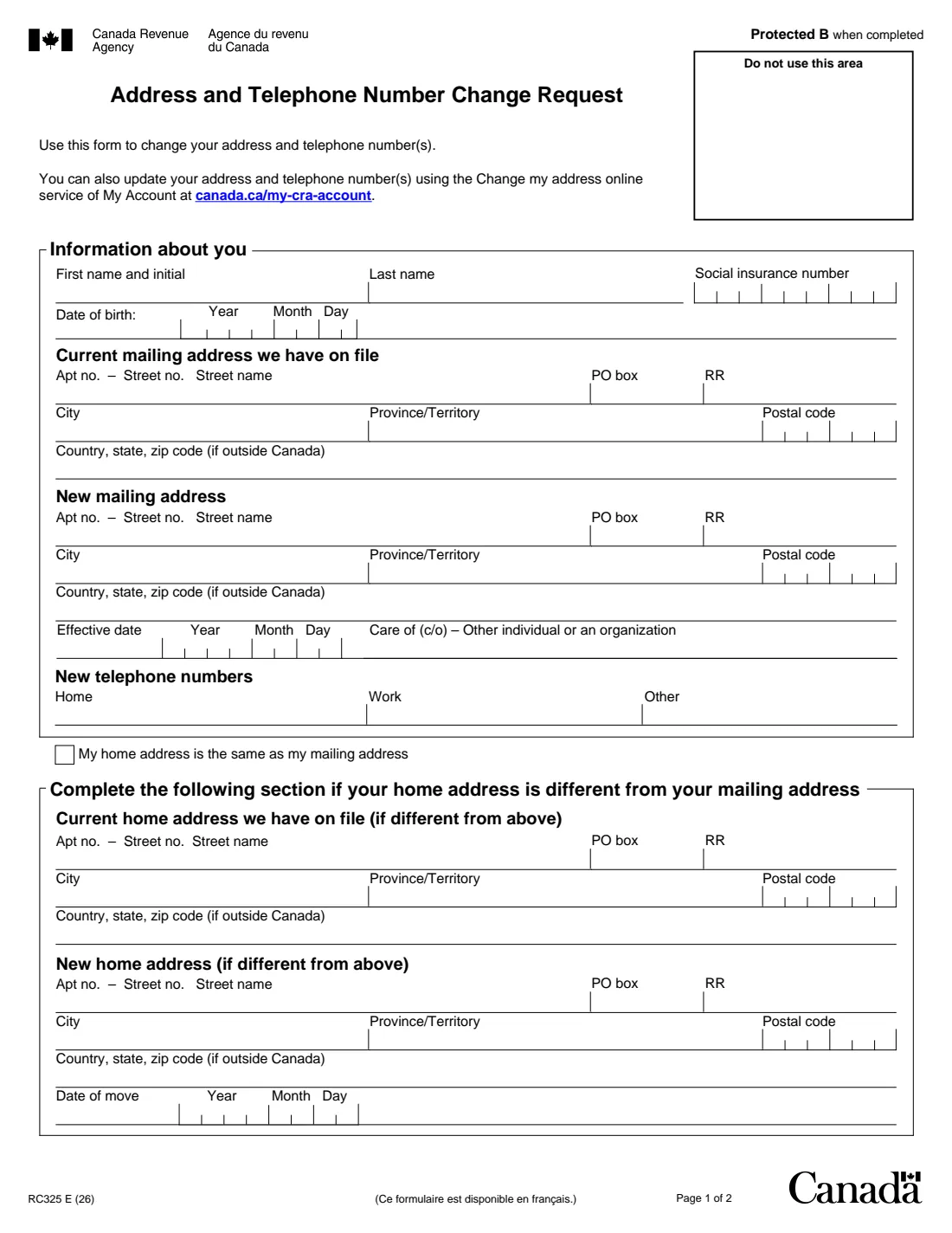
The 2026 edition has 2 pages. FileIt asks for it in 6 parts:
- Information about youTaxpayer
- Current mailing address we have on fileTaxpayer
- New mailing addressTaxpayer
- New telephone numbersTaxpayer
- Home addressTaxpayer
- CertificationTaxpayer
How to fill out RC325, step by step
1 Information about you
Enter your first name and initial, last name, social insurance number and date of birth. The SIN goes into nine separate boxes and the date of birth is printed year, month, day. If you have no SIN but have an individual tax number or temporary taxation number, use that number instead, as the form's More information section explains.
2 Current mailing address we have on file
This is the address the CRA has for you now, not the new one — it helps the CRA find your file. Write the apartment number, a dash, then the street number and name (for example 1204-350 Laurier Avenue West), or use the PO box and RR (rural route) boxes. Add the city, province or territory and postal code, or, for an address outside Canada, the country, state and zip code line.
3 New mailing address
Your new mailing address in the same layout, plus the effective date it starts. If mail should go to someone else's address or an organization, fill in the Care of (c/o) box. Leave this part empty if only your phone numbers or home address change.
4 New telephone numbers
Home, work and other numbers. Only fill in the ones that are changing.
5 My home address is the same as my mailing address
Tick this box if you live at your mailing address. If you don't — for example, your mail goes to a PO box — complete the section below it: the home address the CRA has on file, your new home address, and the date of your move.
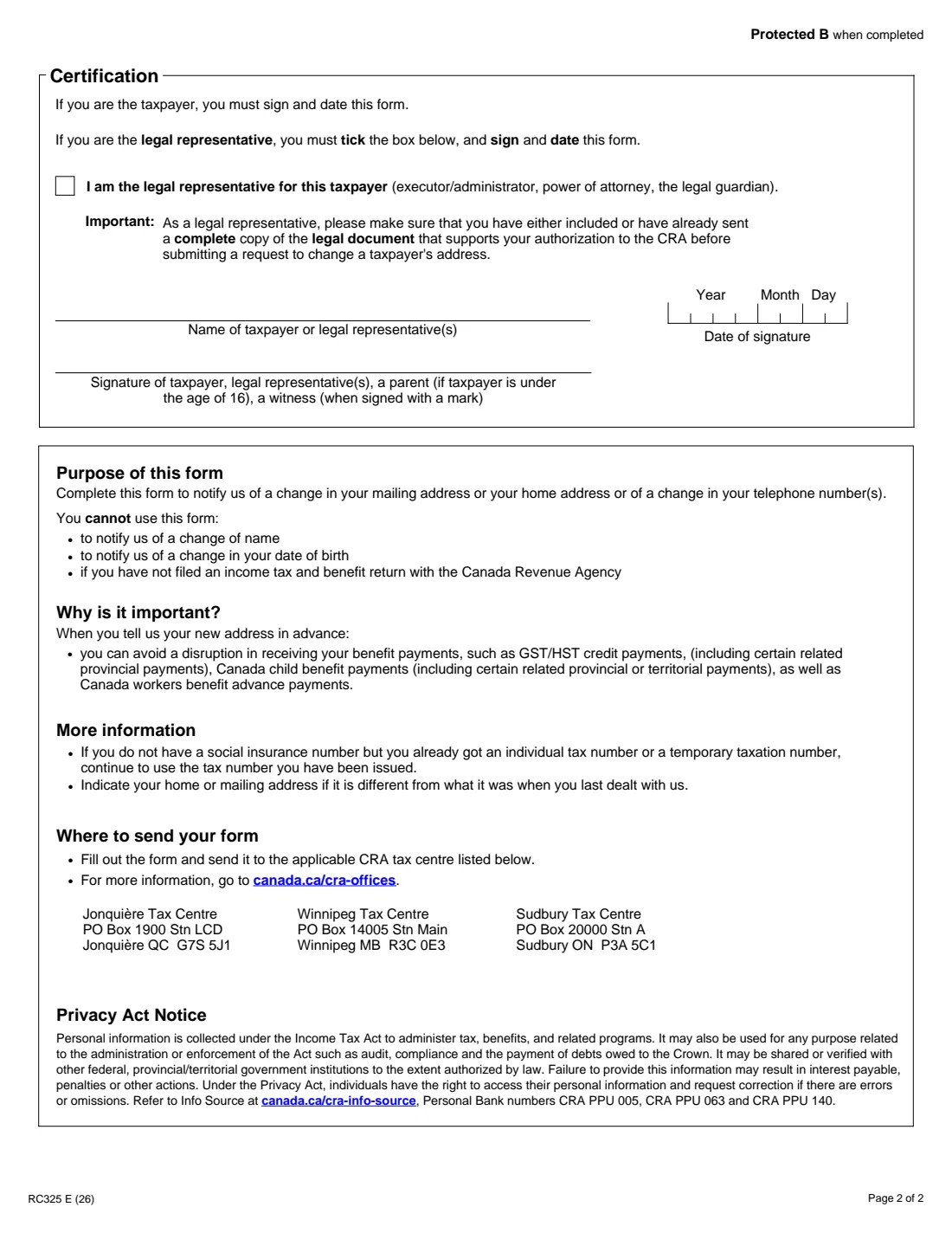
6 Certification
If you are the taxpayer, sign and date the form. If you are the legal representative, tick the box saying so, then sign and date. Print the name of the taxpayer or legal representative above the signature line. The form allows a parent to sign for a taxpayer under 16, and a witness when the taxpayer signs with a mark.
Common mistakes to avoid
- Putting the new address in the 'Current mailing address we have on file' section — that part is for the old address the CRA already has.
- Trying to use RC325 to change your name or date of birth, which the form says it can't do.
- Forgetting to sign and date the certification on page 2 — the form says the taxpayer or legal representative must sign and date it.
- As a legal representative, not ticking the box or not sending a complete copy of the document that authorizes you.
- Leaving the home-address section empty when your home and mailing addresses are different.
- Mistyping the social insurance number; FileIt checks that the nine digits form a valid SIN before generating the PDF.
- Sending the form to the wrong place — mail it to the applicable CRA tax centre listed on the form.
After you fill it out
Print the PDF and sign the certification on page 2 by hand. If you are a legal representative, tick the box and include a complete copy of your authorization document unless you have already sent it to the CRA.
Mail the form to the applicable CRA tax centre listed on page 2 — Jonquière, Winnipeg or Sudbury. The form refers you to canada.ca/cra-offices to find out which one applies to you. FileIt doesn't mail it for you.
Keep a copy with the date you sent it; FileIt stores the filled PDF in your vault. If you move again, or your phone numbers change, send a new request or use My Account's Change my address service.
Fill out RC325 online with FileIt
- Pick the person. Choose someone from People and FileIt fills in their name, date of birth, address and other details it already knows.
- Answer plain-language questions. One part of the form at a time, with the official help text beside each question — 43 fields in all. Your answers save as you go.
- Check the live preview. Watch your answers land on the real Canada Revenue Agency (CRA) form, and let FileIt do any worksheet arithmetic.
- Generate the official PDF. FileIt prints your answers into the agency’s own PDF and files it in that person’s folder in your vault.
FileIt fills the form — it never files or submits anything for you. Deliver the finished form to whoever asked for it, the way the form’s instructions say.
Start RC325 now — it’s freeRC325: frequently asked questions
How do I change my address with the CRA?
Either online through the Change my address service in My Account, or on paper by filling in Form RC325 and mailing it to your CRA tax centre. RC325 covers your mailing address, home address and phone numbers.
Can I fill out RC325 online?
You can fill it in online with FileIt, which prints your answers onto the official CRA PDF. The form must then be printed, signed by hand and mailed — FileIt doesn't send it to the CRA.
Where do I mail Form RC325?
To the applicable CRA tax centre listed on the form: Jonquière Tax Centre, Winnipeg Tax Centre or Sudbury Tax Centre. The form points to canada.ca/cra-offices for which one to use.
Can I use RC325 to change my name?
No. The form says it can't be used to change your name or your date of birth, or if you have never filed an income tax and benefit return with the CRA.
What if I don't have a social insurance number?
If the CRA gave you an individual tax number or a temporary taxation number, keep using that number on the form instead of a SIN.
Can someone else change my address for me?
A legal representative — an executor or administrator, someone with power of attorney, or a legal guardian — can. They tick the legal representative box, sign and date, and make sure the CRA has a complete copy of the document that authorizes them.
Why should I tell the CRA before I move?
The form explains that updating your address in advance helps avoid disruption to benefit payments such as the GST/HST credit, the Canada child benefit and Canada workers benefit advance payments, including related provincial and territorial payments.
What does 'current mailing address we have on file' mean?
It is the address the CRA has for you before the change. Giving it helps the CRA match the request to your file; your new address goes in the New mailing address section.
Official sources
- Blank form (PDF), published by Canada Revenue Agency (CRA): https://www.canada.ca/content/dam/cra-arc/formspubs/pbg/rc325/rc325-fill-26e.pdf
- Official instructions and guidance: https://www.canada.ca/en/revenue-agency/services/forms-publications/forms/rc325.html
- Edition shown on this page: RC325 E (26) (checked 2026-09-26).
FileIt is not affiliated with or endorsed by Canada Revenue Agency (CRA) or any government. This page explains the form in general terms and is not legal, tax or immigration advice. Always read the official instructions, and check that you are using the edition the recipient accepts. Page last reviewed 2026-09-26.