What is Form T1213?
Form T1213, Request to Reduce Tax Deductions at Source, is how you ask the Canada Revenue Agency (CRA) for a reduced tax deduction — often called a waiver — on your salary or on a lump-sum payment. It covers deductions and non-refundable credits that the TD1 forms can't handle, such as regular RRSP contributions, child care expenses, deductible support payments, employment expenses, investment loan interest, medical expenses and charitable donations. If the CRA approves, it sends you a letter of authority, and you give that letter to your employer or payer so they can deduct less tax.
Unlike the TD1, this form goes to the CRA, not your employer, and it has to be backed up with supporting documents. The CRA reviews each request against your income for the year before approving it, which is why the form says you must make the request every year (with one exception for support payments, explained below). The form also says to make sure your returns for previous years are filed and assessed, and anything you owe is paid in full, before you send it.
FileIt walks you through all four parts of the T1213 and prints your answers into the CRA's own fillable PDF (edition T1213 E (25)). Your name can be pre-filled from People records in your vault and your employer's name from the employer details you keep there. The form has no arithmetic — the CRA works out the waiver itself — so FileIt's job is to make sure the right parts are filled and the supporting-document reminders are in front of you. The finished PDF is saved in the person's vault folder. You print it, sign it by hand and send it to the CRA yourself; FileIt never submits it. Filling forms is free on every FileIt plan.
- Who fills it
- Employees or payment recipients who want less tax deducted at source
- Sent to
- The CRA — online through My Account or Represent a Client, or by mail or fax as printed on the form
- When
- Every year you want a reduction (every two years in the support-payments case the form describes)
- Signatures
- Your handwritten signature and date in Part 4
- Edition
- T1213 E (25)
- Result
- A letter of authority from the CRA, which you give to your employer or payer
Who needs to fill out Form T1213?
- Employees who make regular RRSP contributions themselves (not through payroll) and want the tax saving spread across the year instead of waiting for a refund.
- People paying deductible spousal or child support under a court order or written agreement.
- Parents with significant child care expenses.
- Employees with employment expenses supported by a Form T2200 from their employer.
- Anyone with large medical expenses, charitable donations, investment loan interest, clergy residence deductions, RPP past-service buy-backs or foreign tax credits.
- People who live in one province or territory but work in another and are having tax deducted at the wrong provincial rate.
- Anyone receiving a lump sum, such as a bonus or vacation pay, who expects deductions that would offset the tax on it.
When to use Form T1213
- Early in the year, so the reduced deductions can apply to as many pay periods as possible.
- Before a lump-sum payment such as a bonus, if you plan to put it into an RRSP or have other offsetting deductions.
- Each year you want the reduction; the form explains that the CRA must review each year's deductions against that year's income.
- Every two years if your deductible support payments stay the same or increase, as long as you provide a form for each year.
- After your previous years' returns are filed and assessed and any balance owing is paid in full.
What you need before you start
- Your social insurance number, address and phone numbers.
- Your employer's or payer's name, contact person, phone and fax number.
- The amount and details of the payment you want tax reduced on, if it is a lump sum.
- RRSP payment arrangement details or contract (for contributions you make yourself).
- Child care details, or a completed Form T778.
- Your court order or written support agreement, the recipient's name and SIN, and Form T1158 if not previously filed.
- A completed Form T2200 and Form T777 for employment expenses.
- Lender statements for investment loans, lists of medical expenses and of donations with the charities named.
- Form T1223, T2209 or Past Service Pension Adjustment certification, if claiming those items.
- Estimates of other income with no tax deducted, such as interest, net rental or self-employment income.
What’s on Form T1213
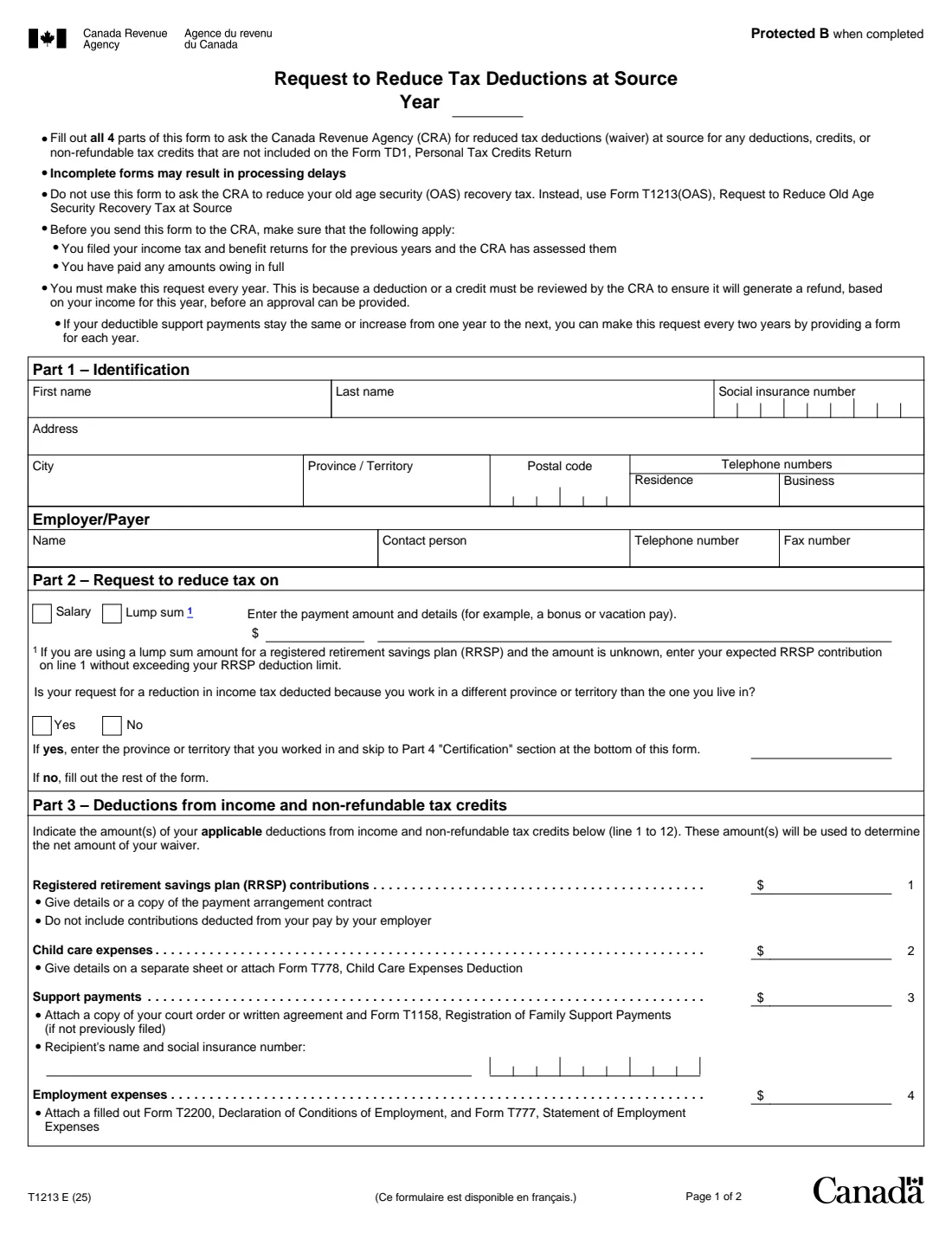
The 2025 edition has 2 pages. FileIt asks for it in 5 parts:
- Part 1 – IdentificationEmployee
- Employer/PayerEmployee
- Part 2 – Request to reduce tax onEmployee
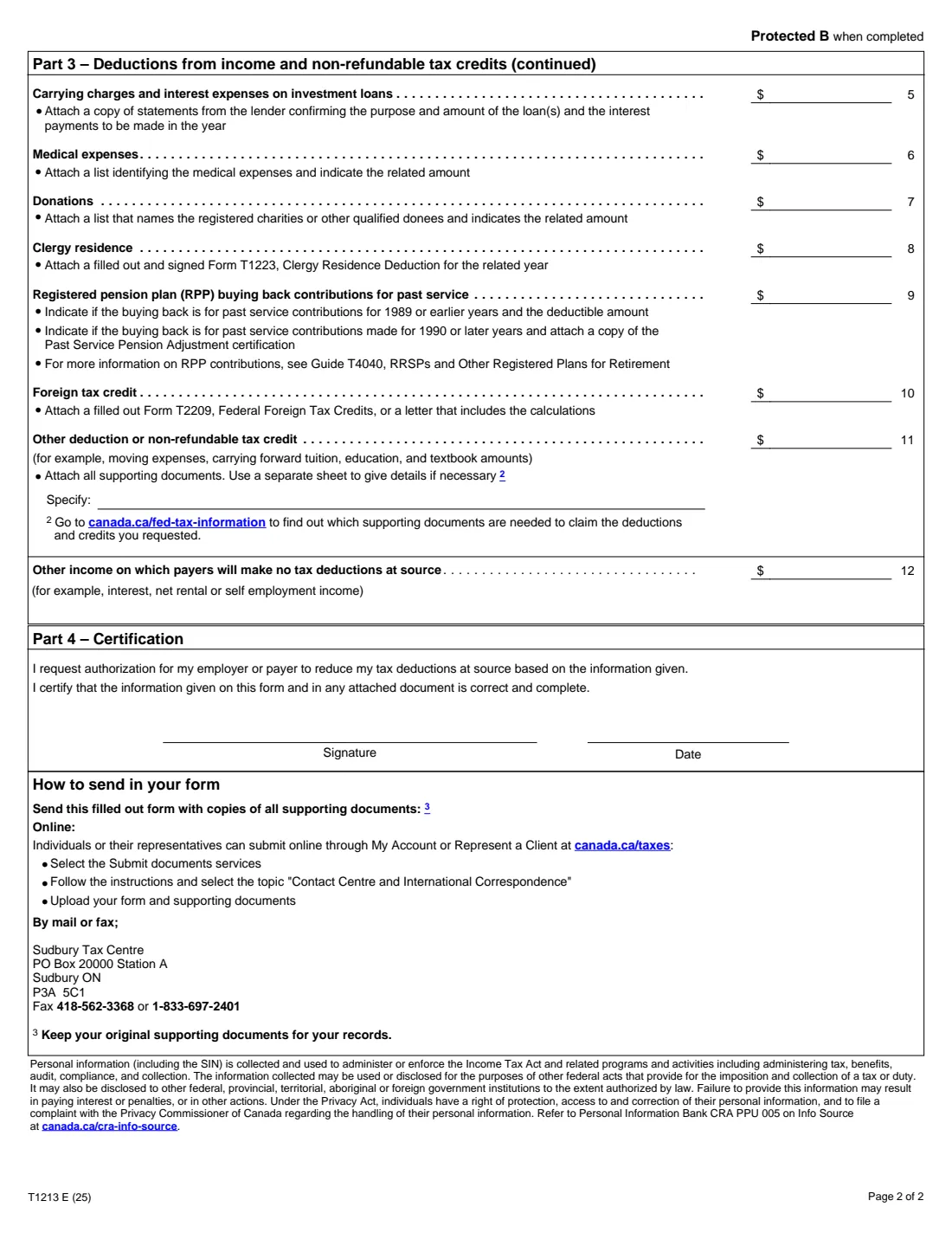
- Part 3 – Deductions from income and non-refundable tax creditsEmployee
- Part 4 – CertificationEmployee
How to fill out Form T1213, step by step
1 Year of the request
At the top of the form, enter the year the reduction is for. Because each year is reviewed separately, a request only covers the year you write here.
2 Part 1 – Identification
Give your first and last name, social insurance number, address, city, province or territory, postal code and residence and business phone numbers. Then fill in the Employer/Payer box: the name, a contact person, their phone number and fax number.
This tells the CRA which employer or payer the reduction is for. If you have more than one, name the one you want to apply the reduced deductions.
3 Part 2 – Request to reduce tax on
Tick whether you want tax reduced on your salary or on a lump sum. For a lump sum, enter the payment amount and details (for example, a bonus or vacation pay). The form notes that if you are putting a lump sum into an RRSP and don't know the amount yet, you enter your expected RRSP contribution on line 1 without going over your RRSP deduction limit.
Next, answer whether your request is because you work in a different province or territory than the one you live in. If yes, enter the province or territory you worked in and go straight to Part 4. If no, fill out Part 3.
4 Part 3 – Lines 1 to 4: RRSP, child care, support and employment expenses
Line 1 is RRSP contributions — don't include contributions your employer already deducts from your pay, since those are handled by payroll without a letter. Line 2 is child care expenses, with details or Form T778. Line 3 is support payments, with the recipient's name and SIN, a copy of the court order or written agreement, and Form T1158 if you haven't filed it before. Line 4 is employment expenses, backed by Form T2200 from your employer and your Form T777.
Enter the amount you expect for the year, not the amount per pay.
5 Part 3 – Lines 5 to 11: other deductions and credits
Line 5 covers carrying charges and interest on investment loans, with lender statements. Line 6 is medical expenses (attach a list), and line 7 donations (attach a list naming the registered charities or other qualified donees). Line 8 is the clergy residence deduction with Form T1223, line 9 RPP past-service buy-backs (say whether they relate to 1989 or earlier, or 1990 or later, with the certification for later years), and line 10 the foreign tax credit with Form T2209 or your calculations.
Line 11 catches other deductions or non-refundable credits — the form gives moving expenses and carried-forward tuition, education and textbook amounts as examples. Use the Specify box and attach everything that supports it.
6 Part 3 – Line 12: other income with no tax deducted
Line 12 is not a total. It asks for other income on which no one will deduct tax at source — for example interest, net rental income or self-employment income. The CRA takes this into account so your waiver doesn't leave you owing tax at the end of the year. Be honest here; leaving it out can lead to an approval that is larger than it should be.
7 Part 4 – Certification
You request authorisation for your employer or payer to reduce your tax deductions and certify that the form and every attached document are correct and complete. Sign and date it.
The T1213 isn't on the CRA's list of forms that accept electronic signatures, so FileIt doesn't offer e-signature for it: print the PDF and sign it by hand.
Common mistakes to avoid
- Sending the form without supporting documents — the form warns that incomplete forms may result in processing delays.
- Including RRSP contributions that your employer already deducts from your pay.
- Entering a lump-sum RRSP contribution above your RRSP deduction limit.
- Forgetting the support recipient's name and SIN, or Form T1158 when it hasn't been filed before.
- Leaving other untaxed income off line 12, which can lead to a balance owing at tax time.
- Sending the T1213 before previous years' returns are filed and assessed, or while a balance is still owing.
- Assuming last year's approval carries over — you generally need a new request each year.
- Using this form for the OAS recovery tax; that has its own Form T1213(OAS).
After you fill it out
Print the completed PDF from your FileIt vault and sign and date Part 4 by hand. Send it to the CRA with copies of all your supporting documents, keeping the originals for your records. The form lists two ways: online through My Account or Represent a Client (using Submit documents and the topic "Contact Centre and International Correspondence"), or by mail or fax to the Sudbury Tax Centre at the address and numbers printed on page 2. FileIt does not send the form for you, and the CRA decides whether to approve it.
If the CRA approves the request, it issues a letter of authority. Give that letter to your employer or payer, who can then reduce the tax they deduct. Store the letter in the same FileIt vault folder as your T1213 so the request and the approval sit together.
Keep your copy in the vault as a reminder for next year: the form says you must make the request every year, or every two years for deductible support payments that stay the same or increase, with a form for each year.
Fill out Form T1213 online with FileIt
- Pick the person. Choose someone from People and FileIt fills in their name, date of birth, address and other details it already knows.
- Answer plain-language questions. One part of the form at a time, with the official help text beside each question — 35 fields in all. Your answers save as you go.
- Check the live preview. Watch your answers land on the real Canada Revenue Agency (CRA) form, and let FileIt do any worksheet arithmetic.
- Generate the official PDF. FileIt prints your answers into the agency’s own PDF and files it in that person’s folder in your vault.
FileIt fills the form — it never files or submits anything for you. Deliver the finished form to whoever asked for it, the way the form’s instructions say.
Start Form T1213 now — it’s freeForm T1213: frequently asked questions
Can I fill out Form T1213 online?
Yes. FileIt guides you through Parts 1 to 4, prints your answers into the CRA's official fillable T1213 PDF and saves it in your vault, free on every plan. You then print and sign it by hand and send it to the CRA yourself.
Where do I send Form T1213?
To the CRA, not your employer. The form says you can upload it with your supporting documents through My Account or Represent a Client using the Submit documents service, or send it by mail or fax to the Sudbury Tax Centre shown on the form.
What is a letter of authority?
It's the CRA's approval of your T1213 request. You give it to your employer or payer, and it allows them to deduct less tax from your pay or lump sum. Without it, your employer deducts tax based on your TD1 forms only.
Do I need a T1213 for RRSP contributions through work?
No. The TD1 forms say you don't need a letter of authority if your employer deducts RRSP contributions from your salary. The T1213 is for contributions you make yourself.
How often do I have to file a T1213?
The form says you must make the request every year, because the CRA has to check that the deduction will produce a refund based on that year's income. If your deductible support payments stay the same or increase, you can make the request every two years by providing a form for each year.
What's the difference between the T1213 and the TD1?
The TD1 covers the standard personal credits and goes straight to your employer. The T1213 covers other deductions and credits, goes to the CRA with supporting documents, and results in a letter of authority for your employer.
Can I sign the T1213 electronically?
The CRA accepts electronic signatures only on forms it lists, and the T1213 isn't one of them. Print the form and sign it by hand.
I live in one province and work in another. Can the T1213 help?
Yes — Part 2 asks whether your request is because you work in a different province or territory than the one you live in. If so, you enter the province or territory you worked in and skip to Part 4 without filling out Part 3.
Can I use the T1213 to reduce the OAS recovery tax?
No. The form directs you to Form T1213(OAS), Request to Reduce Old Age Security Recovery Tax at Source, for that.
Official sources
- Blank form (PDF), published by Canada Revenue Agency (CRA): https://www.canada.ca/content/dam/cra-arc/formspubs/pbg/t1213/t1213-fill-25e.pdf
- Official instructions and guidance: https://www.canada.ca/en/revenue-agency/services/forms-publications/forms/t1213.html
- Edition shown on this page: T1213 E (25) (checked 2026-09-25).
FileIt is not affiliated with or endorsed by Canada Revenue Agency (CRA) or any government. This page explains the form in general terms and is not legal, tax or immigration advice. Always read the official instructions, and check that you are using the edition the recipient accepts. Page last reviewed 2026-09-25.