What is Form TD1ON?
Form TD1ON, the 2026 Ontario Personal Tax Credits Return, is published by the Canada Revenue Agency (CRA) for employees who work in Ontario and pensioners who live there. The federal TD1 sets up your federal tax deductions; the TD1ON does the same job for Ontario provincial tax, using Ontario's own credit amounts, which are different from — and in several cases much lower than — the federal ones. Your employer or payer uses both forms together to work out how much tax to take off each payment.
The form itself explains that if you don't fill out a TD1ON, your employer or payer will deduct tax after allowing the Ontario basic personal amount only. That is fine for many people, but if you are 65 or older, receive a pension, have a disability amount, or support a spouse or dependant, completing the TD1ON can bring your deductions closer to what you will actually owe.
FileIt turns the TD1ON into a short set of plain-language questions and prints your answers into the CRA's own fillable PDF (edition TD1ON E (26)). Name and date of birth can be pre-filled from the People records in your vault, and FileIt works out the age amount, pension income amount, disability amount, spouse amount, eligible dependant amount and total the same way Form TD1ON-WS does. The finished PDF is filed in the person's vault folder, with optional e-signature; you hand it to your employer or payer yourself. Filling forms is free on every FileIt plan.
- Who fills it
- Employees working in Ontario and pensioners residing in Ontario
- Given to
- Your employer or payer, alongside the federal TD1 — not the CRA
- When
- With a new employer or payer, or when your Ontario claim changes in 2026
- Signatures
- You sign and date the Certification on page 2
- Edition
- TD1ON E (26)
- Ontario basic personal amount
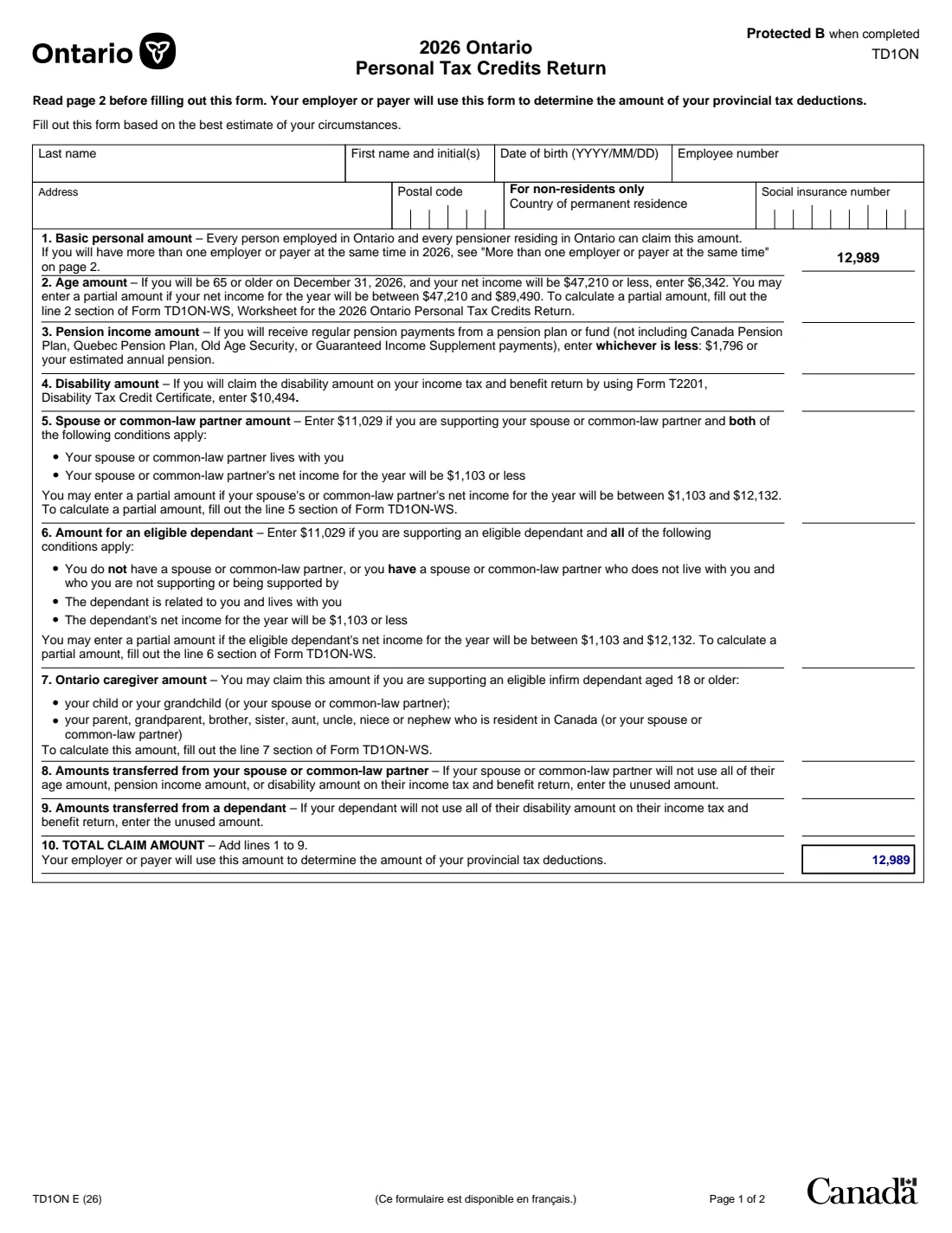
- $12,989, printed on the 2026 edition
Who needs to fill out Form TD1ON?
- Employees whose place of work is in Ontario, even if they live in another province — the TD1 rules follow the province of employment for employees.
- Pensioners who live in Ontario and receive a pension or other payments from a payer.
- Ontario workers aged 65 or older, or turning 65 by December 31, 2026, who may qualify for the Ontario age amount.
- People supporting a spouse, common-law partner or eligible dependant with low income in Ontario.
- Anyone in Ontario claiming the disability amount or caring for an infirm adult relative.
- People who are asked by an Ontario employer to complete both the federal and provincial TD1 at onboarding.
When to use Form TD1ON
- When you start with a new employer or payer and will receive salary, wages, commissions, pensions, employment insurance benefits or other remuneration.
- When you want to change the amounts you claimed before — for example, the number of your eligible dependants has changed.
- When your federal TD1 total claim is more than the federal basic personal amount; the federal form tells you to complete the provincial form too.
- When you move your job into Ontario from another province, or retire and start a pension while living in Ontario.
- At a new tax year if your employer asks for updated forms, since the Ontario amounts are set year by year.
What you need before you start
- Your social insurance number.
- Your full name, date of birth and current address with postal code.
- Your employee number, if your employer has given you one.
- An estimate of your 2026 net income, if you will be 65 or older by December 31, 2026.
- Your expected annual pension income from a pension plan or fund, if any.
- Your spouse's or common-law partner's, or eligible dependant's, estimated 2026 net income, if you support them.
- Whether you will claim the disability amount with an approved Form T2201.
- Any unused Ontario amounts your spouse or a dependant plans to transfer to you.
- Your completed federal TD1, so the two forms tell the same story.
What’s on Form TD1ON
The 2026 edition has 2 pages. FileIt asks for it in 4 parts, and it is signed by Employee:
- Your detailsEmployee
- Lines 1–10: Your Ontario claim amountsEmployee
- Other choices (page 2)Employee
- CertificationEmployee
How to fill out Form TD1ON, step by step
1 Identification
The identification block matches the federal form: last name, first name and initial(s), date of birth (YYYY/MM/DD), employee number, address, postal code, social insurance number, and a country of permanent residence box for non-residents only.
Keep these details identical to what you put on your federal TD1 so payroll can match the two.
2 Line 1 – Basic personal amount
Every person employed in Ontario and every pensioner residing in Ontario can claim the Ontario basic personal amount. On the 2026 edition the amount, $12,989, is already printed on the form, so there is nothing to calculate.
Notice that this is lower than the federal basic personal amount — that is normal. If you have more than one employer or payer at the same time, read the page 2 section before relying on line 1 twice.
3 Line 2 – Age amount
If you will be 65 or older on December 31, 2026, and your net income will be $47,210 or less, the 2026 edition says to enter $6,342. Between $47,210 and $89,490 you may claim a partial amount, worked out on the line 2 section of Form TD1ON-WS.
The Ontario income range is different from the federal age amount range, so don't copy the federal line 3 figure across. FileIt calculates the Ontario amount from your age and estimated net income.
4 Line 3 – Pension income amount
If you will receive regular pension payments from a pension plan or fund, enter whichever is less: $1,796 or your estimated annual pension. As on the federal form, Canada Pension Plan, Quebec Pension Plan, Old Age Security and Guaranteed Income Supplement payments are excluded. The Ontario cap on the 2026 edition is lower than the federal $2,000.
5 Line 4 – Disability amount
If you will claim the disability amount on your income tax and benefit return using Form T2201, Disability Tax Credit Certificate, the 2026 edition says to enter $10,494 — Ontario's own figure, which is not the same as the federal one.
6 Line 5 – Spouse or common-law partner amount
Ontario handles this differently from the federal TD1. You enter a set amount — $11,029 on the 2026 edition — if you support your spouse or common-law partner, they live with you, and their net income for the year will be $1,103 or less. If their income will be between $1,103 and $12,132 you may claim a partial amount using the line 5 section of Form TD1ON-WS.
FileIt asks for your spouse's or partner's estimated net income and works out the full or partial amount for you.
7 Line 6 – Amount for an eligible dependant
The same $11,029 maximum applies if you support an eligible dependant and all the conditions apply: you don't have a spouse or common-law partner (or you have one who doesn't live with you and you aren't supporting or being supported by them), the dependant is related to you and lives with you, and their net income will be $1,103 or less. A partial amount applies between $1,103 and $12,132 (line 6 section of Form TD1ON-WS).
8 Line 7 – Ontario caregiver amount
You may claim this if you support an eligible infirm dependant aged 18 or older who is your (or your spouse's or partner's) child or grandchild, or your parent, grandparent, brother, sister, aunt, uncle, niece or nephew resident in Canada. The amount is worked out on the line 7 section of Form TD1ON-WS for each dependant.
FileIt shows the worksheet rule beside the line, but because it depends on each dependant's circumstances you enter the result yourself.
9 Lines 8 and 9 – Amounts transferred
Line 8 takes the unused part of your spouse's or common-law partner's age amount, pension income amount or disability amount. Line 9 takes the unused part of a dependant's disability amount.
Unlike the federal TD1, the Ontario form has no tuition line and no transfer of tuition amounts.
10 Line 10 – Total claim amount
Add lines 1 to 9. Your employer or payer uses this total to determine your Ontario provincial tax deductions. FileIt adds the lines up for you, including any amounts you entered by hand on lines 7 to 9.
11 Page 2 – More than one employer and total income
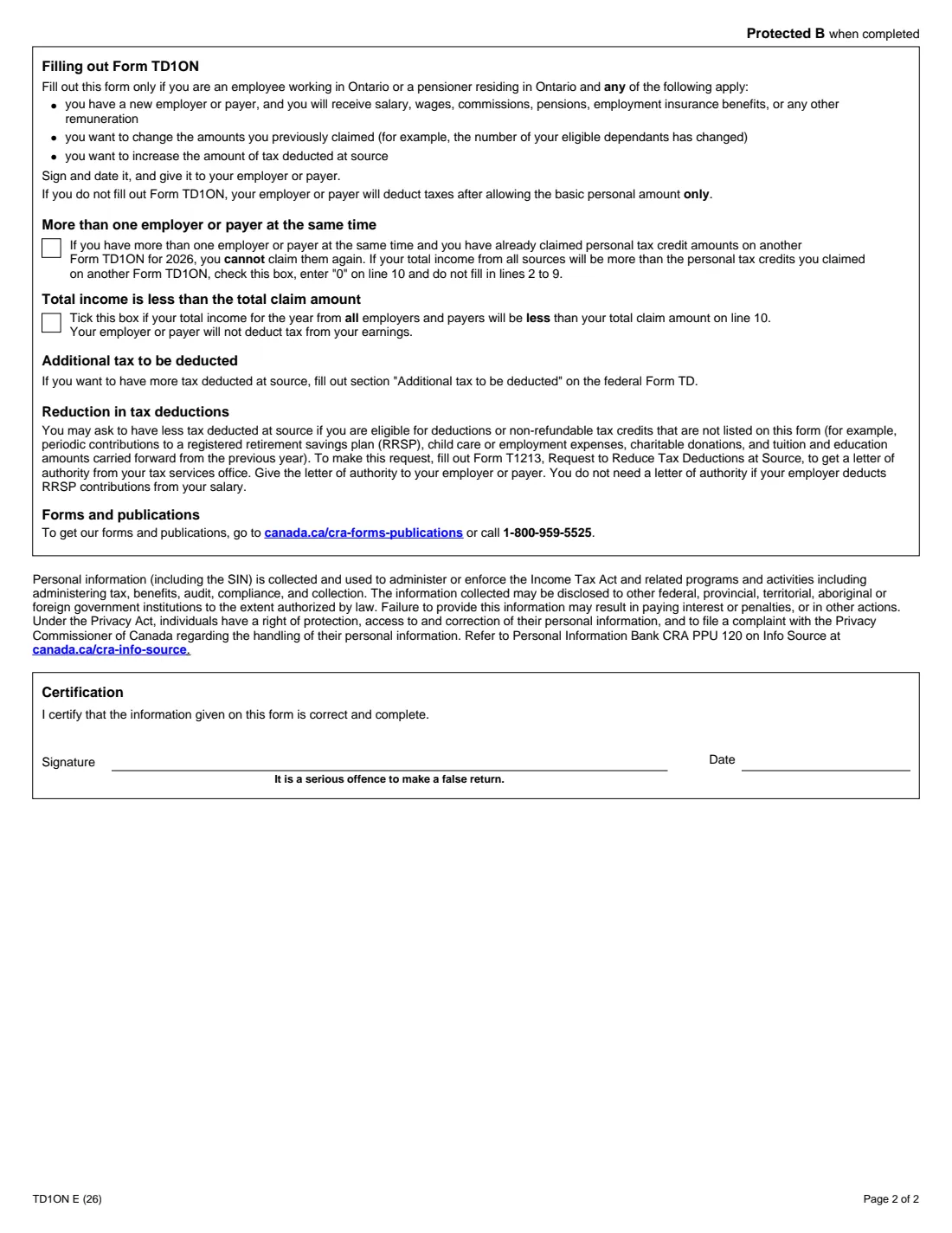
If you have more than one employer or payer at the same time and you already claimed your Ontario credits on another 2026 TD1ON, you can't claim them again. If your total income will be more than those credits, tick the box, enter 0 on line 10 and leave lines 2 to 9 blank.
Tick the "Total income is less than the total claim amount" box if your total income from all employers and payers this year will be less than line 10; your employer or payer will then not deduct tax.
12 Page 2 – Additional tax and reduction in tax deductions
The TD1ON has no box for extra tax. If you want more tax deducted at source, the form directs you to the "Additional tax to be deducted" section of the federal TD1. To have less tax deducted for items that aren't on the form — such as RRSP contributions, child care or donations — you request a letter of authority from the CRA with Form T1213.
13 Certification
Sign and date the form to certify that the information is correct and complete; the form warns that making a false return is a serious offence. Sign with FileIt's optional e-signature or print and sign by hand, as your employer prefers.
Common mistakes to avoid
- Copying federal TD1 figures onto the TD1ON — the Ontario age, pension, disability and spouse amounts are all different.
- Filling out the TD1ON when you actually work in another province; employees use the TD1 for their province of employment.
- Claiming the full $11,029 spouse amount when your spouse's net income will be above $1,103 — a partial amount applies up to $12,132.
- Trying to add tuition to the TD1ON; the Ontario form has no tuition line.
- Claiming Ontario credits in full with two employers at once instead of ticking the "more than one employer" box on the second form.
- Looking for an additional-tax box on the TD1ON — extra tax is requested on the federal TD1.
- Forgetting to sign and date page 2, or giving the form to the CRA instead of your employer or payer.
After you fill it out
Check the filled PDF, then sign and date the Certification — with FileIt's e-signature or by hand. Give it to your employer or payer together with your federal TD1. The form says to give it to your employer or payer; it is not sent to the CRA, and FileIt doesn't deliver it for you.
FileIt keeps the completed TD1ON in the person's vault folder next to their federal TD1, so you can see exactly what you claimed if a pay stub looks wrong. Complete a new TD1ON whenever your circumstances change, if you want to change your claim, or when your employer asks for the next year's edition.
Fill out Form TD1ON online with FileIt
- Pick the person. Choose someone from People and FileIt fills in their name, date of birth, address and other details it already knows.
- Answer plain-language questions. One part of the form at a time, with the official help text beside each question — 31 fields in all. Your answers save as you go.
- Check the live preview. Watch your answers land on the real Canada Revenue Agency (CRA) form, and let FileIt do any worksheet arithmetic.
- Generate the official PDF. FileIt prints your answers into the agency’s own PDF and files it in that person’s folder in your vault. Sign it, or send it for e-signature.
FileIt fills the form — it never files or submits anything for you. Deliver the finished form to whoever asked for it, the way the form’s instructions say.
Start Form TD1ON now — it’s freeForm TD1ON: frequently asked questions
Can I fill out the TD1ON online?
Yes. FileIt guides you through the TD1ON questions and prints your answers into the CRA's official 2026 fillable PDF. It works out the age, pension, disability, spouse and dependant amounts and the line 10 total, and saves the PDF in your vault. Filling forms is free on every FileIt plan.
Where do I send the TD1ON?
Give it to your employer or payer, usually along with your federal TD1. It does not go to the CRA, and FileIt never submits it on your behalf.
What is the Ontario basic personal amount for 2026?
The 2026 edition of Form TD1ON prints an Ontario basic personal amount of $12,989 on line 1. Every person employed in Ontario and every pensioner residing in Ontario can claim it.
Do I need both the TD1 and the TD1ON?
Your employer or payer uses the federal TD1 and your most recent provincial TD1 together. The federal form says you must fill out the provincial form if your federal total claim is more than the federal basic personal amount. If you don't fill out a TD1ON, your employer allows only the Ontario basic personal amount.
I live in Quebec but work in Ontario. Which provincial form do I use?
The federal TD1 says employees use the TD1 for their province or territory of employment, and pensioners use the one for their province or territory of residence. So an employee working in Ontario uses the TD1ON.
Why is the Ontario spouse amount different from the federal one?
On the federal TD1 the spouse amount is the difference between your line 1 and your spouse's income. On the TD1ON it's a set $11,029 (2026 edition) if your spouse's net income is $1,103 or less, with a partial amount between $1,103 and $12,132 calculated on Form TD1ON-WS.
How do I get more tax taken off in Ontario?
The TD1ON doesn't have an additional tax box. Use the "Additional tax to be deducted" section on page 2 of the federal TD1 instead.
Can I sign the TD1ON electronically?
FileIt offers optional e-signature, or you can print and sign by hand. Ask your employer or payer which they accept.
Official sources
- Blank form (PDF), published by Canada Revenue Agency (CRA): https://www.canada.ca/content/dam/cra-arc/formspubs/pbg/td1on/td1on-fill-26e.pdf
- Official instructions and guidance: https://www.canada.ca/en/revenue-agency/services/forms-publications/td1-personal-tax-credits-returns/td1-forms-pay-received-on-january-1-later/td1on.html
- Edition shown on this page: TD1ON E (26) (checked 2026-09-25).
FileIt is not affiliated with or endorsed by Canada Revenue Agency (CRA) or any government. This page explains the form in general terms and is not legal, tax or immigration advice. Always read the official instructions, and check that you are using the edition the recipient accepts. Page last reviewed 2026-09-25.