What is PS 2.73 family allowances (Decree 614/13)?
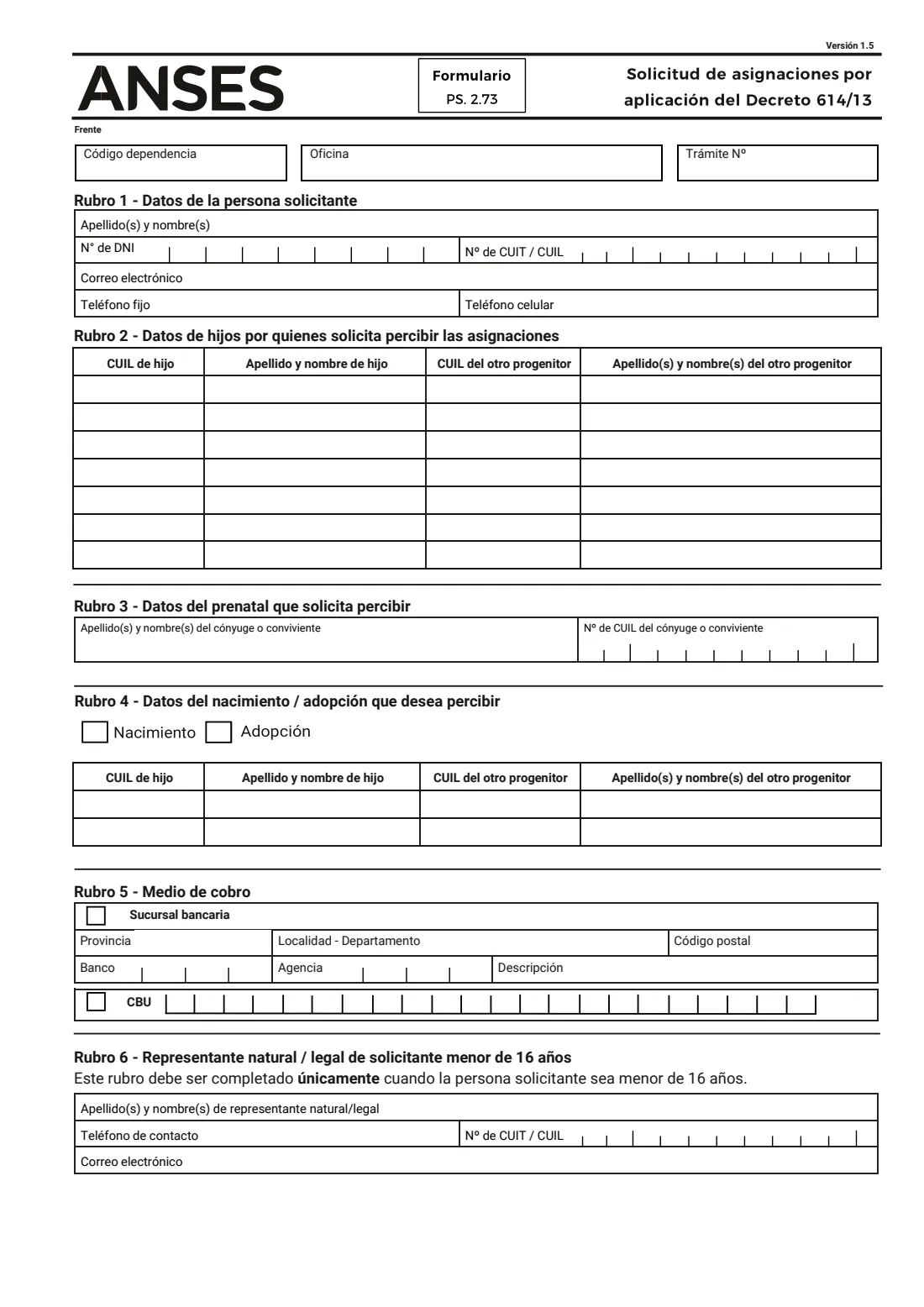
Formulario PS. 2.73, 'Solicitud de asignaciones por aplicación del Decreto 614/13', is the ANSES form for one specific situation. Family allowances (asignaciones familiares) for employees are generated by a parent's job; Decree 614/13 lets the parent who actually has the children in their care ask ANSES to pay those allowances to them instead. The form covers the monthly child allowance, the prenatal allowance and the one-off birth or adoption allowance.
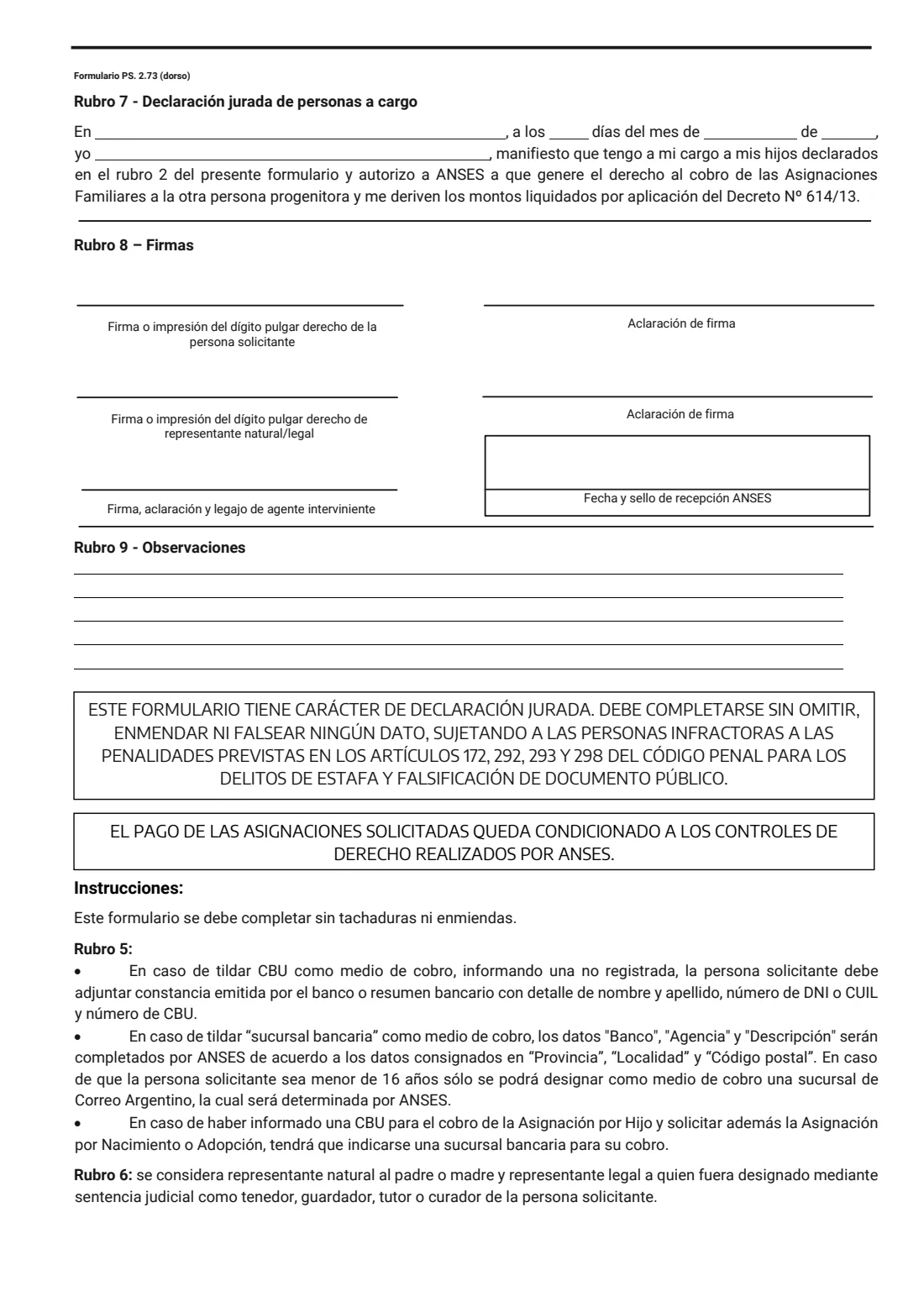
The form is a sworn statement (declaración jurada): it must be completed without crossings-out or corrections, false information is punishable under the Penal Code, and payment depends on the entitlement checks ANSES carries out.
FileIt turns the PDF into guided questions in plain English, with the Spanish terms alongside, and prints your answers into ANSES's own form (Versión 1.5). It checks every CUIL and CBU check digit, fills the receipt stub (talón) too, and saves the finished PDF in your vault. You sign it on paper and take it to ANSES yourself — FileIt never submits anything.
- Who fills it
- The parent (or person) who has the children in their care, claiming allowances generated by the other parent
- Given to
- An ANSES office (UDAI), in person
- Covers
- Child allowance, prenatal allowance, birth or adoption allowance
- Signatures
- Applicant signs or prints the right thumb on paper; a parent or legal representative also signs for an applicant under 16
- Edition
- Versión 1.5 (no date printed; the PDF dates from August 2024)
- Pages
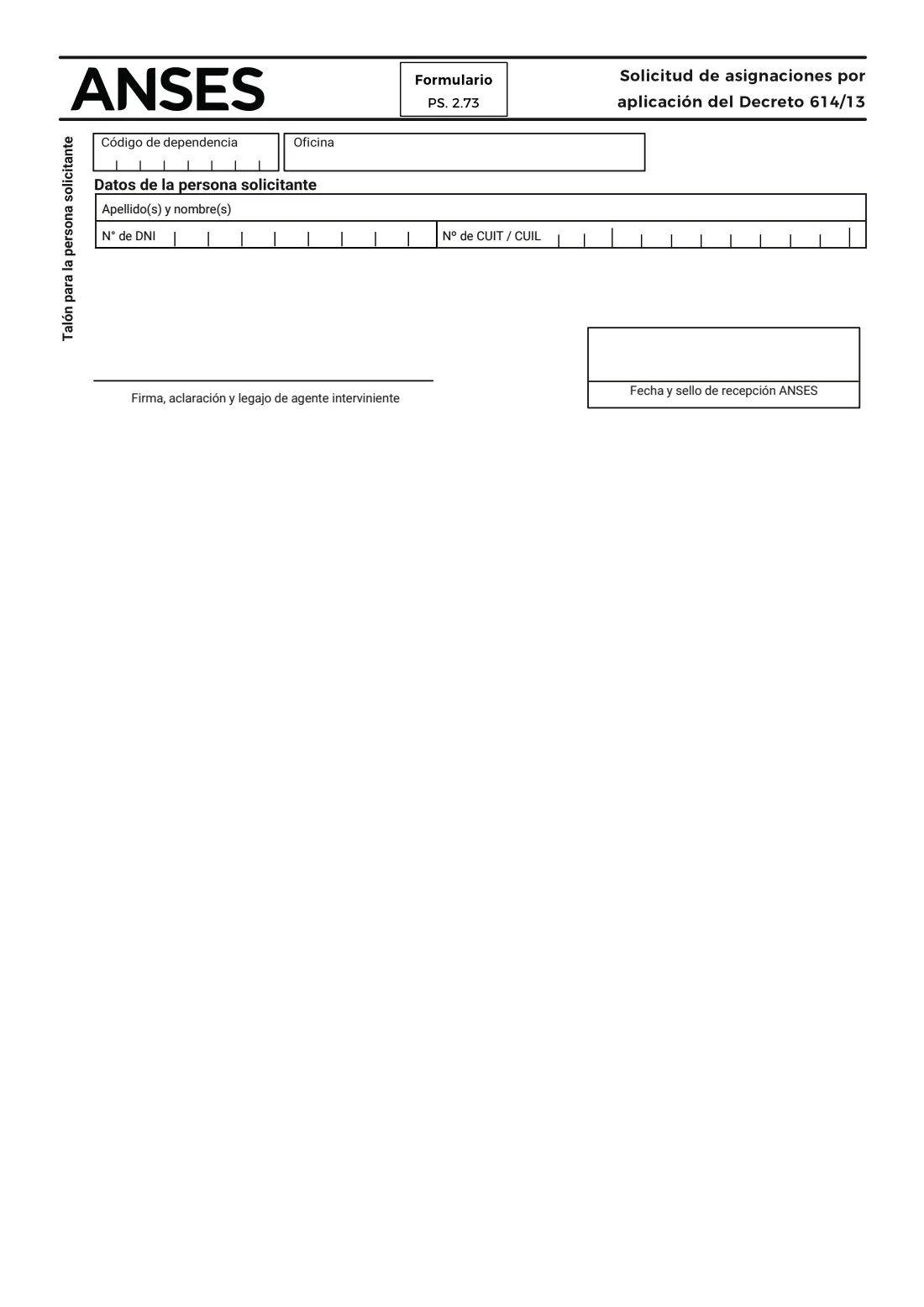
- 4, including a receipt stub ANSES stamps and returns
Who needs to fill out PS 2.73 family allowances (Decree 614/13)?
- A mother or father who lives with and looks after the children while the family allowances are generated by the other parent's employment.
- Separated or divorced parents where the children live with the parent who does not receive the allowances.
- A pregnant applicant who wants the prenatal allowance generated through a spouse or partner (cónyuge o conviviente).
- A parent claiming the one-off birth or adoption allowance that the other parent's job generates.
- Applicants under 16, who can apply with their natural or legal representative completing Rubro 6 and co-signing.
When to use PS 2.73 family allowances (Decree 614/13)
- When the children are in your care but the allowances are being paid, or would be paid, to the other parent.
- When a pregnancy or birth gives rise to a prenatal, birth or adoption allowance generated by your spouse or partner.
- When your circumstances change — for example after a separation — and the children come to live with you.
What you need before you start
- Your DNI and your CUIL (or CUIT).
- Each child's full name and CUIL.
- The other parent's full name and CUIL (the person whose employment generates the allowance).
- For the prenatal allowance, your spouse's or partner's name and CUIL.
- Your email address and landline or mobile number.
- Your 22-digit CBU for payment into your own account, plus a bank certificate or statement if ANSES doesn't have it on record.
- Otherwise, the province, town and postcode where you would like to be paid at a bank branch.
- For an applicant under 16, the representative's name, phone, CUIL and email.
What’s on PS 2.73 family allowances (Decree 614/13)
The 2026 edition has 4 pages. FileIt asks for it in 14 parts:
- Rubro 1 — Applicant's details (Datos de la persona solicitante)Applicant
- Rubro 2 — Children you claim the allowances for (Datos de hijos)Applicant
- Rubro 2 — Child 2Applicant
- Rubro 2 — Child 3Applicant
- Rubro 2 — Child 4Applicant
- Rubro 2 — Child 5Applicant
- Rubro 2 — Child 6Applicant
- Rubro 2 — Child 7Applicant
- Rubro 3 — Prenatal allowance (Datos del prenatal)Applicant
- Rubro 4 — Birth or adoption allowance (Datos del nacimiento / adopción)Applicant
- Rubro 5 — How you want to be paid (Medio de cobro)Applicant
- Rubro 6 — Parent or legal representative of an applicant under 16Representative
- Rubro 7 — Sworn statement of dependants (Declaración jurada de personas a cargo)Applicant
- Rubro 9 — Remarks (Observaciones)Applicant
How to fill out PS 2.73 family allowances (Decree 614/13), step by step
1 Rubro 1 — Datos de la persona solicitante
Your surname and first names, DNI, CUIT or CUIL, email, landline and mobile. The middle eight digits of a CUIL are the DNI number, and the last digit is a check digit, so FileIt flags a number that doesn't add up. Your name, DNI and CUIL also print on the receipt stub (talón) on page 3.
2 Rubro 2 — Datos de hijos por quienes solicita percibir las asignaciones
One row for each child in your care: the child's CUIL and name, and the CUIL and name of the other parent — the person whose job generates the allowance. The form has seven rows.
3 Rubro 3 — Datos del prenatal que solicita percibir
Only for the prenatal allowance: the name and CUIL of your spouse or partner. Leave it blank if you are not claiming it.
4 Rubro 4 — Datos del nacimiento / adopción que desea percibir
Only for the one-off birth (Nacimiento) or adoption (Adopción) allowance. Tick which one, then give the child's CUIL and name and the other parent's CUIL and name. There are two rows, for twins or a joint adoption.
5 Rubro 5 — Medio de cobro
Choose how you want to be paid. For a bank branch (sucursal bancaria), give the province, town and postcode; ANSES fills in the bank, agency and description. For a CBU, write your 22-digit account number.
If you gave a CBU for the child allowance and also claim the birth or adoption allowance, that one must be paid at a bank branch; an applicant under 16 can only be paid at a Correo Argentino branch ANSES chooses.
6 Rubro 6 — Representante natural / legal de solicitante menor de 16 años
Filled in only when the applicant is under 16. A natural representative is the father or mother; a legal representative is someone a court appointed as the applicant's holder, guardian, tutor or curator. Give their name, contact phone, CUIT or CUIL and email.
7 Rubro 7 — Declaración jurada de personas a cargo
A sworn statement, dated and placed ('En … a los … días del mes de … de …'), in which you declare that the children in Rubro 2 are in your care and authorise ANSES to generate the allowance entitlement for the other parent and pay the amounts to you under Decree 614/13. FileIt writes the date in the Spanish form the line expects.
8 Rubro 8 — Firmas
Sign, or print your right thumb, and write your name in block letters (aclaración de firma). A representative signs as well for an applicant under 16. The ANSES agent adds their signature and staff number, and the office stamps the date of receipt.
9 Rubro 9 — Observaciones
Five lines for anything else ANSES should know, such as when the children came to live with you or which documents you are attaching.
Common mistakes to avoid
- Crossing out or correcting anything — ANSES asks for the form to be completed without crossings-out or corrections, so print a clean copy instead.
- Swapping CUILs between columns: the child's CUIL goes in the first column and the other parent's in the third.
- Typing a CUIL or CBU with a wrong digit; both have check digits, which FileIt verifies.
- Choosing CBU payment for an applicant under 16 — they can only be paid at a Correo Argentino branch chosen by ANSES.
- Forgetting the bank certificate or statement when the CBU isn't already registered with ANSES.
- Filling in Rubro 6 when the applicant is 16 or over, or leaving it empty when they are younger.
After you fill it out
Print the PDF, check it, and sign Rubro 8 on paper (or print your right thumb) with your name in block letters. If the applicant is under 16, the parent or legal representative signs too. Because it is signed on paper at ANSES, there is no electronic signature for this form.
Take the form to an ANSES office with your DNI and any supporting documents, such as the bank certificate for a new CBU. The ANSES agent signs and stamps it and gives you back the receipt stub (talón) on page 3 — keep it as proof that you applied. ANSES then checks the entitlement before any payment is made.
FileIt keeps a copy of the completed form in your vault, so it is at hand if ANSES asks about it or your situation changes.
Fill out PS 2.73 family allowances (Decree 614/13) online with FileIt
- Pick the person. Choose someone from People and FileIt fills in their name, date of birth, address and other details it already knows.
- Answer plain-language questions. One part of the form at a time, with the official help text beside each question — 66 fields in all. Your answers save as you go.
- Check the live preview. Watch your answers land on the real Administración Nacional de la Seguridad Social (ANSES) form, and let FileIt do any worksheet arithmetic.
- Generate the official PDF. FileIt prints your answers into the agency’s own PDF and files it in that person’s folder in your vault.
FileIt fills the form — it never files or submits anything for you. Deliver the finished form to whoever asked for it, the way the form’s instructions say.
Start PS 2.73 family allowances (Decree 614/13) now — it’s freePS 2.73 family allowances (Decree 614/13): frequently asked questions
What is Decree 614/13?
It is the Argentine decree that lets family allowances generated by one parent's employment be paid to the other parent when the children are in that other parent's care. Form PS 2.73 is how you ask ANSES to apply it.
Can I fill out form PS 2.73 online?
You can fill it in online with FileIt, which prints your answers into the official ANSES PDF and saves it in your vault. You still print it, sign it on paper and hand it in at an ANSES office yourself.
Where do I hand in the PS 2.73 form?
At an ANSES office, where an agent signs and stamps it and returns the receipt stub to you. FileIt does not send it to ANSES.
Which allowances does this form cover?
The child allowance for the children listed in Rubro 2, the prenatal allowance (Rubro 3) and the one-off birth or adoption allowance (Rubro 4). You can claim one or several on the same form.
Can a teenager under 16 use this form?
Yes, but a natural representative (father or mother) or a court-appointed legal representative must fill in Rubro 6 and sign too, and payment can only be at a Correo Argentino branch chosen by ANSES.
Do I need to attach anything for a CBU?
Only if the CBU isn't already registered with ANSES: then attach a certificate from the bank or a bank statement showing your name, DNI or CUIL and the CBU.
Official sources
- Blank form (PDF), published by Administración Nacional de la Seguridad Social (ANSES): https://www.anses.gob.ar/sites/default/files/formulario/2024-08/PS%202.73-Solicitud-AAFF-Decreto-614-13.pdf
- Official instructions and guidance: https://www.anses.gob.ar/
- Edition shown on this page: Versión 1.5 (PDF dated August 2024) (checked 2026-09-26).
FileIt is not affiliated with or endorsed by Administración Nacional de la Seguridad Social (ANSES) or any government. This page explains the form in general terms and is not legal, tax or immigration advice. Always read the official instructions, and check that you are using the edition the recipient accepts. Page last reviewed 2026-09-26.