What is PS 2.67 pregnancy allowance application?
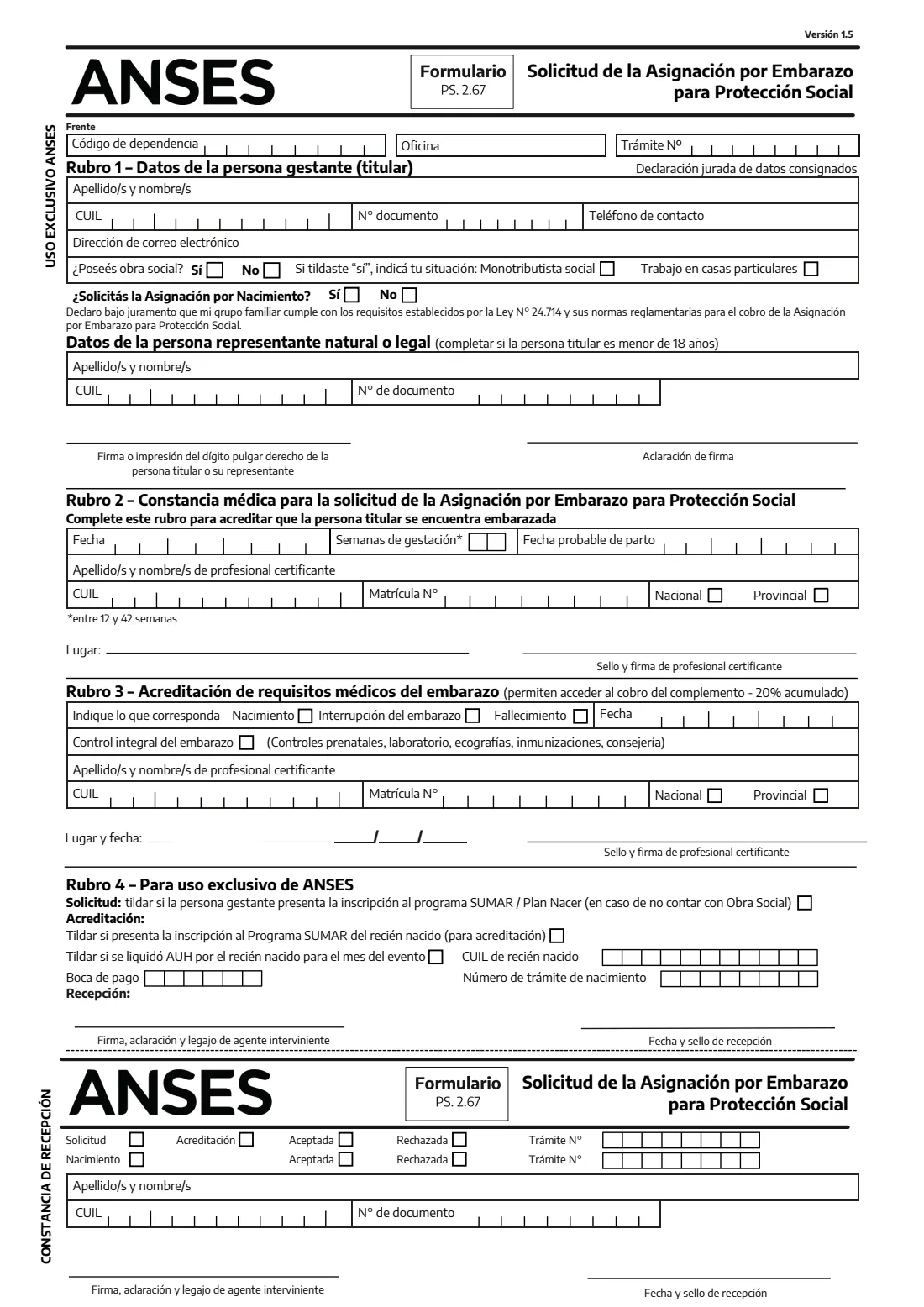
Formulario PS. 2.67 is how a pregnant person applies to ANSES for the Asignación por Embarazo para Protección Social — the pregnancy counterpart of the universal child allowance (AUH). It is meant for families whose group meets the requirements of Law 24.714: typically people without formal employment, and, among those with health insurance (obra social), only social monotributistas and domestic workers in private homes (casas particulares).
The front page has four parts. Rubro 1 is yours: your name, CUIL, DNI, contact details, whether you have an obra social and whether you are also applying for the birth allowance (Asignación por Nacimiento). Rubro 2 is the medical certificate a doctor or midwife completes to confirm the pregnancy, which must be between 12 and 42 weeks. Rubro 3 is completed later to accredit the birth, a pregnancy loss or the full prenatal check-ups that release the accumulated 20% supplement, and Rubro 4 is for ANSES. If you are under 18, your natural or legal representative's details go in a short extra block.
FileIt helps with Rubro 1 and the representative's details. It checks the CUIL check digit and that it matches your DNI, prints each digit in its cell, and saves the completed form in your vault. You take it to the health professional and then to ANSES yourself; FileIt never submits anything.
- Who fills it
- The pregnant person (or their representative if under 18); a doctor or midwife completes the medical part
- Handed in to
- ANSES, with the medical certificate in Rubro 2 completed
- Pregnancy window
- Certified between 12 and 42 weeks of gestation
- Signatures
- Applicant's signature or right thumbprint on paper; the professional's stamp and signature
- Edition
- Versión 1.5 (PDF dated January 2024)
- Pages
- 2, with a receipt stub ANSES stamps and returns
Who needs to fill out PS 2.67 pregnancy allowance application?
- Pregnant people without formal employment whose family group meets the Law 24.714 requirements.
- Pregnant social monotributistas who have an obra social.
- Pregnant domestic workers employed in private homes (personal de casas particulares).
- Pregnant applicants under 18, with a parent or legal guardian filling in the representative's block.
- Relatives or social workers helping someone gather what ANSES asks for.
When to use PS 2.67 pregnancy allowance application
- Once the pregnancy has reached 12 weeks and a doctor or midwife can certify it in Rubro 2.
- When you also want to apply for the birth allowance — you tick it on the same form.
- After the birth or the end of the pregnancy, when Rubro 3 is completed by the professional to accredit what happened and the check-ups.
What you need before you start
- Your DNI and CUIL.
- A contact phone number and, if you have one, an email address.
- Whether you have an obra social, and if so whether you are a social monotributista or a domestic worker.
- If you don't have an obra social, your Programa SUMAR / Plan Nacer registration certificate.
- A doctor or midwife to complete, sign and stamp Rubro 2.
- If you are under 18, your representative's name, CUIL and DNI.
What’s on PS 2.67 pregnancy allowance application
The 2026 edition has 2 pages. FileIt asks for it in 3 parts:
- Rubro 1 — The pregnant person (Datos de la persona gestante)Applicant
- Natural or legal representative (Datos de la persona representante)Representative
- Sworn statement and signature (Declaración jurada y firma)Applicant
How to fill out PS 2.67 pregnancy allowance application, step by step
1 Rubro 1 — Datos de la persona gestante
Your surnames and first names, CUIL, DNI number, contact phone and email. Tick whether you have an obra social; if you tick Sí, also tick whether you are a social monotributista or work in private homes. Then say whether you are applying for the birth allowance too. Your name, CUIL and DNI are repeated on the receipt stub at the bottom of the page.
2 Representative (under 18)
Only if the pregnant person is under 18: the name, CUIL and document number of the natural representative (a parent) or the legal representative appointed by a court.
3 Sworn statement and signature
You declare under oath that your family group meets the requirements of Law 24.714 for this allowance. Sign or print your right thumb on paper; FileIt prints the signer's name above 'Aclaración de firma'.
4 Rubro 2 — Constancia médica
The certifying professional writes the date, the weeks of gestation (12 to 42), the probable delivery date and their name, CUIL and registration number, and signs and stamps it. FileIt leaves this part blank.
5 Rubro 3 — Acreditación de requisitos médicos
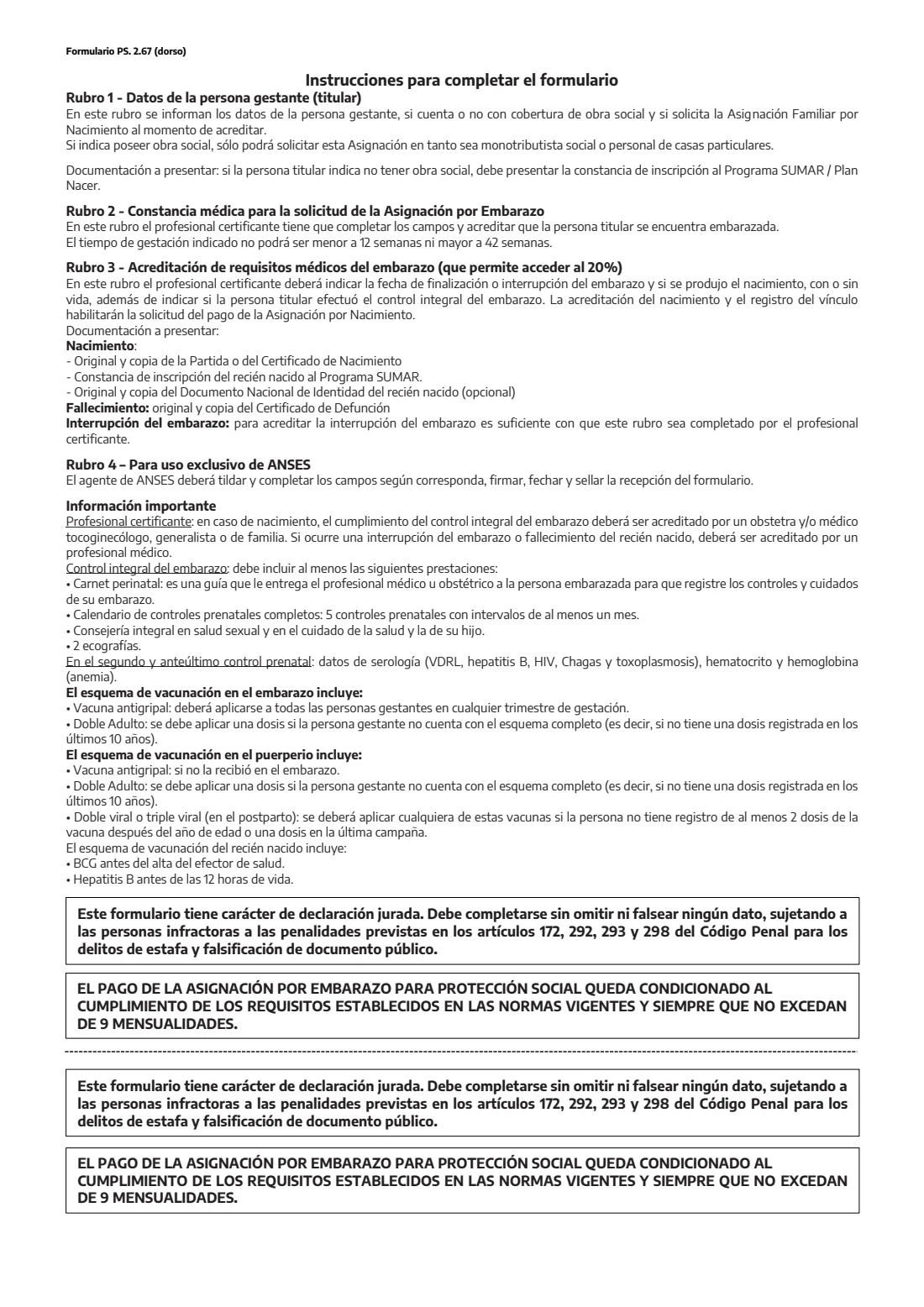
Completed by the professional after the birth, a pregnancy interruption or a death, and to confirm the full prenatal check-ups (controls, lab tests, scans, vaccines, counselling). It gives access to the accumulated 20% supplement. For a birth, ANSES also asks for the birth certificate and the newborn's SUMAR registration.
6 Rubro 4 — For ANSES
The ANSES agent ticks what was presented, signs, dates and stamps the form, and gives you the receipt stub.
Common mistakes to avoid
- Ticking Sí for obra social without saying whether you are a social monotributista or a domestic worker — only those two situations qualify with health insurance.
- Going to ANSES before the doctor or midwife has completed and stamped Rubro 2.
- A CUIL whose middle eight digits don't match the DNI, or with a wrong check digit; FileIt flags both.
- Leaving out the representative's details for an applicant under 18.
- Forgetting the SUMAR registration certificate when you have no obra social.
- Omitting or misstating a detail — the form is a sworn statement under the Penal Code.
After you fill it out
Print the form and take it to your doctor or midwife to complete Rubro 2. Then sign it, or print your right thumb, and hand it in at ANSES with your DNI and any documents it asks for. Keep the stamped receipt stub.
The allowance is paid only while the legal requirements are met and for no more than nine monthly payments. After the birth or end of the pregnancy, Rubro 3 is completed to accredit it and claim the accumulated supplement.
FileIt keeps the completed form in your vault, so you can find the details again for the birth allowance or a later query, and add the baby's birth certificate and DNI alongside it.
Fill out PS 2.67 pregnancy allowance application online with FileIt
- Pick the person. Choose someone from People and FileIt fills in their name, date of birth, address and other details it already knows.
- Answer plain-language questions. One part of the form at a time, with the official help text beside each question — 13 fields in all. Your answers save as you go.
- Check the live preview. Watch your answers land on the real Administración Nacional de la Seguridad Social (ANSES) form, and let FileIt do any worksheet arithmetic.
- Generate the official PDF. FileIt prints your answers into the agency’s own PDF and files it in that person’s folder in your vault.
FileIt fills the form — it never files or submits anything for you. Deliver the finished form to whoever asked for it, the way the form’s instructions say.
Start PS 2.67 pregnancy allowance application now — it’s freePS 2.67 pregnancy allowance application: frequently asked questions
Who can apply for the Asignación por Embarazo?
The form is for pregnant people whose family group meets the requirements of Law 24.714 and its rules. If you have an obra social, the form says you can only apply as a social monotributista or a domestic worker in private homes. ANSES decides on eligibility.
Does a doctor have to sign the form?
Yes. Rubro 2 is a medical certificate a professional completes, signs and stamps to show you are pregnant, between 12 and 42 weeks.
Can I apply for the birth allowance on the same form?
Yes, Rubro 1 asks whether you are applying for the Asignación por Nacimiento. It is paid once the birth and the family link are accredited.
What is the 20% supplement in Rubro 3?
Part of each monthly payment is held back and paid once the professional accredits, in Rubro 3, how the pregnancy ended and that the prenatal check-ups were completed.
Can I fill out PS 2.67 online?
With FileIt you fill in your part online and get the official ANSES PDF back with your answers printed. The medical part, the signature and handing it in still happen in person.
I'm under 18 — can I apply?
Yes. Your natural representative (a parent) or legal representative gives their name, CUIL and document number in the block below Rubro 1.
Official sources
- Blank form (PDF), published by Administración Nacional de la Seguridad Social (ANSES): https://www.anses.gob.ar/sites/default/files/formulario/2024-01/Embarazo%20para%20Proteccion%20Social.pdf
- Official instructions and guidance: https://www.anses.gob.ar/
- Edition shown on this page: Versión 1.5 (PDF dated January 2024) (checked 2026-10-19).
FileIt is not affiliated with or endorsed by Administración Nacional de la Seguridad Social (ANSES) or any government. This page explains the form in general terms and is not legal, tax or immigration advice. Always read the official instructions, and check that you are using the edition the recipient accepts. Page last reviewed 2026-10-19.