What is PS 5.5 retiree health insurer changes or switch?
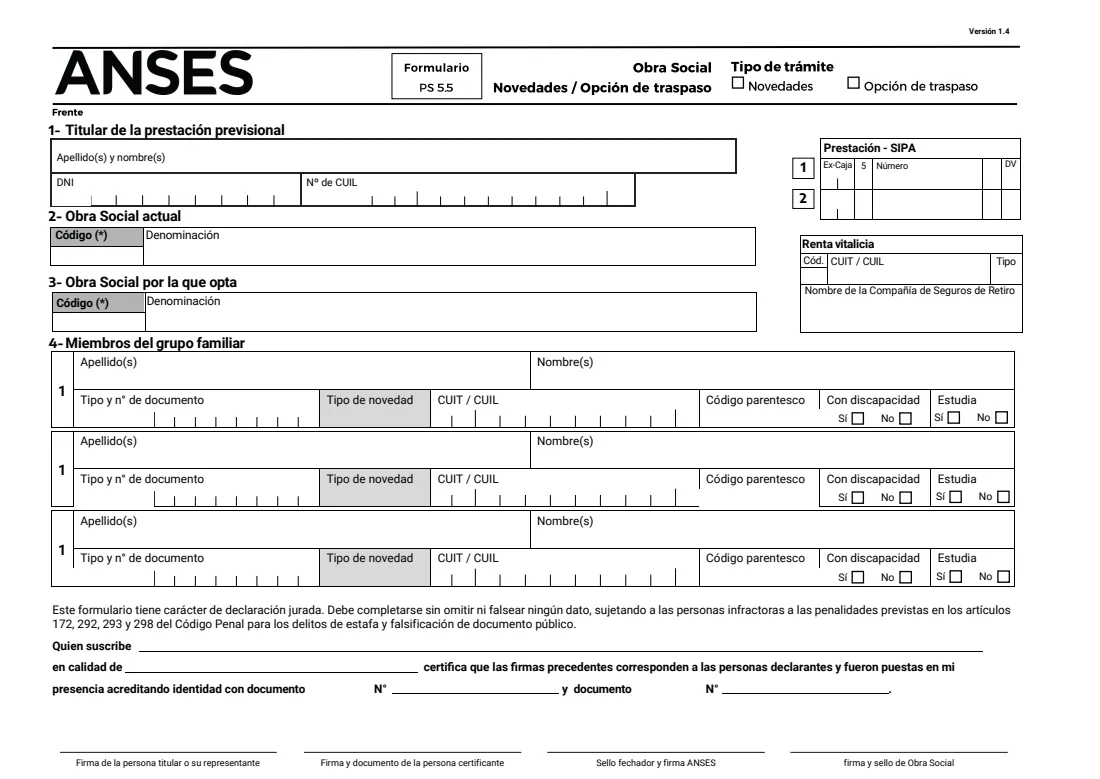
Retirees and pensioners of Argentina's integrated pension system (SIPA) get health cover through an obra social — often PAMI, but not always. Formulario PS 5.5 handles two things on one page. Tick 'Novedades' to add a family member to that cover (alta), take someone off it (baja) or correct their details (modificación). Tick 'Opción de traspaso' to move your cover from your current obra social to another one.
You give the benefit holder's name, document and CUIL and up to two SIPA benefit numbers, plus any life annuity (renta vitalicia) from a retirement insurance company. Then you name the current obra social and, for a switch, the one you are choosing, and list up to three family members with their document, CUIL, relationship code and whether they have a disability or are studying. It is a sworn statement, filled in duplicate; ANSES stamps the copy you keep.
FileIt asks each question in plain English, turns the relationship and document types into the codes the form uses, pads document numbers with leading zeros as the instructions ask, splits the benefit number into its cells and checks every CUIL. The completed form goes into your vault. You sign it and hand it in at ANSES yourself; FileIt never submits it.
- Who fills it
- A SIPA retiree or pensioner (or their representative)
- Two procedures
- Novedades (family members) or Opción de traspaso (switch obra social)
- Handed in to
- ANSES, in duplicate; the stamped copy stays with you
- Signatures
- Holder (or representative) on paper, a certifying person, ANSES and the obra social
- Edition
- Versión 1.4 (PDF dated November 2024)
- Pages
- 2 (form and instructions with code tables)
Who needs to fill out PS 5.5 retiree health insurer changes or switch?
- A retiree who has married or started living with a partner and wants them covered by their obra social.
- A pensioner whose child turned 21, or finished studying at 25, and must be removed from the cover.
- A retiree who wants to leave their current obra social for another one.
- Someone whose family member's document or CUIL was recorded wrongly and needs correcting.
- Family members or carers helping an older relative sort out their health cover paperwork.
When to use PS 5.5 retiree health insurer changes or switch
- When the people in the family group change: a marriage, a new partner, a birth, a child coming of age, a death.
- When you have decided to switch to a different obra social.
- When a child aged 21 to 25 keeps cover because they are studying, or a child has a disability, and that needs recording.
What you need before you start
- The holder's identity document and CUIL.
- The SIPA benefit number(s) from the Orden de Pago Previsional (payment slip).
- If you receive a life annuity, the insurer's code, CUIT and name.
- The name (and code, if you know it) of your current obra social and, for a switch, the new one.
- Each family member's surnames, names, document, CUIL and relationship to you.
- Proof the family member qualifies where it applies, such as a student certificate or a disability certificate.
What’s on PS 5.5 retiree health insurer changes or switch
The 2026 edition has 2 pages. FileIt asks for it in 9 parts:
- Type of procedure (Tipo de trámite)Benefit holder
- 1 — Benefit holder (Titular de la prestación previsional)Benefit holder
- Life annuity (Renta vitalicia)Benefit holder
- 2 — Current obra social (Obra social actual)Benefit holder
- 3 — Obra social you are choosing (Obra social por la que opta)Benefit holder
- 4 — Family member 1 (Miembro del grupo familiar)Benefit holder
- 4 — Family member 2 (Miembro del grupo familiar)Benefit holder
- 4 — Family member 3 (Miembro del grupo familiar)Benefit holder
- Certification of the signatures (Quien suscribe … certifica)Certifying person
How to fill out PS 5.5 retiree health insurer changes or switch, step by step
1 Tipo de trámite
Tick Novedades for changes to the family members covered, or Opción de traspaso to move to another obra social.
2 1 — Titular de la prestación previsional
The holder's surnames and names (a woman gives her maiden surname only), document type and number, and CUIL. In the Prestación - SIPA box, the 12-digit benefit number from the payment slip; a second row is there for a second benefit. If you have a life annuity, fill in its code, CUIT, type and the retirement insurance company's name.
3 2 — Obra social actual
The code and name of the obra social that covers you now.
4 3 — Obra social por la que opta
Only for a switch: the code and name of the obra social you are choosing.
5 4 — Miembros del grupo familiar
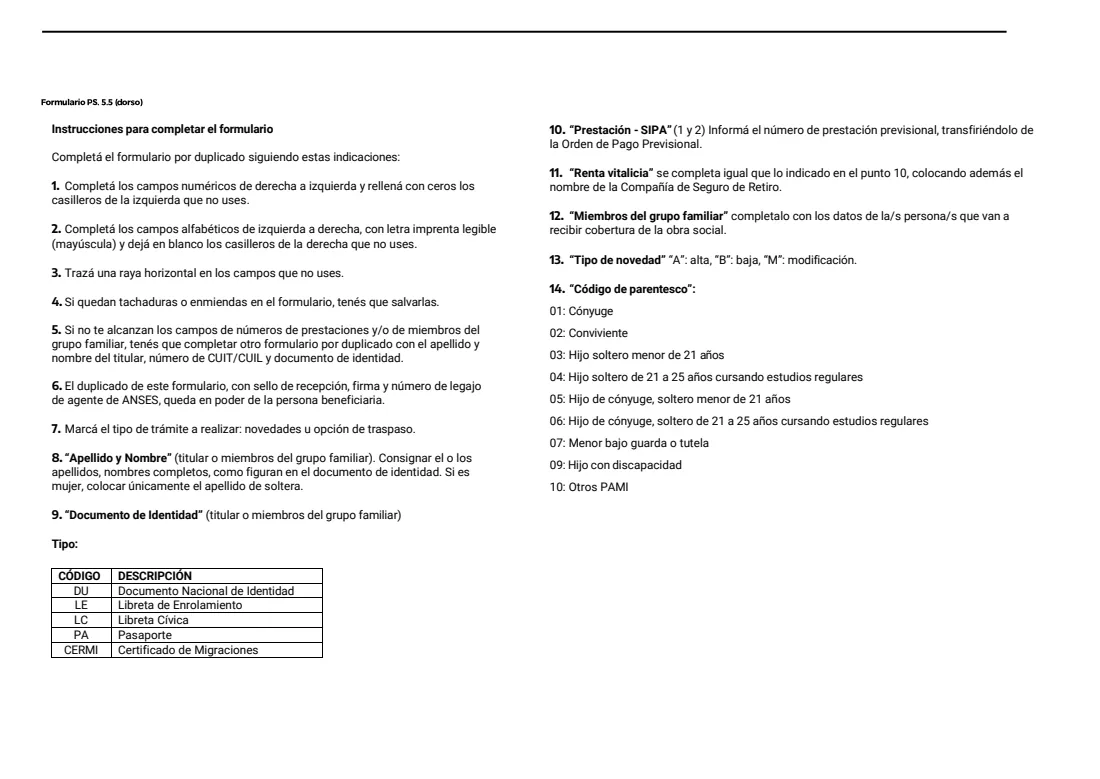
Up to three people, each with their surnames and names, document type and number, the type of change (A to add, B to remove, M to modify), CUIL, relationship code (01 spouse, 02 partner, 03 to 07 children and minors in your care, 09 child with a disability, 10 others PAMI) and whether they have a disability or are studying. For more people, fill in another copy of the form.
6 Certification and signatures
A certifying person states that the signatures were made in their presence after checking identity documents. The holder or their representative signs, and ANSES and the obra social sign and stamp the form.
Common mistakes to avoid
- Writing the benefit number from memory instead of copying it from the payment slip.
- Leaving the document number without leading zeros — the instructions ask for numeric boxes to be filled right to left with zeros on the left.
- Using code 04 or 06 for a 21 to 25-year-old who is not in regular studies, or 09 without ticking disability.
- Ticking Opción de traspaso but leaving the new obra social blank.
- Crossings-out or corrections that are not initialled — the form says they must be validated.
- Giving a married woman's married surname instead of her maiden surname.
After you fill it out
Print two copies, sign them, and have the signatures certified as the form describes. Hand both in at ANSES; the duplicate is stamped, signed and given back with the agent's staff number. Keep it as proof of your request.
Bring the documents that support each change, such as a marriage or birth certificate, a student certificate for a child aged 21 to 25, or a disability certificate. The obra social also signs and stamps the form.
FileIt keeps the completed form in your vault, next to your benefit paperwork, so you can check what you asked for if the obra social or ANSES gets in touch.
Fill out PS 5.5 retiree health insurer changes or switch online with FileIt
- Pick the person. Choose someone from People and FileIt fills in their name, date of birth, address and other details it already knows.
- Answer plain-language questions. One part of the form at a time, with the official help text beside each question — 64 fields in all. Your answers save as you go.
- Check the live preview. Watch your answers land on the real Administración Nacional de la Seguridad Social (ANSES) form, and let FileIt do any worksheet arithmetic.
- Generate the official PDF. FileIt prints your answers into the agency’s own PDF and files it in that person’s folder in your vault.
FileIt fills the form — it never files or submits anything for you. Deliver the finished form to whoever asked for it, the way the form’s instructions say.
Start PS 5.5 retiree health insurer changes or switch now — it’s freePS 5.5 retiree health insurer changes or switch: frequently asked questions
Can I use PS 5.5 to switch from PAMI to another obra social?
Form PS 5.5 has an 'Opción de traspaso' box for moving to another obra social. Whether a particular insurer accepts you is up to the rules for that insurer and ANSES.
How many family members fit on one form?
Three. If you need more, the instructions say to fill in another copy with the holder's name, CUIL and document repeated.
What do A, B and M mean?
They are the 'Tipo de novedad': A (alta) adds a person, B (baja) removes them and M (modificación) changes their details.
Where do I find my benefit number?
On your Orden de Pago Previsional (payment slip). It has 12 digits, and FileIt splits it into the cells of the Prestación - SIPA box.
Can I fill in PS 5.5 online?
With FileIt you fill it in online and get ANSES's own PDF back with your answers printed. You still sign it on paper and hand it in yourself.
Why does the form need a certifying person?
The form has a block where someone certifies that the signatures were made in their presence after checking identity documents. Ask ANSES or your obra social who can certify them in your case.
Official sources
- Blank form (PDF), published by Administración Nacional de la Seguridad Social (ANSES): https://www.anses.gob.ar/sites/default/files/formulario/2024-11/PS%205.5%20OS-opcion-traspaso-rev.-Contenidos15.11.24.pdf
- Official instructions and guidance: https://www.anses.gob.ar/
- Edition shown on this page: Versión 1.4 (PDF dated November 2024) (checked 2026-10-19).
FileIt is not affiliated with or endorsed by Administración Nacional de la Seguridad Social (ANSES) or any government. This page explains the form in general terms and is not legal, tax or immigration advice. Always read the official instructions, and check that you are using the edition the recipient accepts. Page last reviewed 2026-10-19.