
What is PS 6.18 pension benefit application?
Formulario PS. 6.18 is the general application ANSES uses for benefits of the Sistema Integrado Previsional Argentino (SIPA). You tick the benefit you are asking for — a retirement pension (jubilación), the old-age benefit (prestación por edad avanzada), a survivor's pension after the death of a retiree or of a contributor still in work, disability retirement (retiro por invalidez), or the recognition of services — and the form collects everything ANSES needs to assess it.
That is a lot: your personal details and those of your spouse or partner, an optional representative, the bank where you want to be paid, any children applying with you, a chronological history of every job and period of self-employment or inactivity, and a set of sworn statements. Those cover the unemployment benefit (Law 24.013), separation at the time of death for survivor's pensions (Law 17.562), deductions for a moratorium payment plan (Law 24.476), the obra social you want assigned, the Austral Zone supplement and family allowances. A competent authority certifies your identity and signature.
FileIt breaks the form into short steps, shows only the parts that apply to the benefit you pick, checks CUIL check digits and the order of your dates, and prints each answer neatly in the right box of ANSES's own PDF. The completed application is saved in your vault. You sign it, have it certified and hand it in yourself; FileIt never sends anything to ANSES.
- Who fills it
- Anyone applying for a SIPA pension benefit, or for the recognition of their services
- Handed in to
- ANSES, with the documents for the benefit
- Certified by
- ANSES staff, the Social Security Secretariat, police, Gendarmería, Prefectura, a justice or clerk of the peace or court, a notary, or a hospital or care-home director
- Signatures
- Applicant, representative (if any) and the certifying authority, on paper
- Edition
- Versión 1.5 (PDF dated August 2023)
- Pages
- 4
Who needs to fill out PS 6.18 pension benefit application?
- Workers reaching retirement age who want to apply for their jubilación.
- People without enough years of contributions who apply for the old-age benefit.
- A widow, widower, partner or child applying for a survivor's pension.
- Workers who can no longer work because of a disability and apply for disability retirement.
- Anyone who needs past services recognised for a future pension, including those using a moratorium plan.
When to use PS 6.18 pension benefit application
- When you meet, or are about to meet, the age and contribution requirements for the benefit.
- After the death of a retiree or contributor, to claim a survivor's pension.
- When ANSES asks for the paper application, for example when your records in the SIPA are incomplete.
What you need before you start
- Your DNI and CUIL, and your spouse's or partner's if you have one.
- Your full address, phone and email, and the bank where you want to be paid.
- Your complete work history: employers or self-employed activity, main activity, job, and the start and end date of each period.
- For a survivor's pension: the date of death, your relationship to the deceased and, if relevant, details of any judicial separation.
- For a moratorium plan: the plan details you agreed with ANSES.
- If someone will act for you, their name, CUIL, DNI and address.
- A competent authority to certify your signature.
What’s on PS 6.18 pension benefit application
The 2026 edition has 4 pages. FileIt asks for it in 37 parts:
- 1 — Benefit applied for (Tipo de prestación solicitada)Applicant
- 2 — Applicant (Datos de la persona solicitante)Applicant
- 3 — Spouse or partner (Datos de cónyuge o conviviente)Applicant
- 4 — Representative (Designación de persona apoderada)Applicant
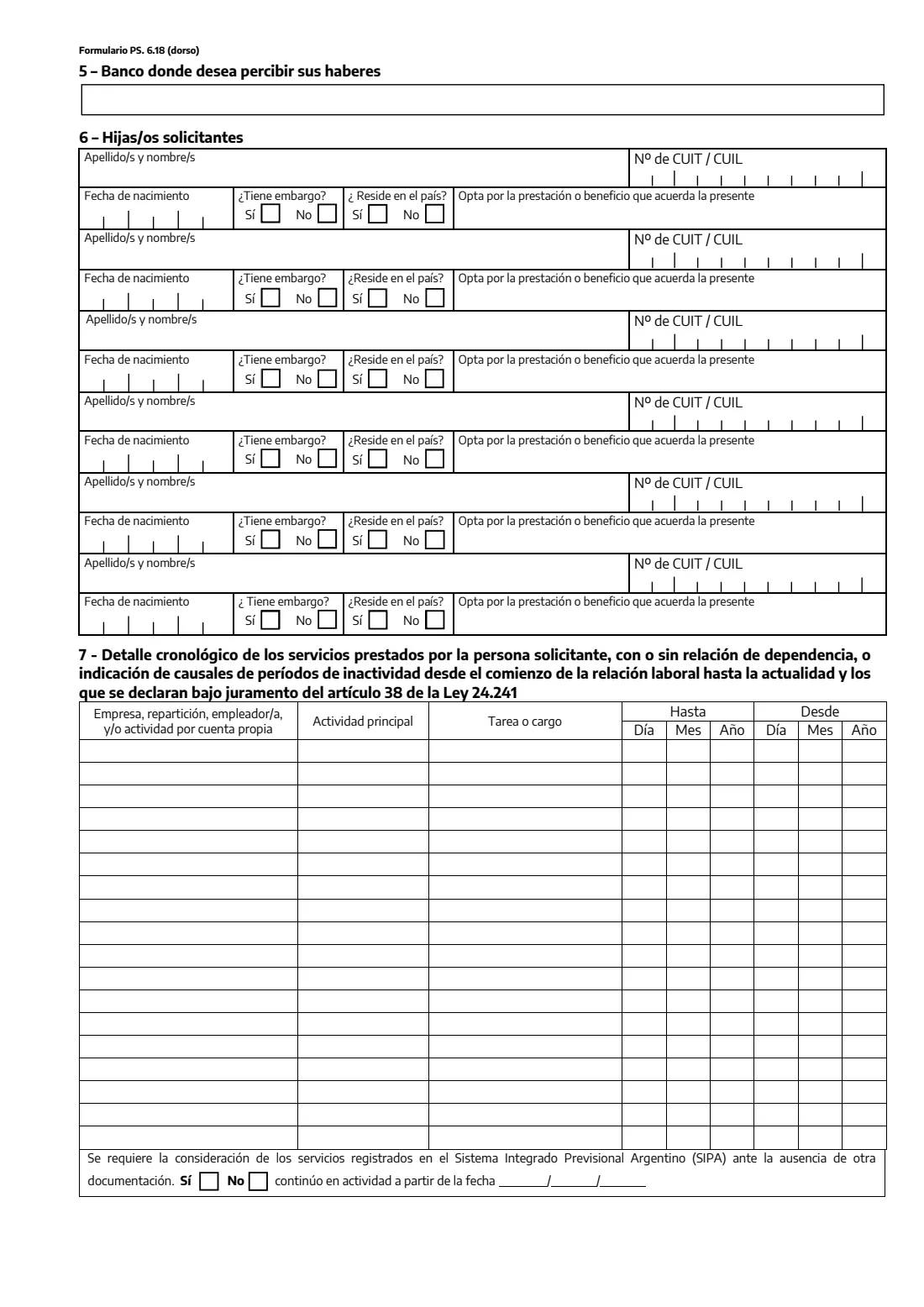
- 5 — Bank where you want to be paid (Banco donde desea percibir sus haberes)Applicant
- 6 — Child applying 1 (Hijas/os solicitantes)Applicant
- 6 — Child applying 2 (Hijas/os solicitantes)Applicant
- 6 — Child applying 3 (Hijas/os solicitantes)Applicant
- 6 — Child applying 4 (Hijas/os solicitantes)Applicant
- 6 — Child applying 5 (Hijas/os solicitantes)Applicant
- 6 — Child applying 6 (Hijas/os solicitantes)Applicant
- 7 — Service period 1 (Detalle cronológico de servicios)Applicant
- 7 — Service period 2 (Detalle cronológico de servicios)Applicant
- 7 — Service period 3 (Detalle cronológico de servicios)Applicant
- 7 — Service period 4 (Detalle cronológico de servicios)Applicant
- 7 — Service period 5 (Detalle cronológico de servicios)Applicant
- 7 — Service period 6 (Detalle cronológico de servicios)Applicant
- 7 — Service period 7 (Detalle cronológico de servicios)Applicant
- 7 — Service period 8 (Detalle cronológico de servicios)Applicant
- 7 — Service period 9 (Detalle cronológico de servicios)Applicant
- 7 — Service period 10 (Detalle cronológico de servicios)Applicant
- 7 — Service period 11 (Detalle cronológico de servicios)Applicant
- 7 — Service period 12 (Detalle cronológico de servicios)Applicant
- 7 — Service period 13 (Detalle cronológico de servicios)Applicant
- 7 — Service period 14 (Detalle cronológico de servicios)Applicant
- 7 — Service period 15 (Detalle cronológico de servicios)Applicant
- 7 — Service period 16 (Detalle cronológico de servicios)Applicant
- 7 — Service period 17 (Detalle cronológico de servicios)Applicant
- 7 — Service period 18 (Detalle cronológico de servicios)Applicant
- 7 — SIPA records (servicios registrados en el SIPA)Applicant
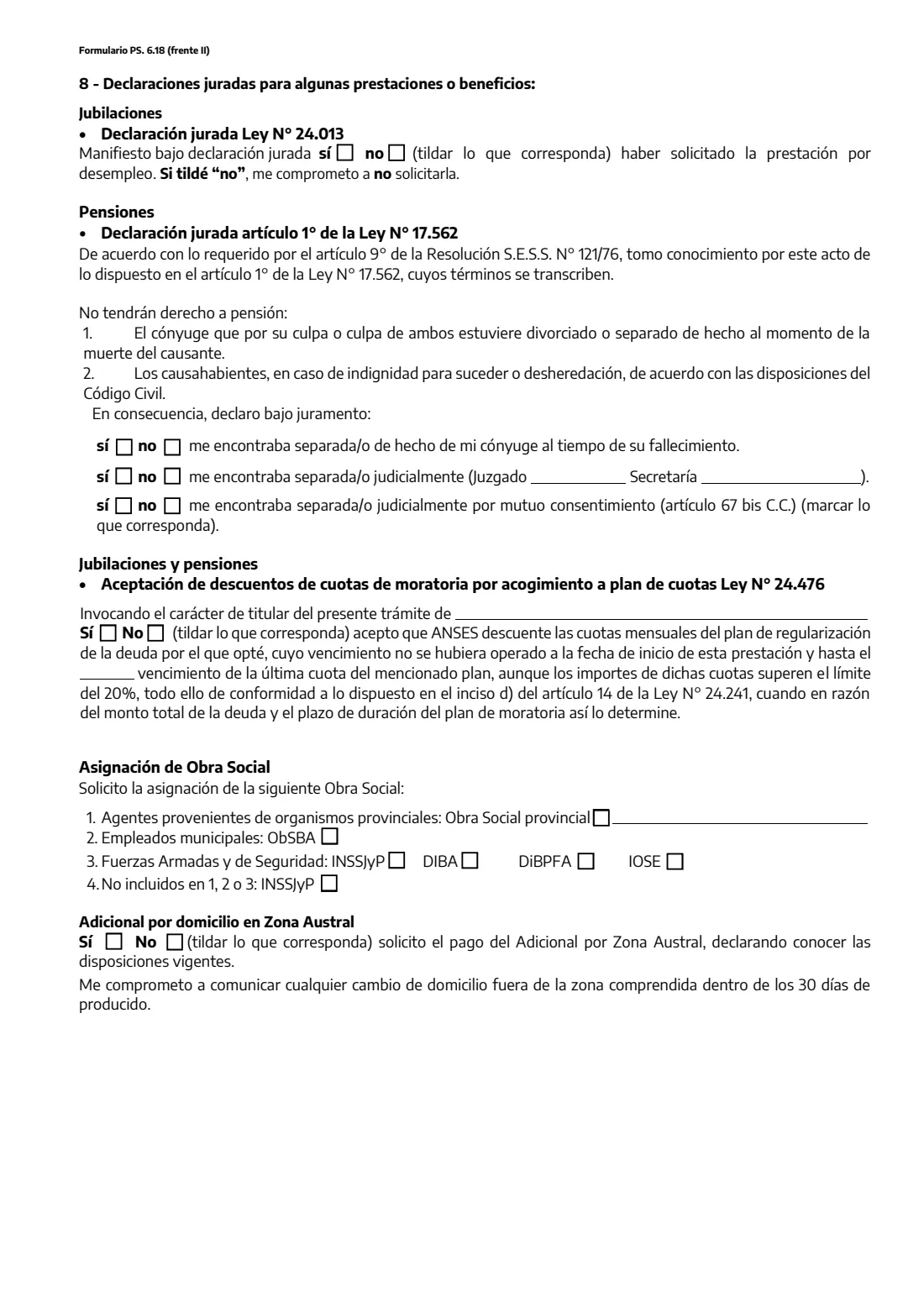
- 8 — Sworn statements: retirement (Ley 24.013)Applicant
- 8 — Sworn statements: survivor's pensions (Ley 17.562, art. 1)Applicant
- 8 — Moratorium plan instalments (Ley 24.476)Applicant
- 8 — Health insurer and Austral zone (Obra social y Zona Austral)Applicant
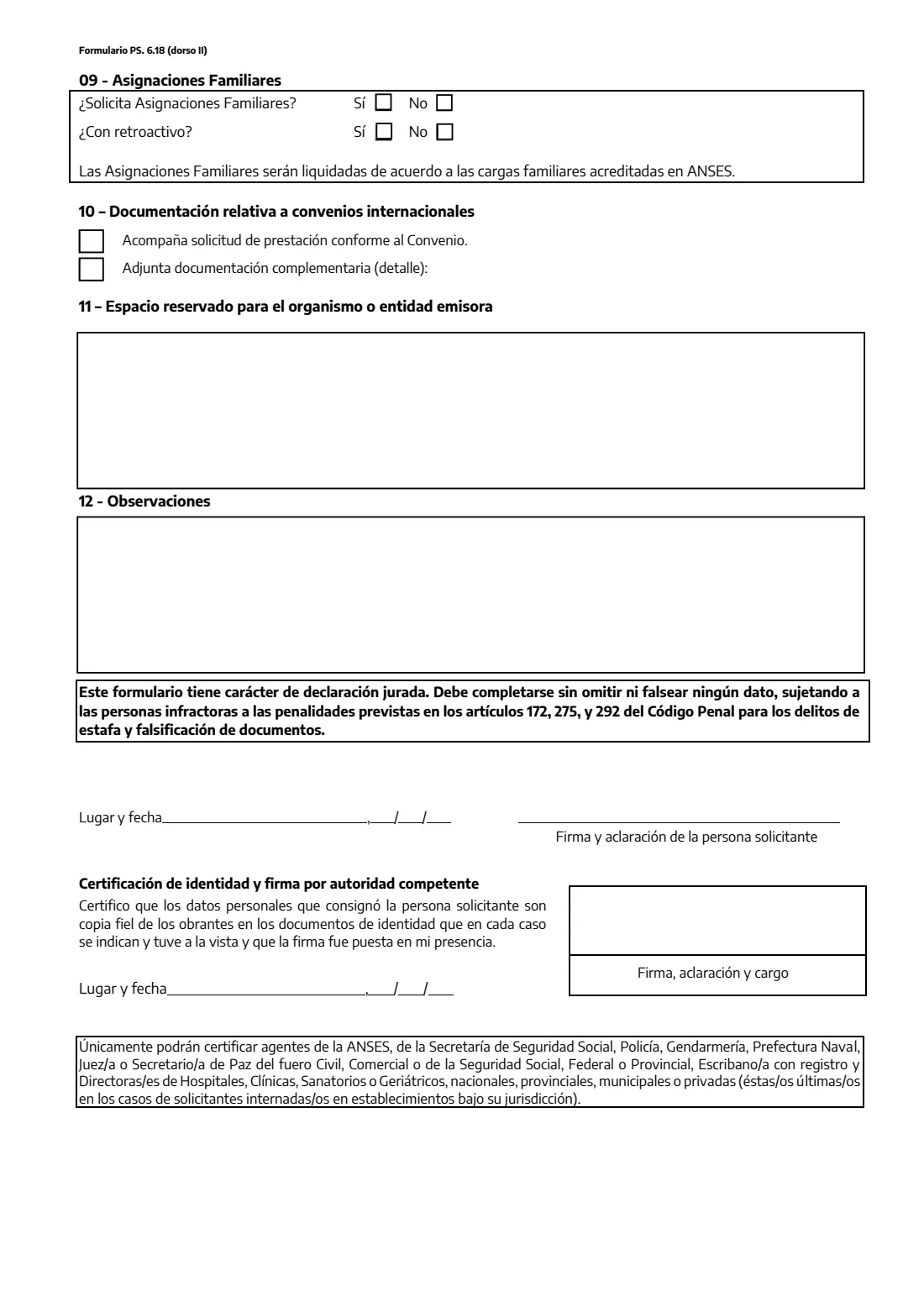
- 9 — Family allowances and 10 — International agreementsApplicant
- 12 — Remarks (Observaciones)Applicant
- Place and date (Lugar y fecha)Applicant
How to fill out PS 6.18 pension benefit application, step by step
1 1 — Tipo de prestación solicitada
Tick the benefit you are applying for and give your CUIL.
2 2 — Datos de la persona solicitante
Your name, date of birth, address, DNI, nationality, phone and email. If you were born abroad, the date you arrived and the document that proves it. Then whether you live in Argentina, are in employment, receive family allowances from another system, present a multiple-coverage certificate or already have another benefit, and, for a survivor's pension, the date of death and your relationship.
3 3 and 4 — Spouse and representative
Your spouse's or partner's details and five yes/no questions about them. If someone will act for you, tick whether they carry out the procedure, collect, or act as guardian or curator, and give their details, including a professional's registration if they are a lawyer or agent.
4 5 and 6 — Bank and children
The bank where you want to be paid, then up to six children applying with you, with their CUIL, date of birth, whether they have a garnishment or live in Argentina, and the benefit they opt for.
5 7 — Work history
Up to 18 rows in date order: employer or own-account activity, main activity, job, and the dates. Note the form puts 'Hasta' (until) before 'Desde' (from); FileIt fills each in the right column. Say whether ANSES should consider the services recorded in the SIPA when there is no other documentation, and from when you carry on working, if you do.
6 8 to 10 — Sworn statements and allowances
The statements that apply to your benefit (unemployment benefit, separation, moratorium deductions), the obra social you want assigned, the Austral Zone supplement, family allowances, and whether you attach documents under an international agreement.
7 12 — Remarks, place and date
Anything else ANSES should know, such as the documents you attach, then where and when you sign. The certifying authority fills in its own place and date.
Common mistakes to avoid
- Leaving gaps in the work history: the form asks for every period, including inactivity and its causes, from your first job to now.
- Swapping the 'Hasta' and 'Desde' dates, which on this form appear in that order.
- A CUIL whose middle digits don't match the DNI, or with a wrong check digit.
- Skipping the sworn statements that apply to your benefit, such as the separation questions for a survivor's pension.
- Signing before the certifying authority sees you sign.
- Leaving out a detail or giving a false one — the form is a sworn statement under the Penal Code.
After you fill it out
Print all four pages and check them. Sign in front of one of the authorities listed on the form, who certifies your identity and signature; a representative signs too.
Hand the application in at ANSES with the documents for your benefit, such as your DNI, a death certificate and marriage certificate for a survivor's pension, and certificates of services from employers.
FileIt keeps the completed application in your vault next to your other pension papers, so the work history you put together is ready the next time ANSES asks for it.
Fill out PS 6.18 pension benefit application online with FileIt
- Pick the person. Choose someone from People and FileIt fills in their name, date of birth, address and other details it already knows.
- Answer plain-language questions. One part of the form at a time, with the official help text beside each question — 215 fields in all. Your answers save as you go.
- Check the live preview. Watch your answers land on the real Administración Nacional de la Seguridad Social (ANSES) form, and let FileIt do any worksheet arithmetic.
- Generate the official PDF. FileIt prints your answers into the agency’s own PDF and files it in that person’s folder in your vault.
FileIt fills the form — it never files or submits anything for you. Deliver the finished form to whoever asked for it, the way the form’s instructions say.
Start PS 6.18 pension benefit application now — it’s freePS 6.18 pension benefit application: frequently asked questions
Which benefits can I apply for with PS 6.18?
Retirement (jubilación PBU-PC-PAP), the old-age benefit, survivor's pensions after the death of a retiree or of a contributor in work, disability retirement, the old-age benefit for disability, the recognition of services and 'other' benefits.
Who can certify my signature?
The form lists ANSES staff, the Social Security Secretariat, the police, Gendarmería, Prefectura Naval, a justice or clerk of the peace or of a civil, commercial or social security court, a notary, and the director of a hospital, clinic or care home for applicants staying there.
What if my work history doesn't fit in 18 rows?
The form has 18 rows, and FileIt fills those. If you have more periods, ask ANSES how it wants them added, and say so in the remarks.
Do I have to fill in every section?
Only the parts that apply to you. FileIt shows the survivor's-pension questions only for a survivor's pension, and the spouse, representative, children and moratorium parts only when you switch them on.
Can I fill out PS 6.18 online?
Yes, with FileIt: you answer the questions online and get ANSES's official PDF with your answers printed. It still has to be signed in front of a certifying authority and handed in to ANSES.
What is the moratorium statement in section 8?
If you joined a payment plan under Law 24.476 to regularise missing contributions, you accept that ANSES deducts the remaining instalments from your benefit, even above the usual 20% limit when the size of the debt requires it.
Official sources
- Blank form (PDF), published by Administración Nacional de la Seguridad Social (ANSES): https://www.anses.gob.ar/sites/default/files/formulario/2023-08/Solicitud%20prestaciones%20previsionales.pdf
- Official instructions and guidance: https://www.anses.gob.ar/
- Edition shown on this page: Versión 1.5 (PDF dated August 2023) (checked 2026-10-19).
FileIt is not affiliated with or endorsed by Administración Nacional de la Seguridad Social (ANSES) or any government. This page explains the form in general terms and is not legal, tax or immigration advice. Always read the official instructions, and check that you are using the edition the recipient accepts. Page last reviewed 2026-10-19.