What is PS 5.3 worker and family health insurer declaration?
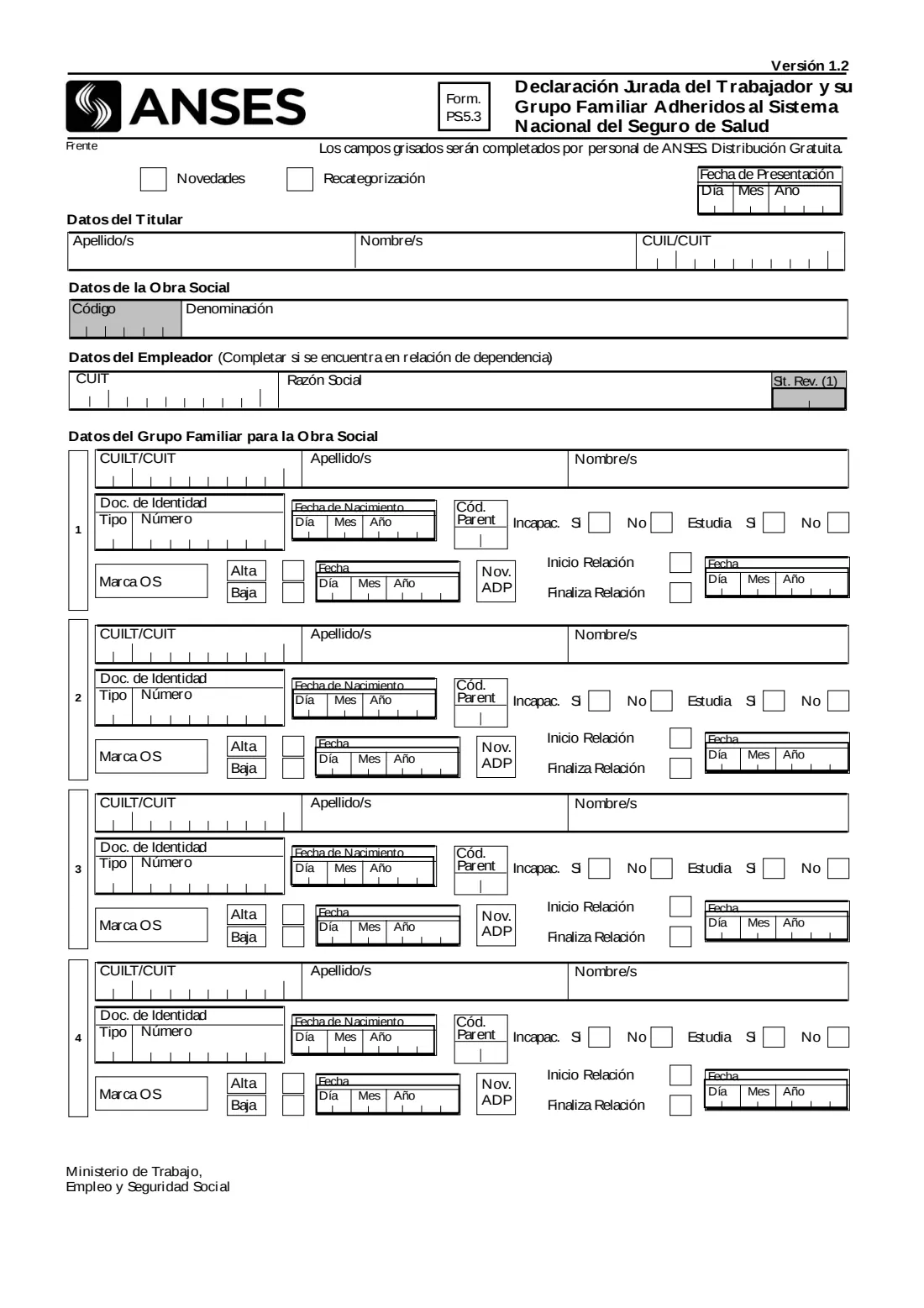
Form PS 5.3, the Declaración Jurada del Trabajador y su Grupo Familiar adheridos al Sistema Nacional del Seguro de Salud, is published by Argentina's social security administration (Administración Nacional de la Seguridad Social, ANSES). A worker uses it to declare the family members covered through their obra social, the health insurer of the National Health Insurance System. The edition covered here is Versión 1.2.
The form asks whether you are declaring changes (Novedades) or a recategorisation (Recategorización), the date you present it, your surname, first names and CUIL, the name of your obra social and, if you are employed, your employer's CUIT and business name. For up to four family members it asks their CUIL, names, identity document, date of birth, relationship code, whether they have a disability or study, and whether and when they join or leave the obra social.
FileIt explains each box in English, with the Spanish terms alongside, and prints your answers into the official ANSES PDF, one digit per printed cell, with the relationship codes from the form's own table. The finished PDF is saved in your FileIt vault. FileIt doesn't submit anything: you sign the declaration on paper in front of the certifying person and hand it in at ANSES.
- Who fills it
- A worker joined to the National Health Insurance System through an obra social
- Given to
- ANSES
- Family members
- Up to four on the form
- Signatures
- On paper: the worker or representative, the certifying person, and ANSES's stamp
- Edition
- Versión 1.2
Who needs to fill out PS 5.3 worker and family health insurer declaration?
- Workers who want their spouse, partner or children covered by their obra social.
- Workers whose family group changes: a new spouse or partner, a birth, a child who leaves, or a member who stops being covered.
- Employed workers (en relación de dependencia), who also give their employer's details.
- Workers declaring a child 21 to 25 in regular studies, or a child with a disability.
When to use PS 5.3 worker and family health insurer declaration
- When you add family members to, or remove them from, the coverage of your obra social (Novedades).
- When ANSES asks for a recategorisation (Recategorización).
- This form is for workers. Retirees and pensioners use form PS 5.5 for changes to their obra social.
What you need before you start
- Your CUIL and the name of your obra social.
- If employed, your employer's CUIT and business name (razón social).
- For each family member: CUIL, surnames and first names, document type and number, and date of birth.
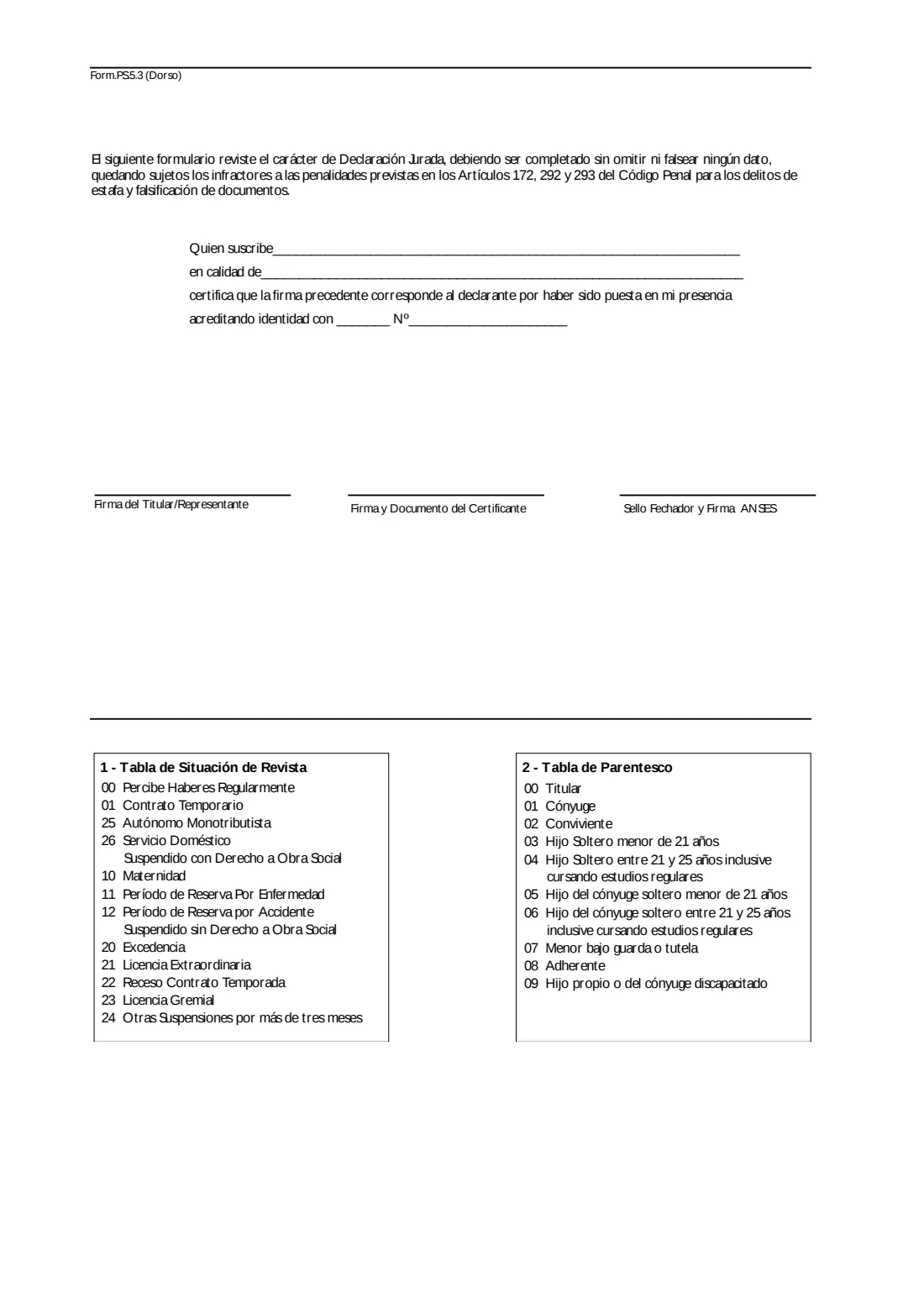
- Each member's relationship code from the form's table: 01 spouse, 02 cohabiting partner, 03 to 06 children and the spouse's children by age and studies, 07 minor in custody or guardianship, 08 additional member, 09 child with a disability.
- Whether each member has a disability or studies, whether they join (alta) or leave (baja), and the date.
- The person who will certify your signature, and your identity document to show them.
What’s on PS 5.3 worker and family health insurer declaration
The 2018 edition has 2 pages. FileIt asks for it in 8 parts:
- Type of procedure and date (Novedades / Recategorización, Fecha de Presentación)Worker (titular)
- Worker (Datos del Titular)Worker (titular)
- Employer (Datos del Empleador)Worker (titular)
- Family member 1 (Grupo Familiar para la Obra Social)Worker (titular)
- Family member 2 (Grupo Familiar para la Obra Social)Worker (titular)
- Family member 3 (Grupo Familiar para la Obra Social)Worker (titular)
- Family member 4 (Grupo Familiar para la Obra Social)Worker (titular)
- Certification of the signature (reverse: Quien suscribe … certifica)Certifying person
How to fill out PS 5.3 worker and family health insurer declaration, step by step
1 Procedure and date
Tick Novedades for changes to the family members or Recategorización, and give the date you present the form.
2 Worker and obra social
Your surnames, first names and CUIL, and the name of your obra social. Its code is a grey box: the form says grey boxes are completed by ANSES staff.
3 Employer
If you are employed (en relación de dependencia), the employer's CUIT and business name. The 'Sit. Rev.' box beside it is grey and left for ANSES.
4 Family members
For each member, the CUIL, names, document type and number, date of birth and relationship code; whether they have a disability and whether they study; whether they join (Alta) or leave (Baja) and the date; and, if it applies, the start or end of the relationship with its date.
5 Signature and certification
On the back, the form says it is a sworn declaration and that false or missing data are subject to the penalties of articles 172, 292 and 293 of the Penal Code. You (or your representative) sign in the presence of the certifying person, who writes their name and capacity, the identity document you showed, and signs. ANSES stamps and signs its own box.
Common mistakes to avoid
- Using code 03 or 05 for a child aged 21 or over. Those codes are for unmarried children under 21; 04 and 06 are for 21 to 25 in regular studies.
- Using code 04 or 06 without ticking 'Estudia: Sí'.
- Using code 09 without ticking that the child has a disability.
- Listing yourself as a family member. Code 00 is the worker, already given at the top.
- Signing before you are in front of the certifying person. The certification says the signature was made in their presence.
After you fill it out
Print the declaration from FileIt and take it, with your and your family members' documents, to ANSES. Sign it there in front of the certifying person.
Keep a copy in your FileIt vault with your family's health insurance papers.
Fill out PS 5.3 worker and family health insurer declaration online with FileIt
- Pick the person. Choose someone from People and FileIt fills in their name, date of birth, address and other details it already knows.
- Answer plain-language questions. One part of the form at a time, with the official help text beside each question — 68 fields in all. Your answers save as you go.
- Check the live preview. Watch your answers land on the real Administración Nacional de la Seguridad Social (ANSES) form, and let FileIt do any worksheet arithmetic.
- Generate the official PDF. FileIt prints your answers into the agency’s own PDF and files it in that person’s folder in your vault.
FileIt fills the form — it never files or submits anything for you. Deliver the finished form to whoever asked for it, the way the form’s instructions say.
Start PS 5.3 worker and family health insurer declaration now — it’s freePS 5.3 worker and family health insurer declaration: frequently asked questions
What is form PS 5.3?
ANSES's sworn declaration of a worker and the family members joined to the National Health Insurance System through their obra social.
How many family members fit on the form?
Four rows. FileIt fills one row per member you add.
Who fills in the grey boxes?
The form says the grey boxes are completed by ANSES staff.
Can I sign it electronically?
No. The signature is certified by a person who sees you sign, so FileIt leaves the signature boxes for signing on paper.
Does FileIt send the form to ANSES?
No. FileIt fills the official PDF. You sign it and hand it in yourself.
Official sources
- Blank form (PDF), published by Administración Nacional de la Seguridad Social (ANSES): https://www.anses.gob.ar/sites/default/files/formulario/2018-04/PS.5.3-DDJJ%20del%20Trabajador%20y%20su%20Grupo%20Familiar%20Adheridos%20al%20Sis%20Nac%20del%20Seguro%20de%20Salud.pdf
- Official instructions and guidance: https://www.anses.gob.ar/
- Edition shown on this page: Versión 1.2 (PDF of January 2018) (checked 2026-10-25).
FileIt is not affiliated with or endorsed by Administración Nacional de la Seguridad Social (ANSES) or any government. This page explains the form in general terms and is not legal, tax or immigration advice. Always read the official instructions, and check that you are using the edition the recipient accepts. Page last reviewed 2026-10-25.