What is the visa invitation letter request form template?
Preparing an invitation letter for someone's visa application means getting a handful of details exactly right — their name as it appears on their passport, passport number and expiry date, the purpose and dates of the visit, and which embassy the letter needs to be addressed for. A quick email request often misses one of these, leading to a corrected letter and a second round of back-and-forth close to a deadline. This template asks for everything in one pass.
Because the applicant answers directly rather than relaying details through someone else, the risk of a typo in a name or passport number is much lower — and the form even reminds them to enter their name exactly as their passport reads. A required upload of the passport photo page gives whoever prepares the letter a way to double-check the details before it's signed.
Once submitted, the request becomes a PDF in your FileIt vault, with the passport copy attached, so the letter can be prepared and the whole paper trail — request, passport copy, and the letter itself once issued — kept together in one place.
- Best for
- Conference organisers, universities, companies and any organisation hosting international visitors
- Filled in by
- The visa applicant themselves
- Time to complete
- About 5 minutes
- Includes
- Passport document upload, conditional postal address, declaration
Who uses a visa invitation letter request form?
- A conference organiser issues invitation letters to international speakers and attendees who need one for their visa application
- A university requests visiting researchers' passport and visit details before preparing a formal invitation
- A company hosting an overseas business partner for meetings needs to send a signed letter confirming the visit
- An event with exhibitors from multiple countries collects visa letter requests through a single standard form
- An organisation tracks which applicants need their letter posted as a signed original versus emailed as a PDF
- A host records the embassy or consulate each applicant will use, so letters can be addressed correctly from the start
Questions on this visa invitation letter request form
29 questions over 4 pages · includes file upload, conditional questions, multiple pages, consent checkbox.
1 About you
- Full name exactly as in your passport*
- Date of birth*
- Nationality*
- Email*
- Phone*
- Home address*
- Employer or organisation
- Job title
2 Passport
- Passport number*
- Issuing country*
- Date of issue*
- Date of expiry*
- Copy of your passport photo page*
3 Your visit
- Purpose of your visit* Attending a conference or event · Speaking or presenting · Business meetings · Training · Exhibiting
- Event or meeting name*
- Registration or order number
- Your contact at our organisation
- Planned arrival*
- Planned departure*
- Cities you will visit
- Where will you stay?
- Who is paying for the trip?* I am · My employer · Your organisation (as agreed) · A sponsor or grant
- Name of the employer, sponsor or grant* asked only when it applies
4 The letter
- Embassy or consulate where you will apply*
- Visa appointment or deadline
- How do you need the letter?* Signed PDF by email · Signed original by post / courier
- Postal address for the original* asked only when it applies
- Should the letter be addressed to someone specific?
- Declaration*
The visa invitation letter request form, page by page
1 About you
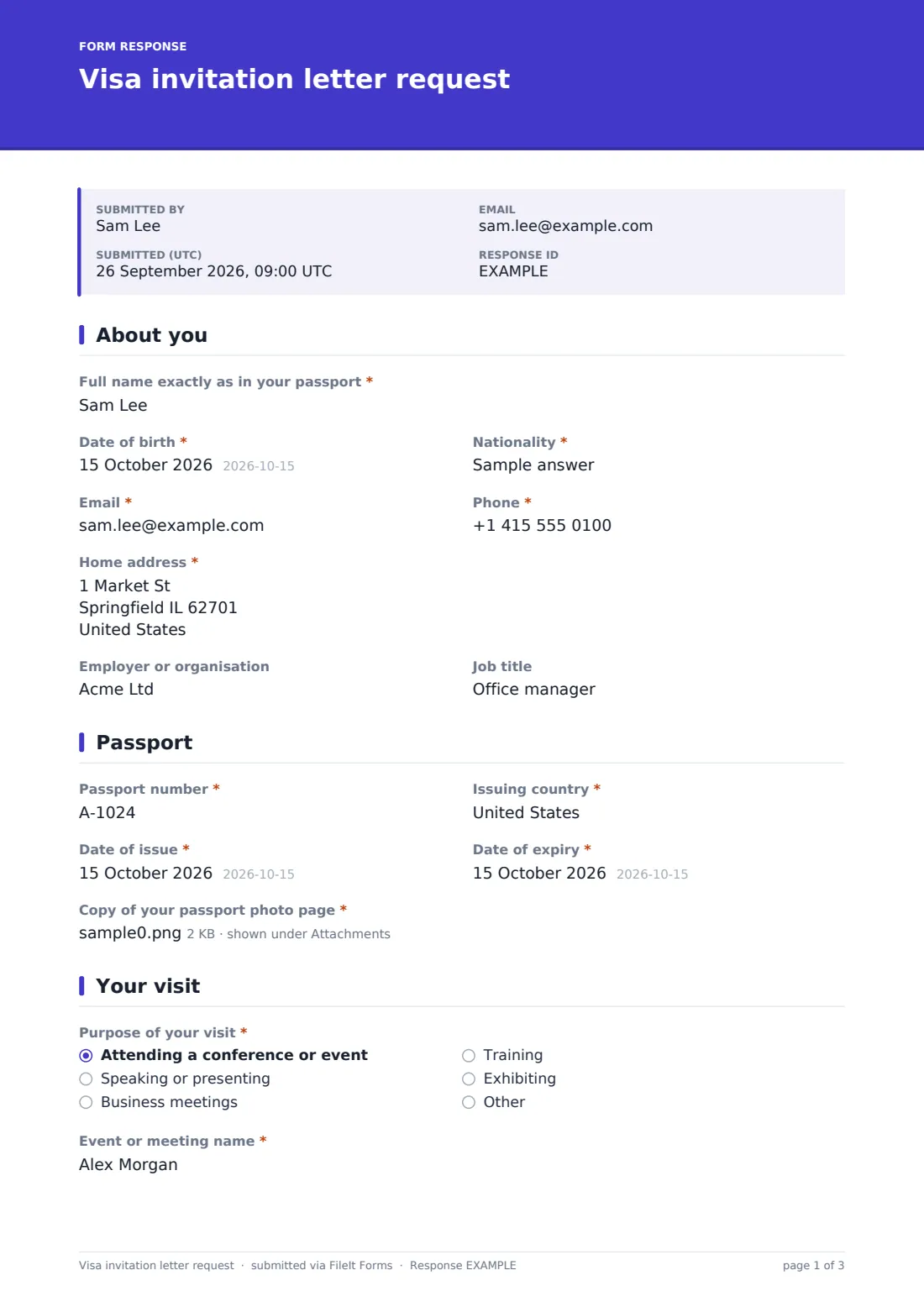
The applicant enters their full name exactly as it appears in their passport, date of birth, nationality, and contact details, along with their home address. Optional fields for their employer or organisation and job title help the host describe the applicant's role accurately in the letter itself.
2 Passport
This short page collects the passport number, issuing country, and dates of issue and expiry, plus a required upload of the passport photo page. The form is explicit that this copy is used only to check the letter matches the passport — it isn't collected for any other purpose.
3 Your visit
A radio question establishes the purpose of the visit — attending a conference or event, speaking or presenting, business meetings, training, or exhibiting — followed by the event or meeting name and an optional registration or order number for anyone who's already registered or paid. A contact at the host organisation, planned arrival and departure dates, cities to be visited, and accommodation details round out the trip itself.
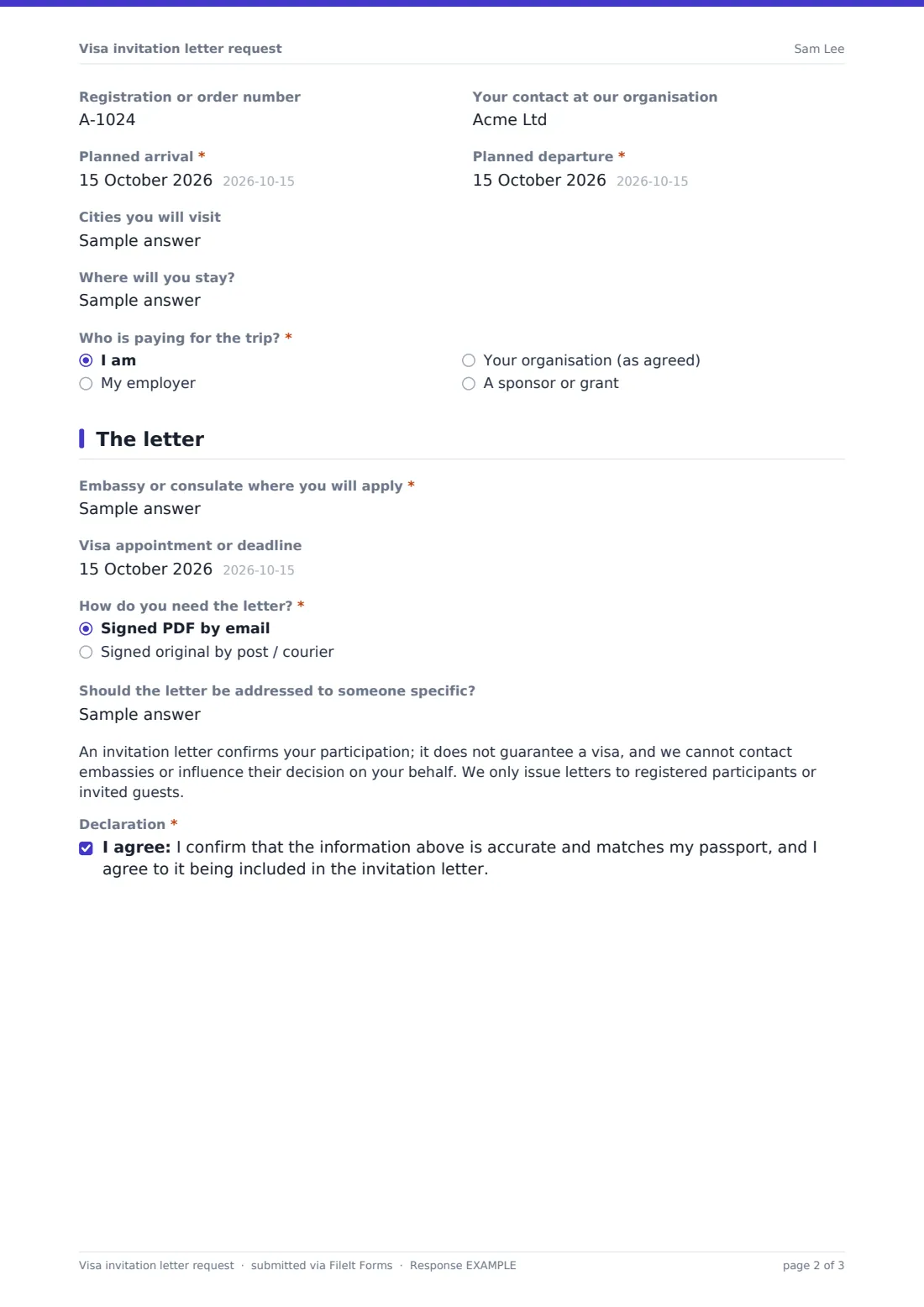
A funding question asks who is paying for the trip — the applicant, their employer, the host organisation, or a sponsor or grant — and choosing "sponsor" reveals a field for the sponsor or grant's name, so the letter can name the right funding source if needed.
4 The letter
The applicant names the embassy or consulate where they'll apply, and can add an appointment or deadline date so the host knows how urgently the letter is needed. A delivery choice — a signed PDF by email or a signed original by post or courier — reveals a postal address field only when posting is selected, and an optional field lets the applicant specify who the letter should be addressed to, defaulting to "To the Visa Officer" if left blank.
A plain-language note makes clear that an invitation letter confirms participation, doesn't guarantee a visa, and that the host can't contact embassies or influence a decision — letters are only issued to registered participants or invited guests. The applicant then confirms a declaration that the information matches their passport and agrees to it appearing in the letter.
Make the template yours
- Add a required registration or ticket number field if you only issue letters to confirmed, paid attendees
- Remove the postal delivery option entirely if your organisation only ever sends signed PDFs by email
- Add a question asking whether a Schengen or other multi-country visa is being applied for, if that affects your letter wording
- Set a closing date tied to your event, since visa processing often needs several weeks' notice
- File each request into a folder alongside the event or programme the applicant is attending
- Add extra notification emails so both your admin team and whoever signs letters see requests as they arrive
- Adjust the confirmation message to state your typical turnaround time for issuing a letter
Tips for a better visa invitation letter request form
- Encourage applicants to submit this as early as possible — visa appointments can be booked weeks or months in advance
- Double-check the uploaded passport photo page against the typed details before the letter is signed
- Keep your standard letter wording factual and specific to the individual — avoid anything that could be read as a guarantee
- Store passport copies securely and only keep them as long as you actually need to, in line with your own data practices
- Make clear in your confirmation message that you can't intervene with embassy decisions, so applicants don't expect that
- Track requests by embassy or country if you regularly issue letters for events with a diverse international audience
Every response becomes a PDF in your vault
As soon as an applicant submits the request, FileIt saves it as a PDF in your vault, with the passport photo page attached, in the folder you've set up. You're notified by email right away, and the applicant can receive a copy of what they submitted if you've turned that setting on.
Whoever prepares invitation letters then reviews the request in the Responses table, checks the passport details, and drafts the letter using your organisation's standard template — the form itself doesn't generate or send the letter, it just collects everything needed to prepare it accurately and quickly.
- Start from this template. It opens in the FileIt Forms designer — change any question, add pages, set the rules for when questions appear.
- Share it. Turn on a public link, or send it to people by email, each with their own link. They don’t need a FileIt account.
- Get the answers as PDFs. Each response is saved as a PDF in the vault folder you choose, with uploaded files attached — and listed in a Responses table you can export to CSV.
Visa invitation letter request form: frequently asked questions
Is this visa invitation letter request form template free?
Yes. It's included in FileIt's Forms app on every plan, including the free plan, and you can edit any question to suit your organisation.
Do applicants need a FileIt account to submit a request?
No. Share a public link or send it as a personal emailed invitation, and applicants submit the form without creating an account.
How do we receive completed requests?
Every request is saved automatically as a PDF in your FileIt vault, with the uploaded passport photo page attached, and you can browse or export all requests from the Responses table.
Does FileIt generate or send the invitation letter itself?
No. The form only collects the details needed to prepare the letter — your organisation still drafts, signs and issues the actual letter.
Does an invitation letter guarantee a visa will be granted?
No, and the form says so directly to applicants — an invitation letter confirms participation but doesn't guarantee a visa, and the host has no influence over the embassy's decision.
Can applicants request a posted original instead of an emailed PDF?
Yes, the delivery question offers both options, and choosing post reveals a field for the applicant's postal address.
Is it safe to collect a copy of someone's passport this way?
The upload is stored in your FileIt vault, and answers are encrypted at rest — you should still handle any passport copies with the same care you'd apply to other sensitive personal documents.
Can we only accept requests from people already registered for our event?
You can add a required registration number field, or manually check registration status before preparing each letter.