What is the tennis lesson booking form template?
A tennis lesson request usually arrives as a text that says 'can I have a lesson next week?', followed by five messages to work out the player's level, who else is coming and when they're free. This booking template asks all of that up front, so a coach can reply with a time instead of a list of questions.
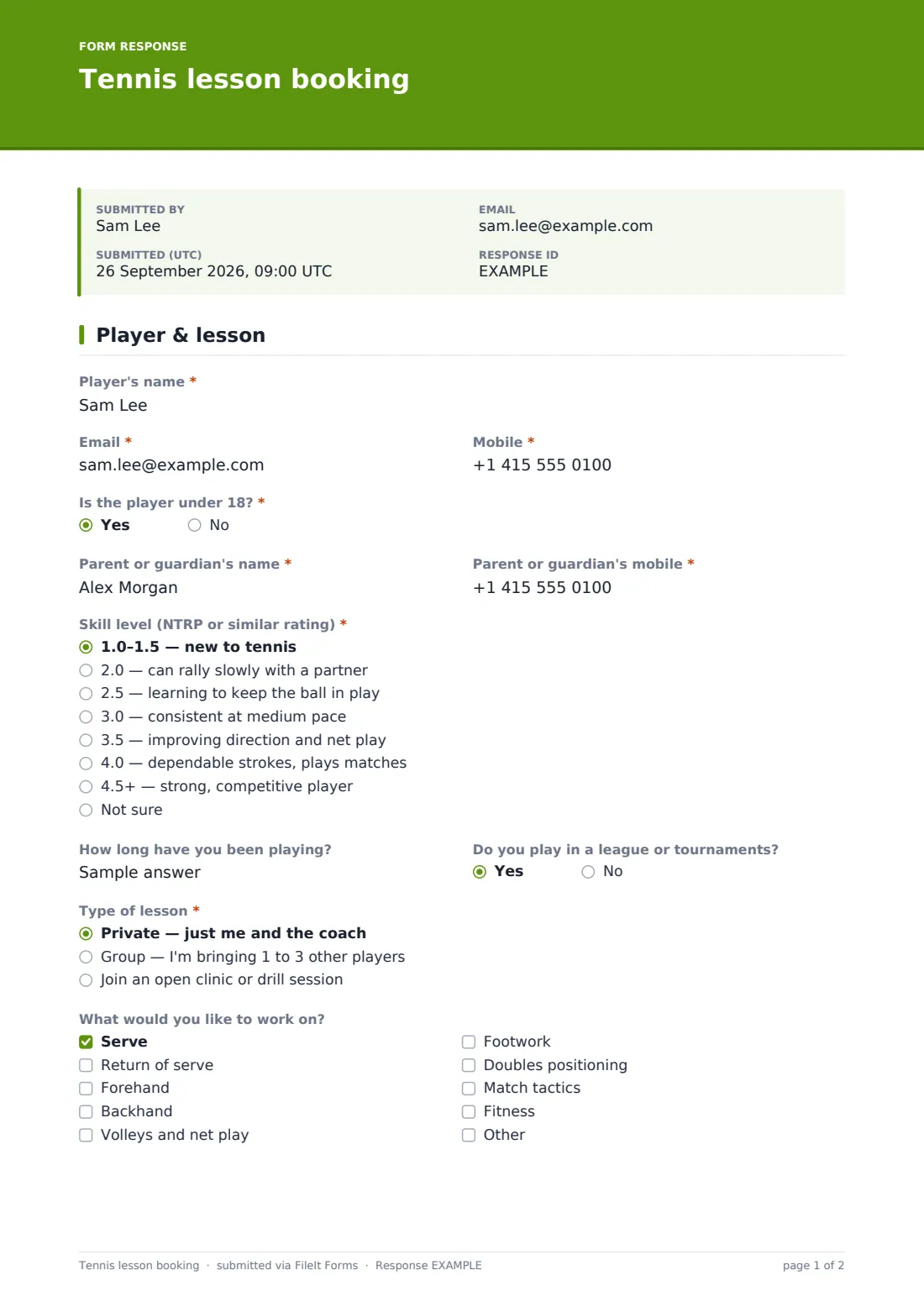
The player gives their name, email and mobile, and whether they're under 18 (a yes asks for a parent or guardian's name and mobile). They choose a skill level from a dropdown of NTRP-style descriptions, from '1.0–1.5 — new to tennis' to '4.5+ — strong, competitive player', with a 'Not sure' option for anyone who's never been rated. Then the type of lesson: private, a group they're bringing, or an open clinic. Choosing a group shows fields for the second, third and fourth players' names and levels, so the coach knows who's on court before anyone arrives.
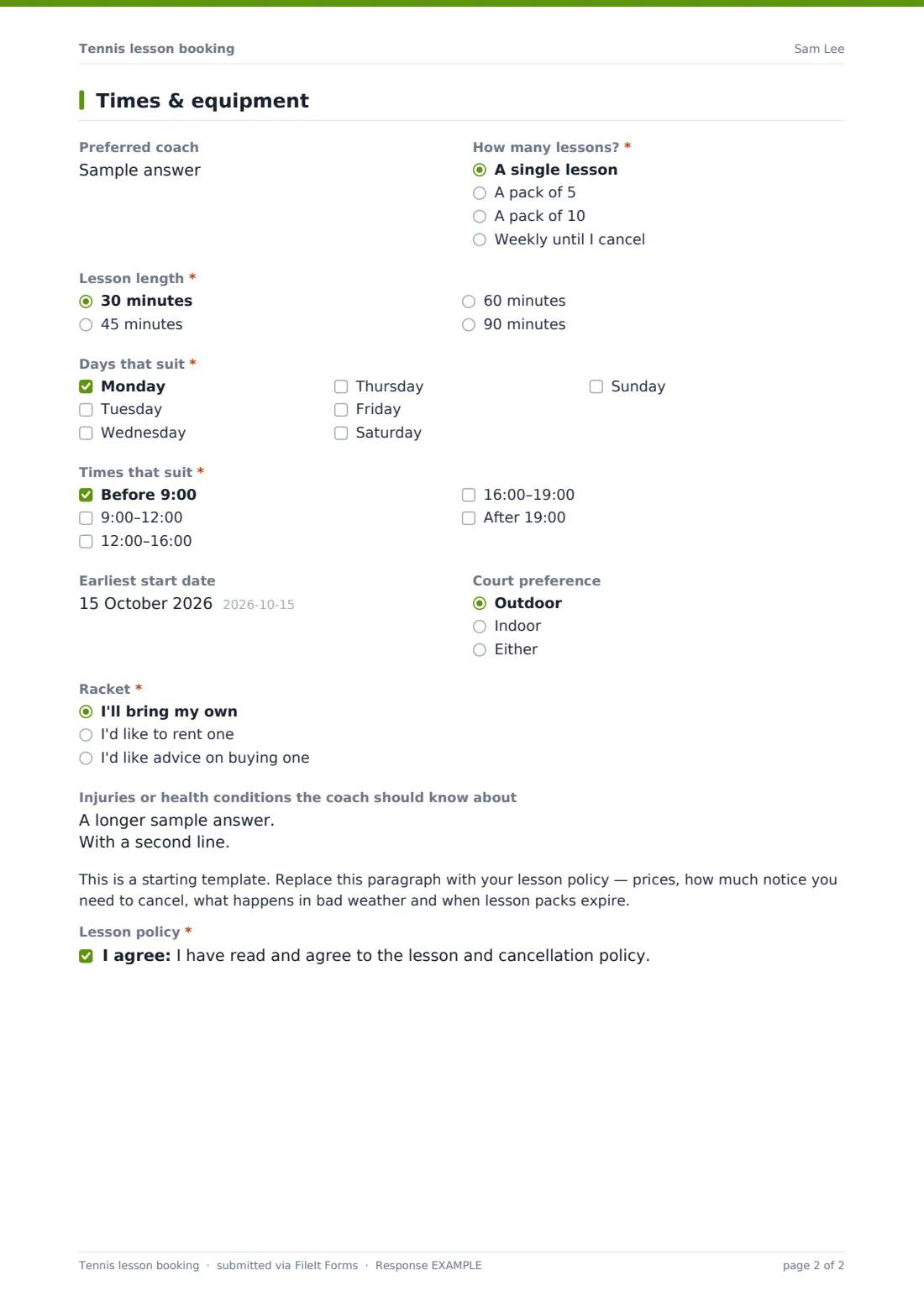
The second page handles the booking itself: preferred coach, how many lessons, lesson length, the days and times that suit, an earliest start date, indoor or outdoor courts, and whether the player needs a racket — renters pick a size. A health box and your lesson policy finish the form, and each request is saved as a PDF in your FileIt vault.
- Best for
- Tennis clubs, coaches, public courts programs and racket centres
- Filled in by
- The player, or a parent for juniors
- Time to complete
- About 3 minutes
- Includes
- NTRP-style level, private/group/clinic choice, group players' names, times, racket rental
Who uses a tennis lesson booking form?
- A beginner books a single private lesson to try tennis
- Four friends book a weekly group lesson and list each other's names
- A parent books a junior clinic and rents a 25-inch racket
- A league player buys a pack of ten lessons to work on their serve
- A club coach shares the link on the club website instead of a phone number
- A tennis centre collects winter indoor lesson requests
Questions on this tennis lesson booking form
28 questions over 2 pages · includes conditional questions, multiple pages, consent checkbox.
1 Player & lesson
- Player's name*
- Email*
- Mobile*
- Is the player under 18?*
- Parent or guardian's name* asked only when it applies
- Parent or guardian's mobile* asked only when it applies
- Skill level (NTRP or similar rating)* 1.0–1.5 — new to tennis · 2.0 — can rally slowly with a partner · 2.5 — learning to keep the ball in play · 3.0 — consistent at medium pace · 3.5 — improving direction and net play · 4.0 — dependable strokes, plays matches · 4.5+ — strong, competitive player · Not sure
- How long have you been playing?
- Do you play in a league or tournaments?
- Type of lesson* Private — just me and the coach · Group — I'm bringing 1 to 3 other players · Join an open clinic or drill session
- Second player's name* asked only when it applies
- Their level (if known) asked only when it applies
- Third player's name asked only when it applies
- Their level asked only when it applies
- Fourth player's name asked only when it applies
- Their level asked only when it applies
- What would you like to work on? Serve · Return of serve · Forehand · Backhand · Volleys and net play · Footwork · Doubles positioning · Match tactics · Fitness
2 Times & equipment
- Preferred coach
- How many lessons?* A single lesson · A pack of 5 · A pack of 10 · Weekly until I cancel
- Lesson length* asked only when it applies 30 minutes · 45 minutes · 60 minutes · 90 minutes
- Days that suit* Monday · Tuesday · Wednesday · Thursday · Friday · Saturday · Sunday
- Times that suit* Before 9:00 · 9:00–12:00 · 12:00–16:00 · 16:00–19:00 · After 19:00
- Earliest start date
- Court preference Outdoor · Indoor · Either
- Racket* I'll bring my own · I'd like to rent one · I'd like advice on buying one
- Rental size asked only when it applies Junior 21" · Junior 23" · Junior 25" · Junior 26" · Adult — small grip · Adult — medium grip · Adult — large grip · Not sure
- Injuries or health conditions the coach should know about
- Lesson policy*
The tennis lesson booking form, page by page
1 Player & lesson
Player's name, email and mobile, and a required 'Is the player under 18?' — a yes asks for a parent or guardian's name and mobile. A required skill level from eight descriptions, how long they've played and whether they play matches. A required lesson type; group lessons show the second player's name (required) plus optional third and fourth players, each with their level. A checklist of what to work on, with an Other option.
2 Times & equipment
Preferred coach, a required number of lessons and — for private and group lessons — a required lesson length. Required days and times, an earliest start date and court preference. A required racket question; renting shows a size dropdown from junior lengths to adult grips. Injuries or conditions, your lesson policy placeholder and a required agreement to it.
Make the template yours
- Replace the policy placeholder with your prices, cancellation notice and wet-weather rules
- Turn the preferred coach box into a dropdown of your coaches' names
- Change the lesson packs and lengths to the ones you sell
- Swap the NTRP descriptions for your national rating system if you use a different one
- Remove the racket rental question if you don't keep rental rackets
- Use the notify addresses in Settings to send requests straight to the head coach
Tips for a better tennis lesson booking form
- Reply with a confirmed time quickly — players booking online often ask more than one club
- Ask group bookers to share the form with their partners if you need each player's own contact details
- Treat the self-rated level as a starting point and adjust after the first lesson
- Keep a few rental rackets in each junior size during school holidays
- Export requests to CSV each week to plan court bookings
Every response becomes a PDF in your vault
Each booking request is saved as a PDF in your FileIt vault and you can be emailed when one arrives. The player sees your confirmation message and can get a copy.
The Responses table shows each request with its lesson type, days and times, so you can match players to coaches and courts.
- Start from this template. It opens in the FileIt Forms designer — change any question, add pages, set the rules for when questions appear.
- Share it. Turn on a public link, or send it to people by email, each with their own link. They don’t need a FileIt account.
- Get the answers as PDFs. Each response is saved as a PDF in the vault folder you choose, with uploaded files attached — and listed in a Responses table you can export to CSV.
Tennis lesson booking form: frequently asked questions
Is the tennis lesson booking template free?
Yes. It's included in the Forms app on every FileIt account, including the free plan.
Does the form book a court automatically?
No. It collects the request; you or your coach confirm the time and court.
What is NTRP?
It's a widely used tennis rating scale. The dropdown describes each level in plain words, and players can choose 'Not sure'.
How do group lessons work on the form?
Choosing a group lesson shows fields for up to three other players' names and levels.
Can parents book for children?
Yes. Answering yes to 'Is the player under 18?' asks for the parent or guardian's name and mobile.
Do players need a FileIt account?
No. They fill in the form from a link.