
What is the subscription audit worksheet form template?
Recurring charges are easy to start and easy to forget. A trial that converted, an upgrade nobody downgraded, two tools that do the same job — each one is small, and they add up quietly on the card statement.
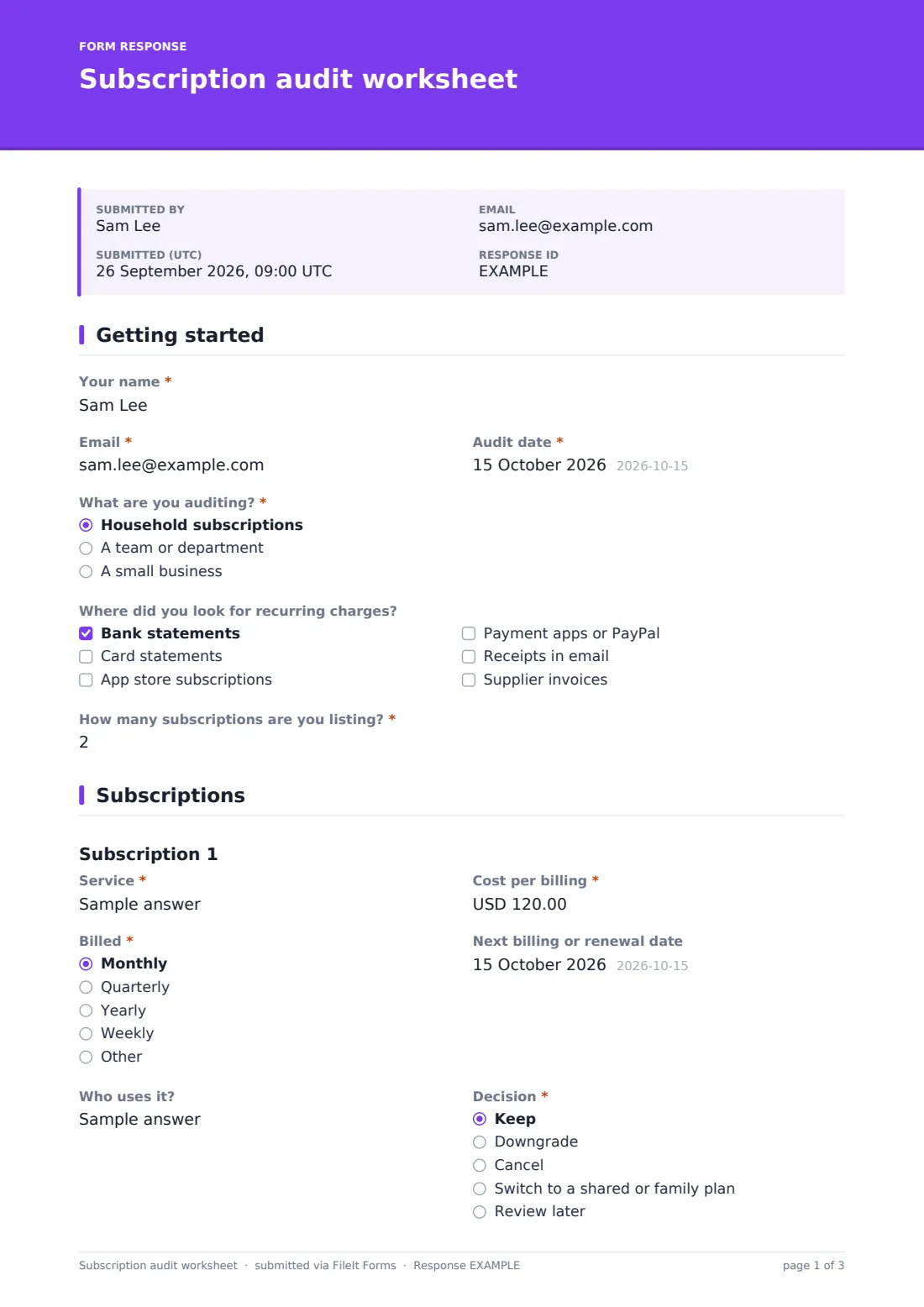
This worksheet walks through an audit in three pages. First you say whether it's a household, team or small business audit and where you looked for charges. Then you list up to eight subscriptions, each with its cost, billing cycle, next renewal date, who uses it and a decision: keep, downgrade, cancel, switch to a shared plan or review later. Only as many blocks appear as the number you enter.
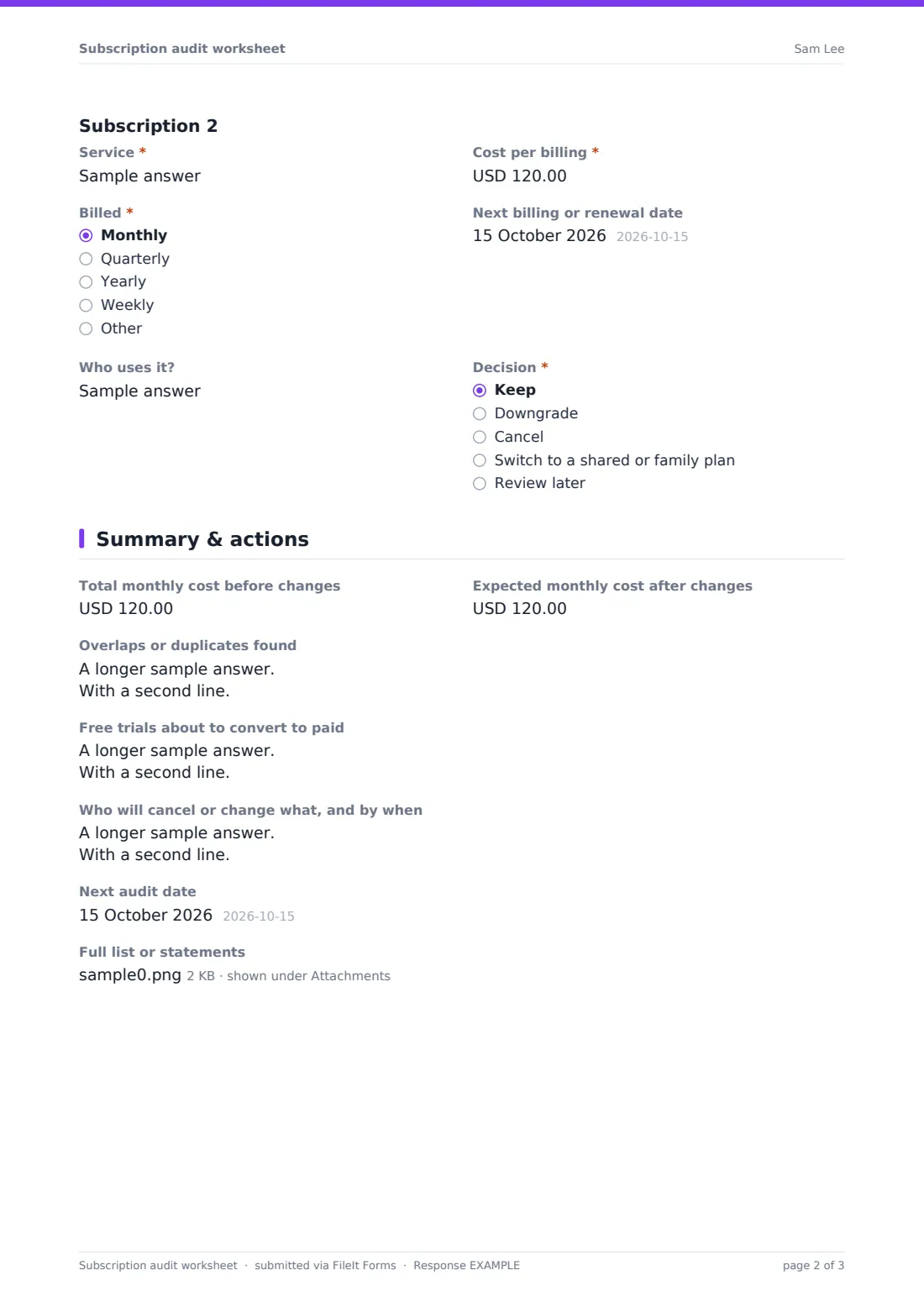
The summary page records monthly cost before and after, overlaps, free trials about to convert, who will act on each change and when to audit again. The result is saved as a PDF in your FileIt vault, so next year's audit starts from this one.
- Best for
- Households, small teams and office managers
- Filled in by
- Whoever pays the bills or manages the budget
- Time to complete
- About 10-20 minutes with statements open
- Includes
- Up to 8 subscriptions, decision per item, before and after totals, action list
Who uses a subscription audit worksheet form?
- A family going through card statements at the start of the year
- An office manager reviewing software seats before the budget round
- A small business owner cutting costs after a slow quarter
- Housemates deciding which shared streaming services to keep
- A team lead checking which tools are still in use after a reorganisation
- Anyone who has just found a charge they didn't recognise
Questions on this subscription audit worksheet form
62 questions over 3 pages · includes file upload, conditional questions, multiple pages.
1 Getting started
- Your name*
- Email*
- Audit date*
- What are you auditing?* Household subscriptions · A team or department · A small business
- Team, department or business asked only when it applies
- Where did you look for recurring charges? Bank statements · Card statements · App store subscriptions · Payment apps or PayPal · Receipts in email · Supplier invoices
- How many subscriptions are you listing?*
2 Subscriptions
- Service*
- Cost per billing*
- Billed* Monthly · Quarterly · Yearly · Weekly · Other
- Next billing or renewal date
- Who uses it?
- Decision* Keep · Downgrade · Cancel · Switch to a shared or family plan · Review later
- Service* asked only when it applies
- Cost per billing* asked only when it applies
- Billed* asked only when it applies Monthly · Quarterly · Yearly · Weekly · Other
- Next billing or renewal date asked only when it applies
- Who uses it? asked only when it applies
- Decision* asked only when it applies Keep · Downgrade · Cancel · Switch to a shared or family plan · Review later
- Service* asked only when it applies
- Cost per billing* asked only when it applies
- Billed* asked only when it applies Monthly · Quarterly · Yearly · Weekly · Other
- Next billing or renewal date asked only when it applies
- Who uses it? asked only when it applies
- Decision* asked only when it applies Keep · Downgrade · Cancel · Switch to a shared or family plan · Review later
- Service* asked only when it applies
- Cost per billing* asked only when it applies
- Billed* asked only when it applies Monthly · Quarterly · Yearly · Weekly · Other
- Next billing or renewal date asked only when it applies
- Who uses it? asked only when it applies
- Decision* asked only when it applies Keep · Downgrade · Cancel · Switch to a shared or family plan · Review later
- Service* asked only when it applies
- Cost per billing* asked only when it applies
- Billed* asked only when it applies Monthly · Quarterly · Yearly · Weekly · Other
- Next billing or renewal date asked only when it applies
- Who uses it? asked only when it applies
- Decision* asked only when it applies Keep · Downgrade · Cancel · Switch to a shared or family plan · Review later
- Service* asked only when it applies
- Cost per billing* asked only when it applies
- Billed* asked only when it applies Monthly · Quarterly · Yearly · Weekly · Other
- Next billing or renewal date asked only when it applies
- Who uses it? asked only when it applies
- Decision* asked only when it applies Keep · Downgrade · Cancel · Switch to a shared or family plan · Review later
- Service* asked only when it applies
- Cost per billing* asked only when it applies
- Billed* asked only when it applies Monthly · Quarterly · Yearly · Weekly · Other
- Next billing or renewal date asked only when it applies
- Who uses it? asked only when it applies
- Decision* asked only when it applies Keep · Downgrade · Cancel · Switch to a shared or family plan · Review later
- Service* asked only when it applies
- Cost per billing* asked only when it applies
- Billed* asked only when it applies Monthly · Quarterly · Yearly · Weekly · Other
- Next billing or renewal date asked only when it applies
- Who uses it? asked only when it applies
- Decision* asked only when it applies Keep · Downgrade · Cancel · Switch to a shared or family plan · Review later
3 Summary & actions
- Total monthly cost before changes
- Expected monthly cost after changes
- Overlaps or duplicates found
- Free trials about to convert to paid
- Who will cancel or change what, and by when
- Next audit date
- Full list or statements
The subscription audit worksheet form, page by page
1 Getting started
The reviewer gives Your name, Email and the Audit date. What are you auditing? offers household, a team or department, or a small business; the last two ask for the team or business name. Where did you look for recurring charges? lists bank and card statements, app store subscriptions, payment apps, receipts in email and supplier invoices. How many subscriptions are you listing? takes a number from 1 to 8.
2 Subscriptions
One block appears for each subscription in the count. Each asks for the Service, Cost per billing, how it's Billed (monthly, quarterly, yearly, weekly or other), the Next billing or renewal date, Who uses it? and a Decision: keep, downgrade, cancel, switch to a shared or family plan, or review later.
3 Summary & actions
The reviewer records Total monthly cost before changes and the Expected monthly cost after changes, notes overlaps or duplicates and free trials about to convert, and writes down who will cancel or change what, and by when. A Next audit date and an upload for a full list or statements finish the worksheet.
Make the template yours
- Add more subscription blocks in the designer if eight isn't enough
- Change the currency fields to your own currency
- Add a cost centre or budget line field for team audits
- Add an account owner question so you know who can cancel each service
- Set a calendar reminder to repeat the audit each year
- Rename the decision options to match your purchasing policy
Tips for a better subscription audit worksheet form
- Check at least two months of statements — quarterly and yearly charges hide in a single month
- Look for app store and payment app subscriptions, which often don't show the service's name clearly
- Cancel before the renewal date, not on it
- Ask users before cancelling a team tool; someone may rely on it
- Keep the PDF so you can compare next year's total with this one
Every response becomes a PDF in your vault
The worksheet is saved as a PDF in the vault folder you choose, with any spreadsheet or statements you attached. You're emailed a copy if you asked for one.
Use the action list to cancel or change each service. Exporting responses to CSV lets you compare audits over time or across teams.
- Start from this template. It opens in the FileIt Forms designer — change any question, add pages, set the rules for when questions appear.
- Share it. Turn on a public link, or send it to people by email, each with their own link. They don’t need a FileIt account.
- Get the answers as PDFs. Each response is saved as a PDF in the vault folder you choose, with uploaded files attached — and listed in a Responses table you can export to CSV.
Subscription audit worksheet form: frequently asked questions
Is this subscription audit template free?
Yes. It's a starter template in the FileIt Forms app and is available on every account.
Does FileIt find my subscriptions automatically?
No. The worksheet is for you to fill in from your statements and receipts.
Does it cancel anything for me?
No. It records your decisions. You cancel or change each service with the provider.
Can a team fill it in together?
Each person can submit their own list for their area, and you can compare them in the Responses table.
What if I have more than eight subscriptions?
Attach a spreadsheet on the summary page, or add more blocks in the designer.
How should I count yearly plans?
The summary suggests dividing yearly costs by 12 so you can compare everything as a monthly figure.