
What is the debt inventory worksheet form template?
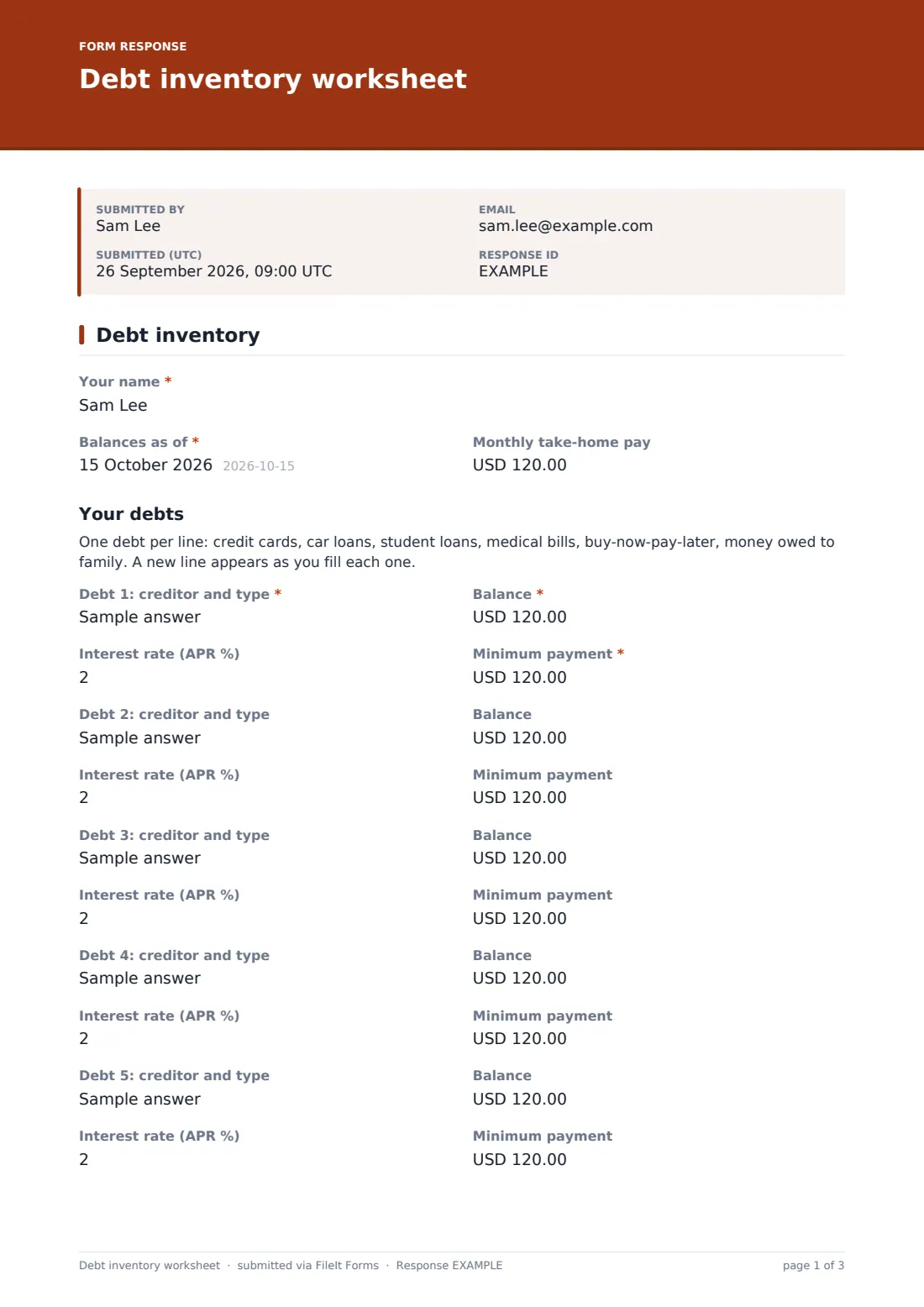
It's hard to make a plan for debts you can't see all at once. Card balances live in one app, the car loan in another, a medical bill in a drawer. This debt inventory worksheet template brings them onto a single page: who's owed, how much, at what interest rate, and the minimum payment due each month.
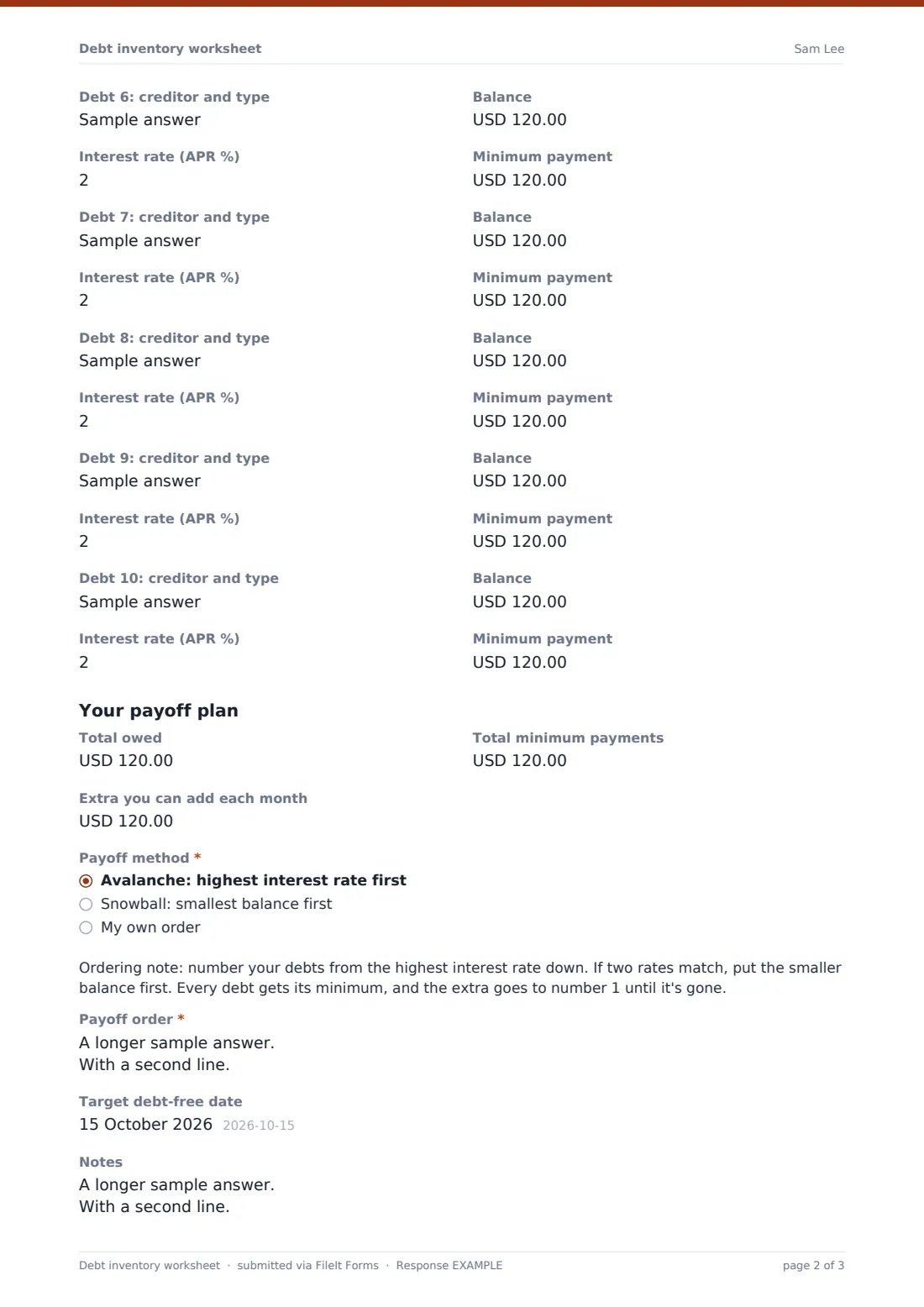
Lines appear as they're needed. Debt 1 is required, and each time a creditor is filled in, the next line opens, up to ten. Below the list, the person totals what they owe and the minimums, adds the extra they can put toward debt each month, and picks a payoff method. Choosing Avalanche shows an ordering note for highest rate first. Choosing Snowball shows one for smallest balance first. Choosing My own order asks why, because there are good reasons to break the rules, like paying back a relative or clearing a promotional rate that's about to end.
It's a practical worksheet for individuals, financial coaches, credit counselors and employee wellbeing programs. Each inventory is saved as a PDF in your FileIt vault, so a new copy every few months shows the balances coming down.
- Best for
- Individuals, couples, financial coaches, credit counselors and wellbeing programs
- Filled in by
- The person whose debts are listed
- Time to complete
- About 10 minutes, with statements to hand
- Includes
- Up to 10 debts with balance, rate and minimum, totals, avalanche and snowball notes, a custom order option
Who uses a debt inventory worksheet form?
- Someone ready to tackle their debts who wants to see the full picture first
- A financial coach asking clients to bring their debts to the first meeting
- A credit counselor gathering balances and rates before a review
- A couple combining their debts into one shared plan
- Checking progress every quarter by filling in a fresh inventory
- Choosing between the avalanche and snowball methods with real numbers in front of you
Questions on this debt inventory worksheet form
51 questions · includes conditional questions.
1 Debt inventory
- Your name*
- Balances as of*
- Monthly take-home pay
- Debt 1: creditor and type*
- Balance* asked only when it applies
- Interest rate (APR %) asked only when it applies
- Minimum payment* asked only when it applies
- Debt 2: creditor and type asked only when it applies
- Balance asked only when it applies
- Interest rate (APR %) asked only when it applies
- Minimum payment asked only when it applies
- Debt 3: creditor and type asked only when it applies
- Balance asked only when it applies
- Interest rate (APR %) asked only when it applies
- Minimum payment asked only when it applies
- Debt 4: creditor and type asked only when it applies
- Balance asked only when it applies
- Interest rate (APR %) asked only when it applies
- Minimum payment asked only when it applies
- Debt 5: creditor and type asked only when it applies
- Balance asked only when it applies
- Interest rate (APR %) asked only when it applies
- Minimum payment asked only when it applies
- Debt 6: creditor and type asked only when it applies
- Balance asked only when it applies
- Interest rate (APR %) asked only when it applies
- Minimum payment asked only when it applies
- Debt 7: creditor and type asked only when it applies
- Balance asked only when it applies
- Interest rate (APR %) asked only when it applies
- Minimum payment asked only when it applies
- Debt 8: creditor and type asked only when it applies
- Balance asked only when it applies
- Interest rate (APR %) asked only when it applies
- Minimum payment asked only when it applies
- Debt 9: creditor and type asked only when it applies
- Balance asked only when it applies
- Interest rate (APR %) asked only when it applies
- Minimum payment asked only when it applies
- Debt 10: creditor and type asked only when it applies
- Balance asked only when it applies
- Interest rate (APR %) asked only when it applies
- Minimum payment asked only when it applies
- Total owed
- Total minimum payments
- Extra you can add each month
- Payoff method* Avalanche: highest interest rate first · Snowball: smallest balance first · My own order
- Why this order?* asked only when it applies
- Payoff order*
- Target debt-free date
- Notes
The debt inventory worksheet form, page by page
1 Debt inventory
The worksheet starts with your name, the date the balances are taken from (Balances as of), and monthly take-home pay. A short note under Your debts suggests what to include, from credit cards and student loans to buy-now-pay-later plans and money owed to family.
Each debt has four fields: Debt 1: creditor and type, Balance, Interest rate (APR %), and Minimum payment. The first debt's creditor, balance and minimum are required, and the next line appears once a creditor is filled in, up to ten debts.
Under Your payoff plan, the person enters the total owed, the total minimum payments, and the extra they can add each month. Help text explains that the extra goes to the debt at the top of the list. Payoff method is required: Avalanche: highest interest rate first, Snowball: smallest balance first, or My own order. Avalanche and snowball each show their own ordering note, explaining how to number the debts and where the extra money goes. My own order asks Why this order? Payoff order is required for everyone, then a target debt-free date and notes about promotional rates, collections or missed payments.
Make the template yours
- Add a dropdown for debt type, such as card, auto, student or medical, if you want to sort by it
- Add a due-date field to each debt for clients who miss payments
- Change the currency for clients outside the US
- Rewrite the ordering notes in your own coaching language
- Remove the take-home pay question if you collect income separately
- File inventories into each client's folder so their progress is easy to see
Tips for a better debt inventory worksheet form
- Copy balances and rates from the latest statements, not from memory
- Keep paying every minimum. The extra only goes to the top debt
- Avalanche usually costs less in interest. Snowball gives quicker wins. Either beats no plan
- Note promotional rates and their end dates, since they can change the best order
- Update the inventory every few months and celebrate each debt that drops off
Every response becomes a PDF in your vault
Each inventory is saved as a PDF in your vault, titled with the date, and the person can get their own copy by email. Coaches get an email notification for every new inventory a client sends.
In the Responses table, inventories from the same person line up by date. Export to CSV to put balances side by side and see how fast each debt is falling.
- Start from this template. It opens in the FileIt Forms designer — change any question, add pages, set the rules for when questions appear.
- Share it. Turn on a public link, or send it to people by email, each with their own link. They don’t need a FileIt account.
- Get the answers as PDFs. Each response is saved as a PDF in the vault folder you choose, with uploaded files attached — and listed in a Responses table you can export to CSV.
Debt inventory worksheet form: frequently asked questions
Is this debt inventory worksheet free?
Yes. It's a starter template in FileIt's Forms app, on every plan including free.
How many debts can I list?
Up to ten. Each line appears once the one before it has a creditor, so short lists stay short. You can add more lines in the designer.
What do the avalanche and snowball options do?
Each shows an ordering note: avalanche numbers debts by highest interest rate, snowball by smallest balance. You then write your payoff order in that sequence.
Does the form work out my payoff date?
No. It records the numbers and your chosen order. You set the target date yourself, or work it out with a calculator or your coach.
Is this debt advice?
No. It's an organising tool. For advice about your debts, talk to a qualified counselor or adviser.
Do I need an account to fill it in?
No. Anyone with the link can complete it without signing up.