What is the savings goal tracker form template?
Most savings goals start with a number and a vague date. What makes them stick is a monthly amount, a place to keep the money, and a moment every so often to check whether the plan is still working.
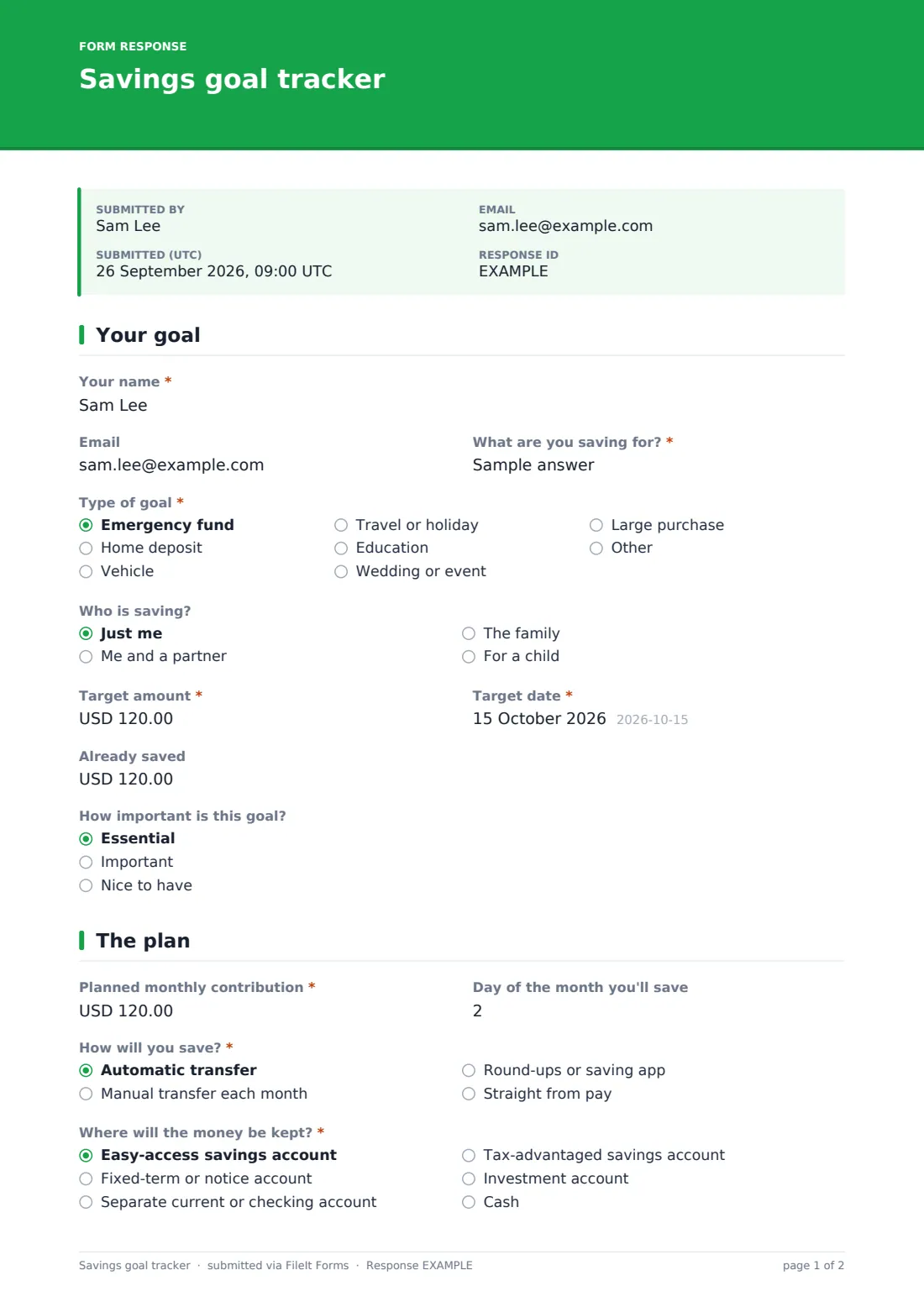
This tracker sets that up across three pages. You name the goal and its type, who is saving, the target amount and date, and what's already saved. Then you plan the monthly contribution, the day you'll save, how the money moves (automatic transfer, manual, round-ups or straight from pay) and the kind of account it lives in.
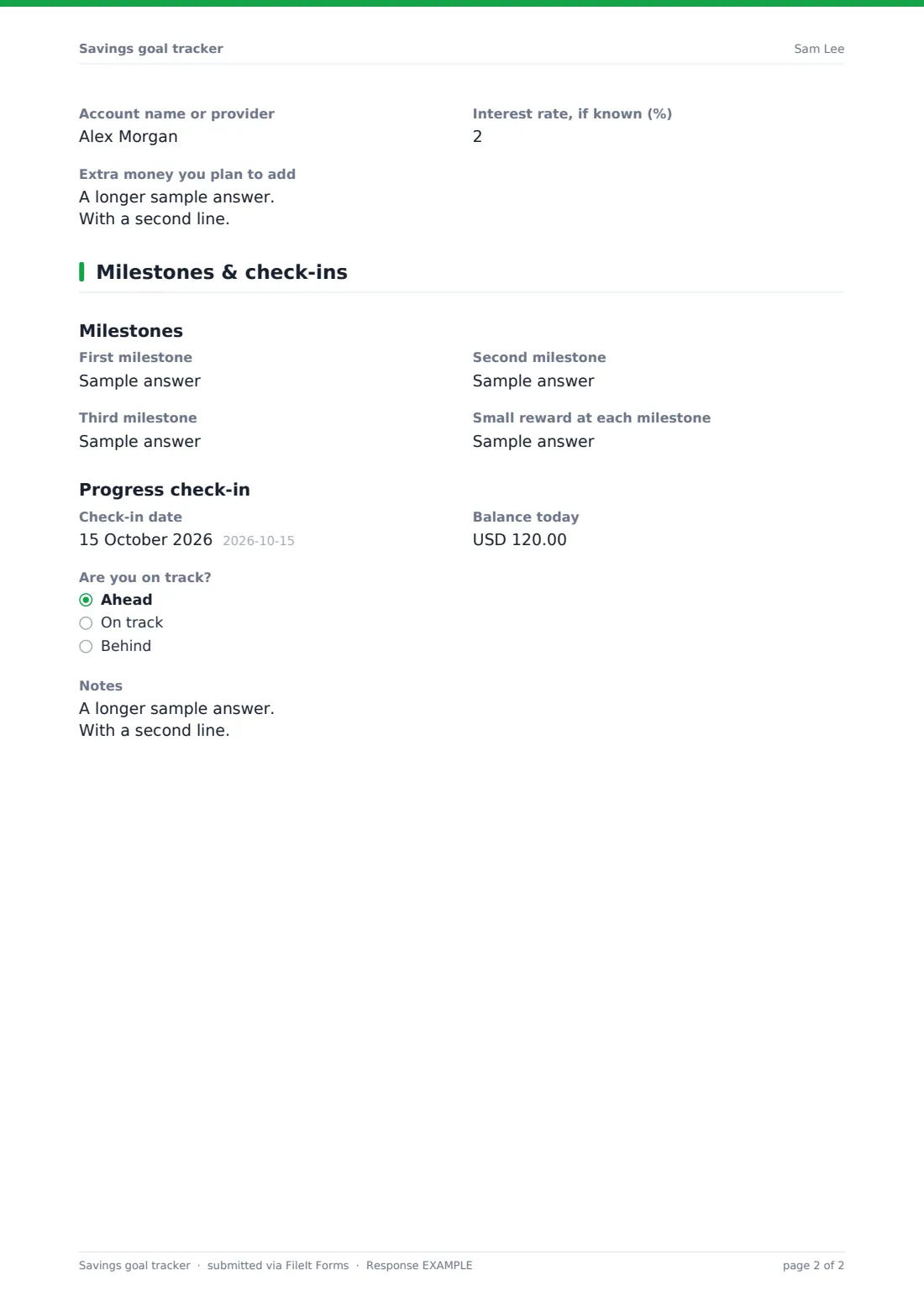
The last page sets up to three milestones and a check-in: today's balance and whether you're ahead, on track or behind. If you're behind, you choose adjustments such as raising the monthly amount or moving the date. Each submission is saved as a PDF in your FileIt vault, so repeated check-ins build a history.
- Best for
- Individuals, couples and families saving towards something specific
- Filled in by
- The saver
- Time to complete
- About 5-8 minutes; check-ins take a minute
- Includes
- Target and date, monthly plan, account type, three milestones, adjustments
Who uses a savings goal tracker form?
- Building an emergency fund a little each month
- A couple saving for a home deposit over two years
- Parents setting aside money for a child's school trip or first car
- Planning a holiday paid for in cash rather than on a card
- A financial coach giving clients a structured goal-setting form
- Monthly check-ins on a goal that's already under way
Questions on this savings goal tracker form
28 questions over 3 pages · includes conditional questions, multiple pages.
1 Your goal
- Your name*
- What are you saving for?*
- Type of goal* Emergency fund · Home deposit · Vehicle · Travel or holiday · Education · Wedding or event · Large purchase · Other
- Who is saving? Just me · Me and a partner · The family · For a child
- Target amount*
- Target date*
- Already saved
- How important is this goal? Essential · Important · Nice to have
2 The plan
- Planned monthly contribution*
- Day of the month you'll save
- How will you save?* Automatic transfer · Manual transfer each month · Round-ups or saving app · Straight from pay
- Where will the money be kept?* Easy-access savings account · Fixed-term or notice account · Separate current or checking account · Tax-advantaged savings account · Investment account · Cash
- Account name or provider
- Interest rate, if known (%)
- Extra money you plan to add
3 Milestones & check-ins
- First milestone
- Second milestone
- Third milestone
- Small reward at each milestone
- Check-in date
- Balance today
- Are you on track? Ahead · On track · Behind
- Adjustments asked only when it applies Raise the monthly amount · Move the target date · Lower the target · Cut a spending category · Add income from elsewhere
- New monthly contribution asked only when it applies
- New target date asked only when it applies
- New target amount asked only when it applies
- Notes
The savings goal tracker form, page by page
1 Your goal
The saver enters their name and optional email, then What are you saving for? and a Type of goal, such as emergency fund, home deposit, vehicle, travel, education, wedding or large purchase. Who is saving? covers just me, a partner, the family or a child. Target amount and Target date are required, with Already saved and How important is this goal? as optional.
2 The plan
Planned monthly contribution is required, with a hint showing how to work it out. Day of the month you'll save, How will you save? and Where will the money be kept? set the routine. The account name or provider can be noted, with a reminder not to enter account numbers, along with an interest rate if known and any extra money the saver plans to add, such as a refund or bonus.
3 Milestones & check-ins
Under Milestones there are three milestone lines and a small reward. The Progress check-in records a Check-in date, Balance today and Are you on track? If the answer is Behind, Adjustments lists raising the monthly amount, moving the target date, lowering the target, cutting a spending category or adding income; choosing one of the first three asks for the new monthly amount, target date or target amount. A Notes box finishes the page.
Make the template yours
- Change the currency fields to your own currency
- Add a second goal block if you track several goals at once
- Set the form to send you a copy so you have your plan by email
- Remove the Type of goal question if you only use it for one kind of saving
- Add a question about who is responsible for each transfer in a shared goal
- File each submission into a family member's vault folder
Tips for a better savings goal tracker form
- Schedule the transfer for just after payday so it happens before spending does
- Keep goal money in a separate account so it's easy to see and harder to dip into
- Re-submit the form at each check-in to build a progress record
- If you fall behind, moving the date can be easier to stick to than a bigger monthly amount
- Celebrate milestones — small rewards help with long goals
Every response becomes a PDF in your vault
Your plan is saved as a PDF in the vault folder you pick, and you can get a copy by email. Each later check-in is saved as its own PDF.
The Responses table lists every submission by date, so you can see balances over time. The CSV export lets you chart progress in a spreadsheet.
- Start from this template. It opens in the FileIt Forms designer — change any question, add pages, set the rules for when questions appear.
- Share it. Turn on a public link, or send it to people by email, each with their own link. They don’t need a FileIt account.
- Get the answers as PDFs. Each response is saved as a PDF in the vault folder you choose, with uploaded files attached — and listed in a Responses table you can export to CSV.
Savings goal tracker form: frequently asked questions
Is this savings goal tracker free?
Yes. It's a starter template in the FileIt Forms app on every account.
Does it connect to my bank?
No. You enter balances and amounts yourself. FileIt doesn't read bank accounts.
Does the form calculate the monthly amount?
No. The help text gives the simple rule of thumb: the amount still needed divided by the months to go.
Can I track more than one goal?
Submit the form once per goal, or add a second goal block in the designer.
Is this financial advice?
No. It's a planning worksheet. For investment or tax questions, talk to a qualified adviser.
Can my partner fill it in too?
Yes. Share the link and each check-in can be submitted by whoever does it.