What is the retirement plan contribution election form template?
Contribution changes reach payroll in all sorts of ways: a quick message to HR, a sticky note at open enrollment, an email that says "bump me up to 8%" with no start date. When a change is missed or applied to the wrong paycheck, it's hard to show what the employee actually asked for.
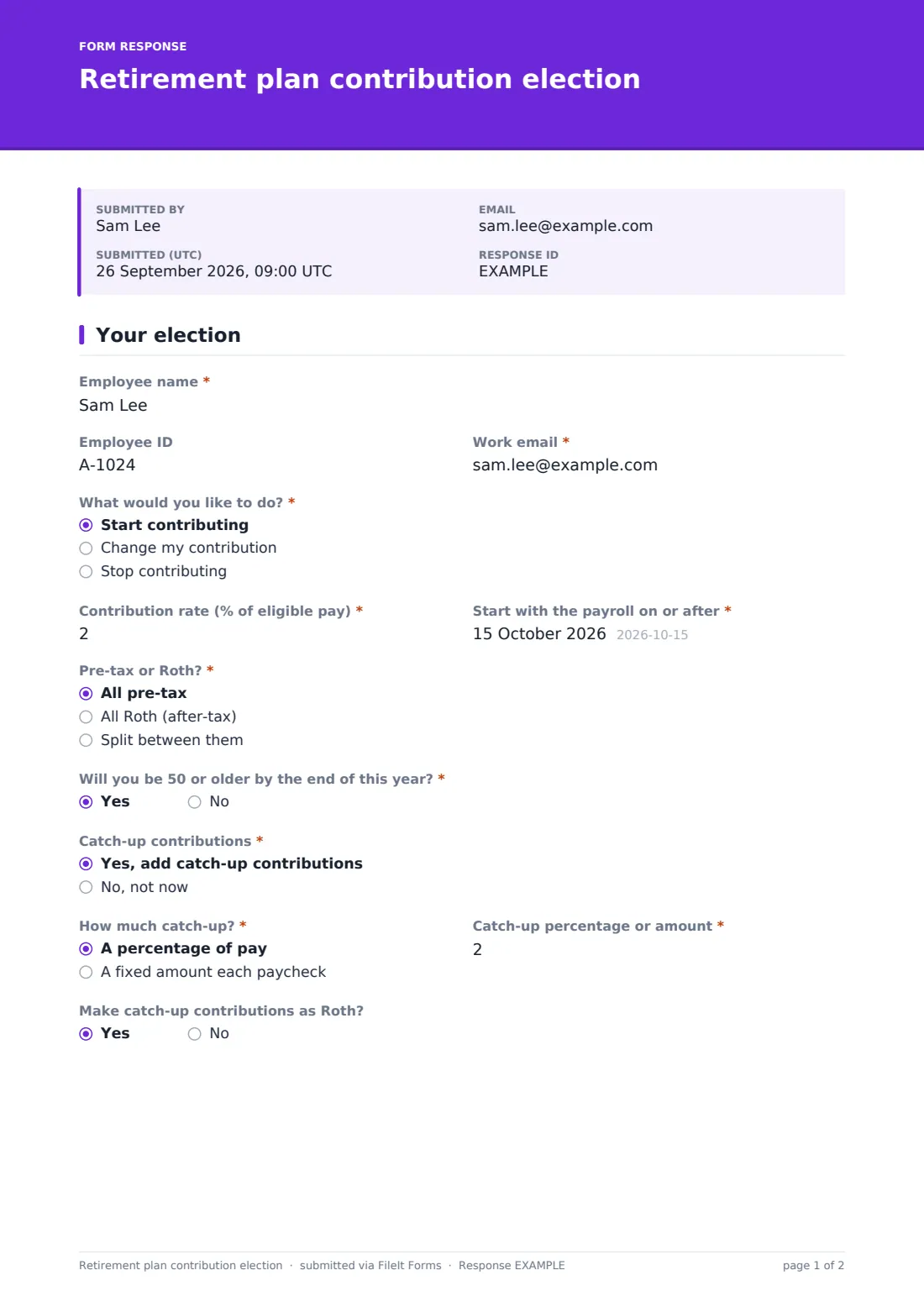
This two-page election form records the request clearly. On the first page the employee chooses What would you like to do?: start, change or stop. Starting or changing asks for a Contribution rate, a start payroll date and Pre-tax or Roth?, with a split that asks for each share. Answering Yes to Will you be 50 or older by the end of this year? opens the catch-up contribution questions: whether to add them, as a percentage or fixed amount, and whether to make them as Roth.
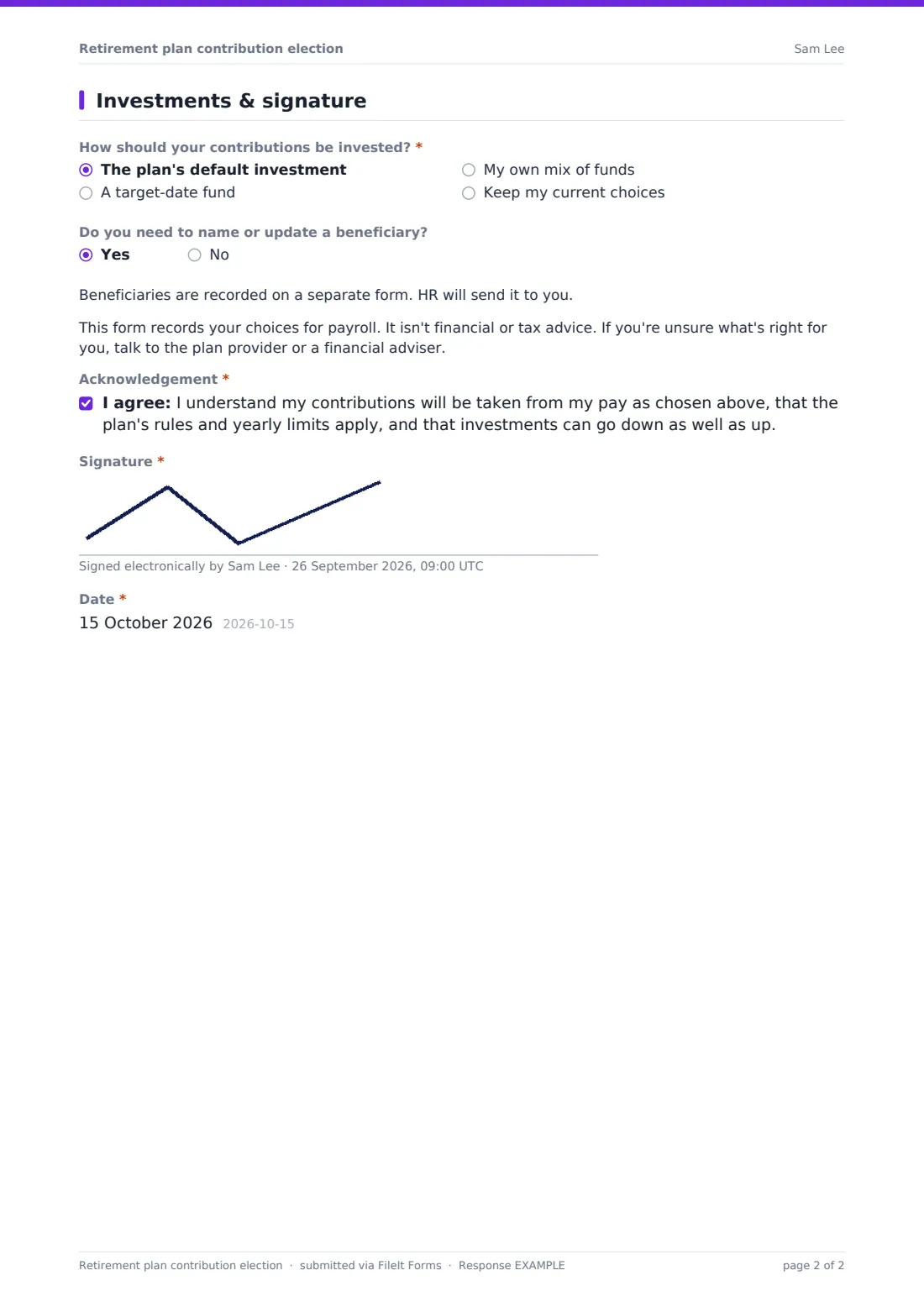
The second page covers how contributions should be invested: the plan's default, a target-date fund by year, the employee's own mix of funds, or no change. A note makes clear the form isn't financial or tax advice, and the employee signs an acknowledgement. Each election is filed as a PDF in your FileIt vault.
- Best for
- Small and mid-sized employers running a 401(k), 403(b) or similar workplace plan
- Filled in by
- The employee
- Time to complete
- About 4 minutes
- Pages
- 2: your election, then investments and signature
Who uses a retirement plan contribution election form?
- New hires choosing their contribution rate after the waiting period
- Employees raising their rate after a pay rise
- Staff turning 50 who want to add catch-up contributions
- Pausing contributions during a tight month, with a record of the request
- An open enrollment window when everyone reviews their elections
- A small business whose plan provider doesn't offer online enrollment
Questions on this retirement plan contribution election form
22 questions over 2 pages · includes signature, conditional questions, multiple pages, consent checkbox.
1 Your election
- Employee name*
- Employee ID
- Work email*
- What would you like to do?* Start contributing · Change my contribution · Stop contributing
- Contribution rate (% of eligible pay)* asked only when it applies
- Start with the payroll on or after*
- Pre-tax or Roth?* asked only when it applies All pre-tax · All Roth (after-tax) · Split between them
- Pre-tax share of my contribution (%)* asked only when it applies
- Roth share of my contribution (%)* asked only when it applies
- Will you be 50 or older by the end of this year?* asked only when it applies
- Catch-up contributions* asked only when it applies Yes, add catch-up contributions · No, not now
- How much catch-up?* asked only when it applies A percentage of pay · A fixed amount each paycheck
- Catch-up percentage or amount* asked only when it applies
- Make catch-up contributions as Roth? asked only when it applies
2 Investments & signature
- How should your contributions be invested?* asked only when it applies The plan's default investment · A target-date fund · My own mix of funds · Keep my current choices
- Target-date fund year* asked only when it applies 2030 · 2035 · 2040 · 2045 · 2050 · 2055 · 2060 · 2065 · 2070
- Your funds and percentages* asked only when it applies
- Rebalance my existing balance to match? asked only when it applies
- Do you need to name or update a beneficiary?
- Acknowledgement*
- Signature*
- Date*
The retirement plan contribution election form, page by page
1 Your election
The employee gives their name, Employee ID and work email, then answers What would you like to do? Stop contributing shows a short note about when contributions end and skips the rate questions.
For a start or change, Contribution rate (% of eligible pay) and Start with the payroll on or after come first. Pre-tax or Roth? offers all pre-tax, all Roth or a split, which asks for the Pre-tax share and the Roth share. Will you be 50 or older by the end of this year? reveals Catch-up contributions, then How much catch-up? as a percentage or a fixed amount per paycheck, the value, and Make catch-up contributions as Roth?
2 Investments & signature
How should your contributions be invested? offers the plan's default investment, a target-date fund, the employee's own mix of funds, or keeping current choices. A target-date fund asks for the year, from 2030 to 2070. Their own mix asks for fund names and percentages, and whether to rebalance the existing balance to match.
Do you need to name or update a beneficiary? points to a separate beneficiary form. A note says the form isn't financial or tax advice, and the employee signs an acknowledgement that contributions come from their pay, plan rules and limits apply, and investments can go down.
Make the template yours
- Replace the free-text fund mix with your plan's actual fund list
- Remove the Roth questions if your plan doesn't offer Roth contributions
- Add your plan's employer match formula to the cover text
- Remove target-date years that don't apply to your workforce
- Link your beneficiary designation form in the beneficiary note
- Send notifications to payroll as well as HR
Tips for a better retirement plan contribution election form
- Share the plan's summary and fund list alongside the link so employees can choose with the facts
- Process elections from the next payroll you can, and tell the employee which one
- Check rates against the plan's yearly limits before applying them
- Don't give investment recommendations unless you're qualified to; point employees to the plan provider
- Keep each signed election, as it's the record of what the employee chose and when
Every response becomes a PDF in your vault
Each election is saved as a signed PDF in the vault folder you choose, titled with the employee's name and the date, and you're notified by email. The employee can receive a copy for their records.
Payroll updates the deduction and the plan provider updates the investments. The Responses table and its CSV export make a tidy list of changes for each payroll period.
- Start from this template. It opens in the FileIt Forms designer — change any question, add pages, set the rules for when questions appear.
- Share it. Turn on a public link, or send it to people by email, each with their own link. They don’t need a FileIt account.
- Get the answers as PDFs. Each response is saved as a PDF in the vault folder you choose, with uploaded files attached — and listed in a Responses table you can export to CSV.
Retirement plan contribution election form: frequently asked questions
Is this retirement contribution election template free?
Yes. It's a starter template in FileIt's Forms app on every account, and you can change every question.
Does the form change the employee's payroll deductions?
No. It records the employee's signed choice. Payroll and the plan provider make the change in their own systems.
Does FileIt check contribution limits?
No. Limits depend on the plan and the year, so payroll should check them before applying the election.
Who sees the catch-up questions?
Only employees who answer Yes to Will you be 50 or older by the end of this year?
Is this financial advice?
No. The form says so on the second page and points employees to the plan provider or an adviser.
Do employees need a FileIt account?
No. Send the form by email or share the link, and employees fill it in and sign without signing up.