What is the student absence note form template?
A paper absence note only works if it actually makes it from the kitchen table into the teacher's hand — and plenty don't. This student absence note form template lets a parent explain an absence from their phone in about two minutes, whether it already happened, is planned in advance, or is just a late arrival or early pickup on a single day.
The form adapts to the reason given: choose "Illness" and it asks about symptoms and whether a doctor said it's contagious; choose "Medical or dental appointment" and it offers a spot to attach the appointment letter; choose "Travel" and it reminds the parent that many schools only authorise term-time travel in exceptional circumstances, then asks for the reason. Nobody has to answer questions that don't apply to their situation.
Every note a parent submits is turned into a signed PDF and filed in the school's FileIt vault the moment it's sent — no more notes lost in a bag, and no more chasing parents for a written reason after the fact.
- Best for
- Schools collecting a written explanation for a student's absence, lateness or early leave
- Filled in by
- A parent or guardian
- Time to complete
- About 2 minutes
- Includes
- Conditional questions by reason for absence, a doctor's note upload, a signed declaration
Who uses a student absence note form?
- A parent reporting a sick day the morning it happens
- Requesting authorisation in advance for a family event or appointment that falls on a school day
- Explaining a single instance of arriving late or leaving early for a dentist or doctor visit
- Giving a school the details it needs about a contagious illness, including any return-to-school advice from a doctor
- Letting a family flag that schoolwork should be sent home while a child is away
- Building a school-wide record of absence reasons, separate from the daily attendance register
Questions on this student absence note form
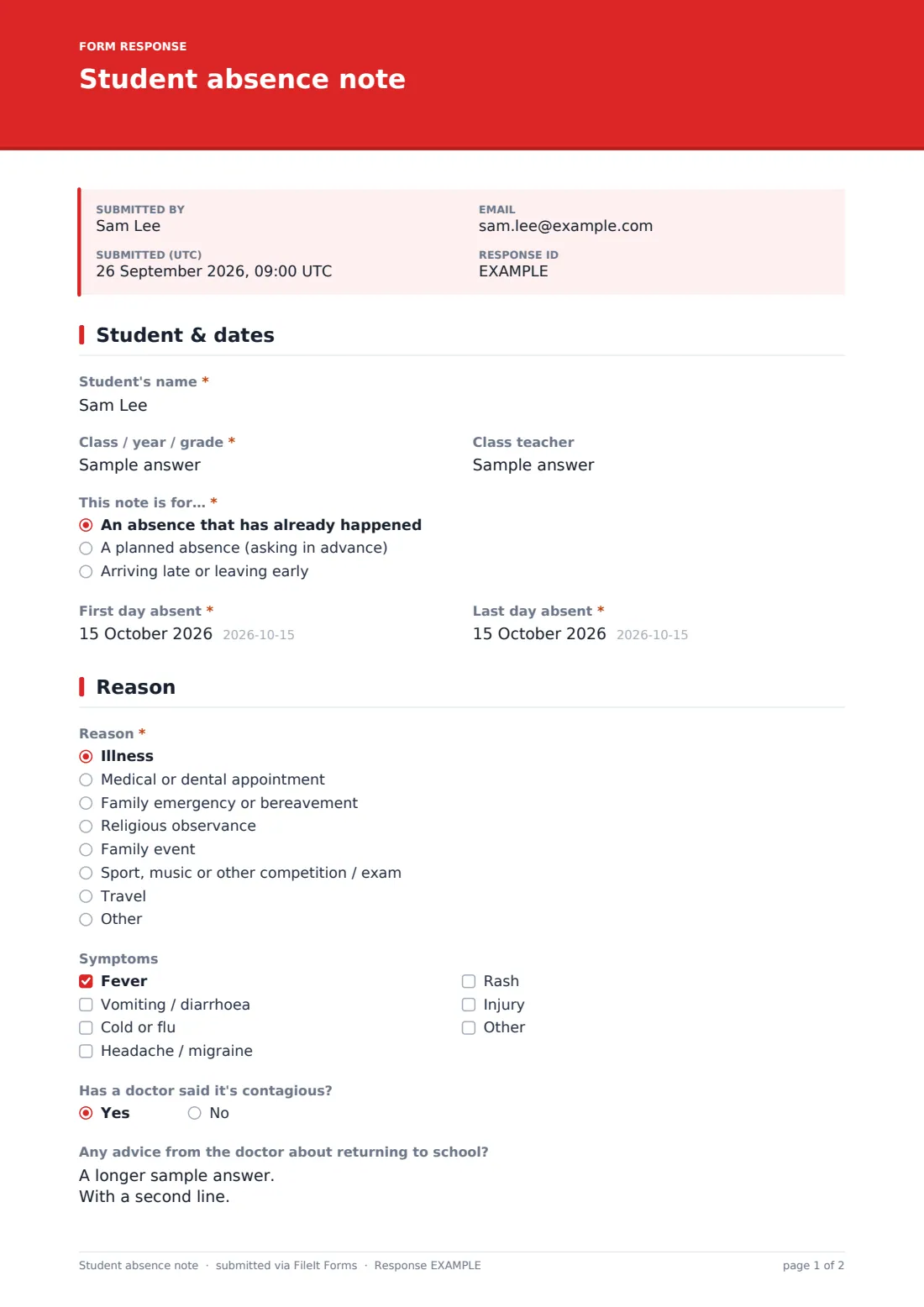
25 questions over 4 pages · includes signature, file upload, conditional questions, multiple pages, consent checkbox.
1 Student & dates
- Student's name*
- Class / year / grade*
- Class teacher
- This note is for…* An absence that has already happened · A planned absence (asking in advance) · Arriving late or leaving early
- First day absent*
- Last day absent*
- Leaving at asked only when it applies
- Arriving / back at asked only when it applies
2 Reason
- Reason* Illness · Medical or dental appointment · Family emergency or bereavement · Religious observance · Family event · Sport, music or other competition / exam · Travel
- Symptoms asked only when it applies Fever · Vomiting / diarrhoea · Cold or flu · Headache / migraine · Rash · Injury
- Has a doctor said it's contagious? asked only when it applies
- Any advice from the doctor about returning to school? asked only when it applies
- Appointment asked only when it applies
- Appointment letter or doctor's note (optional) asked only when it applies
- Details asked only when it applies
- Reason for travelling in term time* asked only when it applies
- Anything else the school should know?
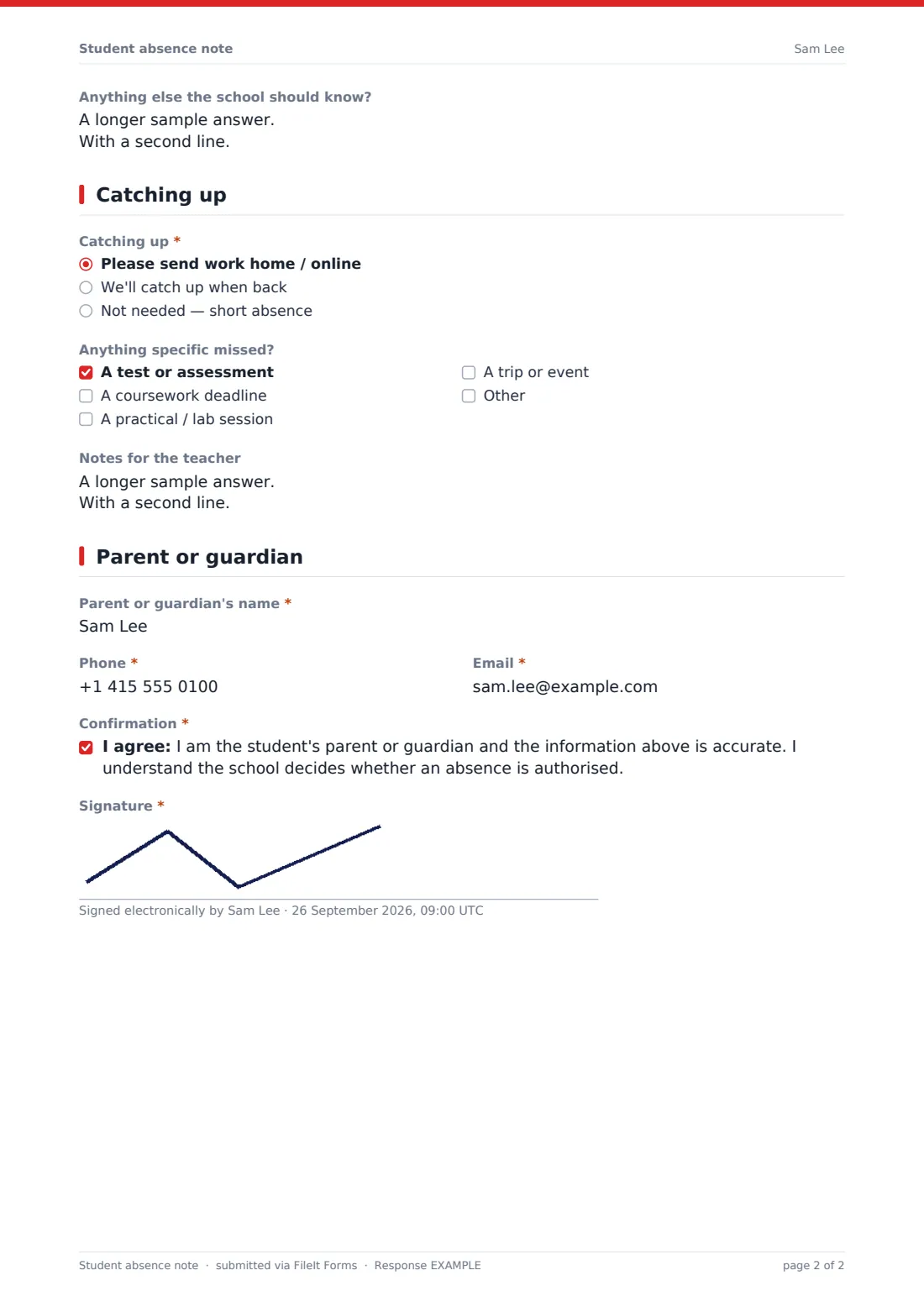
3 Catching up
- Catching up* Please send work home / online · We'll catch up when back · Not needed — short absence
- Anything specific missed? asked only when it applies A test or assessment · A coursework deadline · A practical / lab session · A trip or event
- Notes for the teacher asked only when it applies
4 Parent or guardian
- Parent or guardian's name*
- Phone*
- Email*
- Confirmation*
- Signature*
The student absence note form, page by page
1 Student & dates
The note opens with the student's name, class or year group, and teacher, then asks whether this note covers an absence that's already happened, one being requested in advance, or a partial day (arriving late or leaving early). It records the first and last day absent — the same date for a single day — and, for a partial day, the times the student left and returned.
2 Reason
Parents pick a reason: illness, a medical or dental appointment, a family emergency or bereavement, religious observance, a family event, a sport, music or exam commitment, travel, or their own reason via "Other." Each reason unlocks its own follow-up — illness reveals a symptom checklist and asks whether a doctor has said it's contagious (which then asks for any return-to-school advice); an appointment offers a spot to name it and attach a letter; travel shows a note about term-time restrictions and asks for the reason in the parent's own words. A general "anything else the school should know" question is always available.
3 Catching up
This page asks how the family would like to handle missed schoolwork — sent home or online, caught up when the student returns, or not needed for a short absence. Choosing either of the first two options reveals a checklist for anything specific that was missed, such as a test, coursework deadline, practical session or trip, plus a free-text space for notes to the teacher.
4 Parent or guardian
The note finishes with the parent or guardian's name, phone and email, a confirmation that they are the student's parent or guardian and the information given is accurate — noting that the school decides whether an absence is authorised — and a signature.
Make the template yours
- Add your school's own list of classes or year groups as a dropdown for the "Class / year / grade" question
- Route notification emails to the right year group office or attendance officer
- Adjust the reasons list to match your school's attendance policy and reporting categories
- Add a question asking for a sibling's name if your school often has more than one child absent from the same family
- Set the vault folder so absence notes file automatically alongside each student's records
- Turn on an emailed PDF copy so parents keep their own record of what was submitted
Tips for a better student absence note form
- Keep the form short for common, low-risk reasons and let conditional questions do the extra work only when needed
- Make clear in your confirmation message that submitting a note doesn't automatically authorise the absence — that's the school's decision
- Encourage same-day submission for illness so attendance registers stay accurate
- For contagious illnesses, ask specifically what a doctor said about returning, so the school can apply its own health guidance consistently
- Review travel requests promptly, since families often need an answer before booking anything
Every response becomes a PDF in your vault
As soon as a parent submits an absence note, FileIt turns it into a signed PDF and files it in your vault automatically, with any appointment letter attached, and sends an email so the right staff member sees it straight away.
From there, most schools use the Responses table to check absences day by day, open a specific student's note when a question comes up, and export everything to CSV to reconcile against the attendance register or feed into a wider reporting system.
- Start from this template. It opens in the FileIt Forms designer — change any question, add pages, set the rules for when questions appear.
- Share it. Turn on a public link, or send it to people by email, each with their own link. They don’t need a FileIt account.
- Get the answers as PDFs. Each response is saved as a PDF in the vault folder you choose, with uploaded files attached — and listed in a Responses table you can export to CSV.
Student absence note form: frequently asked questions
Is this student absence note template free?
Yes — it's included in the Forms app on every FileIt account, including the free plan, along with more than 160 other ready-made templates.
Do parents need a FileIt account to submit a note?
No. Share the form as a link on your school website, in a newsletter, or by email, and any parent can fill it in without signing up.
Where do the absence notes go once submitted?
Each note becomes a PDF automatically saved in your FileIt vault, and staff can view every submission in a searchable table or export them to CSV.
Does the form only ask about symptoms if the reason is illness?
Yes — that's built in with conditional logic, so a parent explaining a family event, for example, never sees the illness questions at all.
Does submitting this form authorise the absence?
No. It gives the school a written explanation and record, but the school still decides whether the absence is authorised under its own policy.
Can parents attach a doctor's note?
Yes — when "Medical or dental appointment" is selected as the reason, the form offers a place to upload an appointment letter or doctor's note.
Can we limit this form to certain year groups?
You can create a separate copy of the form for each year group or key stage if you want different routing, or keep one form and use the class/year field to sort responses afterwards.