What is the school meal application form template?
A school meal application form gives families a simple, private way to apply for free or reduced-price meals, asking only for the household and benefit information a school actually needs to check eligibility. It replaces a paper form sent home in a school bag, which can be lost, filled in incompletely, or simply never returned.
Because eligibility for free or reduced-price meals is usually assessed against local rules — benefits received, household size or an income band — a form that structures those questions clearly makes it far easier for a school or local authority to process an application quickly and consistently, without extra phone calls to clarify details.
This template runs on FileIt's Forms app, included on every FileIt account including the free plan. Families fill it in without needing a FileIt account of their own, and every application is automatically saved as a PDF and filed in your vault, kept confidential and separate from a student's general school records.
- Best for
- Schools and local authorities processing free or reduced-price meal applications
- Filled in by
- A parent or guardian, on behalf of one or more children
- Time to complete
- About 5 minutes
- Includes
- Benefit and income-band questions, evidence upload, dietary needs, eligibility-check consent
Who uses a school meal application form?
- A family applying for free meals for the first time after a change in circumstances
- A household with multiple children applying together in one submission
- A family receiving income-related benefits confirming which ones apply to them
- A household without qualifying benefits providing an income band for assessment
- A foster family applying on behalf of a looked-after child
- A school confirming eligibility while also capturing dietary needs for the kitchen
Questions on this school meal application form
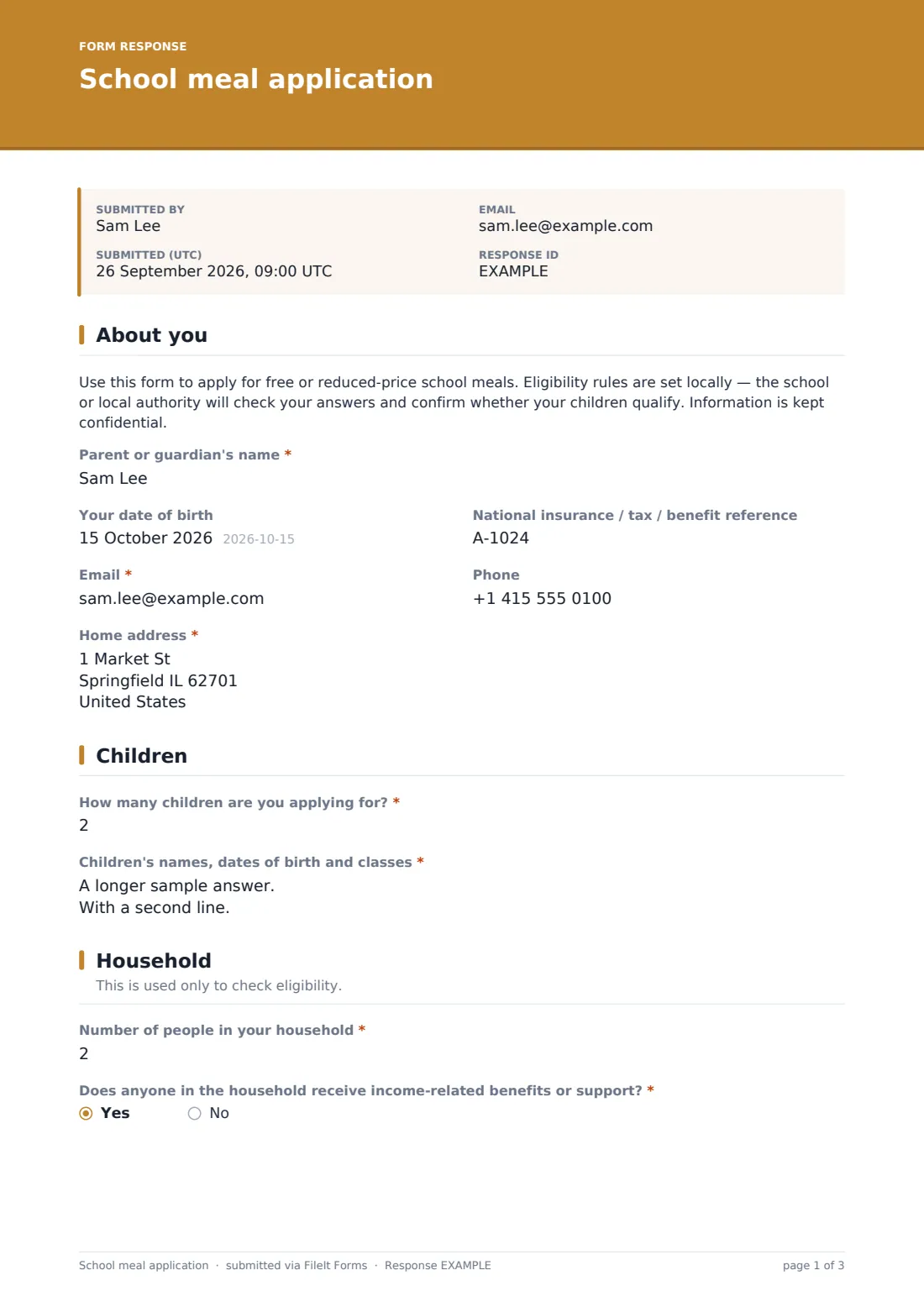
19 questions over 4 pages · includes signature, file upload, conditional questions, multiple pages, consent checkbox.
1 About you
- Parent or guardian's name*
- Your date of birth
- National insurance / tax / benefit reference
- Email*
- Phone
- Home address*
2 Children
- How many children are you applying for?*
- Children's names, dates of birth and classes*
3 Household
- Number of people in your household*
- Does anyone in the household receive income-related benefits or support?*
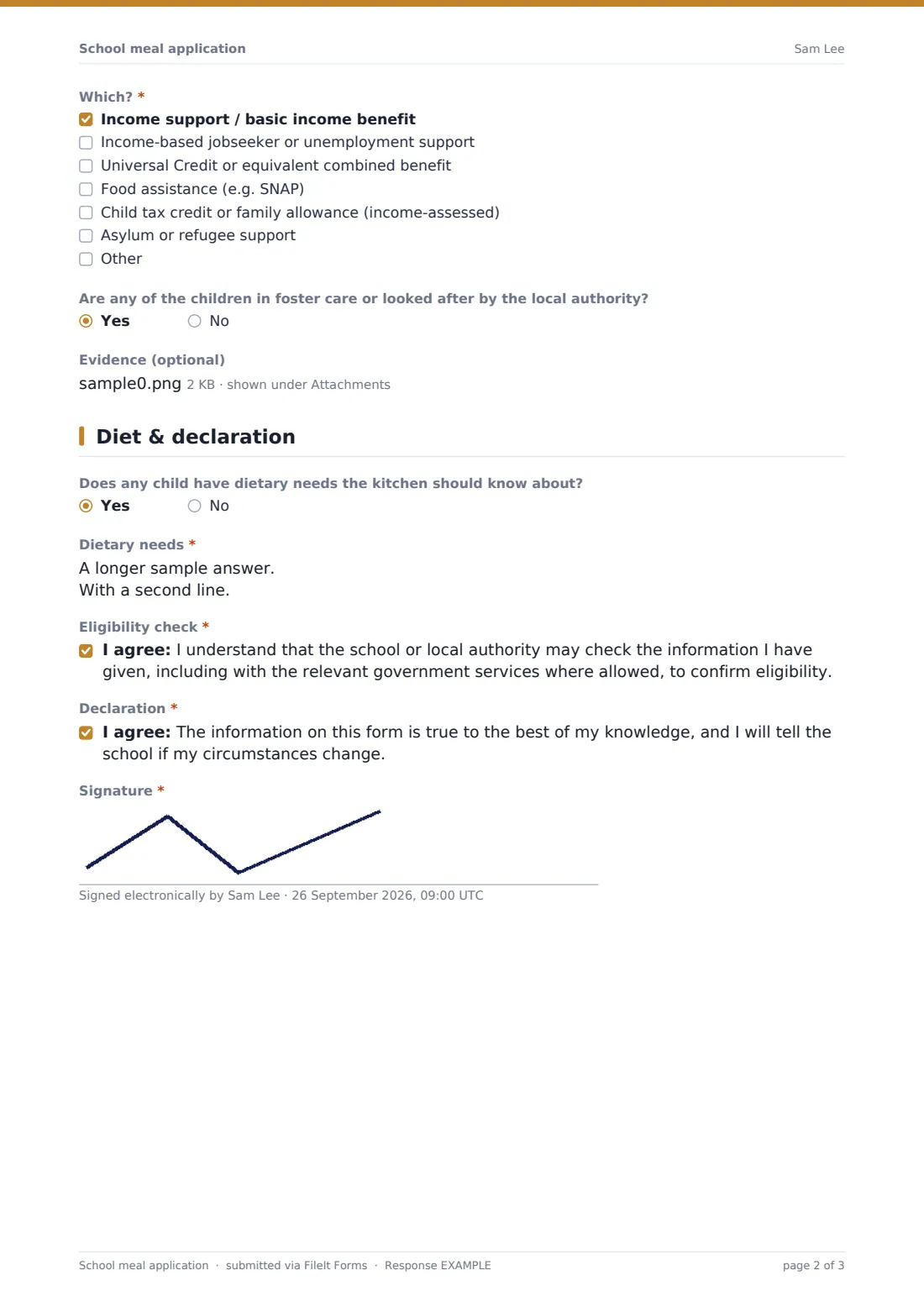
- Which?* asked only when it applies Income support / basic income benefit · Income-based jobseeker or unemployment support · Universal Credit or equivalent combined benefit · Food assistance (e.g. SNAP) · Child tax credit or family allowance (income-assessed) · Asylum or refugee support
- Total household income before tax* asked only when it applies Under 10,000 · 10,000 – 19,999 · 20,000 – 29,999 · 30,000 – 44,999 · 45,000 or more · Prefer to discuss with the school
- Are any of the children in foster care or looked after by the local authority?
- Evidence (optional)
4 Diet & declaration
- Does any child have dietary needs the kitchen should know about?
- Dietary needs* asked only when it applies
- Eligibility check*
- Declaration*
- Signature*
The school meal application form, page by page
1 About you
An introductory note explains that eligibility rules are set locally, that the school or local authority will check the answers given, and that information is kept confidential. Parent or guardian's name, an optional date of birth, an optional national insurance, tax or benefit reference (only if the school asks for it), Email, Phone and Home address follow.
2 Children
How many children are you applying for? sets the scope of the application, and Children's names, dates of birth and classes is a single field for listing each child, one per line — a simple way to cover a whole family without repeating the same set of fields for every sibling.
3 Household
Number of people in your household establishes the family size used in eligibility checks. Does anyone in the household receive income-related benefits or support? is the key branching question: a yes opens a checkbox list of benefit types with an Other option, since names vary by country, while a no opens an income-band question instead, ranging from under 10,000 up to 45,000 or more, with an option to discuss the figure directly with the school instead of stating it online. Are any of the children in foster care or looked after by the local authority? and an optional evidence upload, such as a benefit award letter, complete the household section.
4 Diet & declaration
Does any child have dietary needs the kitchen should know about? opens a required details field covering allergies and religious or medical diets whenever the answer is yes. The family then confirms they understand the school or local authority may check the information given, including with relevant government services where allowed, and declares the information is true, closing with a signature.
Make the template yours
- Adjust the benefit checkbox list to match the specific benefits recognised in your country or district
- Change the income bands to match your local authority's own eligibility thresholds
- Route applications into a restricted folder so meal eligibility stays separate from general school records
- Turn on a reminder to reapply each academic year if your eligibility rules require annual renewal
- Add a language toggle or translated version if your school community speaks several languages at home
- Adjust dietary checkboxes to match what your kitchen can actually accommodate
Tips for a better school meal application form
- Keep this form and its answers confidential from general school records and staff who don't need to see it
- Make the benefit and income questions as simple as possible, since families may find this a sensitive topic
- Accept evidence like a benefit letter only where your local rules require it, to avoid unnecessary delay
- Confirm the outcome promptly by email so families aren't left wondering whether meals have been approved
- Review and renew eligibility on whatever schedule your local rules require, rather than treating it as one-off
- Make sure kitchen staff receive dietary information separately from the eligibility decision itself
Every response becomes a PDF in your vault
As soon as a family submits the application, FileIt saves it — along with any evidence uploaded — as a PDF named with the applicant's name, and files it in the vault folder you've set up, ideally one restricted to the staff who process meal eligibility. With owner notification and a copy to the family both switched on by default, your team is alerted right away and the family has a record of what they submitted.
From there, most schools use the Responses table to track applications awaiting a decision, open each PDF to check benefit or income answers against local eligibility rules, and export the list to CSV for the school's meal management system. As the confirmation message tells families, the outcome is communicated by email once eligibility has been checked.
- Start from this template. It opens in the FileIt Forms designer — change any question, add pages, set the rules for when questions appear.
- Share it. Turn on a public link, or send it to people by email, each with their own link. They don’t need a FileIt account.
- Get the answers as PDFs. Each response is saved as a PDF in the vault folder you choose, with uploaded files attached — and listed in a Responses table you can export to CSV.
School meal application form: frequently asked questions
Is this school meal application form template free?
Yes. It's included with the Forms app on every FileIt account, including the free plan.
Do families need a FileIt account to apply?
No. Families fill in and submit the form using only the link you share, without ever needing a FileIt account.
How do I get applications as PDFs?
Every submission, including any evidence uploaded, is automatically saved as a PDF in the vault folder you choose, and the full set is browsable and exportable to CSV from the Responses table.
Does FileIt decide who is eligible for free meals?
No. FileIt collects the application and evidence as a PDF; the actual eligibility decision is made by your school or local authority based on your own local rules.
Is this application kept confidential?
FileIt encrypts answers at rest and lets you restrict the vault folder to only the staff who process meal applications, keeping the details separate from general school records.
Can I change the benefit types or income bands?
Yes. Every option, including the benefit checkbox list and income bands, can be edited in the designer to match your own eligibility rules.
Can I apply for more than one child at once?
Yes. The form lets a family list every child they're applying for in a single submission.
Do we need to reapply every year?
The template itself doesn't set a renewal schedule — that depends on your local eligibility rules, and you can add a reminder or a closing date if your school requires annual reapplication.