
What is the ski school lesson booking form template?
A ski school morning is a balancing act: dozens of families at the meeting point, kids sorted into groups by ability, rental sizes to check and, at the end, every child handed back to the right adult. This booking template gets that information in before the holiday starts, so instructors spend the first hour of the day teaching, not filling in forms.
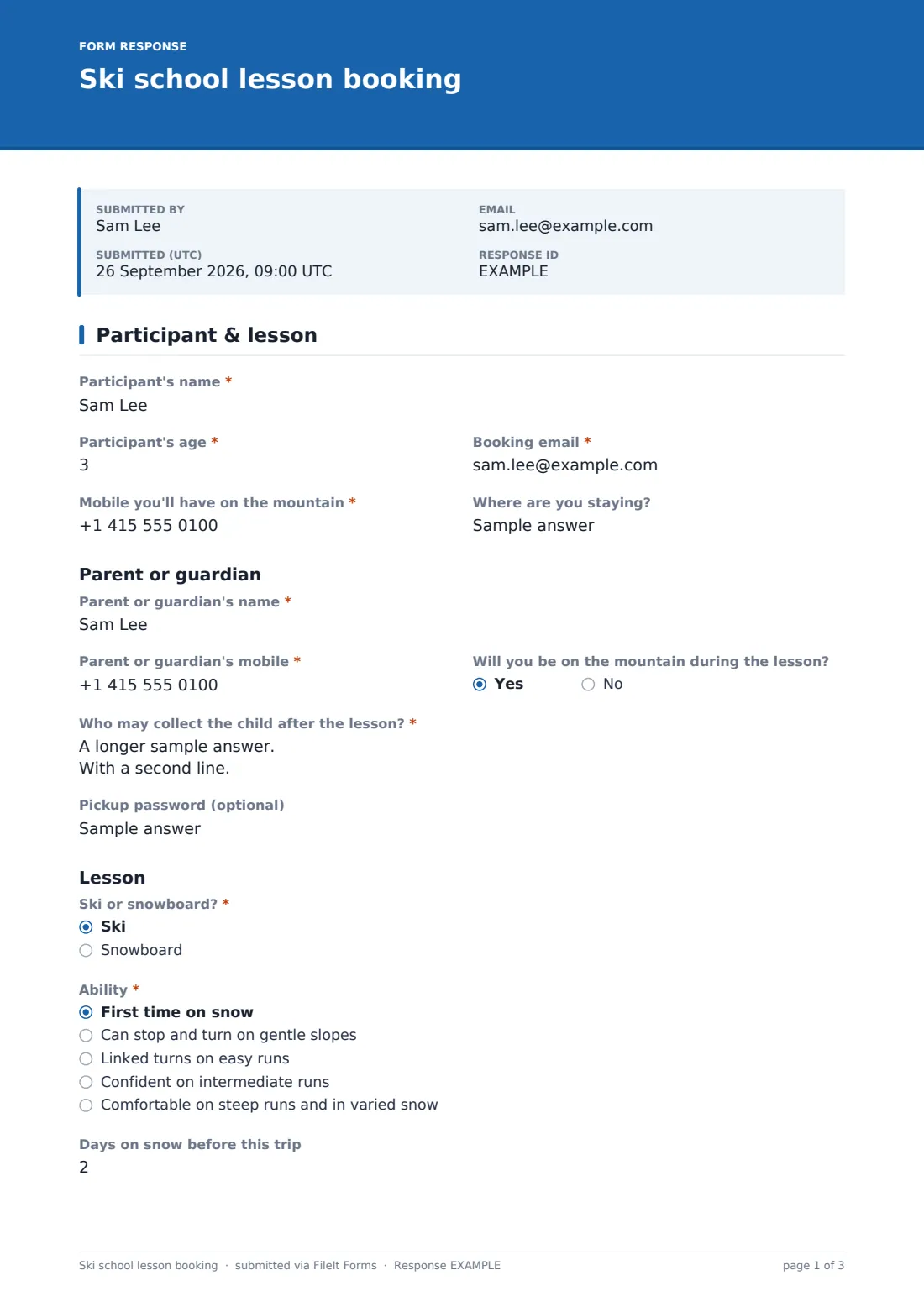
The first page asks for the participant's name and age, a booking email and the mobile the family will have on the mountain. If the participant's age is under 18, a parent or guardian section appears: the guardian's name and mobile, whether they'll be on the mountain, who may collect the child after the lesson and an optional pickup password. Then the lesson itself — ski or snowboard, ability from 'First time on snow' to 'Comfortable on steep runs and in varied snow', days on snow before, lesson type, first lesson date, number of days, session, and preferred language and instructor.
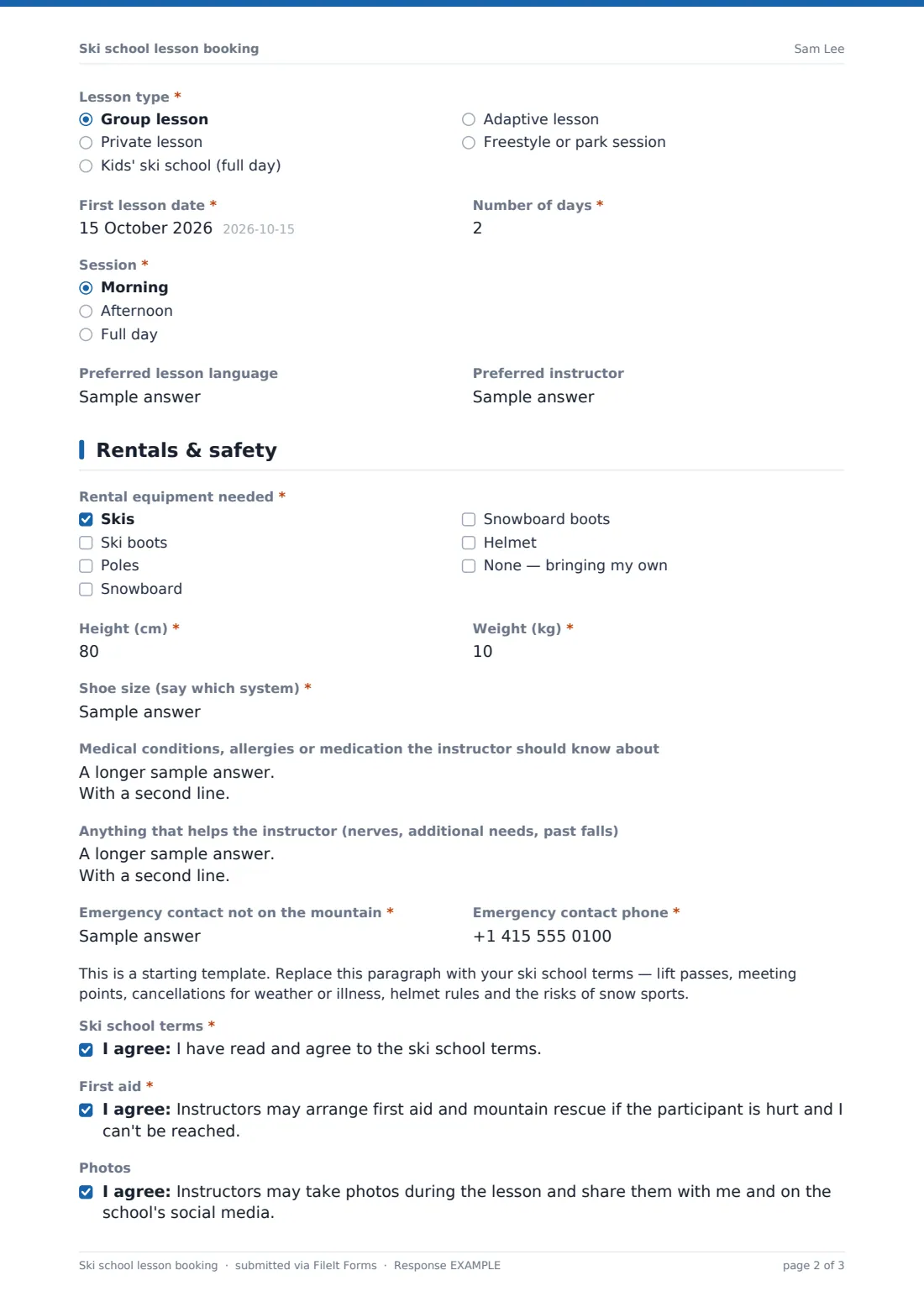
The second page covers rentals and safety. Anyone renting gives height, weight and shoe size; helmet renters add head circumference, and snowboarders give their stance. Medical notes, anything that helps the instructor, an emergency contact who isn't on the mountain, your terms and consents finish the booking. Each signed booking is saved as a PDF in your FileIt vault.
- Best for
- Ski and snowboard schools, resort lesson desks, independent instructors and ski clubs
- Filled in by
- The skier, or a parent for under-18s
- Time to complete
- About 4 minutes
- Includes
- Ability, lesson type and dates, rental sizes, guardian details, pickup authorization, consents
Who uses a ski school lesson booking form?
- A family books a week of kids' ski school before their holiday
- An adult beginner books three mornings of group snowboard lessons
- A ski school collects rental sizes so equipment is ready at the meeting point
- A parent names the grandparents allowed to collect the children
- An independent instructor takes private lesson requests from their website
- A school ski trip organiser gathers ability levels for each pupil
Questions on this ski school lesson booking form
33 questions over 2 pages · includes signature, conditional questions, multiple pages, consent checkbox.
1 Participant & lesson
- Participant's name*
- Participant's age*
- Booking email*
- Mobile you'll have on the mountain*
- Where are you staying?
- Parent or guardian's name* asked only when it applies
- Parent or guardian's mobile* asked only when it applies
- Will you be on the mountain during the lesson? asked only when it applies
- Who may collect the child after the lesson?* asked only when it applies
- Pickup password (optional) asked only when it applies
- Ski or snowboard?* Ski · Snowboard
- Ability* First time on snow · Can stop and turn on gentle slopes · Linked turns on easy runs · Confident on intermediate runs · Comfortable on steep runs and in varied snow
- Days on snow before this trip
- Lesson type* Group lesson · Private lesson · Kids' ski school (full day) · Adaptive lesson · Freestyle or park session
- First lesson date*
- Number of days*
- Session* Morning · Afternoon · Full day
- Preferred lesson language
- Preferred instructor
2 Rentals & safety
- Rental equipment needed* Skis · Ski boots · Poles · Snowboard · Snowboard boots · Helmet · None — bringing my own
- Height (cm)* asked only when it applies
- Weight (kg)* asked only when it applies
- Shoe size (say which system)* asked only when it applies
- Head circumference for a helmet (cm) asked only when it applies
- Snowboard stance asked only when it applies Regular (left foot forward) · Goofy (right foot forward) · Not sure
- Medical conditions, allergies or medication the instructor should know about
- Anything that helps the instructor (nerves, additional needs, past falls)
- Emergency contact not on the mountain*
- Emergency contact phone*
- Ski school terms*
- First aid*
- Photos
- Signature (parent or guardian for under-18s)*
The ski school lesson booking form, page by page
1 Participant & lesson
Participant's name and age, booking email and mountain mobile (required), and where they're staying. Under-18s show a guardian section: name and mobile (required), whether they'll be on the mountain, a required list of who may collect the child and an optional pickup password. Then required ski or snowboard, ability, lesson type, first lesson date, number of days and session, plus days on snow before, lesson language and preferred instructor.
2 Rentals & safety
A required rental checklist; anyone renting gives height, weight and shoe size (required), helmet renters add head circumference, and snowboarders choose regular or goofy stance. Medical notes, other needs, a required emergency contact not on the mountain, your terms placeholder, required consents to the terms and to first aid, an optional photo consent and the signature.
Make the template yours
- Replace the placeholder with your meeting points, cancellation rules and terms
- Change the minimum age to the youngest age you teach
- Rename the ability levels to match your school's groups or badges
- Remove the rental questions if equipment is booked separately
- Swap centimetres and kilograms for feet and pounds if that suits your guests
- Add a lift pass question if you sell passes with lessons
Tips for a better ski school lesson booking form
- Use the ability answers to draft groups the night before, then adjust on the first run
- Send rental sizes to the rental shop as soon as bookings close
- Print the pickup list for each kids' group and check names at handover
- Ask families to update the form if collection arrangements change during the week
- Make sure instructors read the medical notes before the lesson starts
Every response becomes a PDF in your vault
Each booking is filed as a signed PDF in your FileIt vault, and the lesson desk can be emailed for every one. Families see your confirmation and can receive a copy.
Filter the Responses table by first lesson date or ability, or export to CSV for the rental shop and group lists.
- Start from this template. It opens in the FileIt Forms designer — change any question, add pages, set the rules for when questions appear.
- Share it. Turn on a public link, or send it to people by email, each with their own link. They don’t need a FileIt account.
- Get the answers as PDFs. Each response is saved as a PDF in the vault folder you choose, with uploaded files attached — and listed in a Responses table you can export to CSV.
Ski school lesson booking form: frequently asked questions
Is the ski school lesson booking template free?
Yes. It's one of the starter templates in the FileIt Forms app, included on the free plan.
What changes for children?
When the participant's age is under 18, the form asks for a parent or guardian's details, who may collect the child and an optional pickup password.
Does it work for snowboard lessons?
Yes. Choose snowboard and the rental section also asks for stance.
Does the form confirm the lesson?
No. It records the request; the ski school confirms the group, time and meeting point.
Can I book several family members?
Each participant has their own form so ability and rental sizes stay separate. Use the same link again.
Do families need a FileIt account?
No. They book and sign from a link.