What is the ski & snowboard rental form form template?
The busiest hour in any ski shop is the first one of the day, and much of it goes on clipboards: height, weight, shoe size, how do you ski, sign here. This ski and snowboard rental form moves that to the evening before. Each renter fills it in on their phone, and the technician can have the equipment set up when they walk in.
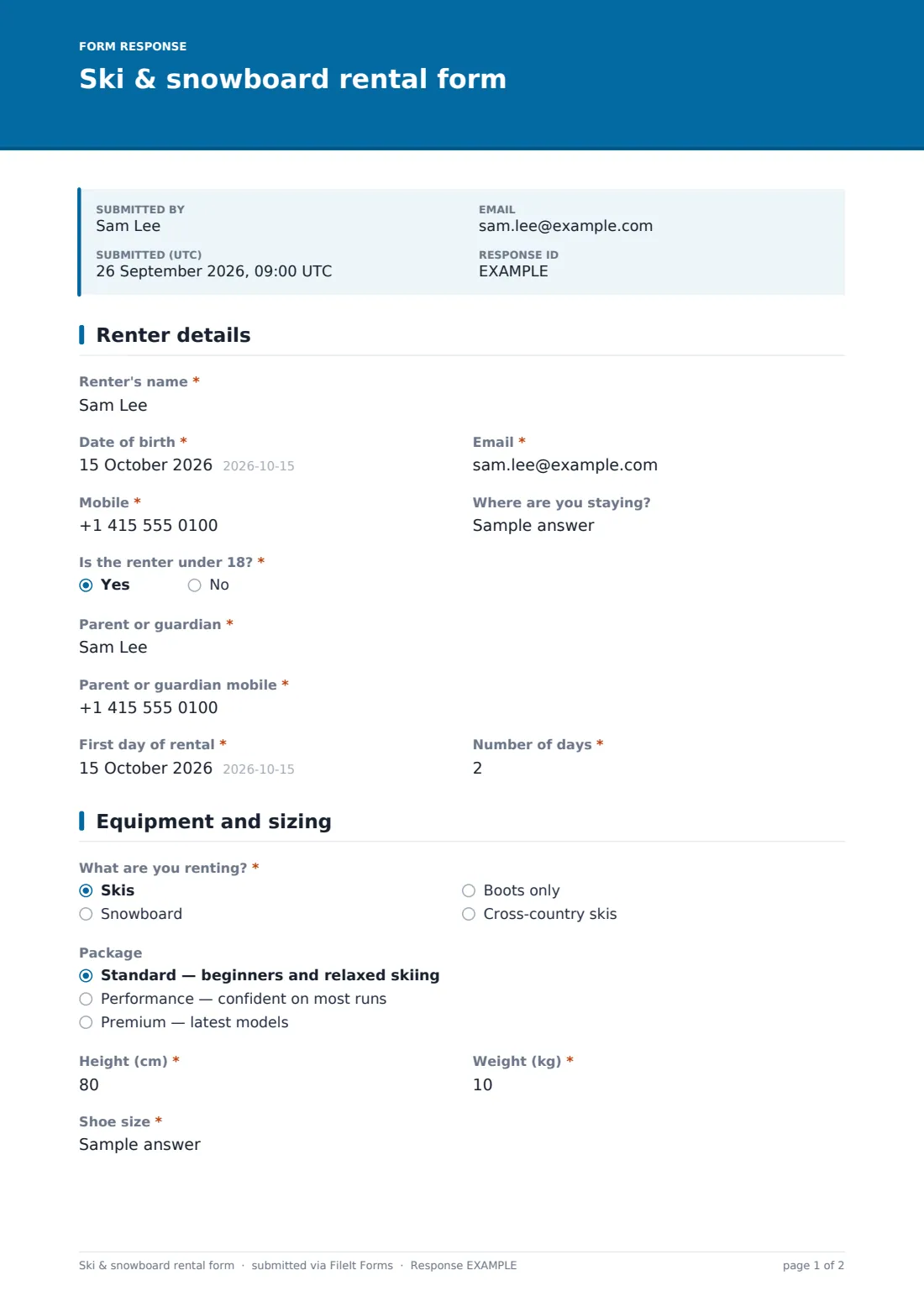
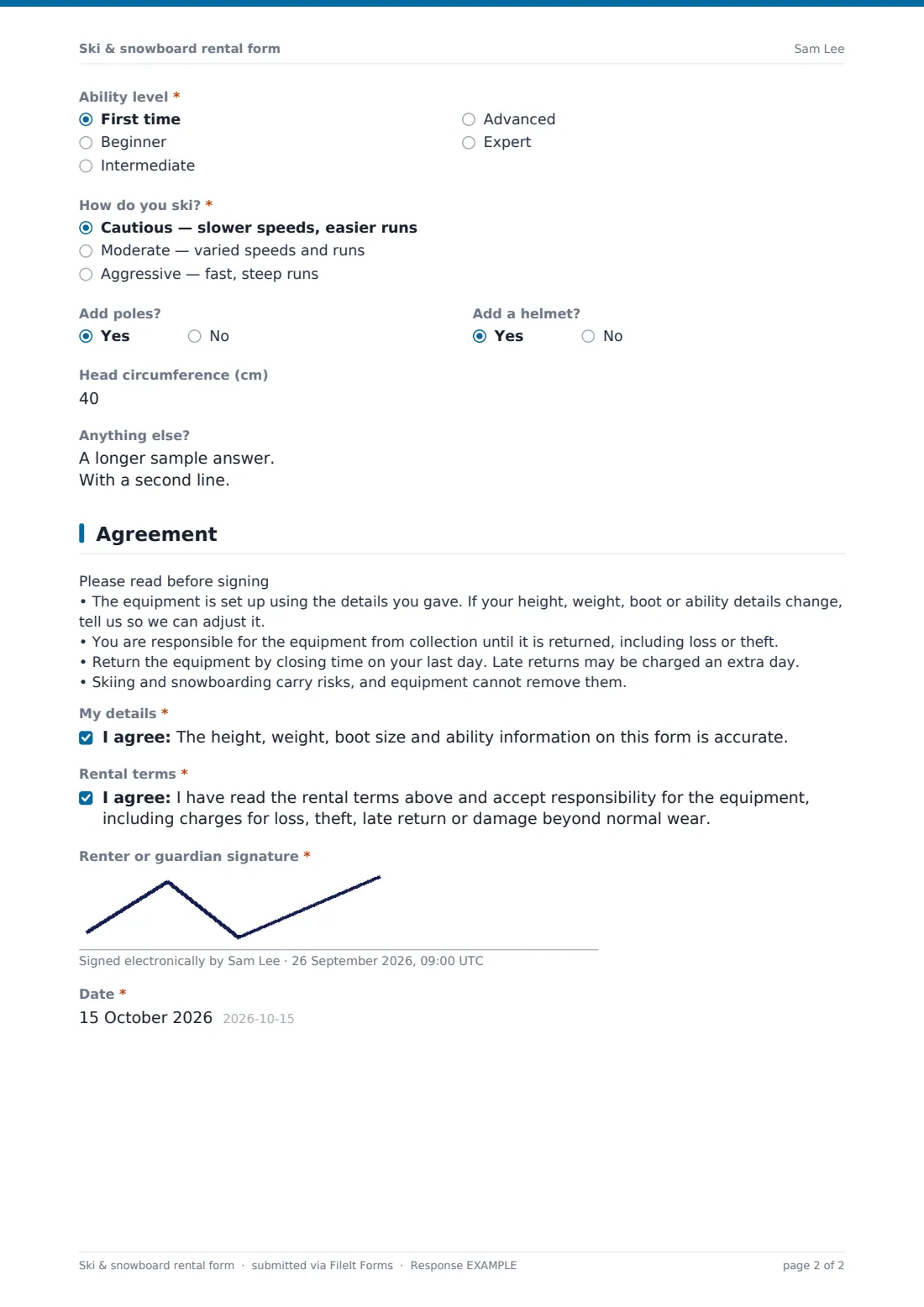
The form changes with what's being rented. Skiers answer "How do you ski?" — cautious, moderate or aggressive — which the technician uses when choosing release settings, and they're offered poles. Snowboarders give their stance instead. Boots-only renters skip the package choice. A renter under 18 brings up fields for a parent or guardian, who signs on their behalf. Helmets are an add-on, with a head circumference question when chosen.
The final page sets out your rental terms in plain words, asks the renter to confirm their details are accurate, and takes a signature. Each signed form is filed as a PDF in your FileIt vault.
- Best for
- Ski and snowboard rental shops, resort hire desks and chalet operators
- Filled in by
- Each renter, or a parent or guardian for children
- Time to complete
- About 4 minutes per person
- Includes
- Sizing, ability, skier type or stance, add-ons, rental terms, two consents and a signature
Who uses a ski & snowboard rental form form?
- Sending the form with every booking so equipment is ready on day one
- A chalet company collecting rental details for a whole group before the transfer
- A family filling in one form per child, with the parent signing for each
- A cross-country centre fitting boots and skis for guided tours
- Keeping a signed record of the terms each renter agreed to
Questions on this ski & snowboard rental form form
26 questions over 3 pages · includes signature, conditional questions, multiple pages, consent checkbox.
1 Renter details
- Renter's name*
- Date of birth*
- Email*
- Mobile*
- Where are you staying?
- Is the renter under 18?*
- Parent or guardian* asked only when it applies
- Parent or guardian mobile* asked only when it applies
- First day of rental*
- Number of days*
2 Equipment and sizing
- What are you renting?* Skis · Snowboard · Boots only · Cross-country skis
- Package asked only when it applies Standard — beginners and relaxed skiing · Performance — confident on most runs · Premium — latest models
- Height (cm)*
- Weight (kg)*
- Shoe size*
- Ability level* First time · Beginner · Intermediate · Advanced · Expert
- How do you ski?* asked only when it applies Cautious — slower speeds, easier runs · Moderate — varied speeds and runs · Aggressive — fast, steep runs
- Snowboard stance* asked only when it applies Regular (left foot forward) · Goofy (right foot forward) · Not sure
- Add poles? asked only when it applies
- Add a helmet?
- Head circumference (cm) asked only when it applies
- Anything else?
3 Agreement
- My details*
- Rental terms*
- Renter or guardian signature*
- Date*
The ski & snowboard rental form form, page by page
1 Renter details
The renter gives their name, date of birth, email, mobile and "Where are you staying?". "Is the renter under 18?" is required, and a yes asks for a parent or guardian's name and mobile. The page ends with "First day of rental" and "Number of days".
2 Equipment and sizing
"What are you renting?" offers skis, snowboard, boots only, or cross-country skis. Anyone renting more than boots chooses a package: standard, performance or premium. Everyone gives height in centimetres, weight in kilograms, shoe size with the sizing system, and an ability level from first time to expert.
Skiers answer "How do you ski?", and help text explains it guides the technician's release settings. They're also asked "Add poles?". Snowboarders choose a regular or goofy stance, or say they're not sure. "Add a helmet?" asks for head circumference when the answer is yes, and a free-text box covers anything else — wide feet, a softer board, an old knee injury.
3 Agreement
A short paragraph covers the terms. The equipment is set up from the renter's details, the renter is responsible for it until it's returned, late returns may cost an extra day, and the sport carries risks that equipment cannot remove. The renter ticks two consents — that their details are accurate, and that they accept the rental terms and charges — then signs and dates.
Make the template yours
- Rename the packages and add your prices to the labels
- Rewrite the terms paragraph to match your own rental agreement
- Add a question for a damage protection add-on if you offer one
- Set a maximum number of responses for a limited fleet on a busy week
- File forms in a folder per season so last year's records stay separate
Tips for a better ski & snowboard rental form form
- Send the link a few days before arrival and remind people the evening before
- Ask each person to fill in their own form, including each child, so nothing gets mixed up
- Double-check weight and ability at fitting — people often guess
- Search the Responses table by name at the counter to find a renter in seconds
- Keep the signed form with the equipment numbers you hand out
Every response becomes a PDF in your vault
The signed rental form is saved as a PDF in your vault and you're notified by email. The renter gets a copy of their answers by email, which is useful at the counter if they want to check what they entered.
The Responses table can be searched by name and exported to CSV, giving your technicians a set-up list for the next morning sorted however you like — by start date, equipment type or package.
- Start from this template. It opens in the FileIt Forms designer — change any question, add pages, set the rules for when questions appear.
- Share it. Turn on a public link, or send it to people by email, each with their own link. They don’t need a FileIt account.
- Get the answers as PDFs. Each response is saved as a PDF in the vault folder you choose, with uploaded files attached — and listed in a Responses table you can export to CSV.
Ski & snowboard rental form form: frequently asked questions
Is this ski rental form template free?
Yes. It's one of the ready-made templates in the Forms app on every FileIt account, including the free plan.
Does the form calculate binding settings?
No. It collects the height, weight, boot size, age and skier type your technician uses. The setting itself is done in the shop by your staff.
Can a parent sign for a child?
Yes. When the renter is under 18 the form asks for a parent or guardian, and the signature line reads "Renter or guardian signature".
Can a family use one form?
The template is one form per person, because each renter needs their own sizing. Families simply submit it once for each person.
Can I take a deposit through the form?
No. The form doesn't take payments. Take deposits through your own booking or till system.
Are the rental terms legally checked?
No. They're a plain-language starting point. Replace them with your own terms and check them for your situation.