
What is the training course enrollment form template?
Enrolling an adult learner takes more than a name and email. Providers usually need to know about their prior qualifications, who's paying — and, if it's their employer, who to invoice — and whether they need any support to take part.
This template covers the full enrollment: learner details, course choice and study mode, reasons for studying, highest qualification and relevant experience, recognition of prior learning with certificate uploads, funding and invoicing, support needs, an emergency contact and declarations.
Each enrollment becomes a PDF in your vault, alongside any certificates uploaded, so your admissions team has a complete record.
- Best for
- Training providers, colleges, professional bodies and adult education centers
- Filled in by
- Adult learners enrolling themselves
- Time to complete
- About 10 minutes
- Includes
- Recognition of prior learning, employer invoicing questions, a fee field, support needs and two declarations
Who uses a training course enrollment form?
- Professional and CPD courses paid for by employers
- Evening and weekend adult education classes
- Online or blended short courses
- Courses where prior qualifications may give credit or exemptions
- Funded training where the funding source must be recorded
- Planning support for learners with disabilities or learning differences
Questions on this training course enrollment form
31 questions over 5 pages · includes file upload, conditional questions, multiple pages, consent checkbox.
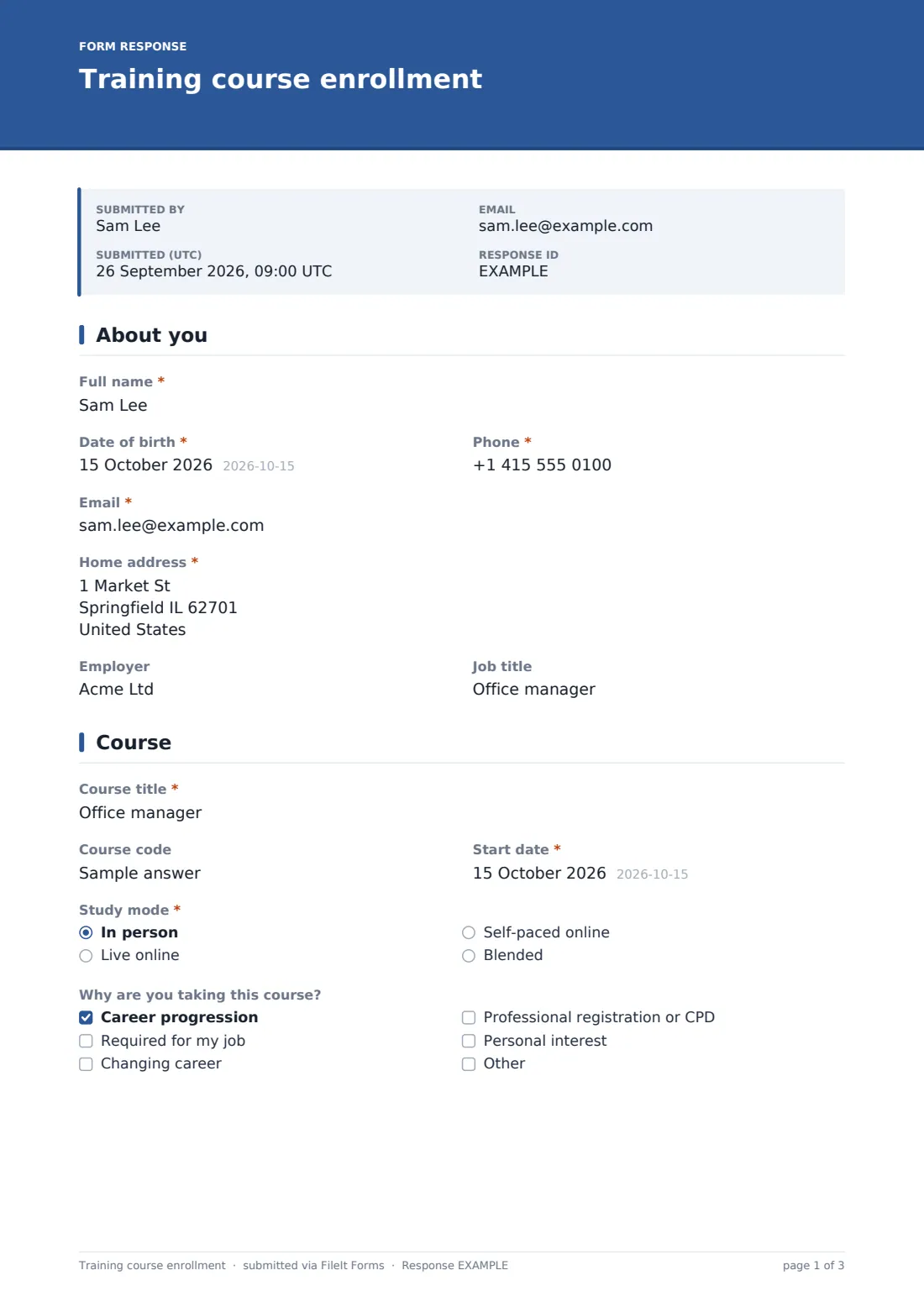
1 About you
- Full name*
- Date of birth*
- Phone*
- Email*
- Home address*
- Employer
- Job title
2 Course
- Course title*
- Course code
- Start date*
- Study mode* In person · Live online · Self-paced online · Blended
- Why are you taking this course? Career progression · Required for my job · Changing career · Professional registration or CPD · Personal interest
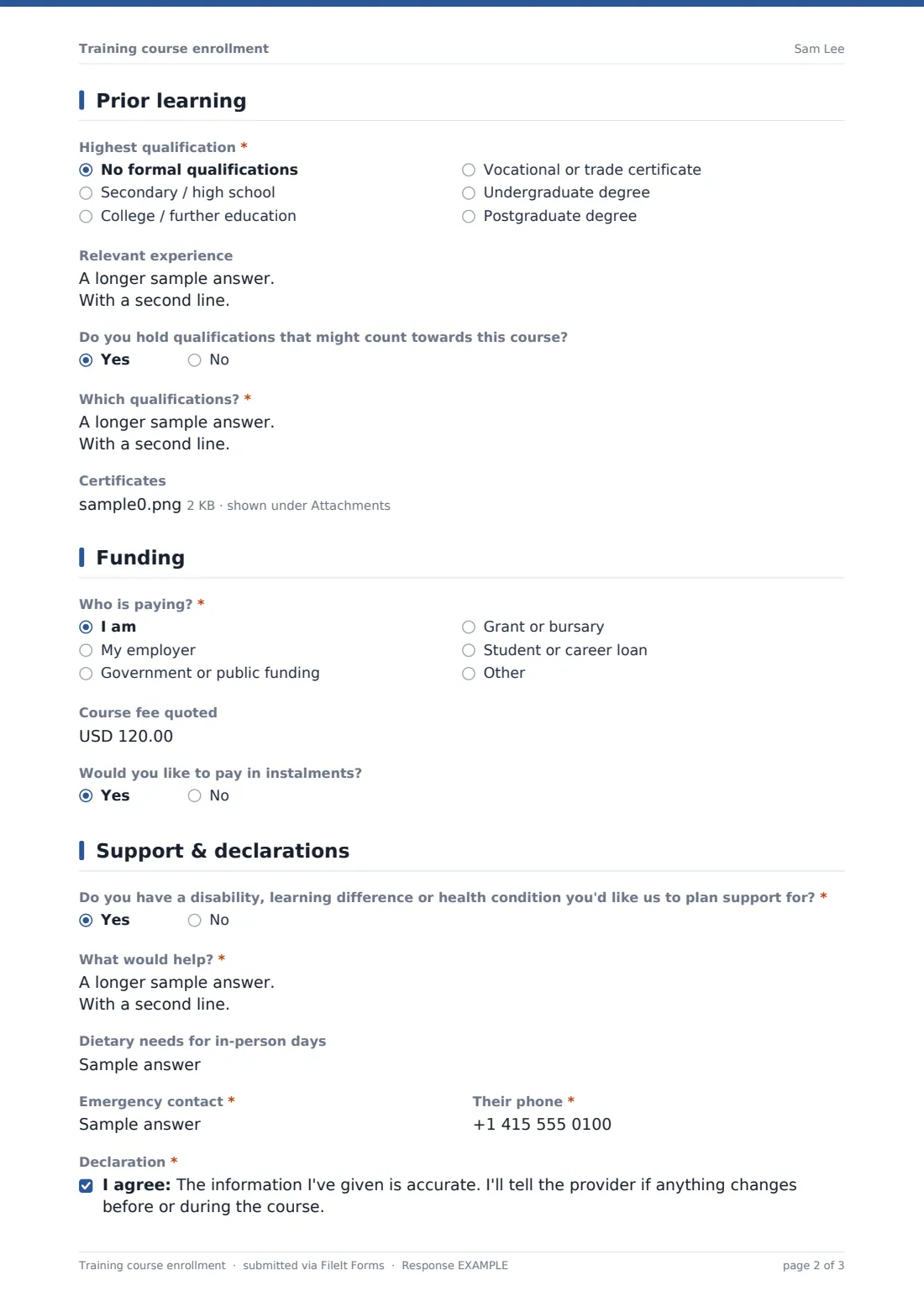
3 Prior learning
- Highest qualification* No formal qualifications · Secondary / high school · College / further education · Vocational or trade certificate · Undergraduate degree · Postgraduate degree
- Relevant experience
- Do you hold qualifications that might count towards this course?
- Which qualifications?* asked only when it applies
- Certificates asked only when it applies
4 Funding
- Who is paying?* I am · My employer · Government or public funding · Grant or bursary · Student or career loan
- Employer invoicing contact* asked only when it applies
- Invoicing email* asked only when it applies
- Purchase order number asked only when it applies
- Course fee quoted
- Would you like to pay in instalments? asked only when it applies
5 Support & declarations
- Do you have a disability, learning difference or health condition you'd like us to plan support for?*
- What would help?* asked only when it applies
- Dietary needs for in-person days
- Emergency contact*
- Their phone*
- Declaration*
- Course terms*
- Send me news about future courses
The training course enrollment form, page by page
1 About you
The learner's name, date of birth, phone, email and home address are required, with optional employer and job title.
2 Course
The course title and start date are required, with an optional course code. The learner chooses in person, live online, self-paced or blended study, and ticks why they're taking the course.
3 Prior learning
The highest qualification is required. An optional box covers relevant experience, and a yes/no asks about qualifications that might count towards the course — a yes asks which ones and lets the learner upload certificates.
4 Funding
A required question asks who is paying: the learner, their employer, public funding, a grant or bursary, a loan or something else. Choosing an employer asks for an invoicing contact, email and purchase order number. There's a field for the course fee quoted and, for self-funded learners, an option to pay in instalments.
5 Support & declarations
A required yes/no asks about a disability, learning difference or health condition the provider should plan support for, opening a box for what would help. Dietary needs and an emergency contact follow, then two required declarations — that the information is accurate and that the learner has read the course terms including cancellation and refunds — and an optional opt-in for news about future courses.
Make the template yours
- Change the fee field's currency to your own
- Replace the funding options with the schemes you work with
- Add a dropdown of your course list instead of free-text course titles
- Remove the prior learning page for courses that don't offer credit
- File enrollments in a folder per course or intake
- Set a response limit when a course has a fixed number of places
Tips for a better training course enrollment form
- Ask employers for a purchase order early — it speeds up invoicing
- Contact learners who request support before the course starts
- Check prior learning certificates against the course requirements
- Link your terms and refund policy in the cover text
- Close enrollment a few days before the start date for joining instructions
- Keep enrollment records for as long as your funding or accreditation rules require
Every response becomes a PDF in your vault
When a learner enrolls, FileIt saves the form as a PDF with any uploaded certificates and files it in your chosen vault folder. You're notified, and the learner can receive a PDF copy.
Admissions teams typically use the Responses table to confirm places, raise invoices for employer-funded learners, and follow up support requests. The CSV export gives a class list for each intake.
- Start from this template. It opens in the FileIt Forms designer — change any question, add pages, set the rules for when questions appear.
- Share it. Turn on a public link, or send it to people by email, each with their own link. They don’t need a FileIt account.
- Get the answers as PDFs. Each response is saved as a PDF in the vault folder you choose, with uploaded files attached — and listed in a Responses table you can export to CSV.
Training course enrollment form: frequently asked questions
Is this course enrollment template free?
Yes. It's included with the Forms app on every FileIt account, including the free plan.
Can employers be invoiced?
The form collects the employer's invoicing contact, email and purchase order number when the employer is paying. You raise the invoice yourself.
Can learners upload certificates?
Yes. Learners who say they have qualifications that may count towards the course can upload up to five certificates.
Can I limit the number of places?
Yes. Set a maximum number of responses in the form's settings.
Does the form take payment?
No. It records the fee quoted and who is paying. Payment is handled separately.
Do learners need a FileIt account?
No. They enroll from a link without an account.