What is the salary advance request form template?
An unexpected bill doesn't wait for payday. Many employers will advance part of someone's pay in a genuine emergency, but the request is often awkward to make and easy to handle inconsistently: an informal chat, no agreed repayment plan, nothing in writing when the person later leaves.
This template makes the request simple and private. The employee says how much they need and by when, chooses a reason category (with Prefer not to say as an option), and picks a repayment schedule, from one pay period to three or a schedule of their own. It asks about any previous advance in the last year and where the money should be paid. Bank details are only asked for when it's going to a different account.
The employee signs a repayment agreement, and FileIt files the request as a PDF in your vault for the manager and payroll to act on.
- Best for
- Employers that offer pay advances or small employee loans
- Filled in by
- The employee asking for the advance
- Time to complete
- About 5 minutes
- Includes
- A private reason list, repayment options, previous-advance and bank follow-ups, and a signed agreement
Who uses a salary advance request form?
- Handling emergency pay advance requests consistently across a business
- Recording agreed repayment schedules before payroll makes deductions
- Keeping a signed record in case an employee leaves before repaying
- Checking for previous advances before approving a new one
- Offering support information alongside the request
Questions on this salary advance request form
22 questions over 4 pages · includes signature, conditional questions, multiple pages, consent checkbox.
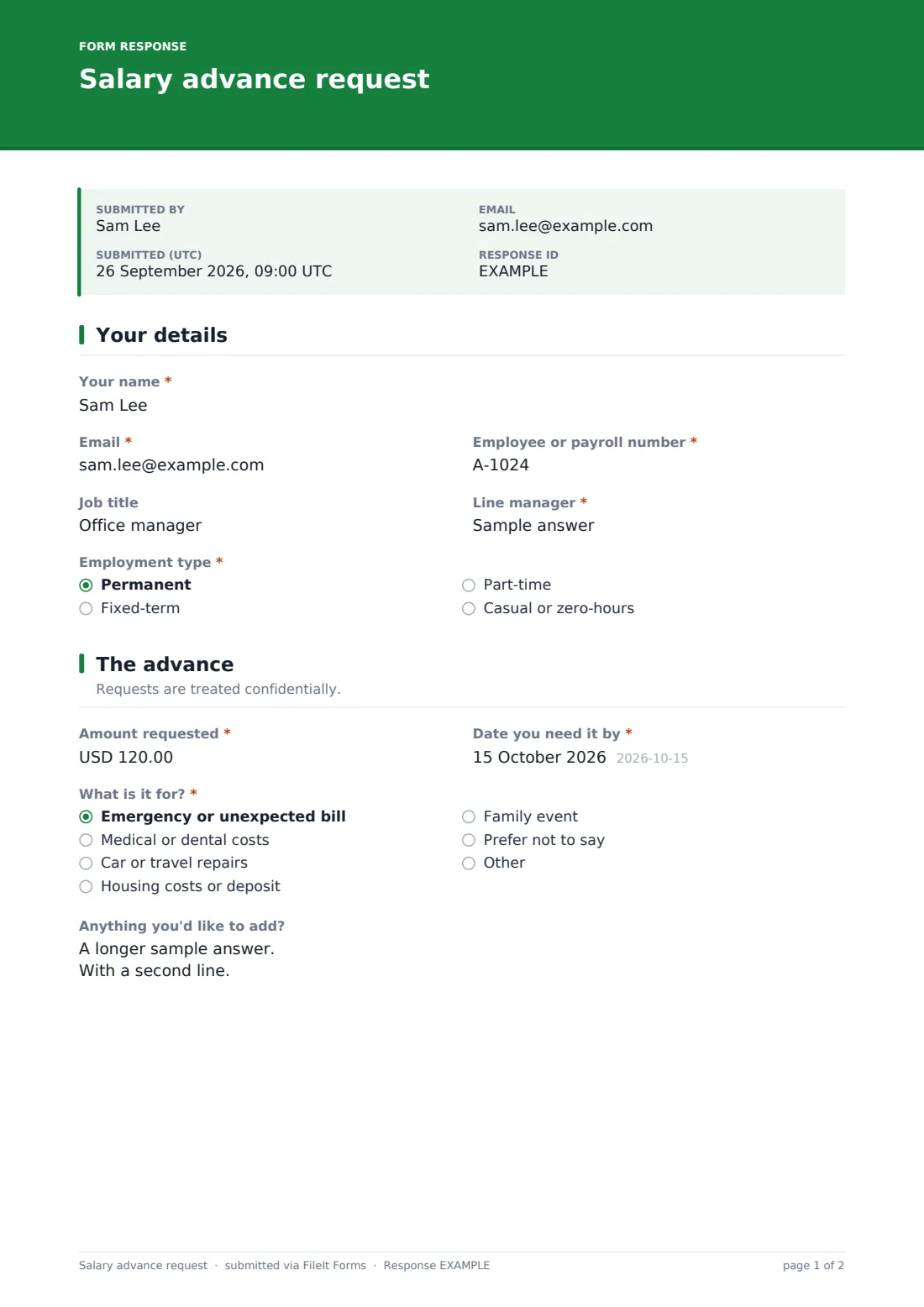
1 Your details
- Your name*
- Email*
- Employee or payroll number*
- Job title
- Line manager*
- Employment type* Permanent · Fixed-term · Part-time · Casual or zero-hours
2 The advance
- Amount requested*
- Date you need it by*
- What is it for?* Emergency or unexpected bill · Medical or dental costs · Car or travel repairs · Housing costs or deposit · Family event · Prefer not to say · Other
- Anything you'd like to add?
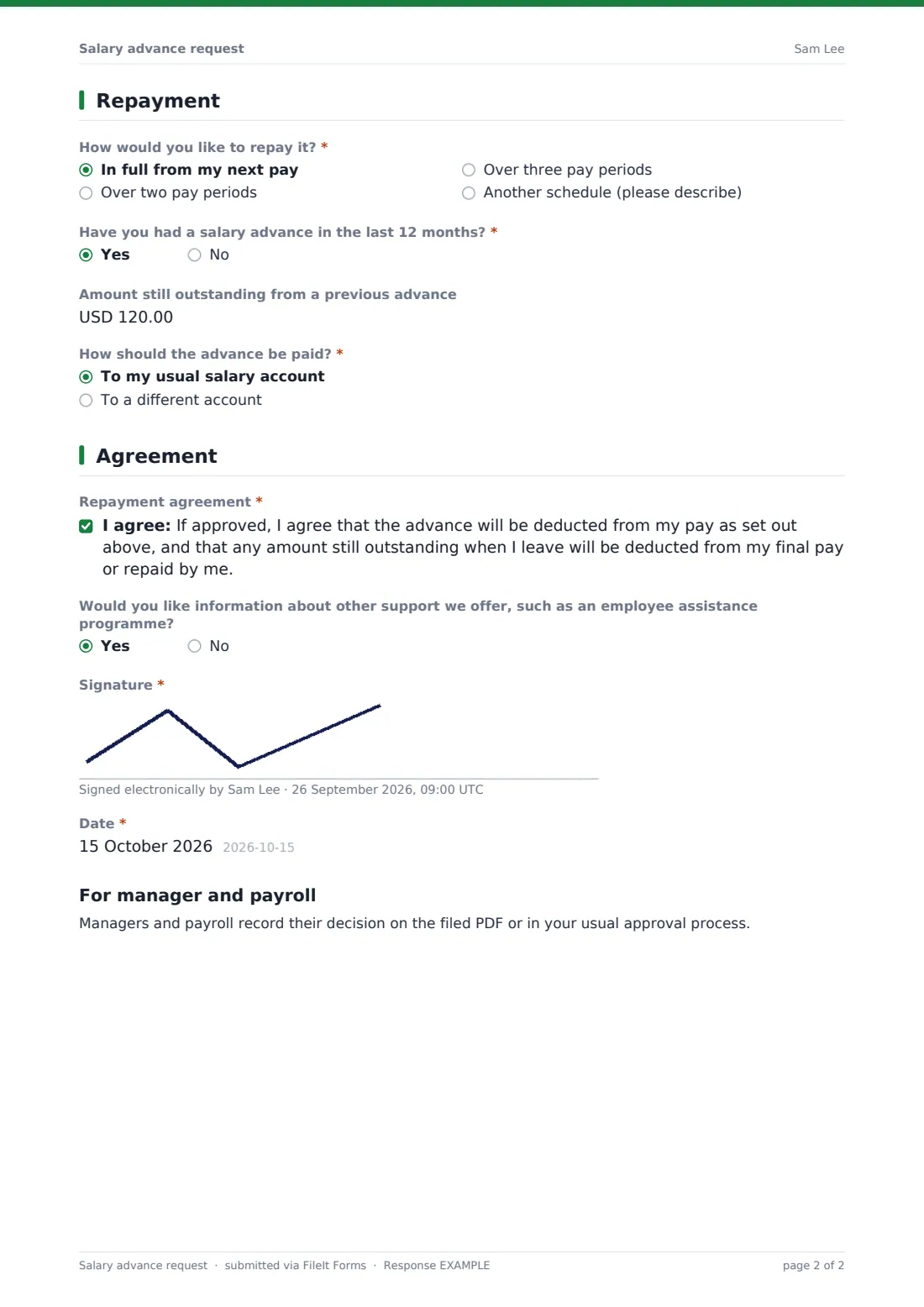
3 Repayment
- How would you like to repay it?* In full from my next pay · Over two pay periods · Over three pay periods · Another schedule (please describe)
- Describe the schedule you'd like* asked only when it applies
- Have you had a salary advance in the last 12 months?*
- Amount still outstanding from a previous advance asked only when it applies
- How should the advance be paid?* To my usual salary account · To a different account
- Account holder name* asked only when it applies
- Account number or IBAN* asked only when it applies
- Sort code, routing number or SWIFT asked only when it applies
4 Agreement
- Repayment agreement*
- Would you like information about other support we offer, such as an employee assistance programme?
- Signature*
- Date*
The salary advance request form, page by page
1 Your details
The employee gives their name, email, employee or payroll number, job title and line manager, and their employment type: permanent, fixed-term, part-time, or casual or zero-hours.
2 The advance
Amount requested and Date you need it by are required. What is it for? lists common reasons such as an unexpected bill, medical or dental costs, car repairs, housing costs or a family event, with help text saying the category is enough and Prefer not to say included. An optional box lets them add anything else.
3 Repayment
How would you like to repay it? offers in full from the next pay, over two or three pay periods, or another schedule, which opens a box to describe it. Have you had a salary advance in the last 12 months? is required, and a Yes asks how much is still outstanding.
The employee chooses whether the advance goes to their usual salary account or a different one. A different account opens questions for the account holder name, account number or IBAN, and sort code, routing number or SWIFT.
4 Agreement
The employee ticks a repayment agreement: if approved, the advance is deducted from their pay as set out, and any amount outstanding when they leave is deducted from their final pay or repaid. They can ask for information about other support, such as an employee assistance programme, then sign and date. A short closing section reminds managers and payroll to record their decision in your usual approval process.
Make the template yours
- Set the currency and a maximum amount that matches your policy
- Edit the repayment options to fit your pay frequency
- Have the repayment agreement wording checked against your employment terms
- Send requests to a private payroll folder with limited access
- Add payroll and HR to the notification emails
Tips for a better salary advance request form
- Publish a short policy on how often and how much can be advanced
- Respond quickly, since these requests are usually urgent
- Keep requests confidential to the people who need to approve them
- Confirm the approved schedule in writing before the first deduction
- Point people to other support if advances become frequent
Every response becomes a PDF in your vault
Each request is filed as a PDF in the vault folder you chose, titled with the employee's name and date, including the repayment choice and signature. The owner is notified by email, and the employee can be sent their own copy.
In the Responses table, payroll can search for an employee to see earlier requests, open each PDF, and export to CSV to track amounts and repayment schedules.
- Start from this template. It opens in the FileIt Forms designer — change any question, add pages, set the rules for when questions appear.
- Share it. Turn on a public link, or send it to people by email, each with their own link. They don’t need a FileIt account.
- Get the answers as PDFs. Each response is saved as a PDF in the vault folder you choose, with uploaded files attached — and listed in a Responses table you can export to CSV.
Salary advance request form: frequently asked questions
Is this salary advance form free?
Yes. It's a starter template in FileIt's Forms app, and you can change every question.
Does the form approve the advance?
No. It collects the request and the signed agreement. Approval and payment happen through your own process.
Do employees have to explain why they need the money?
No. They choose a category, and Prefer not to say is one of the options. Extra detail is optional.
Is the repayment agreement legally enforceable?
The wording is a plain starting point. Rules on pay deductions vary, so check it against your employment terms and local rules before relying on it.
Are bank details kept secure?
Answers are encrypted when stored, and the PDF is filed in the vault folder you choose. Pick a folder only payroll can open.
Can I see if someone had an advance before?
The form asks, and you can also search the Responses table for earlier requests from the same employee.