
What is the rental property expense log form template?
Landlords rarely lose track of the big costs. It's the forty-dollar plumbing part, the listing fee and the drive to show the unit that slip away. By the time the accountant asks for totals, half the receipts have faded or vanished. A log that takes a minute per cost, filled in on your phone while you're still at the counter, fixes most of that.
This template records one expense per entry. You give the property and unit, the "Date paid" and a "Category" from a list built around rental costs: repairs and maintenance, property management fees, insurance, property tax, mortgage interest, utilities, cleaning and turnover, HOA fees, professional fees, advertising, travel to the property, supplies and more. "What was it for?", the amount, "Paid to", the payment method and an invoice or check number follow, then the receipt itself.
One category works differently. Choose "Capital improvement" and the form asks you to "Describe the improvement" and when it was finished or put into use. Those are the details you'll want later for depreciation records, while the decision about how to treat the cost stays with your tax adviser. Each entry is filed in your FileIt vault as a PDF with the receipt attached, and the response table exports straight to a spreadsheet.
- Best for
- Landlords with one or more rental properties, and the people who keep their books
- Filled in by
- The landlord, a co-owner or a property manager
- Time to complete
- About 1 minute per expense
- Includes
- Fifteen expense categories, capital improvement details, payment method, receipt upload and CSV export
Who uses a rental property expense log form?
- Logging repair and supply receipts as you pay for them
- Couples or partners who co-own a rental and both spend on it
- Property managers recording costs on behalf of an owner
- Tracking a renovation between tenants, item by item
- Separating costs you'll recharge to a tenant
- Handing a year's expenses to a bookkeeper as one spreadsheet
Questions on this rental property expense log form
14 questions · includes file upload, conditional questions.
1 Expense
- Property*
- Unit
- Date paid*
- Category* Repairs and maintenance · Capital improvement · Property management fees · Insurance · Property tax · Mortgage interest · Utilities · Cleaning and turnover · Landscaping and snow removal · HOA or condo fees · Legal and professional fees · Advertising and listing fees
- Describe the improvement* asked only when it applies
- Date finished or put into use asked only when it applies
- What was it for?*
- Amount*
- Paid to*
- Paid by Card · Bank transfer · Check · Cash
- Invoice or check number
- Will you charge this back to a tenant?
- Receipt or invoice
- Notes
The rental property expense log form, page by page
1 Expense
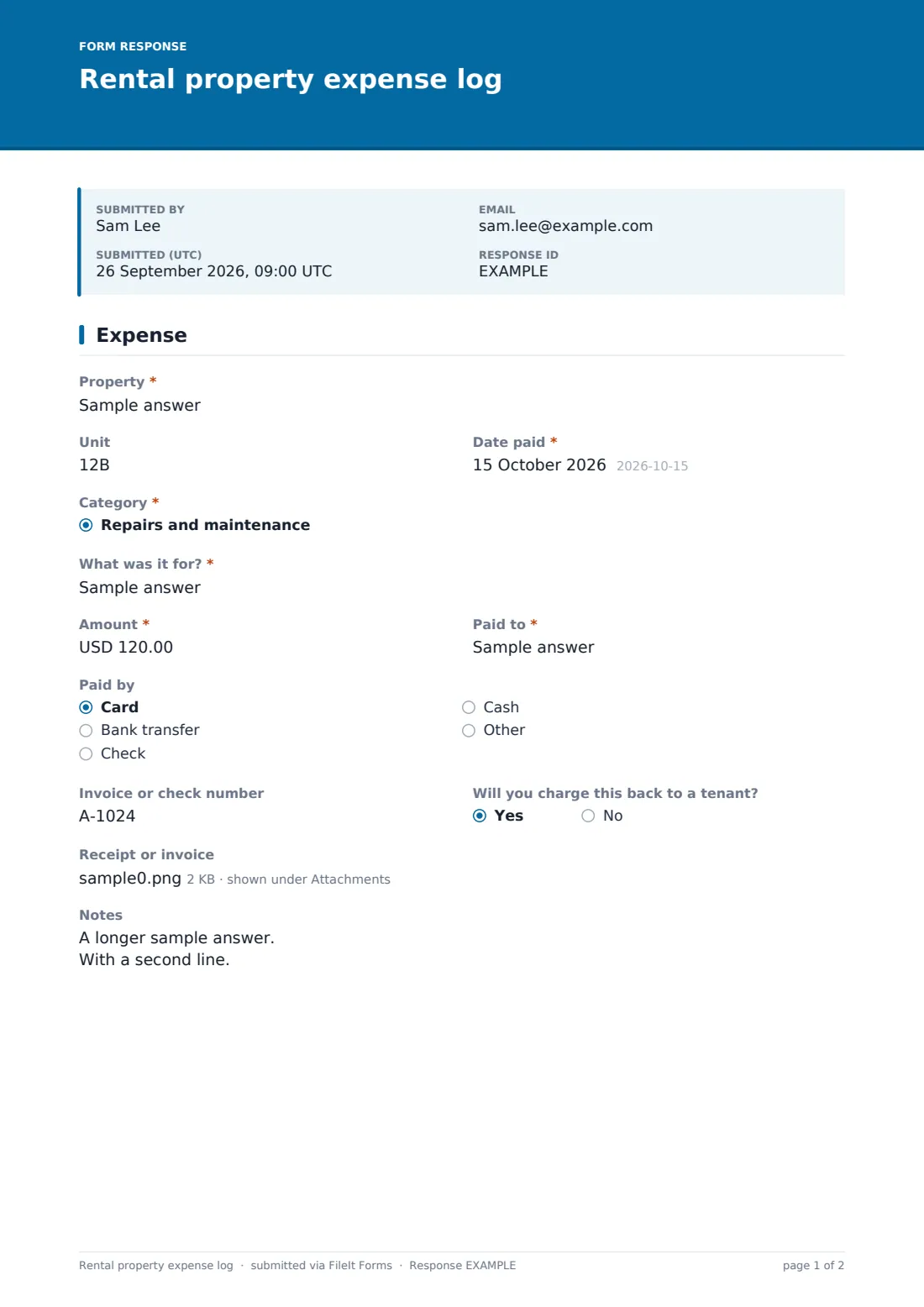
"Property" accepts an address or the nickname you use. There's an optional unit, then the "Date paid" and the "Category" dropdown. When the category is capital improvement, two more fields appear: "Describe the improvement", with a note that the details are for your depreciation records, and "Date finished or put into use". Every entry then asks "What was it for?", the amount, "Paid to", and how it was paid — card, bank transfer, check, cash or other — with an invoice or check number. "Will you charge this back to a tenant?" flags recoverable costs. Up to three receipts or invoices can be uploaded, and there's a notes box.
Make the template yours
- Turn "Property" into a dropdown of your addresses so entries match exactly
- Change the currency if your rentals aren't in US dollars
- Rename categories to match your accountant's chart of accounts
- Make the receipt upload required if you want every entry backed up
- File each property's expenses into its own vault folder
- Add your bookkeeper as a notification address
Tips for a better rental property expense log form
- Log the expense when you pay, not at the end of the month
- Photograph paper receipts straight away — thermal paper fades
- Use the same property name every time so the CSV sorts cleanly
- Write enough in "What was it for?" that you'll understand it in a year
- Ask your tax adviser how to treat anything you've marked as a capital improvement
Every response becomes a PDF in your vault
Each expense is filed in your vault as a PDF with the receipt attached as a separate file, and the account owner is notified unless you turn that off.
At year-end, open the Responses table, search by property or vendor, and export to CSV. The amount and category columns are ready for a spreadsheet or your accountant.
- Start from this template. It opens in the FileIt Forms designer — change any question, add pages, set the rules for when questions appear.
- Share it. Turn on a public link, or send it to people by email, each with their own link. They don’t need a FileIt account.
- Get the answers as PDFs. Each response is saved as a PDF in the vault folder you choose, with uploaded files attached — and listed in a Responses table you can export to CSV.
Rental property expense log form: frequently asked questions
Is the rental property expense log free?
Yes. It's a starter template in FileIt's Forms app, on every plan including free.
Does FileIt tell me which expenses are deductible?
No. The log records costs and receipts. Questions about deductions or depreciation are for your tax adviser.
Why one entry per expense?
It keeps every receipt tied to one amount and one category, which makes the CSV export easy to total.
Can more than one person log expenses?
Yes. Share the form link with a co-owner or manager and every entry files into the same account.
Can I attach more than one receipt?
Yes, up to three files per entry.