

What is the home insurance claim form template?
A burst pipe, a storm, or a break-in rarely happens at a convenient time, and chasing down every damaged item and its rough value afterwards is tedious even when you're not stressed. This template gives you one online form to walk through the whole claim: what happened and when, which parts of the property are affected, what needs repairing or replacing, and any receipts or photos you can attach.
Doing this online instead of over the phone or in a scattered email thread means the form only asks what's relevant — a theft claim asks for a police reference and whether there was forced entry, a water-damage claim asks where the leak came from, and neither set of questions shows up for, say, a storm claim. That keeps the form quick without leaving out anything the insurer is likely to ask for.
Once it's submitted, FileIt saves the whole claim — including any item list, photos and repair quotes — as a single PDF filed in your vault, so you have one dated record of everything you reported instead of a handful of separate attachments.
- Best for
- Homeowners, landlords and tenants reporting damage or theft to their insurer
- Filled in by
- The policyholder
- Time to complete
- About 10-15 minutes, longer with an item list and photos
- Includes
- Conditional questions for water damage, theft and alternative accommodation, plus file uploads and a signature
Who uses a home insurance claim form?
- A homeowner reporting a burst pipe or other escape of water before the damage spreads further
- A landlord claiming for storm or flood damage to a rented-out property
- Reporting a burglary or attempted break-in, along with the police crime reference number
- A tenant with contents-only cover claiming for damaged or stolen belongings
- Recording accidental damage, such as a dropped television or a fire in the kitchen
- Anyone who has already paid for emergency repairs, like a plumber or a board-up, and needs to note the cost
- A household comparing a rough total claim estimate against their policy excess before deciding whether to proceed
Questions on this home insurance claim form
29 questions over 4 pages · includes signature, file upload, conditional questions, multiple pages, consent checkbox.
1 Policyholder
- Policyholder name*
- Email*
- Phone*
- Policy number*
- What does your policy cover? Buildings · Contents · Buildings and contents
- Address of the insured property*
- How is the property used? My main home · Second or holiday home · Rented out to tenants · I rent it (tenant)
2 What happened
- When did it happen?*
- When did you discover it?
- Cause of the loss or damage* Escape of water (burst pipe, leak) · Flood · Storm or wind · Fire or smoke · Theft or burglary · Vandalism or malicious damage · Accidental damage · Subsidence or ground movement · Power surge or electrical fault
- Where did the water come from, and has the leak been stopped? asked only when it applies
- Was there any sign of forced entry? asked only when it applies
- Police crime reference number* asked only when it applies
- Describe what happened*
- Which parts of the property are affected? Walls, floors or ceilings · Roof or gutters · Kitchen · Bathroom · Living areas · Bedrooms · Garage, shed or garden · Furniture and belongings
- Can you still live in the property?*
- Where are you staying, and what is it costing? asked only when it applies
- Have you paid for any emergency repairs?
- Emergency repair costs so far asked only when it applies
3 Damaged or stolen items
- Items damaged or stolen
- Damage to the building
- Estimated total claim
- Receipts, valuations or proof of ownership
4 Evidence & declaration
- Photos or video stills of the damage
- Repair quotes or invoices
- Is any of this also covered by another policy?
- Insurer and policy number asked only when it applies
- Declaration*
- Signature*
The home insurance claim form, page by page
1 Policyholder
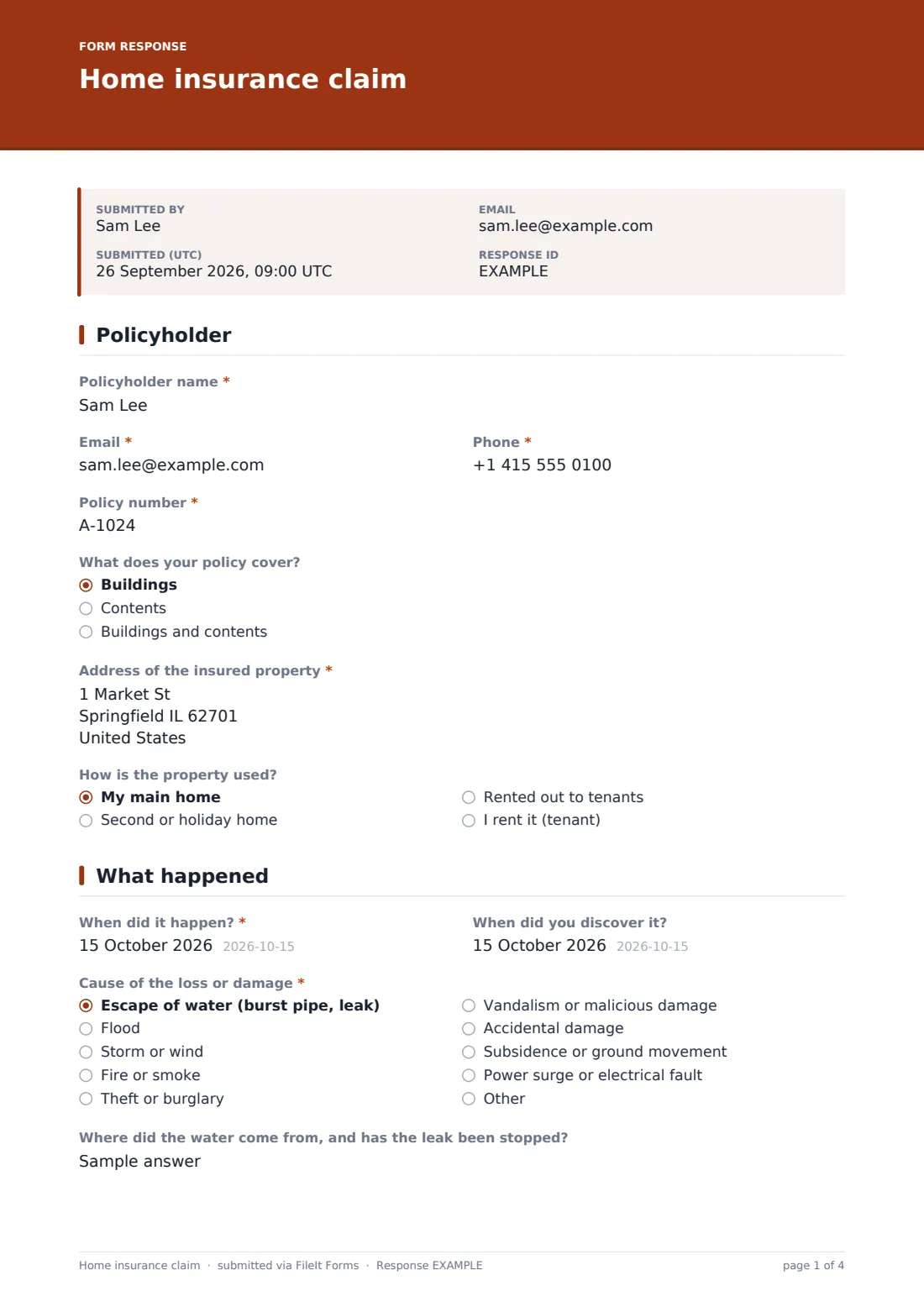
This page collects the policyholder's name, email, phone and policy number, what the policy covers (buildings, contents, or both), the address of the insured property, and how the property is used — a main home, a second home, rented out to tenants, or rented by the person filling in the form.
2 What happened
The form asks when the loss happened and when it was discovered, since these aren't always the same day, then a "cause of the loss or damage" choice covering escape of water, flood, storm, fire, theft, vandalism, accidental damage, subsidence, power surge or another cause you can specify. Choosing escape of water opens a question about where the water came from and whether the leak has been stopped; choosing theft opens questions about forced entry and the police crime reference number.
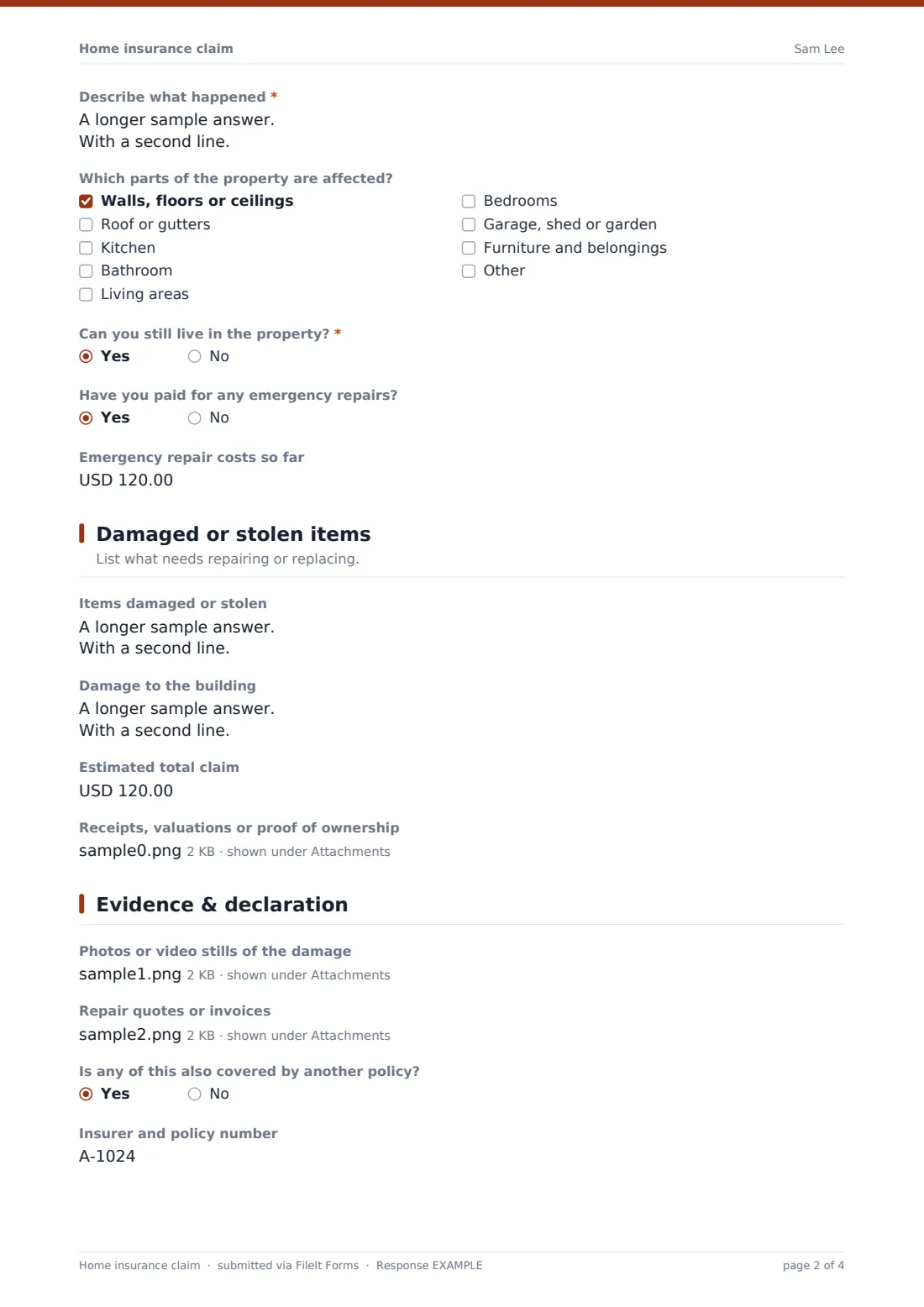
A "describe what happened" box and a checklist of affected areas (walls, floors, roof, kitchen, bathroom, living areas, bedrooms, outbuildings or contents) capture the scope. If the property isn't currently habitable, a follow-up question asks where you're staying and what it's costing; a separate yes/no question records whether you've already paid for emergency repairs like a plumber or drying equipment, and if so, how much.
3 Damaged or stolen items
A long-text box lists items damaged or stolen one per line — description, brand or model, roughly how old, and replacement cost — alongside a separate box for damage to the building itself, such as a stained ceiling or lifted flooring. A rough estimated total claim figure is optional, and there's an upload for receipts, valuations or proof of ownership if you have them to hand.
None of this needs to be exact on first submission; a rough figure is enough for the insurer to get started.
4 Evidence & declaration
The last page accepts photos or video stills of the damage and any repair quotes or invoices you've already obtained, then asks whether the loss is also covered by another policy, such as a landlord's policy, a gadget policy or a credit card, opening a field for that insurer's details if so.
It closes with a declaration that the information given is true and complete and a promise to keep damaged items until the insurer says they can be disposed of, followed by a signature drawn on screen.
Make the template yours
- Add a field for a specific room or building if the property has several units, such as a duplex or a rental with multiple flats
- Set the vault folder so claims file under the right property or family member automatically
- Add extra file-upload questions for a subsidence survey or a loss adjuster's report if your insurer typically asks for one
- Turn on an emailed PDF copy to the policyholder so they have a record while the claim is being assessed
- Adjust the "cause of loss" options to match categories your own insurer uses
- Add notification emails for a letting agent or property manager if you manage the claim on a landlord's behalf
- Change the document title pattern to include the property address for easier filing across multiple properties
Tips for a better home insurance claim form
- Photograph damage before starting any cleanup or emergency repairs, and again once repairs begin
- Keep any damaged items until your insurer confirms they can be thrown away — this can affect the claim
- Estimate item values honestly using age and condition; insurers expect a reasonable current value, not the original purchase price
- Report theft or vandalism to the police as soon as possible and record the crime reference number while it's fresh
- Get more than one repair quote where you can — it speeds up settlement and gives you a stronger record
- Note down alternative accommodation costs from day one if the property isn't habitable, including receipts
Every response becomes a PDF in your vault
As soon as the claim is submitted, FileIt saves it as a PDF in your chosen vault folder, together with any item list, photos and quotes attached, and the account owner is notified by email. If an emailed copy to the respondent is switched on, the policyholder also gets their own PDF for their records.
From there, most people forward the PDF to their insurer or broker, then track the claim's progress in the Responses table, which can be exported to CSV if you need to share it with a loss adjuster or keep a running log of claims across more than one property.
- Start from this template. It opens in the FileIt Forms designer — change any question, add pages, set the rules for when questions appear.
- Share it. Turn on a public link, or send it to people by email, each with their own link. They don’t need a FileIt account.
- Get the answers as PDFs. Each response is saved as a PDF in the vault folder you choose, with uploaded files attached — and listed in a Responses table you can export to CSV.
Home insurance claim form: frequently asked questions
Is this home insurance claim form template free?
Yes. It's one of FileIt's ready-made templates, available on every account including the free plan, and every question can be edited.
Does the policyholder need a FileIt account to submit a claim?
No. The form can be shared by public link or sent directly by email, and the person filling it in doesn't need a FileIt account.
How do I get a copy of the claim once it's submitted?
Every submission is saved automatically as a PDF in your vault, and you can also turn on an emailed PDF copy sent straight to the policyholder.
Do I need photos before I submit the claim?
No — photos, receipts and quotes are all optional uploads, so you can submit the claim first and attach evidence as you gather it.
What if the damage affects more than one cause, like a storm that also caused a leak?
Choose the main cause and describe the rest in the "describe what happened" box; you can always follow up with your insurer about the details.
Is this claim legally binding or the same as my insurer's own form?
No — this is your own record of the loss for your files and for sending to your insurer. Always check your policy wording and your insurer's own claim requirements.
Can I use this for a rental property I don't live in?
Yes — the "how is the property used" question covers second homes and properties rented out to tenants, not just a main residence.