
What is the pre-construction meeting form template?
The pre-construction meeting is the last calm moment on a project. It's where the client, the design team and the contractors agree what's being built, when work can happen, how people get on and off site and who answers questions. When it's recorded loosely, the same issues come back weeks later as disputes about working hours, deliveries or who agreed to what.
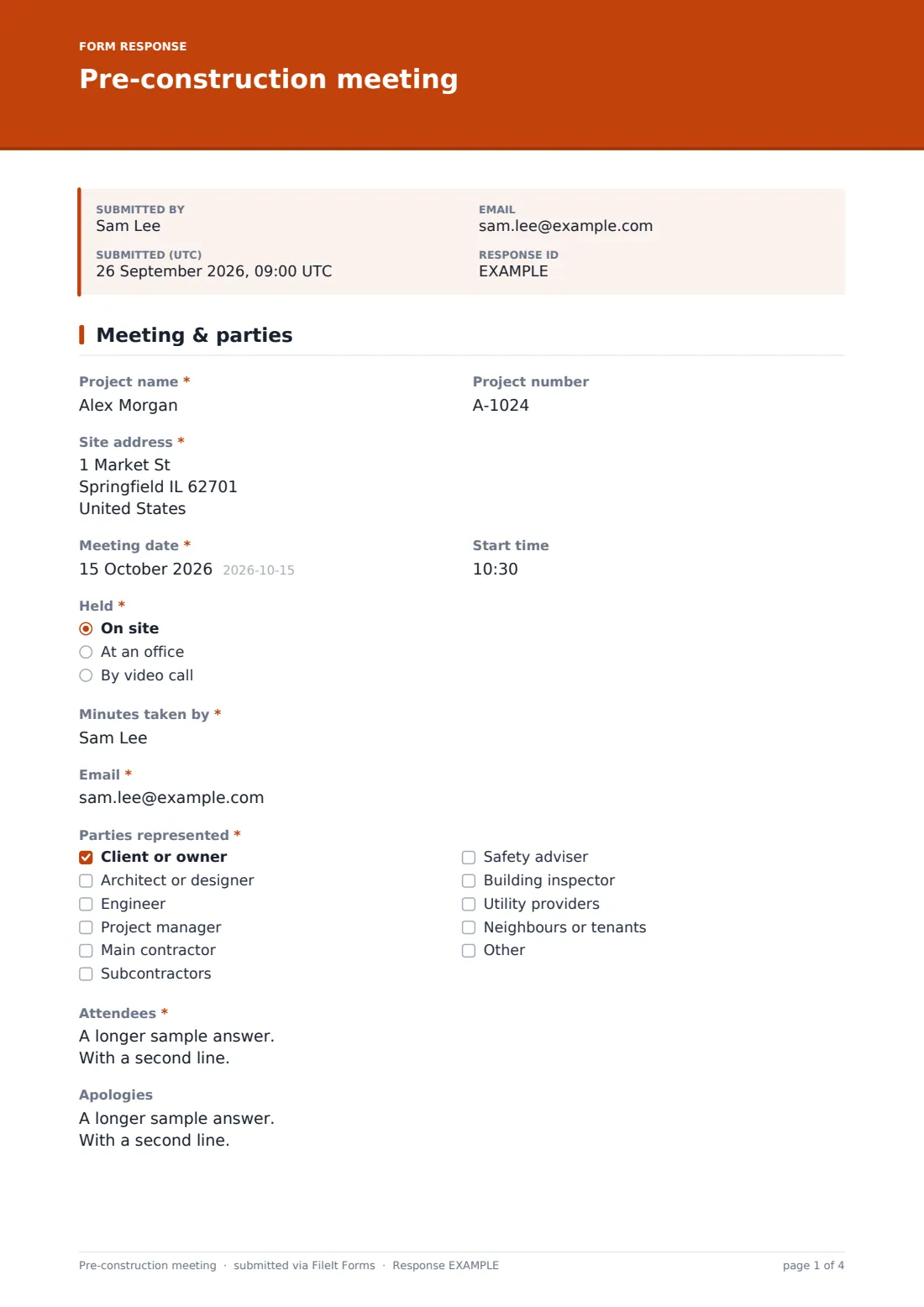
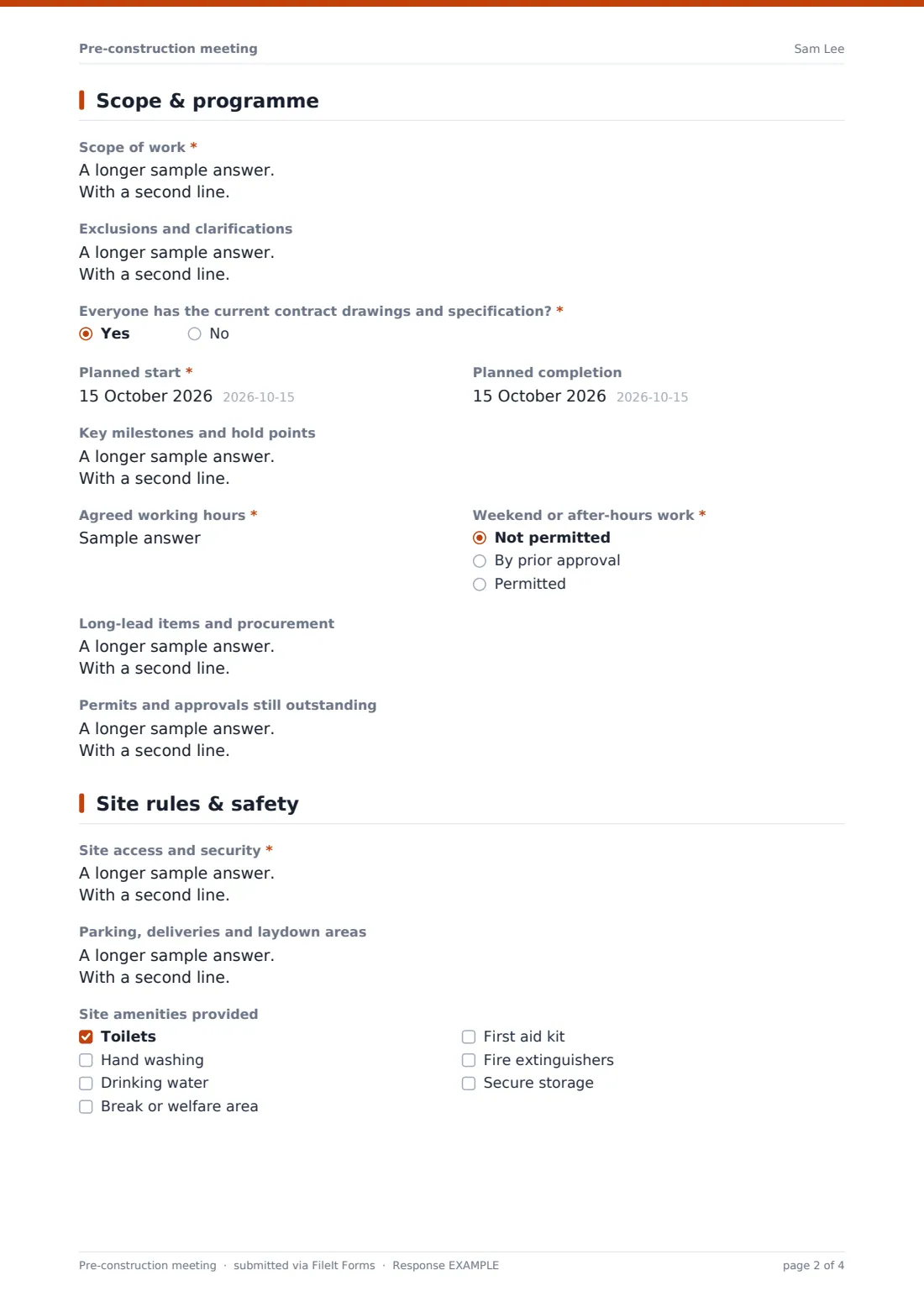
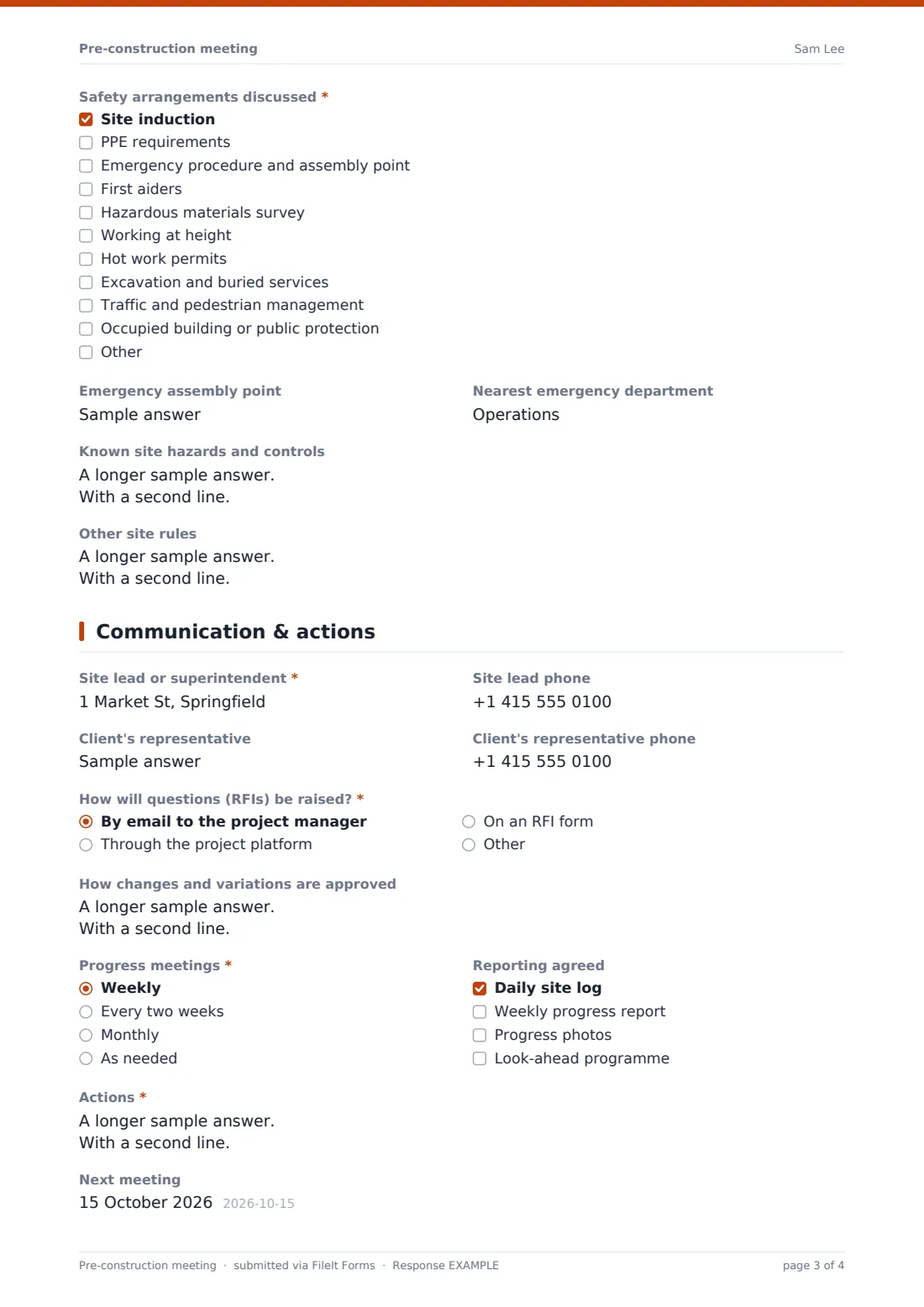
This template turns the meeting into structured minutes. The first page records the project, site, date, parties and attendees. The second covers the scope, exclusions, whether everyone has the current drawings, the planned start and finish, milestones, working hours, after-hours rules, long-lead items and outstanding permits. The third deals with site access, deliveries, amenities, the safety arrangements discussed and known hazards. The last records contacts, how questions and changes will be handled, meeting and reporting frequency, and the action list.
The person taking minutes signs, and the minutes are filed as a PDF in your FileIt vault with any attachments, ready to send to every attendee.
- Best for
- Contractors, project managers, clients and design teams starting a construction or fit-out job
- Filled in by
- The project manager or whoever takes the minutes
- Time to complete
- During the meeting, about 15–20 minutes of typing
- Includes
- Attendee list, scope and programme, working hours, access, safety checklist, communication routes, actions, signature
Who uses a pre-construction meeting form?
- A main contractor's kick-off meeting with the client and design team
- A renovation builder walking through the job with a homeowner before starting
- A fit-out in an occupied building where access and noise rules matter
- A subcontractor pre-start with the main contractor's site team
- A public works job with utility providers and inspectors attending
- A facilities team briefing contractors before a maintenance shutdown
Questions on this pre-construction meeting form
42 questions over 4 pages · includes signature, file upload, conditional questions, multiple pages.
1 Meeting & parties
- Project name*
- Project number
- Site address*
- Meeting date*
- Start time
- Held* On site · At an office · By video call
- Minutes taken by*
- Email*
- Parties represented* Client or owner · Architect or designer · Engineer · Project manager · Main contractor · Subcontractors · Safety adviser · Building inspector · Utility providers · Neighbours or tenants
- Attendees*
- Apologies
2 Scope & programme
- Scope of work*
- Exclusions and clarifications
- Everyone has the current contract drawings and specification?*
- What's missing or out of date?* asked only when it applies
- Planned start*
- Planned completion
- Key milestones and hold points
- Agreed working hours*
- Weekend or after-hours work* Not permitted · By prior approval · Permitted
- Long-lead items and procurement
- Permits and approvals still outstanding
3 Site rules & safety
- Site access and security*
- Parking, deliveries and laydown areas
- Site amenities provided Toilets · Hand washing · Drinking water · Break or welfare area · First aid kit · Fire extinguishers · Secure storage
- Safety arrangements discussed* Site induction · PPE requirements · Emergency procedure and assembly point · First aiders · Hazardous materials survey · Working at height · Hot work permits · Excavation and buried services · Traffic and pedestrian management · Occupied building or public protection
- Emergency assembly point
- Nearest emergency department
- Known site hazards and controls
- Other site rules
4 Communication & actions
- Site lead or superintendent*
- Site lead phone
- Client's representative
- Client's representative phone
- How will questions (RFIs) be raised?* By email to the project manager · Through the project platform · On an RFI form
- How changes and variations are approved
- Progress meetings* Weekly · Every two weeks · Monthly · As needed
- Reporting agreed Daily site log · Weekly progress report · Progress photos · Look-ahead programme
- Actions*
- Next meeting
- Attachments
- Signature of the person taking minutes*
The pre-construction meeting form, page by page
1 Meeting & parties
Project name, Project number, Site address, Meeting date and Start time come first, then whether the meeting was held on site, at an office or by video call. Minutes taken by and Email identify the recorder. Parties represented ticks the organisations present, Attendees lists name, company and role, and Apologies records anyone missing.
2 Scope & programme
Scope of work and Exclusions and clarifications set out what's in and out. If not everyone has the current contract drawings and specification, the form asks what's missing. Planned start, Planned completion, Key milestones and hold points, Agreed working hours and Weekend or after-hours work fix the programme, and Long-lead items and Permits and approvals still outstanding record open risks.
3 Site rules & safety
Site access and security reminds the recorder not to write down alarm or key-safe codes. Parking, deliveries and laydown areas and Site amenities provided follow. Safety arrangements discussed is a checklist from site induction and PPE to excavation, traffic management and protecting an occupied building. Emergency assembly point, Nearest emergency department, Known site hazards and controls and Other site rules complete the page.
4 Communication & actions
Site lead or superintendent, Client's representative and their phones give everyone the right numbers. How will questions (RFIs) be raised?, How changes and variations are approved, Progress meetings and Reporting agreed set the routine. Actions takes one line per item with owner and due date, then Next meeting, Attachments and the minute-taker's signature.
Make the template yours
- Add your company's standard site rules as a paragraph on the safety page
- Edit the parties list to match the roles on your typical jobs
- Remove the utility and inspector options for small residential work
- Add questions for site-specific risks such as asbestos or live traffic
- Store each project's minutes in its own vault folder
- Add the project manager's address to notification emails so every set of minutes reaches them
Tips for a better pre-construction meeting form
- Send the agenda in advance using the page headings, so people bring the right information
- Agree working hours and deliveries in writing — they're the most common early dispute
- Give every action an owner and a date, not just a description
- Walk the site after the meeting to confirm access, laydown and assembly points
- Review the action list at the first progress meeting
Every response becomes a PDF in your vault
The minutes are saved as a PDF in the vault folder you choose, with the programme, site plan or attendance sheet attached. The form owner is notified, and the minute-taker can receive a copy to forward to attendees.
The Responses table keeps every project's pre-start minutes together and can be exported to CSV if you want to compare start dates or open actions across jobs.
- Start from this template. It opens in the FileIt Forms designer — change any question, add pages, set the rules for when questions appear.
- Share it. Turn on a public link, or send it to people by email, each with their own link. They don’t need a FileIt account.
- Get the answers as PDFs. Each response is saved as a PDF in the vault folder you choose, with uploaded files attached — and listed in a Responses table you can export to CSV.
Pre-construction meeting form: frequently asked questions
Is this pre-construction meeting template free?
Yes. It's included with the Forms app on every FileIt account, including the free plan.
Can attendees sign the minutes?
The template has one signature for the minute-taker. Add more signature questions if you want each party to sign, or attach a signed attendance sheet.
Does FileIt email the minutes to all attendees?
No. The minute-taker can receive a copy and forward it. FileIt doesn't send to the attendee list automatically.
Can I attach the programme and site plan?
Yes. Up to six files, as PDF, image, spreadsheet or Word.
Is this a legally required meeting record?
FileIt doesn't give legal advice. Some contracts or regulators require specific pre-start records — check what applies to your project.
Can I use it for small jobs?
Yes. Only the essentials are required, so a builder and homeowner can complete the essentials in a few minutes.