What is the player season evaluation form template?
End-of-season reviews often end up as a line in a group chat, or as a page of notes only the coach can read. This template gives coaches a consistent structure for every player: what they're good at, what to work on, and where they should play next season. Players and families get feedback they can act on, and the club gets a record it can find again at the next tryouts.
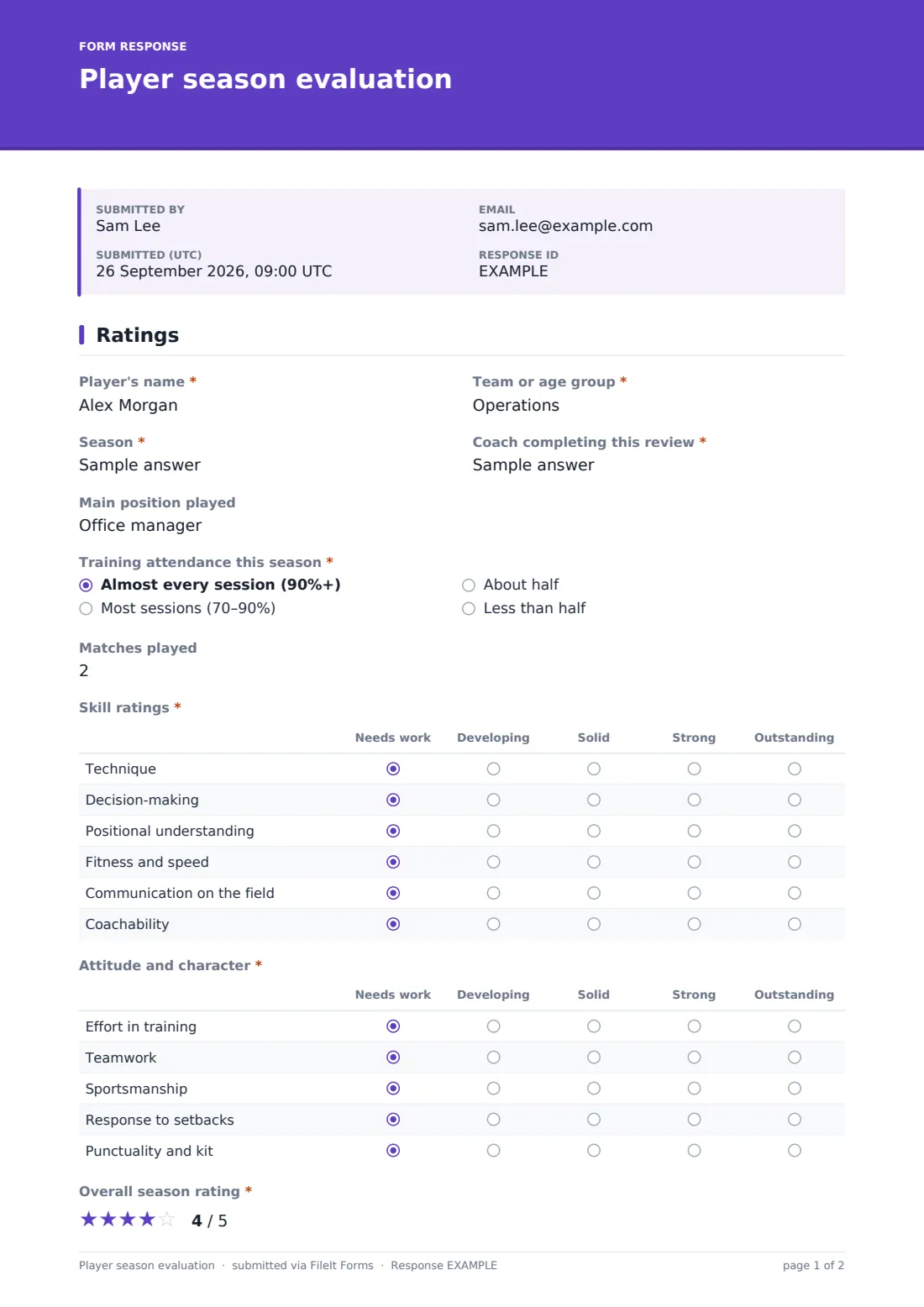
Page one is ratings. The coach records the team, season, their own name, the player's main position, training attendance and matches played. Two grids follow. 'Skill ratings' covers technique, decision-making, positional understanding, fitness and speed, communication and coachability, and 'Attitude and character' covers effort, teamwork, sportsmanship, response to setbacks, and punctuality and kit. Both use the same five steps from 'Needs work' to 'Outstanding', and an overall star rating comes last.
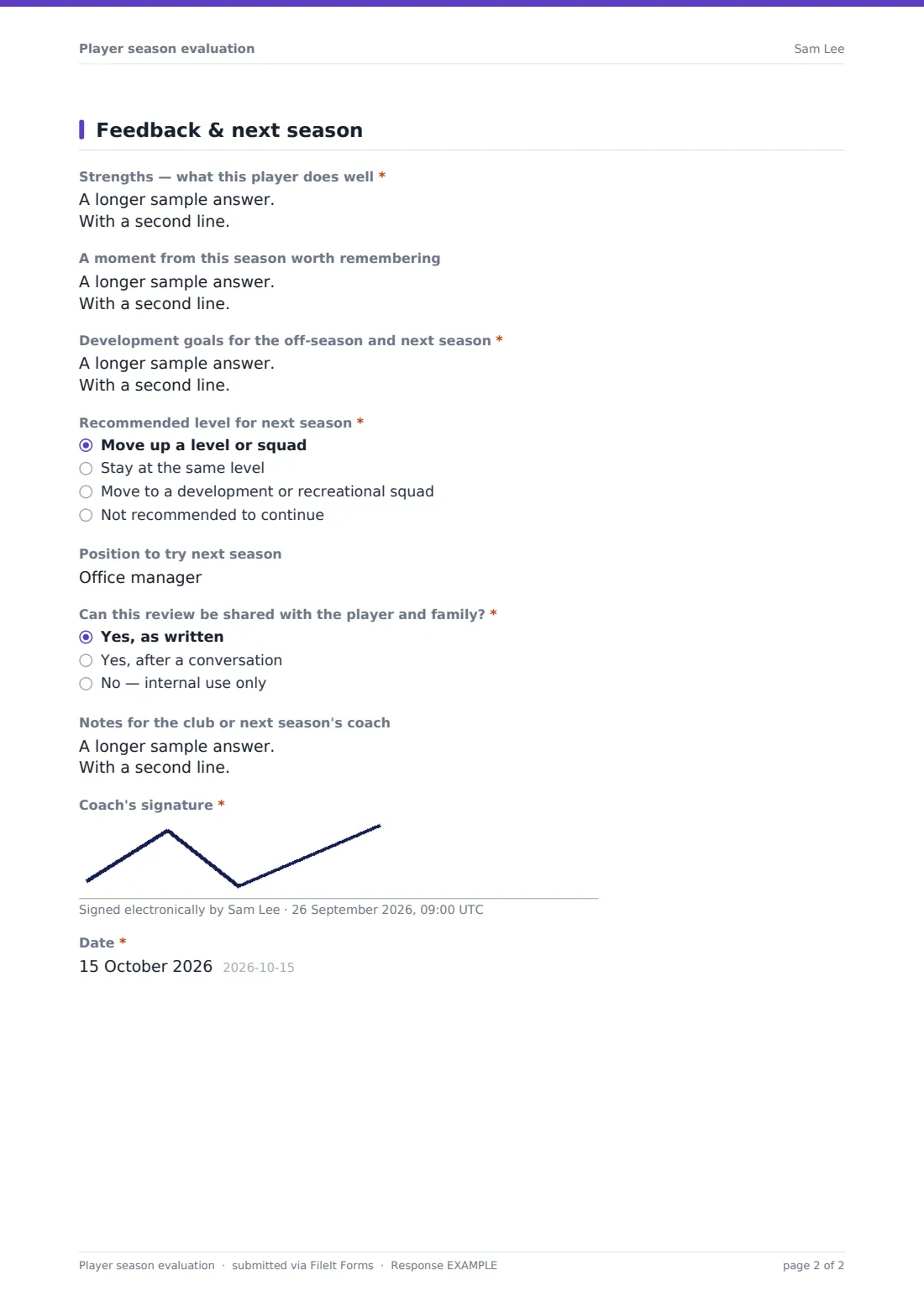
Page two is written feedback: strengths, a memorable moment, and development goals. 'Recommended level for next season' offers four options. Choosing 'Not recommended to continue' requires a written reason, asks whether it has been discussed with the family, and invites another pathway. Each review is signed by the coach and filed as a PDF in your FileIt vault.
- Best for
- Youth clubs, school teams, academies and recreational leagues
- Filled in by
- The coach, once per player
- Time to complete
- 5–8 minutes per player
- Includes
- Two rating grids, attendance, strengths, goals, next-season level, coach signature
Who uses a player season evaluation form?
- A U14 basketball coach reviews twelve players before end-of-season meetings
- A club director collects every coach's recommendations to plan next year's squads
- A volleyball coach gives each player two or three off-season goals
- An academy keeps a record of why a player was moved to a development squad
- A new coach reads last season's reviews before meeting their team
- A school PE department writes reports for its representative teams
Questions on this player season evaluation form
22 questions over 2 pages · includes signature, conditional questions, multiple pages, ratings.
1 Ratings
- Player's name*
- Team or age group*
- Season*
- Coach completing this review*
- Main position played
- Training attendance this season* Almost every session (90%+) · Most sessions (70–90%) · About half · Less than half
- Matches played
- Skill ratings* Needs work · Developing · Solid · Strong · Outstanding
- Attitude and character* Needs work · Developing · Solid · Strong · Outstanding
- Overall season rating*
2 Feedback & next season
- Strengths — what this player does well*
- A moment from this season worth remembering
- Development goals for the off-season and next season*
- Recommended level for next season* Move up a level or squad · Stay at the same level · Move to a development or recreational squad · Not recommended to continue
- Reason for this recommendation* asked only when it applies
- Has this been discussed with the player or family?* asked only when it applies
- Other pathway you'd suggest (another club, sport or program) asked only when it applies
- Position to try next season asked only when it applies
- Can this review be shared with the player and family?* Yes, as written · Yes, after a conversation · No — internal use only
- Notes for the club or next season's coach
- Coach's signature*
- Date*
The player season evaluation form, page by page
1 Ratings
Required 'Player's name', team, season and 'Coach completing this review', plus main position. 'Training attendance this season' is required and matches played is optional. Then the required 'Skill ratings' and 'Attitude and character' grids (every row needs an answer) and a required five-star 'Overall season rating'.
2 Feedback & next season
Required strengths and 'Development goals for the off-season and next season', with an optional highlight. 'Recommended level for next season' is required. 'Not recommended to continue' adds a required reason, whether it has been discussed and an alternative pathway. Every other choice asks for a position to try. Then whether the review can be shared, notes for next season's coach, the coach's signature and date.
Make the template yours
- Rename the skill rows to the techniques of your sport, such as serving or shooting
- Change the five rating steps to your club's own scale
- Add a goalkeeper or pitcher section shown only for that position
- Remove the 'Not recommended to continue' option if your club doesn't make that call
- Add a parent-meeting date field if reviews are discussed in person
- File each team's reviews in its own vault folder
Tips for a better player season evaluation form
- Write strengths first. Families read the review more openly that way
- Make development goals specific, for example 'weak-foot passing', not 'improve skills'
- Have a conversation before writing 'Not recommended to continue', never after
- Complete reviews within a week of the last game, while details are fresh
- Use the Responses table to compare recommendations across teams before forming squads
Every response becomes a PDF in your vault
Each review is saved as a signed PDF in your vault, and the club gets an email for each one. Copies aren't emailed automatically because coaches fill in the form, not players.
Download a single PDF to share with a family, or export to CSV to see every recommended level side by side.
- Start from this template. It opens in the FileIt Forms designer — change any question, add pages, set the rules for when questions appear.
- Share it. Turn on a public link, or send it to people by email, each with their own link. They don’t need a FileIt account.
- Get the answers as PDFs. Each response is saved as a PDF in the vault folder you choose, with uploaded files attached — and listed in a Responses table you can export to CSV.
Player season evaluation form: frequently asked questions
Is the player season evaluation template free?
Yes. It's a starter template in the Forms app on every FileIt account, including the free plan.
Who fills it in, the coach or the player?
The coach, once per player. The form asks whether the review may be shared with the player and family.
What happens if I recommend a player doesn't continue?
The form requires a written reason, asks whether it has been discussed with the player or family, and offers a box for another pathway.
Can several coaches use the same form?
Yes. Share the link with your coaches. Each review records who completed it and is signed.
Can I change the rating scale?
Yes. The grids' rows and columns can be edited in the form designer.
Do coaches need a FileIt account?
No. They can fill in the form from a link. Only the club's account owner manages the responses.