What is the athlete daily wellness check form template?
Coaches tend to find out an athlete slept four hours or has a sore hamstring only when the warm-up goes badly. A short daily wellness check moves that conversation to before the session. This template is a single page athletes can complete on their phone in the changing room or on the bus, and it stays short enough that they'll keep doing it.
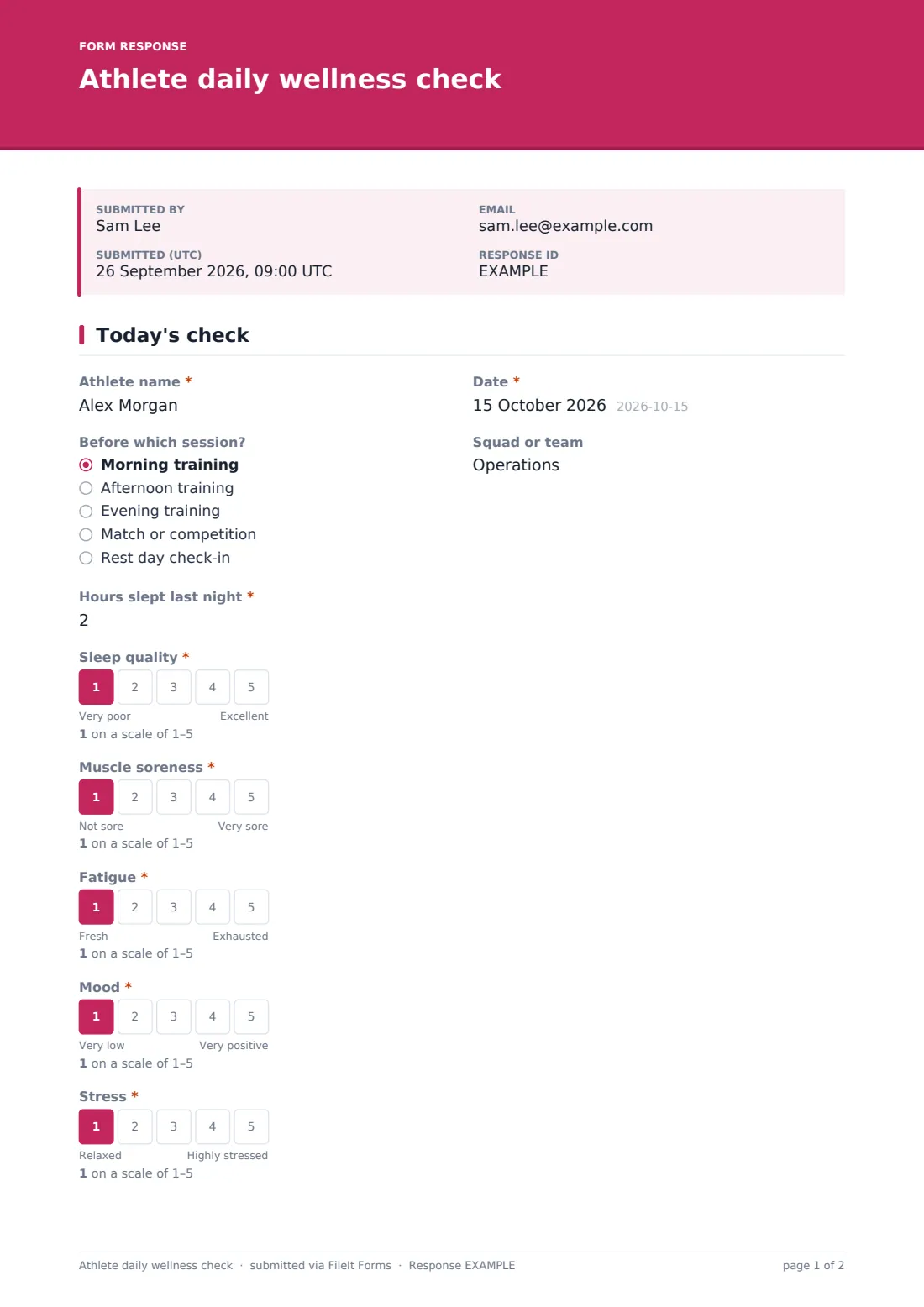
Athletes give their name, the date, which session it's for and their squad. Then they record 'Hours slept last night' and rate sleep quality, muscle soreness, fatigue, mood and stress on five-point scales, each with plain words at both ends so a 2 means the same thing to everyone. 'Any new pain? Rate it' runs from 0 to 10. A rating above 3 adds three more questions: 'Where is the pain?', which side, and 'Describe the pain'.
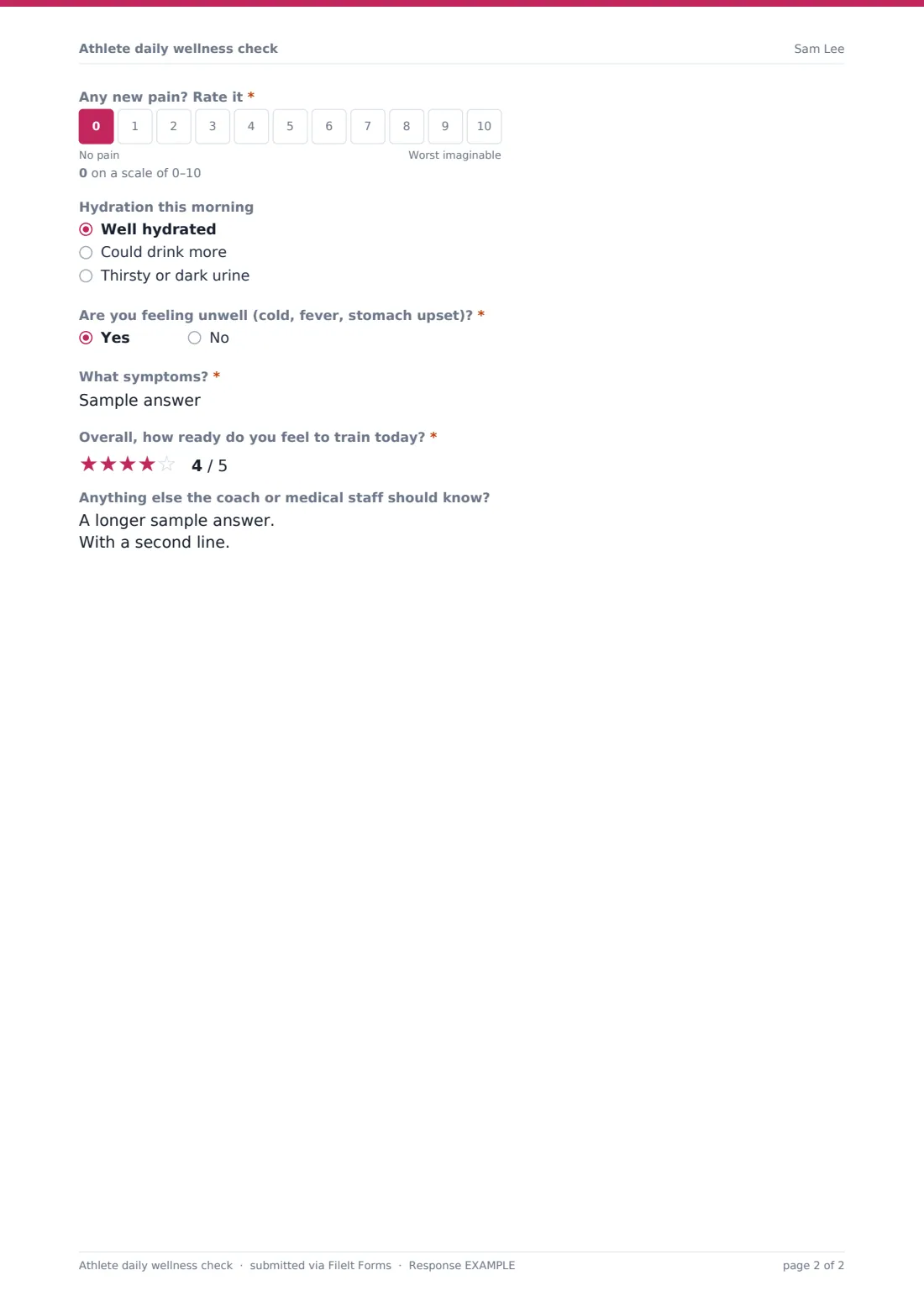
The check ends with hydration, whether they're feeling unwell, a star rating for 'Overall, how ready do you feel to train today?' and a free note for the coach or medical staff. Every check-in is filed as a PDF in your FileIt vault, and the Responses table shows the whole squad's answers for the day in one place.
- Best for
- Academy and college teams, clubs with a performance squad, individual coaches
- Filled in by
- The athlete, before each session
- Time to complete
- Under a minute
- Includes
- Sleep, five readiness scales, 0–10 pain with body area, illness, readiness rating
Who uses a athlete daily wellness check form?
- A college soccer team checks in before every morning session
- An academy rugby coach looks for low sleep scores during exam season
- A running coach asks distance athletes to log readiness before key workouts
- A physio sees body-area answers for anyone who rated pain above 3
- A swim squad tracks how athletes feel during a heavy training block
- An individual athlete keeps their own daily log to share with a coach
Questions on this athlete daily wellness check form
19 questions · includes conditional questions, ratings.
1 Today's check
- Athlete name*
- Date*
- Before which session? Morning training · Afternoon training · Evening training · Match or competition · Rest day check-in
- Squad or team
- Hours slept last night*
- Sleep quality*
- Muscle soreness*
- Fatigue*
- Mood*
- Stress*
- Any new pain? Rate it*
- Where is the pain?* asked only when it applies Head or neck · Shoulder · Elbow, wrist or hand · Back · Hip or groin · Thigh (hamstring or quad) · Knee · Calf or shin · Ankle or foot · Chest or abdomen
- Which side? asked only when it applies Left · Right · Both · Not applicable
- Describe the pain* asked only when it applies
- Hydration this morning Well hydrated · Could drink more · Thirsty or dark urine
- Are you feeling unwell (cold, fever, stomach upset)?*
- What symptoms?* asked only when it applies
- Overall, how ready do you feel to train today?*
- Anything else the coach or medical staff should know?
The athlete daily wellness check form, page by page
1 Today's check
'Athlete name' and 'Date' are required, then the session and squad. 'Hours slept last night' (in half hours) and five required 1–5 scales: sleep quality, muscle soreness, fatigue, mood and stress. 'Any new pain? Rate it' runs from 0 (no pain) to 10. Above 3, the form asks 'Where is the pain?' (ten body areas plus Other), which side and a required description. Then hydration, a required question on feeling unwell with symptoms on a yes, the five-star readiness rating and an optional note.
Make the template yours
- Change the scales to 1–7 or 1–10 if your sports science staff use a different range
- Move the pain threshold from 3 to whatever your medical team wants flagged
- Edit the session options to match your training week
- Add a training-load question, such as minutes trained yesterday
- Add a menstrual-cycle or travel question if it's relevant to your squad
- Turn on owner notifications only for the medical staff's address
Tips for a better athlete daily wellness check form
- Keep the form short. Athletes stop filling in long ones within a fortnight
- Pin the public link in the team chat so it's one tap away
- Look at trends over a week rather than one bad day
- Follow up any pain report in person before the session starts
- Use the check to start a conversation. A wellness check doesn't diagnose anything
Every response becomes a PDF in your vault
Every check-in is saved as a PDF in your vault and listed in the Responses table, which you can filter by date to see the whole squad before training. Copies aren't emailed to athletes by default, to keep inboxes quiet.
Export to CSV each week to chart sleep, soreness and readiness in your own spreadsheet.
- Start from this template. It opens in the FileIt Forms designer — change any question, add pages, set the rules for when questions appear.
- Share it. Turn on a public link, or send it to people by email, each with their own link. They don’t need a FileIt account.
- Get the answers as PDFs. Each response is saved as a PDF in the vault folder you choose, with uploaded files attached — and listed in a Responses table you can export to CSV.
Athlete daily wellness check form: frequently asked questions
Is the athlete wellness check template free?
Yes. It's a starter template in the Forms app, included with every FileIt account, including the free plan.
When do the pain questions appear?
Only when the athlete rates new pain above 3 out of 10. They're then asked for the body area, the side and a short description.
Does FileIt chart the scores over time?
No. FileIt saves each response and lets you view and export them. Export the CSV to chart trends in a spreadsheet.
Can athletes fill it in every day from the same phone?
Yes. Multiple responses from the same browser are allowed by default, which is what a daily check needs.
Is this a medical assessment?
No. It records how the athlete says they feel. Anything worrying should go to a qualified professional.
Do athletes need a FileIt account?
No. They open the link and answer. Nothing to install.