What is the package receipt log form template?
Lost parcels rarely vanish on the road; they go missing in the last few metres. A box signed for at reception sits under a desk, a cold delivery goes unnoticed until the next morning, or someone swears they never got the laptop that the courier's app says was delivered. A consistent receipt log closes that gap.
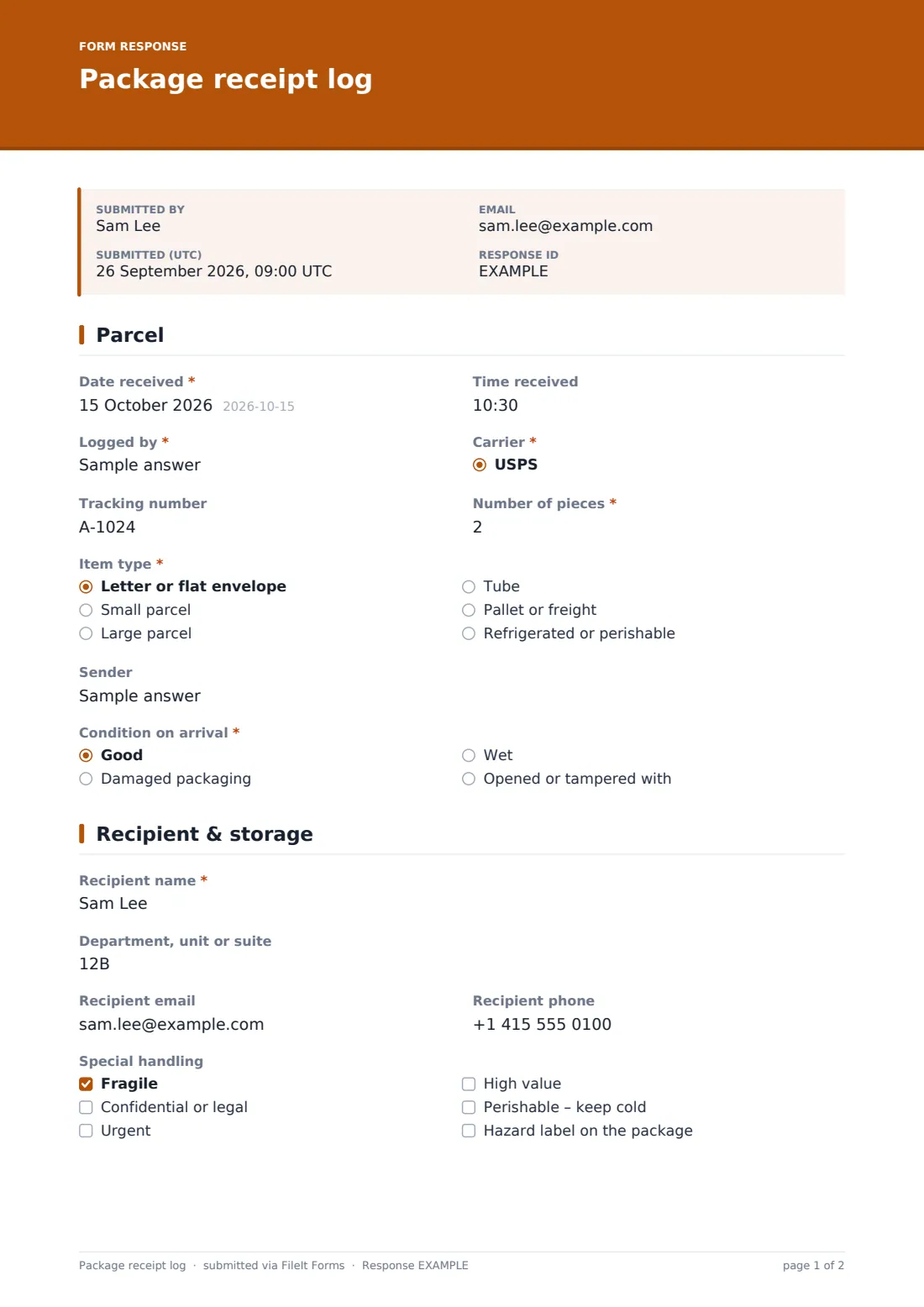
This template gives mailroom and reception staff one quick form per item. The first page captures the date, carrier, tracking number, item type, sender and condition on arrival — and anything damaged, wet or opened asks for a description and photos. The second page records the recipient, any special handling, where the parcel is stored and how the recipient was told. The last page records what happened at the time of logging: still waiting, collected on the spot with a signature, delivered to a desk, or refused.
Each entry is filed as a PDF in your FileIt vault with its photos, giving offices, apartment buildings, schools and campuses a searchable history of every parcel that came through the door.
- Best for
- Mailrooms, office receptions, apartment front desks, schools and campus post rooms
- Filled in by
- The staff member who signs for or receives the parcel
- Time to complete
- About 1–2 minutes per parcel
- Includes
- Carrier list, damage photos, special handling flags, storage location, notification method, collection signature
Who uses a package receipt log form?
- An office reception logging deliveries for staff who work on several floors
- An apartment building's front desk holding parcels for residents
- A school office tracking textbooks and equipment deliveries
- Recording damaged deliveries with photos before reporting them to the carrier
- Keeping a signed record when confidential or high-value items change hands
- A university post room handling student and department mail
Questions on this package receipt log form
27 questions over 3 pages · includes signature, file upload, conditional questions, multiple pages.
1 Parcel
- Date received*
- Time received
- Logged by*
- Carrier* USPS · UPS · FedEx · DHL · Royal Mail / Parcelforce · Amazon Logistics · Evri · DPD · Canada Post · Australia Post · Local courier · Hand delivered
- Carrier name* asked only when it applies
- Tracking number
- Number of pieces*
- Item type* Letter or flat envelope · Small parcel · Large parcel · Tube · Pallet or freight · Refrigerated or perishable
- Sender
- Condition on arrival* Good · Damaged packaging · Wet · Opened or tampered with
- Describe the damage* asked only when it applies
- Photos of the damage asked only when it applies
2 Recipient & storage
- Recipient name*
- Department, unit or suite
- Recipient email
- Recipient phone
- Special handling Fragile · Confidential or legal · Urgent · High value · Perishable – keep cold · Hazard label on the package
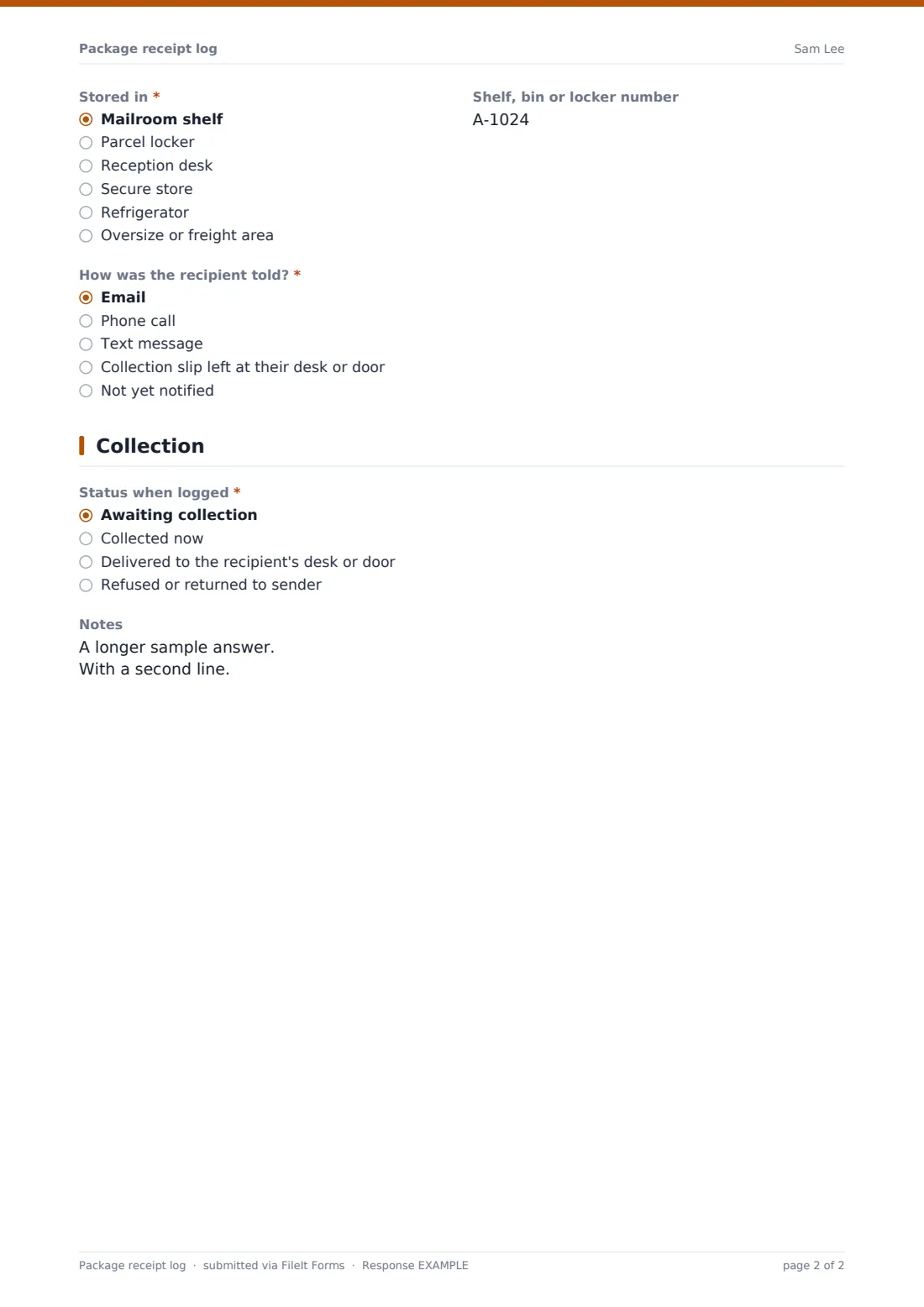
- Stored in* Mailroom shelf · Parcel locker · Reception desk · Secure store · Refrigerator · Oversize or freight area
- Shelf, bin or locker number
- How was the recipient told?* Email · Phone call · Text message · Collection slip left at their desk or door · Not yet notified
3 Collection
- Status when logged* Awaiting collection · Collected now · Delivered to the recipient's desk or door · Refused or returned to sender
- Handed over to* asked only when it applies
- Handover time asked only when it applies
- ID or staff pass checked? asked only when it applies
- Reason for refusal or return* asked only when it applies
- Signature of the person receiving the item* asked only when it applies
- Notes
The package receipt log form, page by page
1 Parcel
Date received, Time received and Logged by come first, followed by a Carrier dropdown covering the common national carriers, local couriers and hand delivery; choosing Other asks for the Carrier name. Tracking number and Number of pieces sit side by side, and Item type ranges from a letter or flat envelope to a pallet or a refrigerated delivery.
Sender is optional. Condition on arrival is required: anything other than Good reveals Describe the damage — with help text reminding staff to note whether it was pointed out to the driver — and an upload for up to four Photos of the damage.
2 Recipient & storage
Recipient name is required, with Department, unit or suite, Recipient email and Recipient phone to help find them. Special handling flags fragile, confidential or legal, urgent, high-value and perishable items, and packages with a hazard label.
Stored in records where the parcel went — mailroom shelf, parcel locker, reception desk, secure store, refrigerator or the oversize area — with an optional Shelf, bin or locker number. How was the recipient told? records email, phone, text, a collection slip, or that they haven't been told yet.
3 Collection
Status when logged records whether the parcel is awaiting collection, was collected now, was delivered to the recipient's desk or door, or was refused or returned to the sender. For anything handed over, the form asks who it was handed over to and the Handover time.
A parcel collected on the spot asks whether an ID or staff pass was checked and takes a Signature of the person receiving the item. A refused or returned parcel asks for the reason. Free-text Notes close the entry.
Make the template yours
- Trim the Carrier list to the couriers you actually receive from
- Replace Recipient name with a dropdown of residents or departments if your list is short
- Add your building's locker bank numbers to the Stored in options
- Add a heading or paragraph with your own policy on how long parcels are held
- Add the facilities manager's address to notifications if they need to see damaged deliveries
- Add a Tracking number to the document title so the vault list can be scanned by parcel
Tips for a better package receipt log form
- Log the parcel before it leaves your hands — logging later is when mistakes creep in
- Photograph damage with the label visible, while the driver is still there if you can
- Move refrigerated items to the fridge first and log them second
- Use the same shelf or locker naming every time so anyone on shift can find an item
- Search the Responses table by tracking number when a recipient chases a delivery
- Export the log monthly if you report on mailroom volume
Every response becomes a PDF in your vault
Each entry is saved as a PDF, titled with the recipient's name and the date, in the vault folder you choose, with any damage photos attached to the same document. Notifications can go to the mailroom inbox, and the entry is searchable by recipient, carrier or tracking number in the Responses table.
For a parcel collected later, many teams submit a short second entry at handover with the status and signature, so both moments are on record. You can export the whole log to CSV at any time.
- Start from this template. It opens in the FileIt Forms designer — change any question, add pages, set the rules for when questions appear.
- Share it. Turn on a public link, or send it to people by email, each with their own link. They don’t need a FileIt account.
- Get the answers as PDFs. Each response is saved as a PDF in the vault folder you choose, with uploaded files attached — and listed in a Responses table you can export to CSV.
Package receipt log form: frequently asked questions
Is this package receipt log free?
Yes. It's included with the Forms app on every FileIt account, including the free plan.
Does it email the recipient automatically?
No. The form records how the recipient was told; staff send the email, call or slip themselves. Staff can copy the recipient's email from the entry in the Responses table.
Can I update an entry when the parcel is collected?
Responses aren't edited after they're submitted. Record the collection in a new entry, or log parcels at the moment of handover.
Can recipients sign on a tablet at the desk?
Yes. The signature question works with a finger or stylus on a phone or tablet, as well as a mouse.
Does FileIt track the parcel with the carrier?
No. It stores the tracking number as typed so you can look it up on the carrier's own website.
Can several staff use the same log?
Yes. Share the form link with everyone on reception or in the mailroom; each entry records who logged it.