What is the overtime request form template?
Overtime approvals tend to happen in one of two ways: cleanly, before the hours are worked, or messily, after the fact, when someone's trying to remember exactly what time they left on a Tuesday three weeks ago. This template handles both. A single Is this request… question lets an employee choose whether they're asking for pre-approval or logging overtime already worked, and the form adjusts what it asks for accordingly.
A quick message to a manager works until you need to check hours against a weekly limit, calculate pay, or explain a decision later. A structured form captures the date, hours, reason and how the employee wants to be compensated — paid, time off in lieu, or as set out in their contract — every time, in the same format.
Every submitted request becomes a PDF in your FileIt vault, giving payroll and managers a clean, dated record of exactly what was requested, why, and how it was meant to be compensated.
- Best for
- Businesses that need overtime approved or logged in a consistent, auditable way
- Filled in by
- Employees, either before working overtime or shortly after
- Time to complete
- About 4-5 minutes
- Includes
- Pre-approval vs. logged-after-the-fact logic, and a weekly-hours warning for long weeks
Who uses a overtime request form?
- A business requiring managers to approve overtime before it's worked, wherever possible
- A retail or hospitality employer tracking overtime hours against weekly working-time limits
- An operations team logging emergency or incident overtime that couldn't be approved in advance
- A company offering employees the choice between paid overtime and time off in lieu
- A payroll team that needs a consistent, dated record of every overtime claim before processing pay
- A manager who wants visibility into why overtime is being requested, not just how many hours
Questions on this overtime request form
20 questions over 3 pages · includes conditional questions, multiple pages, consent checkbox.
1 About you
- Your name*
- Work email*
- Employee ID
- Department Operations · Sales · Marketing · Finance · Engineering · Customer support · Human resources · Other
- Approving manager*
2 The overtime
- Is this request…* For overtime I'd like to work (pre-approval) · For overtime I've already worked
- Why wasn't approval asked for in advance?* asked only when it applies
- Date*
- Overtime hours*
- From
- To
- Does this cover more than one day?
- List the other dates and hours* asked only when it applies
- Total hours you'll have worked that week, including this overtime
3 Reason & compensation
- Main reason* Deadline or backlog · Covering an absence or vacancy · Seasonal or peak demand · Urgent incident or emergency · Project or go-live
- What needs doing, and why can't it wait?*
- Could this be done in normal hours or by someone else?
- How would you like it compensated?* Paid overtime · Time off in lieu (TOIL) · As set out in my contract / policy
- Cost centre or project code
- Declaration*
The overtime request form, page by page
1 About you
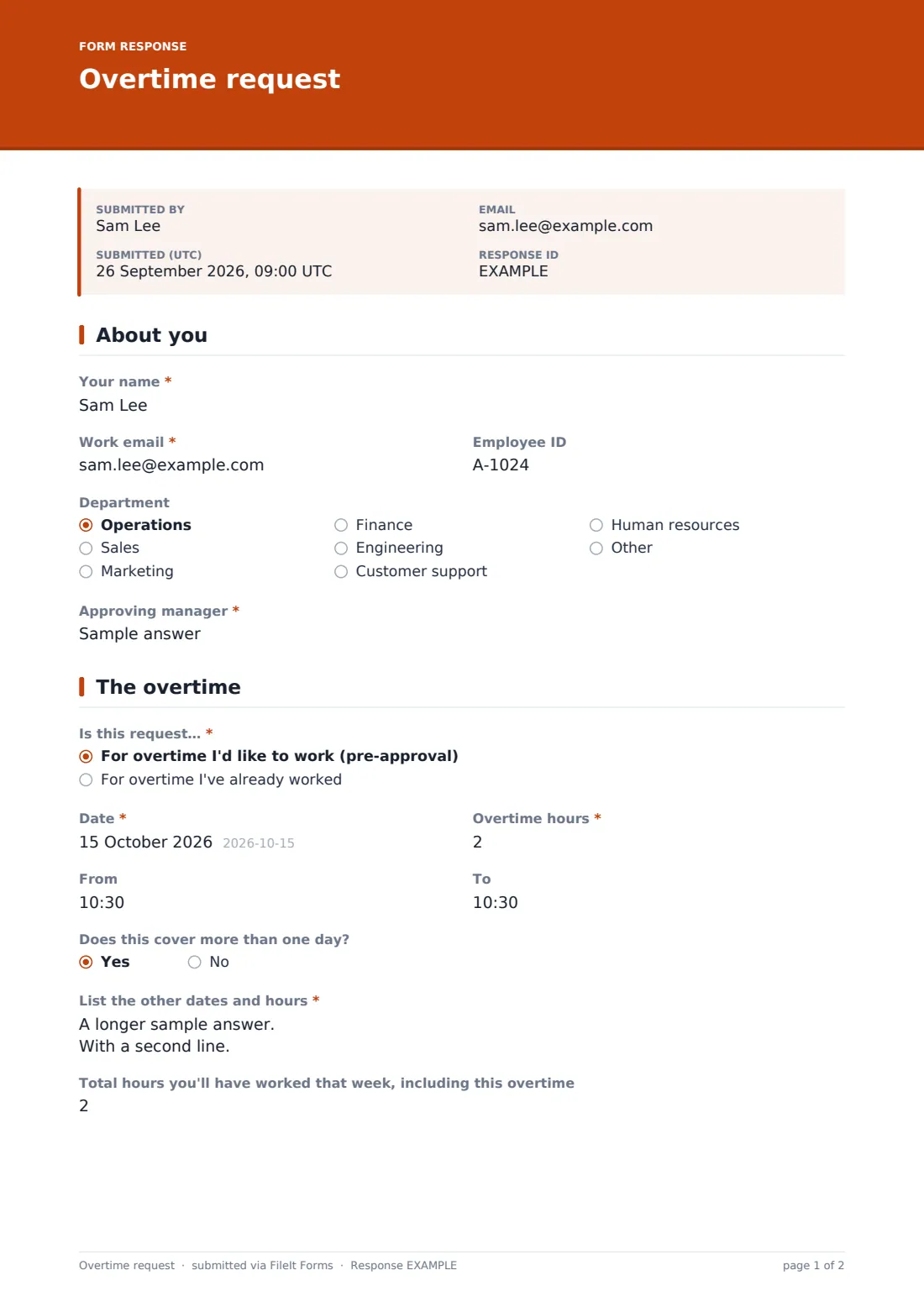
The employee provides Your name, Work email, an optional Employee ID, Department and the name of their Approving manager — enough for the request to be routed and matched to payroll records without extra back-and-forth.
2 The overtime
The employee chooses whether the request is For overtime I'd like to work (pre-approval) or For overtime I've already worked — the latter triggers a required Why wasn't approval asked for in advance? question. They then record the Date, Overtime hours in half-hour steps, and optional start and end times. A Does this cover more than one day? question opens a free-text field for listing multiple dates and hours together.
A Total hours you'll have worked that week field feeds a built-in warning: if the total goes over 48 hours, a note appears reminding the employee (and their manager) that many places limit average weekly working hours, and that this should be checked against contract, policy and local rules before approval.
3 Reason & compensation
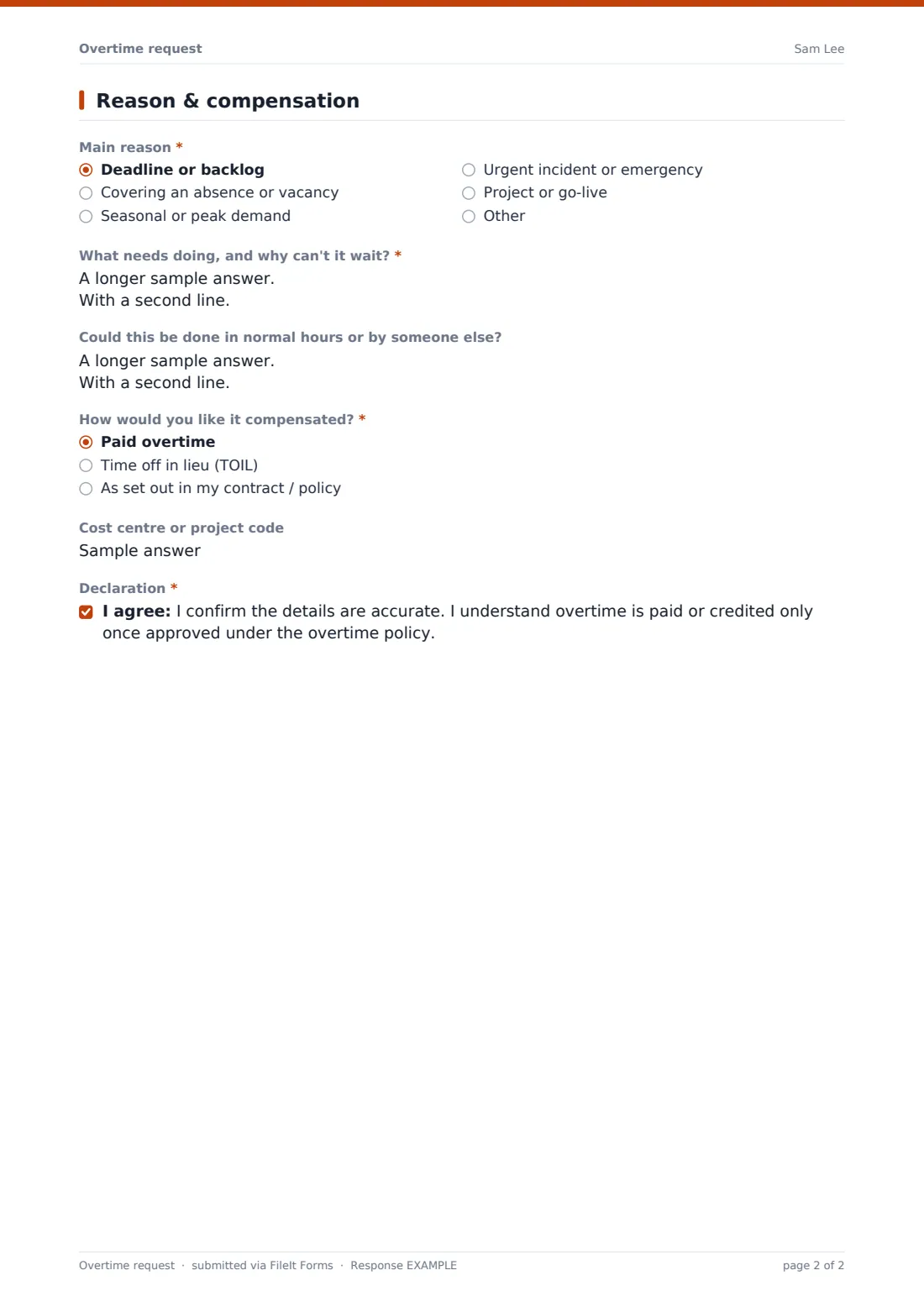
The employee picks a Main reason — deadline or backlog, covering an absence, seasonal demand, an urgent incident, or a project — and explains What needs doing, and why can't it wait?, with an optional note on whether the work could be done in normal hours or by someone else. They choose how they'd like it compensated: paid overtime, time off in lieu, or as set out in their contract, add a cost centre or project code if relevant, and confirm a declaration that the details are accurate before submitting.
Make the template yours
- Change the overtime rate or TOIL accrual explanation in your confirmation message if your policy differs by role
- Add an approval step so a manager reviews and signs off the request before it's treated as final
- Adjust the 48-hour warning threshold to match your own working-time policy or local regulations
- Route notifications straight to payroll as well as the approving manager, so pay adjustments aren't delayed
- File requests by department or pay period so payroll can process a batch at the end of each cycle
- Add a field for project or client code if overtime needs to be billed back to a specific job
Tips for a better overtime request form
- Encourage employees to request pre-approval whenever possible — it avoids awkward conversations about overtime that shouldn't have happened
- Review the weekly hours total for every request, not just the overtime hours in isolation, to stay ahead of working-time limits
- Ask for a specific reason category as well as free text — it makes it much easier to spot patterns, like recurring understaffing on a particular day
- Confirm whether an employee prefers pay or time off in lieu before assuming one over the other
- Process requests promptly — overtime that sits unapproved for weeks erodes trust in the process
Every response becomes a PDF in your vault
As soon as an employee submits a request, FileIt saves it as a PDF in your vault and notifies the approving manager (and anyone else you've added) by email. Because pre-approval and after-the-fact requests both flow through the same form, there's one consistent record to work from regardless of when the request came in.
Managers and payroll typically review new requests in the Responses table, checking the reason and weekly hours before approving pay or time off in lieu. Because every request is dated and saved as a PDF, it's straightforward to pull up a specific employee's overtime history later, whether for a payroll query or a working-time review.
- Start from this template. It opens in the FileIt Forms designer — change any question, add pages, set the rules for when questions appear.
- Share it. Turn on a public link, or send it to people by email, each with their own link. They don’t need a FileIt account.
- Get the answers as PDFs. Each response is saved as a PDF in the vault folder you choose, with uploaded files attached — and listed in a Responses table you can export to CSV.
Overtime request form: frequently asked questions
Is this overtime request form template free?
Yes, it's included in FileIt's Forms app on every account, including the free plan, and every question can be edited to match your own overtime policy.
Do employees need a FileIt account to submit a request?
No. You share the form internally as a link, and employees fill it in and submit it without needing an account.
Do we get a record of every overtime request?
Yes. Every submission is saved as a PDF automatically in your FileIt vault, and you can browse, filter and export all requests from the Responses table.
Can this form be used to log overtime that's already been worked?
Yes — the employee chooses at the start whether the request is for pre-approval or for overtime already worked, and the form adjusts what it asks accordingly.
Does the form check working-time limits automatically?
It shows a warning note if an employee's weekly total, including the overtime, goes over 48 hours, so it can be reviewed against your policy — it doesn't block submission or make a legal determination on its own.
Can employees choose between pay and time off in lieu?
Yes, there's a compensation question with paid overtime, time off in lieu, or "as set out in my contract" as options.
Does the request need manager approval before it counts?
The form records the request and who the approving manager is, but approval itself happens outside the form — for example by the manager reviewing it in the Responses table.
Can we route requests to payroll as well as the manager?
Yes, you can add extra notification email addresses in the form settings so payroll is alerted alongside the approving manager.