What is the shift swap request form template?
A shift swap request form gives employees a clear way to ask to change a shift, whether that's a straight swap with a colleague or simply having someone cover it, while making sure a manager has everything needed to approve it safely. It replaces a quick word passed along a shift or a message buried in a group chat that a manager never actually sees.
Informal swaps arranged between colleagues can quietly break rules around rest periods or contracted hours, and if a manager only finds out after the fact, there's no real chance to catch a problem before it happens. A form asks both shifts, confirms the colleague has actually agreed, and checks for rest and qualification issues before it ever reaches a manager for sign-off.
This template runs on FileIt's Forms app, included on every FileIt account including the free plan. Employees fill it in themselves, and every request — approved or not — becomes a PDF automatically filed in your vault, giving you a clear record of who worked what and when.
- Best for
- Shift-based businesses such as retail, hospitality and healthcare teams
- Filled in by
- The employee requesting the swap or cover
- Time to complete
- About 4 minutes
- Includes
- Swap vs. cover branching, colleague agreement check, rest-period and qualification questions
Who uses a shift swap request form?
- Two colleagues agreeing to swap shifts and formally recording it for their manager
- An employee asking a colleague to simply cover a shift with nothing worked in return
- A manager checking whether a proposed swap would break a rest period between shifts
- A team confirming a colleague covering a specialist role is actually trained for it
- An employee documenting a personal reason for needing a shift changed
- HR keeping a written trail of every approved swap for payroll and scheduling records
Questions on this shift swap request form
25 questions over 4 pages · includes conditional questions, multiple pages, consent checkbox.
1 About you
- Your name*
- Email*
- Mobile
- Employee ID
- Team, site or location
2 The shifts
- What kind of change is this?* A swap — we each work the other's shift · Cover — my colleague takes my shift and I don't take one back
- Date*
- Role, station or post
- Start time*
- End time*
- Date* asked only when it applies
- Role, station or post asked only when it applies
- Start time* asked only when it applies
- End time* asked only when it applies
- Reason for the change (optional)
3 Your colleague
- Colleague's full name*
- Colleague's email
- Colleague's phone
- Has your colleague agreed to this?*
- How did they agree? asked only when it applies In person · By message or chat · By email · They're copied on this request
4 Check & confirm
- Is your colleague trained for this shift's role?* Yes · No · Not sure
- Would the change take either of you over your contracted hours, or cut into a rest break between shifts?*
- Please explain* asked only when it applies
- Manager or supervisor approving
- Confirmation*
The shift swap request form, page by page
1 About you
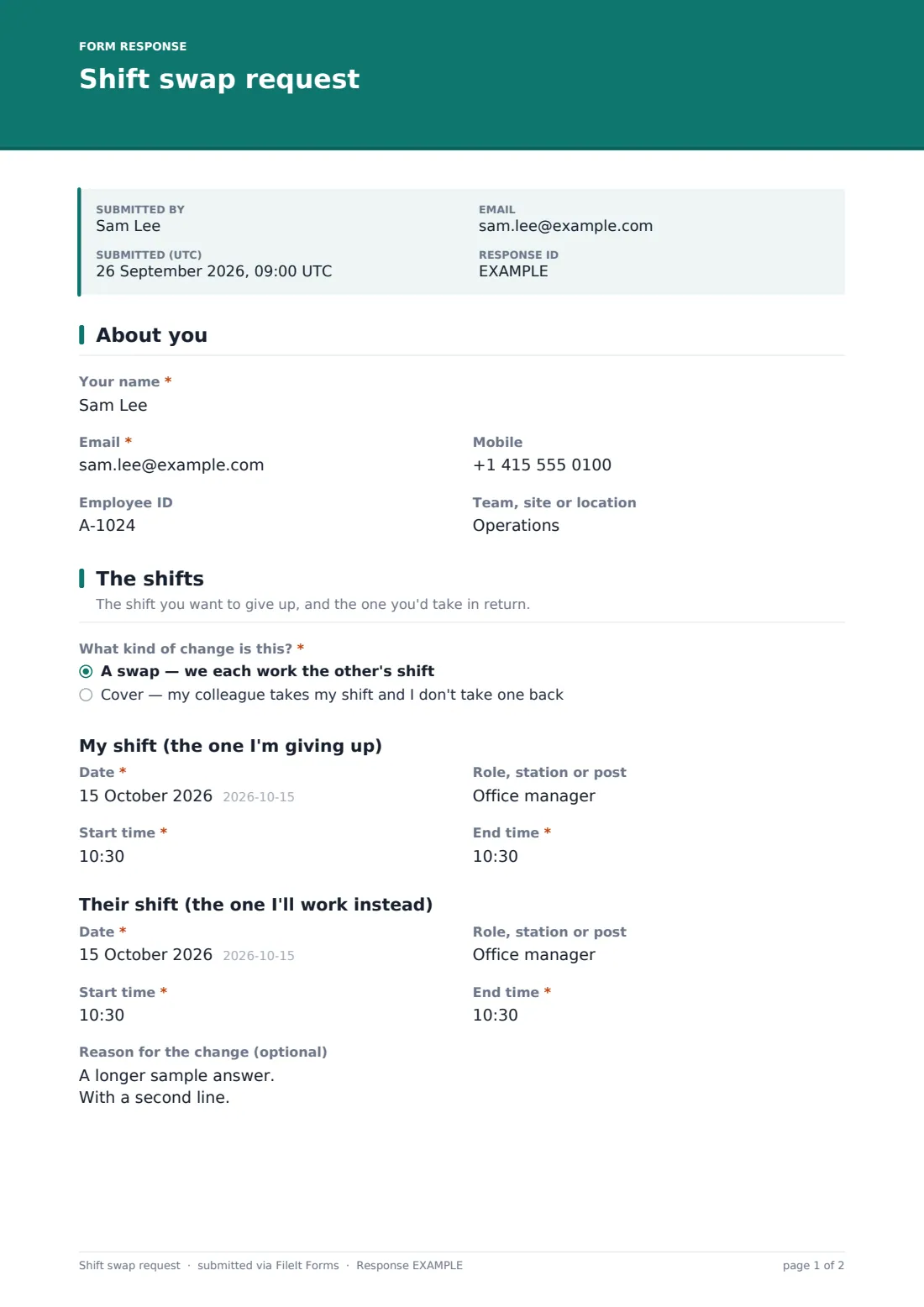
The form opens with Your name, Email, optional Mobile, Employee ID and Team, site or location — enough for a manager to place the request in the right schedule at a glance.
2 The shifts
What kind of change is this? sets the shape of the rest of the form: a swap, where each person works the other's shift, or cover, where a colleague takes the shift with nothing worked in return. My shift (the one I'm giving up) asks for the date, role or station, and start and end times, and — only for a genuine swap — a matching Their shift section captures the same detail for the shift being taken in return. An optional Reason for the change gives a manager context without requiring the employee to explain themselves.
3 Your colleague
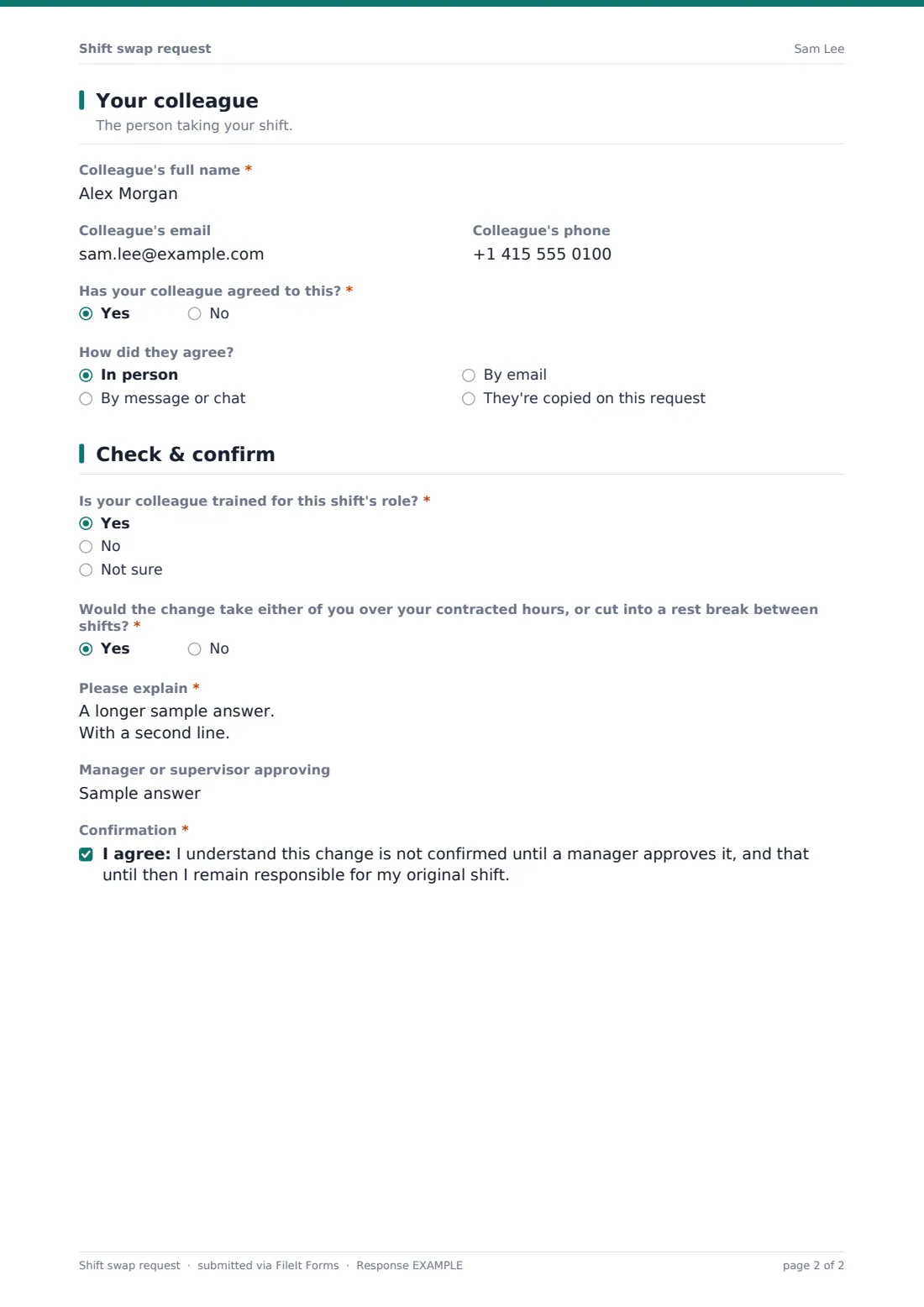
Colleague's full name, email and phone identify who's involved, and Has your colleague agreed to this? is required — if the answer is no, the form shows a message asking the employee to speak to their colleague first, since a swap can only be approved once both sides agree. If they have agreed, How did they agree? records whether that happened in person, by message, by email, or because the colleague is copied on the request itself.
4 Check & confirm
Is your colleague trained for this shift's role? flags a straightforward but important safety check, and Would the change take either of you over your contracted hours, or cut into a rest break between shifts? opens a required explanation whenever the answer is yes — catching exactly the kind of issue an informal swap can miss. Manager or supervisor approving names who needs to sign off, and a final confirmation reminds the employee the change isn't confirmed until a manager approves it, and that they remain responsible for their original shift until then.
Make the template yours
- Add your own list of roles or stations so the shift fields match your actual rota structure
- Route requests straight to the named approving manager's inbox
- Add a required manager sign-off field or a second approval step for cross-team swaps
- Turn on a closing date or cut-off time so swaps can't be requested too close to the shift itself
- Adjust the rest-period question to reflect your own working-time rules or union agreement
- Add a field to record the final approval decision and date directly on the same document
Tips for a better shift swap request form
- Make sure employees speak to their colleague and agree the swap before submitting the request
- Check qualifications and rest periods every time, even for swaps that look routine
- Keep the original shift owner responsible until a manager has actually confirmed the change
- Approve or decline requests promptly so the schedule doesn't stay uncertain close to the shift
- Review swap requests periodically for patterns that might suggest an understaffed shift or role
- Keep every submitted request, approved or not, as part of your scheduling and payroll records
Every response becomes a PDF in your vault
As soon as an employee submits the request, FileIt saves it as a PDF named with the employee's name and files it in the vault folder you've set up for shift changes. With owner notification and a copy to the employee both switched on by default, the approving manager hears about it immediately and the employee has a record of exactly what they requested.
From there, most teams use the Responses table to see pending swap requests, filter for anything flagged with a rest-period or qualification concern, and export approved swaps to CSV to update the schedule and payroll. As the confirmation message makes clear, the employee should keep working their original shift until they've heard the swap has been approved.
- Start from this template. It opens in the FileIt Forms designer — change any question, add pages, set the rules for when questions appear.
- Share it. Turn on a public link, or send it to people by email, each with their own link. They don’t need a FileIt account.
- Get the answers as PDFs. Each response is saved as a PDF in the vault folder you choose, with uploaded files attached — and listed in a Responses table you can export to CSV.
Shift swap request form: frequently asked questions
Is this shift swap request form template free?
Yes. It's included with the Forms app on every FileIt account, including the free plan.
Does the employee need a FileIt account to request a swap?
No. Employees fill in and submit the form using only the link you share, without ever needing a FileIt account.
How do I get swap requests as PDFs?
Every submission is automatically saved as a PDF in the vault folder you choose, and the full history is browsable and exportable to CSV from the Responses table.
Does this form automatically approve the swap?
No. Submitting the form only creates the request — a manager still needs to review and approve it before the change is confirmed, as the form's own declaration makes clear.
Can I check whether a swap would break rest-period rules?
Yes. The form directly asks whether the change would take either employee over their contracted hours or cut into a rest break, prompting a required explanation whenever that's the case.
What if my colleague hasn't agreed to the swap yet?
The form shows a message asking the employee to speak to their colleague first, since a swap can only be approved once both people have agreed to it.
Can I customise the roles or shift details collected?
Yes. Every field, including role names and shift timing, can be edited in the designer to match your own rota structure.
Can I use this for one-way cover as well as a full swap?
Yes — the What kind of change is this? question offers both a two-way exchange and one-way cover, showing only the relevant fields for each.