What is the meal train sign-up form template?
When a family is going through a new baby, a hospital stay or a bereavement, a group chat fills up with offers to cook. Keeping track of who's bringing what, on which day, and whether anyone remembered the nut allergy falls to one organiser. This meal train sign-up form gives everyone the same short set of questions and gives the organiser a clear list.
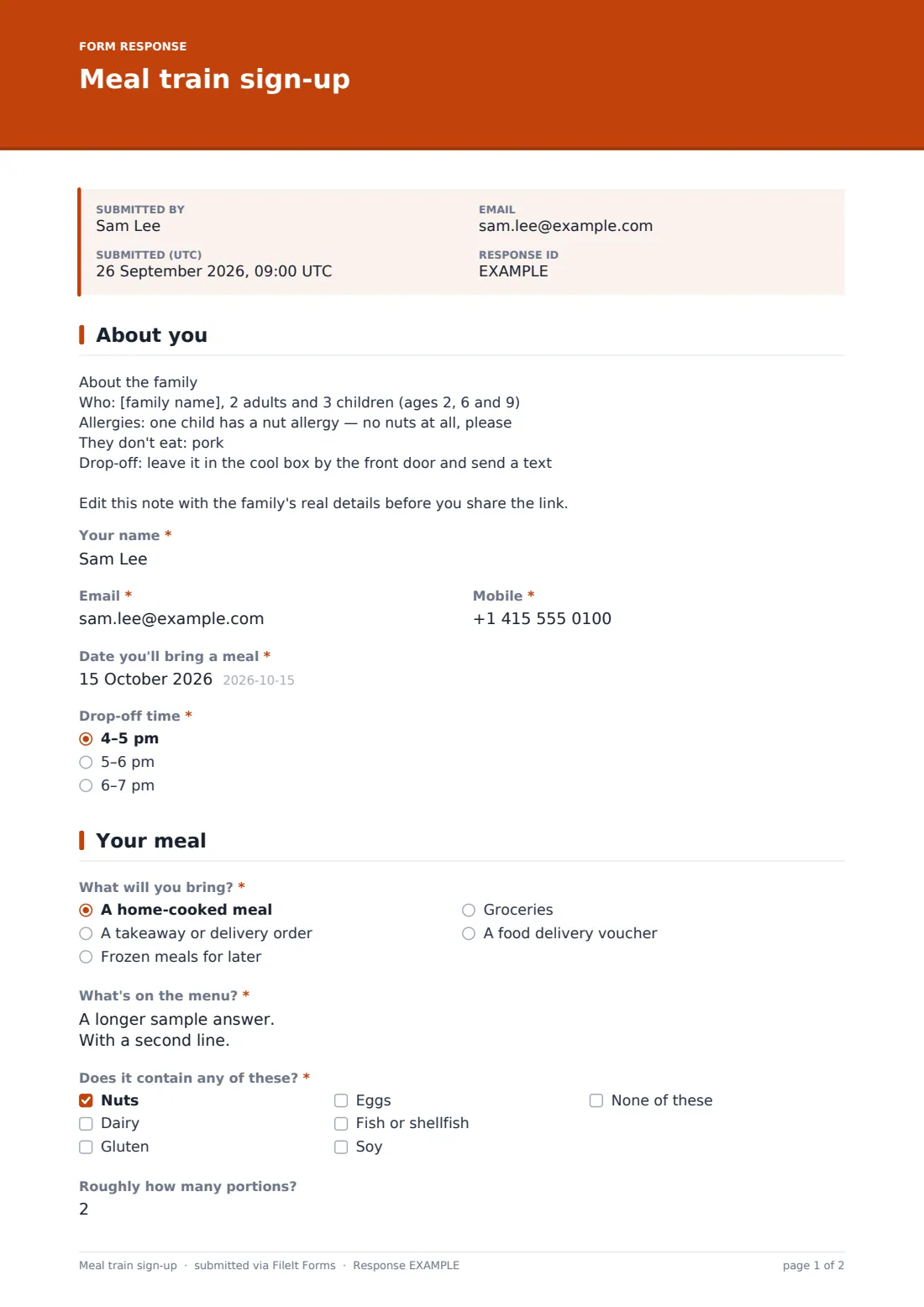
The form opens with a note about the family that you edit before sharing: who's in the household, allergies, foods they don't eat, and where to leave the meal. Volunteers then choose a date and a drop-off window and say what they'll bring — a home-cooked meal, a takeaway, frozen meals, groceries or a delivery voucher. Anyone bringing food lists the menu and ticks any allergens, and a home-cooked meal asks for heating instructions and whether the dishes need returning.
Before submitting, each volunteer confirms they've checked their meal against the family's needs. Sign-ups are filed as PDFs in your FileIt vault, and the Responses table shows the rota at a glance.
- Best for
- Churches, mosques, synagogues, parent groups, neighbours and workplaces supporting a family
- Filled in by
- Friends, neighbours and community members bringing meals
- Time to complete
- About 3 minutes
- Includes
- An editable family note, date and drop-off window, menu and allergen checklist, a required needs check
Who uses a meal train sign-up form?
- Two weeks of dinners for parents with a new baby
- Meals for a family while one parent is in hospital or recovering from surgery
- Support after a bereavement, organised by a faith community
- A neighbour coordinating help for an older couple
- A workplace sending meals or vouchers to a colleague's family
Questions on this meal train sign-up form
13 questions over 2 pages · includes conditional questions, multiple pages, consent checkbox.
1 About you
- Your name*
- Email*
- Mobile*
- Date you'll bring a meal*
- Drop-off time* 4–5 pm · 5–6 pm · 6–7 pm
2 Your meal
- What will you bring?* A home-cooked meal · A takeaway or delivery order · Frozen meals for later · Groceries · A food delivery voucher
- What's on the menu?* asked only when it applies
- Does it contain any of these?* asked only when it applies Nuts · Dairy · Gluten · Eggs · Fish or shellfish · Soy · None of these
- Roughly how many portions? asked only when it applies
- Heating instructions asked only when it applies
- Containers asked only when it applies Disposable — no need to return · Please return my dishes
- The family's needs*
- A note for the family (optional)
The meal train sign-up form, page by page
1 About you
A note at the top tells volunteers who the family are, their allergies, foods they don't eat and how drop-off works. The template's example note is there for you to replace. Volunteers then give their name, email and mobile, the "Date you'll bring a meal" and a "Drop-off time" between 4 and 7 pm.
2 Your meal
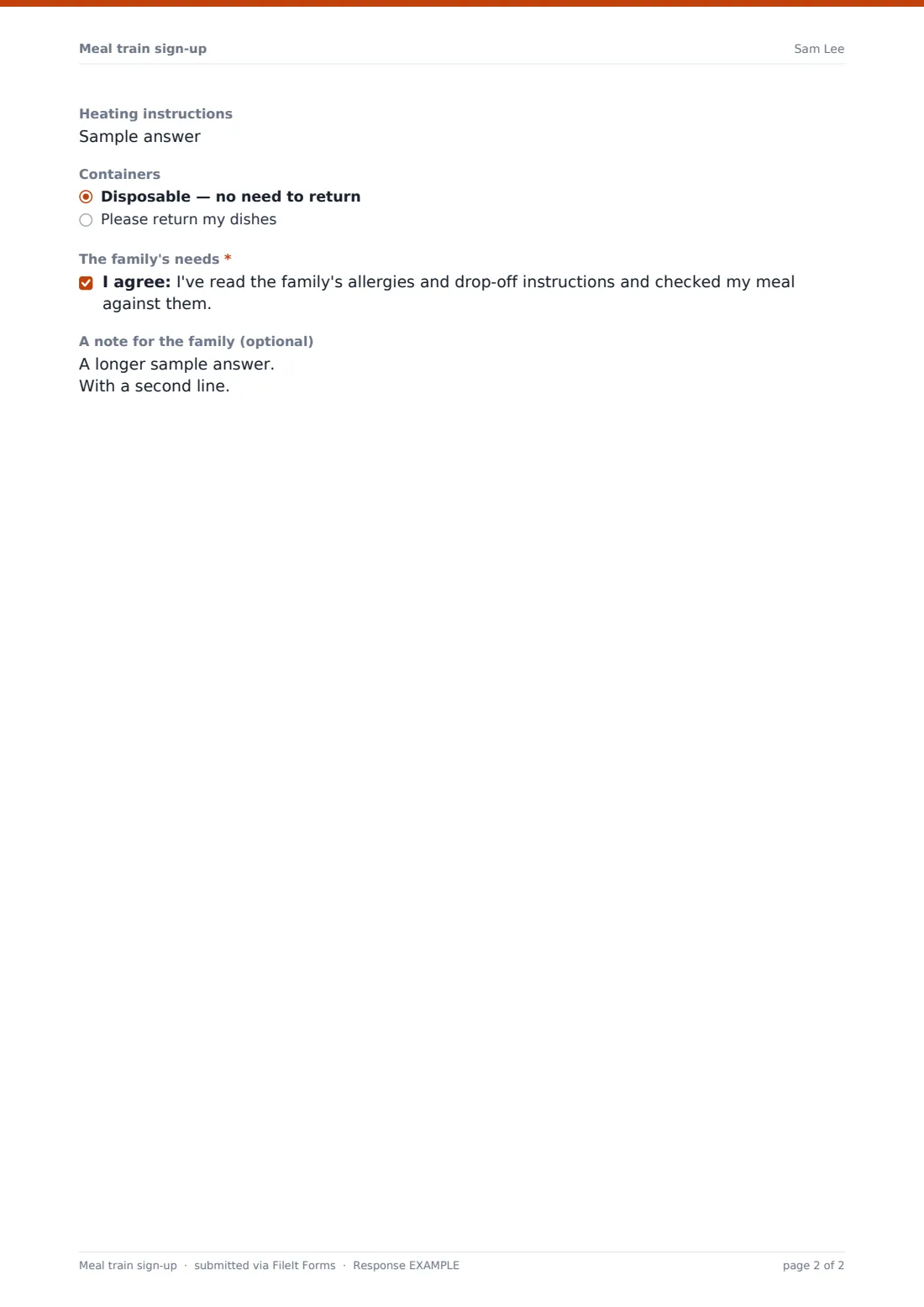
"What will you bring?" offers a home-cooked meal, a takeaway or delivery order, frozen meals for later, groceries, or a food delivery voucher. Anything other than a voucher asks "What's on the menu?", the required "Does it contain any of these?" allergen list (nuts, dairy, gluten, eggs, fish or shellfish, soy, or none of these), and roughly how many portions. A home-cooked meal also asks for heating instructions and whether the containers are disposable or need returning.
Every volunteer ticks a confirmation that they've read the family's allergies and drop-off instructions and checked their meal against them. There's an optional note for the family at the end.
Make the template yours
- Replace the family note with real details, agreed with the family first
- Change the drop-off windows to suit the family's routine
- Set a closing date for when the meal train ends
- Set a maximum number of responses equal to the number of meals needed
- Duplicate the form for each family you support, so each has its own link
- Remove options such as vouchers if the family prefers home-cooked food
Tips for a better meal train sign-up form
- Ask the family what they actually want before you start — sometimes it's groceries, not casseroles
- Check the Responses table for gaps and double bookings every couple of days
- Spread meals out: three a week is often more helpful than one every night
- Remind volunteers of allergies the day before their drop-off
- Keep the family's address out of the public note — send it to volunteers directly
Every response becomes a PDF in your vault
Each sign-up is saved as a PDF in your vault and you receive an email notice. Volunteers get a copy of their sign-up, so they have the date and menu they promised.
Sort the Responses table by date to see the rota, or export to CSV to share it with the family or a co-organiser. Search by name when someone needs to change their day.
- Start from this template. It opens in the FileIt Forms designer — change any question, add pages, set the rules for when questions appear.
- Share it. Turn on a public link, or send it to people by email, each with their own link. They don’t need a FileIt account.
- Get the answers as PDFs. Each response is saved as a PDF in the vault folder you choose, with uploaded files attached — and listed in a Responses table you can export to CSV.
Meal train sign-up form: frequently asked questions
Is this meal train form template free?
Yes. It's one of the ready-made templates in the Forms app on every FileIt account, including the free plan.
Does the form stop two people choosing the same date?
No. Dates aren't locked. The cover text asks volunteers to choose a date that isn't covered, and the organiser checks the Responses table for clashes.
Do volunteers need an account?
No. Share the link in your group chat or newsletter and anyone can sign up.
Where do I put the family's address?
We suggest not putting it in the form's public note. Send it to each volunteer privately once they've signed up.
Can volunteers give a voucher instead of cooking?
Yes. Choosing a food delivery voucher skips the menu and allergen questions.
Can I run several meal trains at once?
Yes. Duplicate the form for each family so their sign-ups, notes and links stay separate.