What is the lone worker check-in form template?
People who work alone — care workers on home visits, engineers on call-outs, meter readers, estate agents showing properties, security staff on patrol — need someone to know where they are and when they should be finished. Most lone working procedures come down to the same thing: check in at the start, check in during the job, check out at the end, and have a named person who acts if a check-in is missed.
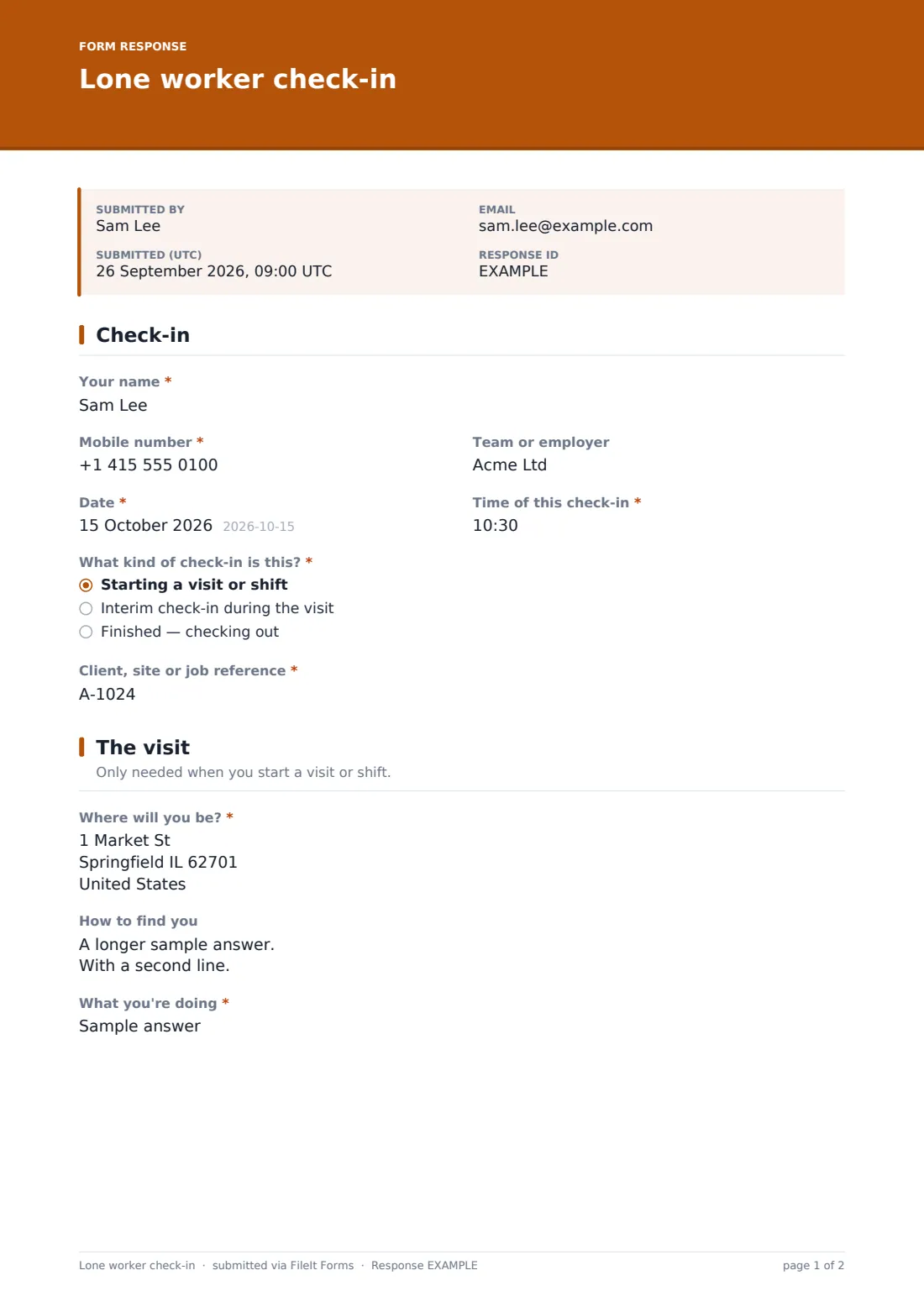
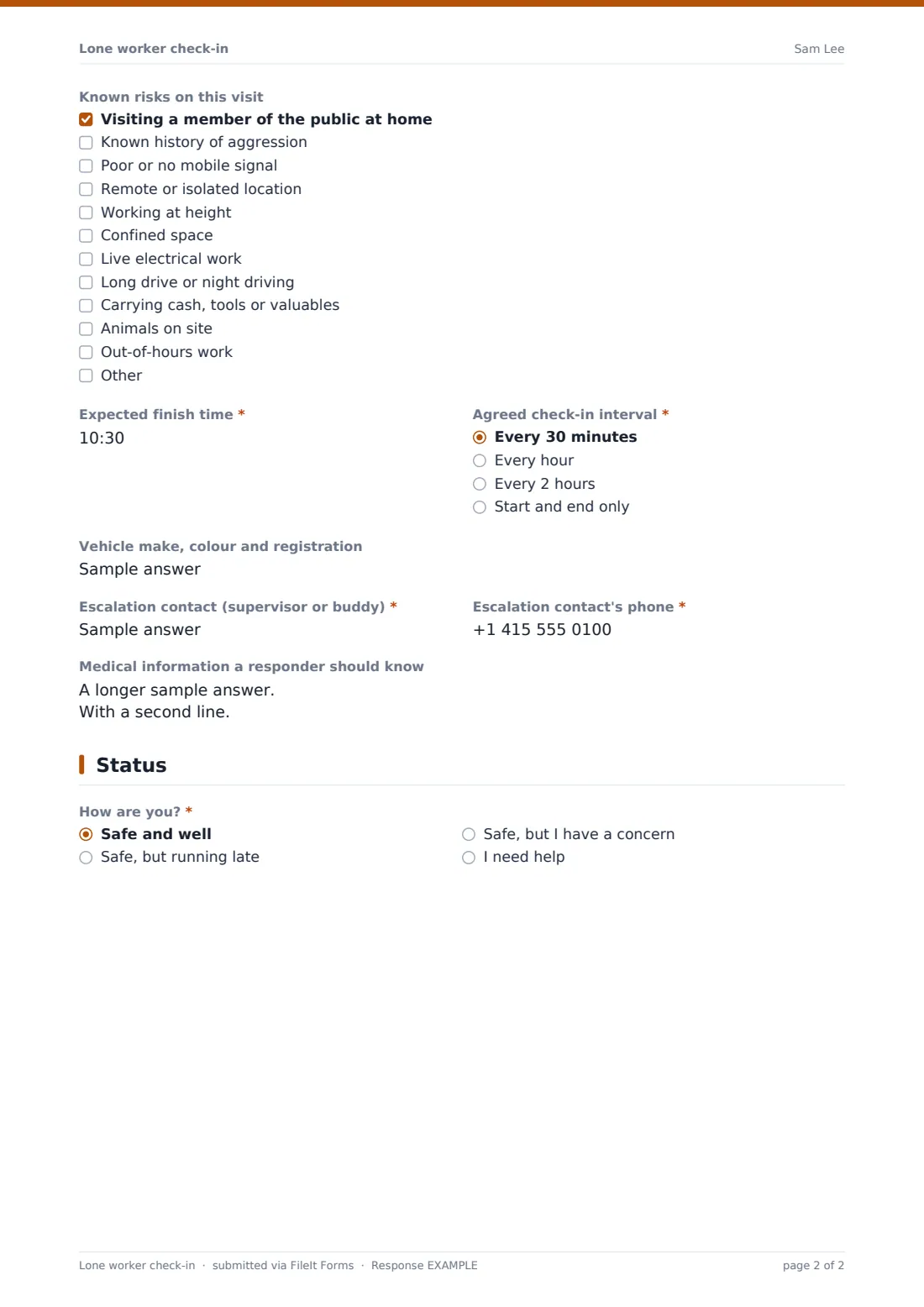
This template handles all three check-ins with one form. The worker picks whether they're starting, checking in mid-visit or finishing. At the start they record the site, address, how to find them, the task, known risks, an expected finish time, the agreed check-in interval, their vehicle and an escalation contact. Every check-in ends with a status — safe and well, running late, a concern, or needing help — and finishing a visit records the time they left and anything to report.
Each check-in is filed as a PDF in FileIt and can email your team the moment it's sent, so supervisors have a time-stamped trail of every visit. The form is a record and a notification, not a monitored alarm: your procedure still needs someone watching for missed check-ins.
- Best for
- Employers with staff who visit homes, sites or remote locations on their own
- Filled in by
- The lone worker, on their phone
- Time to complete
- About 2 minutes to start a visit, under a minute to check in or out
- Includes
- Start, interim and end check-ins, known-risk checklist, escalation contact, status with follow-ups for delays, concerns or help
Who uses a lone worker check-in form?
- Home care workers logging each client visit
- Engineers and technicians on solo call-outs
- Estate and letting agents attending viewings alone
- Community nurses and social workers on home visits
- Utility, meter and survey staff in remote areas
- Cleaners, security and maintenance staff working out of hours
Questions on this lone worker check-in form
25 questions over 3 pages · includes conditional questions, multiple pages.
1 Check-in
- Your name*
- Mobile number*
- Team or employer
- Date*
- Time of this check-in*
- What kind of check-in is this?* Starting a visit or shift · Interim check-in during the visit · Finished — checking out
- Client, site or job reference*
2 The visit
- Where will you be?* asked only when it applies
- How to find you asked only when it applies
- What you're doing* asked only when it applies
- Known risks on this visit asked only when it applies Visiting a member of the public at home · Known history of aggression · Poor or no mobile signal · Remote or isolated location · Working at height · Confined space · Live electrical work · Long drive or night driving · Carrying cash, tools or valuables · Animals on site · Out-of-hours work
- Expected finish time* asked only when it applies
- Agreed check-in interval* asked only when it applies Every 30 minutes · Every hour · Every 2 hours · Start and end only
- Vehicle make, colour and registration asked only when it applies
- Escalation contact (supervisor or buddy)* asked only when it applies
- Escalation contact's phone* asked only when it applies
- Medical information a responder should know asked only when it applies
3 Status
- How are you?* Safe and well · Safe, but running late · Safe, but I have a concern · I need help
- What's happening and where exactly are you?* asked only when it applies
- New expected finish time* asked only when it applies
- Reason for the delay asked only when it applies
- Describe your concern* asked only when it applies
- Time you left the site* asked only when it applies
- Anything to report from this visit?* asked only when it applies
- What happened?* asked only when it applies
The lone worker check-in form, page by page
1 Check-in
The worker gives their name, mobile number, team, the date and time of the check-in, then chooses what kind it is: starting a visit or shift, an interim check-in during the visit, or finished and checking out. Every check-in also asks for the client, site or job reference, using the same reference each time so a visit's check-ins can be matched up. The type of check-in decides what the rest of the form asks.
2 The visit
Only shown when a visit starts. The worker records the address, and how to find them — building, floor, gate code or landmark — plus what they're doing. A checklist of known risks covers home visits, known aggression, poor signal, remote locations, working at height, confined spaces, live electrical work, driving, carrying valuables, animals and out-of-hours work.
They then set an expected finish time and the agreed check-in interval, from every 30 minutes to start and end only, note their vehicle, and name an escalation contact with a phone number. An optional box holds medical information a responder should know. On interim and end check-ins this page just shows a short note.
3 Status
Every check-in asks how the worker is. Running late asks for a new finish time and reason; a concern asks for details; needing help shows a reminder to call the emergency services first and asks what's happening and exactly where they are. A check-out records the time they left site and whether there's anything to report, with details of near misses, abuse, injuries or hazards the next visitor should know about.
Make the template yours
- Add your escalation steps to the cover text so workers see them every time
- Change the check-in intervals to match your lone working policy
- Add risk types specific to your work, such as lone driving at night or chemical handling
- Add the email addresses of supervisors who should receive every check-in
- Create one copy per team so check-ins land in separate vault folders
- Prefill the worker's name and phone with personal links so check-ins take seconds
Tips for a better lone worker check-in form
- Agree who watches for missed check-ins and what they do after 15, 30 and 60 minutes
- Save the form link to each worker's phone home screen
- Keep the escalation contact reachable for the whole of the visit
- Review risk notes before sending someone back to the same address
- Test your escalation procedure with a planned missed check-in
- Pair the form with a personal alarm or app for high-risk visits
Every response becomes a PDF in your vault
Each check-in is saved as a time-stamped PDF in the vault folder you choose, and the account owner and any extra addresses you list can be emailed the moment it arrives. Help and concern statuses appear in the PDF and email like any other answer, so supervisors should read every notification.
In Responses, filter by worker, date or job reference to see a visit's start, interim and end check-ins together, or export to CSV to review visit patterns, delays and reported incidents.
- Start from this template. It opens in the FileIt Forms designer — change any question, add pages, set the rules for when questions appear.
- Share it. Turn on a public link, or send it to people by email, each with their own link. They don’t need a FileIt account.
- Get the answers as PDFs. Each response is saved as a PDF in the vault folder you choose, with uploaded files attached — and listed in a Responses table you can export to CSV.
Lone worker check-in form: frequently asked questions
Is this lone worker check-in template free?
Yes. It's part of the Forms app, included with every FileIt account, the free plan too.
Does FileIt raise an alarm if a worker misses a check-in?
No. FileIt records check-ins and can email them as they arrive, but it doesn't monitor for missed ones. Someone on your team must watch for them and follow your escalation procedure.
Can workers use it on their phone?
Yes. The form works in any phone browser with no app or account needed, and a check-in or check-out takes under a minute.
Why does the visit page only appear at the start?
Location, task, risks and escalation contact are recorded once when the visit starts. Interim and end check-ins only need the job reference and a status, so they stay quick.
What happens if someone selects 'I need help'?
The form reminds them to call the emergency services first and asks what's happening and where they are. The check-in is then emailed to your notification addresses, but it is not a substitute for an emergency call.
Can we see all check-ins for one worker?
Yes. Filter the Responses table by name, date or job reference, or export to CSV.