What is the software license and certificate register form template?
Expired SSL certificates take websites offline. Forgotten subscriptions renew for another year at full price. Domains lapse because the card on file belonged to someone who left. Nearly all of it comes down to the same gap: nobody wrote down what you have, when it renews and who owns it.
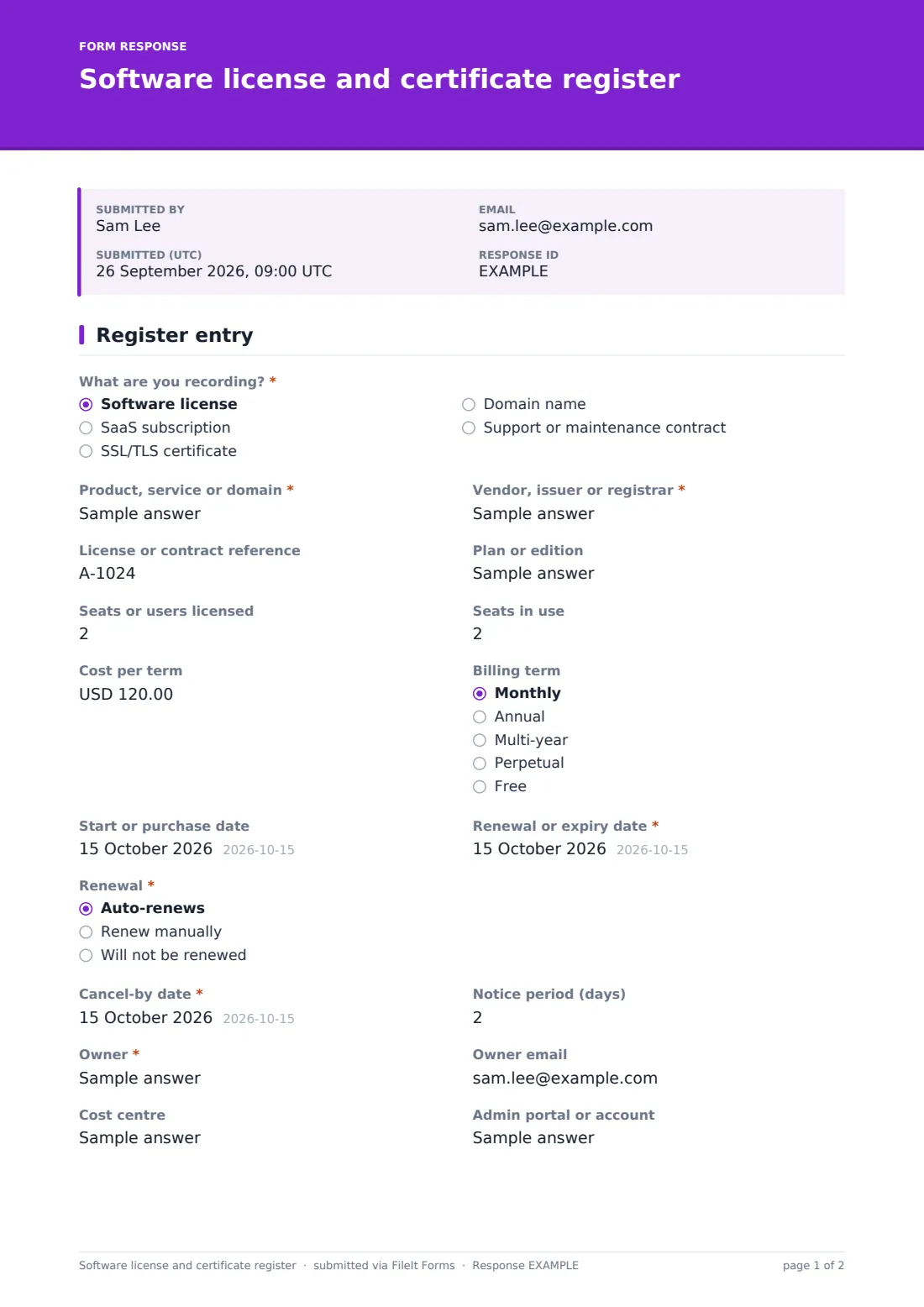
This one-page form records a single item in your register. What are you recording? covers software licenses, SaaS subscriptions, SSL/TLS certificates, domain names and support contracts. Each entry captures the product, the vendor or issuer, a contract or license reference, the plan, seats licensed and in use, cost, billing term, start date and the Renewal or expiry date. Certificates also ask which domains are covered, the certificate type and where it's installed.
When an item auto-renews, the form asks for the Cancel-by date and the notice period, the date that actually matters if you want to change plans. An owner, cost centre, admin portal, users, documents and notes complete each entry, which is filed in your FileIt vault as a PDF.
- Best for
- IT managers, office managers and finance teams tracking software spend
- Filled in by
- Whoever buys, renews or installs the item
- Time to complete
- About 3 minutes per entry
- Includes
- Five item types, certificate details, seats, cost, renewal date, cancel-by date for auto-renewals, owner and documents
Who uses a software license and certificate register form?
- Building a first register of every SaaS tool the company pays for
- Recording SSL certificates and where each one is installed
- Tracking domain renewals across several registrars
- Checking seats licensed against seats in use before a renewal
- Logging support and maintenance contracts for key systems
- Handing over IT to a new manager or MSP
Questions on this software license and certificate register form
24 questions · includes file upload, conditional questions.
1 Register entry
- What are you recording?* Software license · SaaS subscription · SSL/TLS certificate · Domain name · Support or maintenance contract
- Product, service or domain*
- Vendor, issuer or registrar*
- License or contract reference
- Plan or edition
- Domains covered* asked only when it applies
- Certificate type asked only when it applies Domain validated (DV) · Organization validated (OV) · Extended validation (EV) · Wildcard · Multi-domain (SAN)
- Installed on asked only when it applies
- Seats or users licensed
- Seats in use
- Cost per term
- Billing term Monthly · Annual · Multi-year · Perpetual · Free
- Start or purchase date
- Renewal or expiry date*
- Renewal* Auto-renews · Renew manually · Will not be renewed
- Cancel-by date* asked only when it applies
- Notice period (days) asked only when it applies
- Owner*
- Owner email
- Cost centre
- Admin portal or account
- Who or what uses it
- Invoice, contract or certificate
- Notes
The software license and certificate register form, page by page
1 What it is
What are you recording? sets the type. Product, service or domain and Vendor, issuer or registrar are required. License or contract reference has help text suggesting full keys stay in a password manager, since anyone who can see responses can read them. Plan or edition is optional. For SSL/TLS certificates, the form adds Domains covered, Certificate type (DV, OV, EV, wildcard or multi-domain) and Installed on.
2 Seats, cost and renewal
Seats licensed and seats in use sit side by side, followed by Cost per term, Billing term, the start date and the required Renewal or expiry date. Renewal is auto-renews, renew manually or will not be renewed. Auto-renewing items ask for the Cancel-by date, the last day to cancel or change plan, and the notice period in days.
3 Ownership
Owner is required, with help text explaining it means the person who decides whether it renews. Owner email, cost centre and admin portal or account follow, with a reminder not to enter the password. Who or what uses it, invoices or certificates, and notes complete the entry.
Make the template yours
- Change the currency and add your common vendors as a dropdown
- Add a department question if costs are charged back
- Remove item types you don't track, such as domains
- File entries into vault folders by type: licenses, certificates, domains
- Add a keep, downgrade or cancel question for your yearly review
Tips for a better software license and certificate register form
- Record the cancel-by date as well as the renewal date for every auto-renewal
- Give every item a named owner, not a team
- Compare seats in use with seats licensed before each renewal
- Keep keys and passwords in a password manager, not in the register
- Export the register and sort by renewal date at the start of each month
Every response becomes a PDF in your vault
Each entry is filed as a PDF in your FileIt vault with its invoice, contract or certificate attached, and the form owner is emailed.
The Responses table is your register: search by product, vendor or owner, and export to CSV to sort by renewal or cancel-by date and plan upcoming renewals.
- Start from this template. It opens in the FileIt Forms designer — change any question, add pages, set the rules for when questions appear.
- Share it. Turn on a public link, or send it to people by email, each with their own link. They don’t need a FileIt account.
- Get the answers as PDFs. Each response is saved as a PDF in the vault folder you choose, with uploaded files attached — and listed in a Responses table you can export to CSV.
Software license and certificate register form: frequently asked questions
Is this license register template free?
Yes. It's a starter template in FileIt Forms, and you can change any question.
Will FileIt remind me before a certificate expires?
The form records the renewal and cancel-by dates; it doesn't send renewal reminders itself. Export the responses and sort by date to see what's coming up.
Should I put license keys in it?
We'd suggest a reference only. Anyone who can view responses or the filed PDF can read what's typed, so full keys are better kept in a password manager.
Can one entry cover several certificates?
It's one item per entry, though a multi-domain or wildcard certificate lists all the domains it covers.
What does the cancel-by date mean?
It's the last day you can cancel or change an auto-renewing contract before it renews. It's often weeks before the renewal date.