What is the leave carryover request form template?
Near the end of every leave year the same emails arrive: "I couldn't take all my holiday, can I carry it over?" Without a standard request, HR has to work out each person's balance, why the leave wasn't taken, and what the manager actually agreed — and the decisions end up inconsistent.
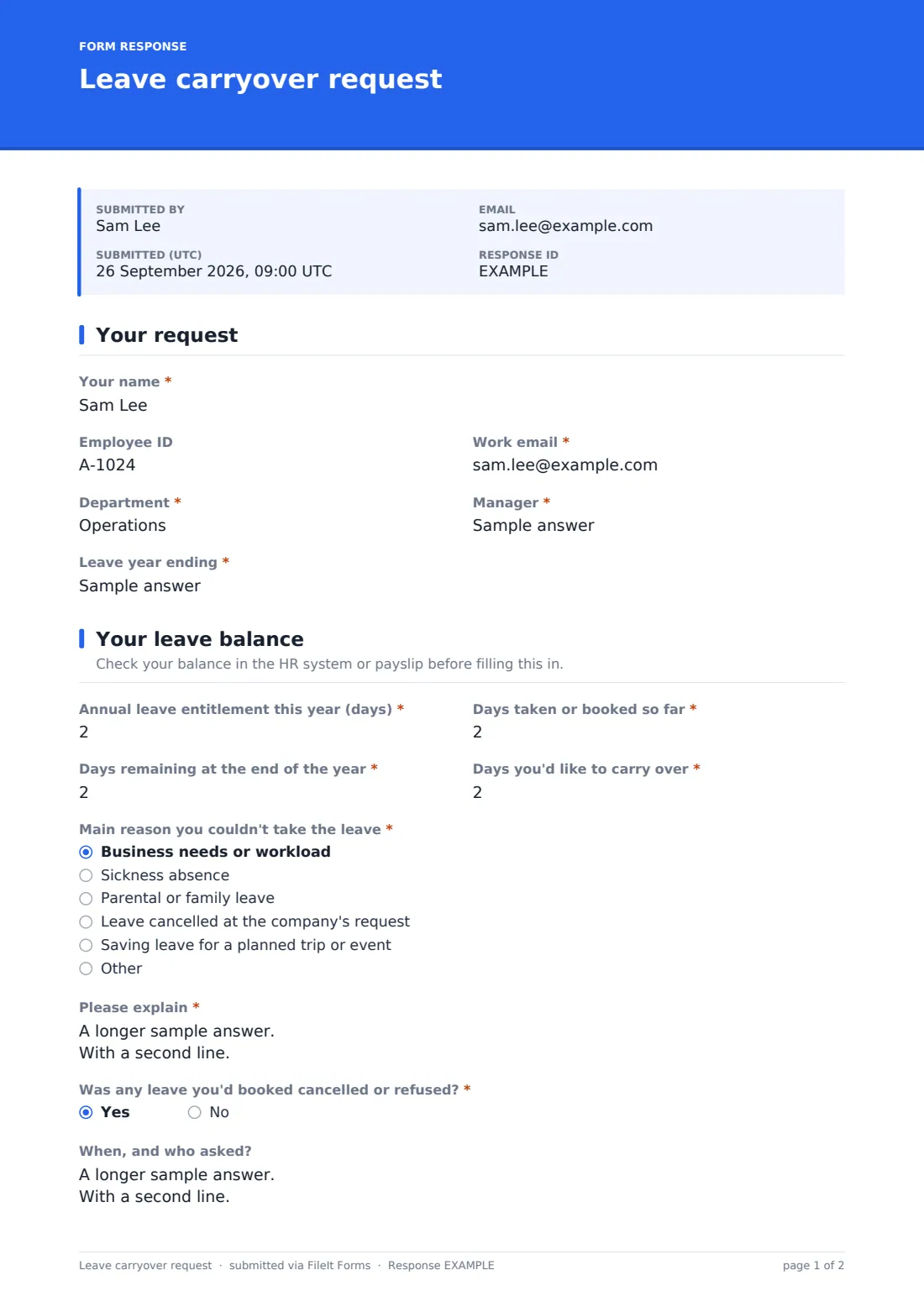
This template collects the request and the decision together. The employee gives their details and the leave year, then their entitlement, days taken or booked, days remaining and days they'd like to carry over. They choose the main reason — workload, sickness, parental leave, cancelled leave or saving for a trip — explain it, say whether booked leave was cancelled or refused, and when they plan to use the days.
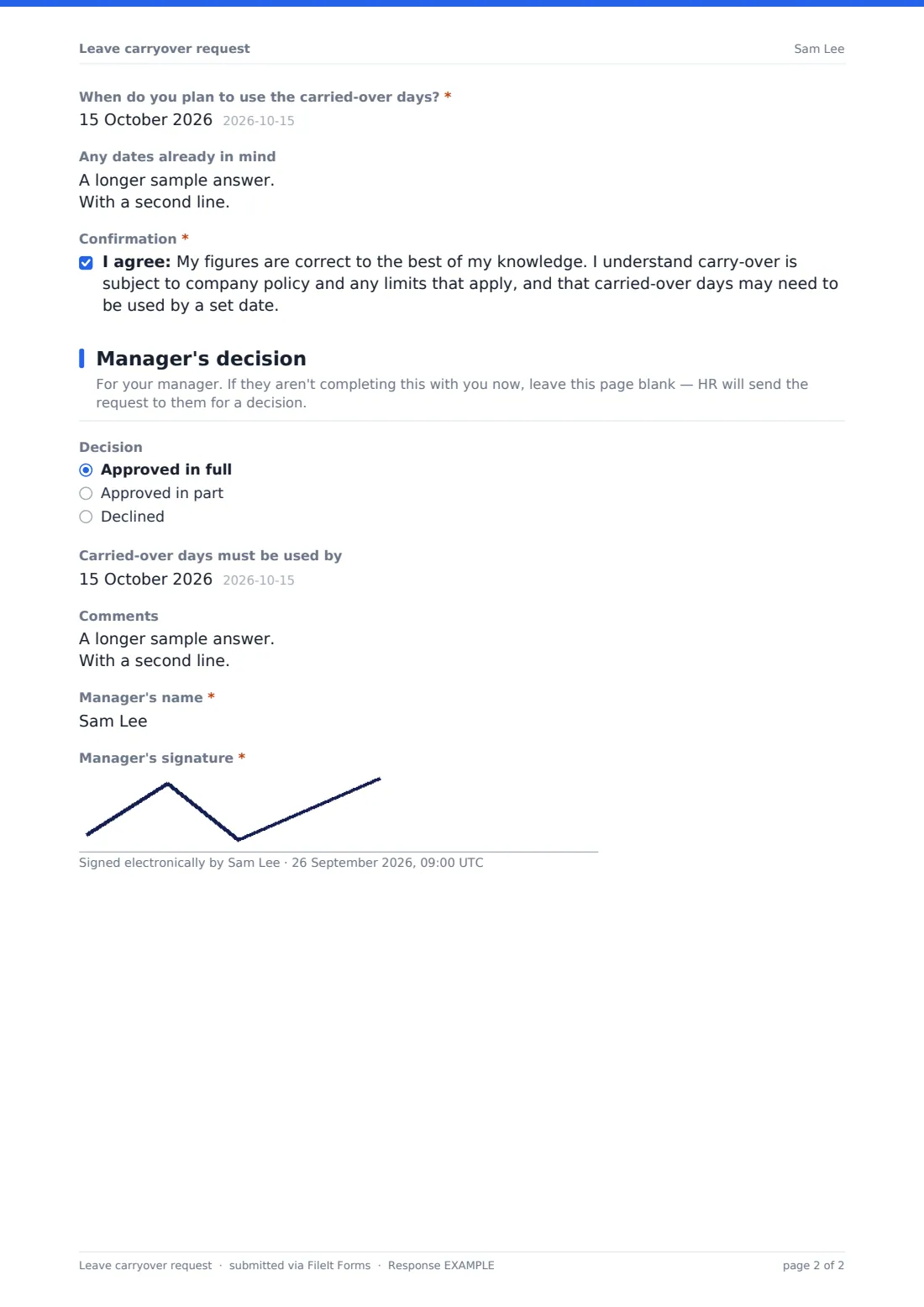
The manager's section records approval in full, in part (with the days approved) or a decline, the date carried-over days must be used by, comments and a signature. Carry-over rules vary by employer and location, so set the limits in your own policy; each request is saved as a PDF in your FileIt vault.
- Best for
- HR teams and managers handling end-of-year leave
- Filled in by
- The employee, then their manager
- Time to complete
- About 3 minutes for the employee
- Includes
- Balance figures, reason, cancelled-leave check, partial approval and a use-by date
Who uses a leave carryover request form?
- Year-end leave requests across a whole company
- An employee who couldn't take leave during a busy project
- A returner from parental leave with untaken holiday
- A team member saving days for a long trip next year
- HR keeping a record of every carry-over decision
- A small business replacing carry-over emails with one form
Questions on this leave carryover request form
23 questions over 3 pages · includes signature, conditional questions, multiple pages, consent checkbox.
1 Your request
- Your name*
- Employee ID
- Work email*
- Department*
- Manager*
- Leave year ending*
2 Your leave balance
- Annual leave entitlement this year (days)*
- Days taken or booked so far*
- Days remaining at the end of the year*
- Days you'd like to carry over*
- Main reason you couldn't take the leave* Business needs or workload · Sickness absence · Parental or family leave · Leave cancelled at the company's request · Saving leave for a planned trip or event
- Please explain*
- Was any leave you'd booked cancelled or refused?*
- When, and who asked? asked only when it applies
- When do you plan to use the carried-over days?*
- Any dates already in mind
- Confirmation*
3 Manager's decision
- Decision Approved in full · Approved in part · Declined
- Days approved* asked only when it applies
- Carried-over days must be used by asked only when it applies
- Comments asked only when it applies
- Manager's name* asked only when it applies
- Manager's signature* asked only when it applies
The leave carryover request form, page by page
1 Your request
The employee gives Your name, Employee ID, Work email, Department, Manager and the Leave year ending.
2 Your leave balance
Four numbers set out the balance: entitlement, days taken or booked, days remaining and days to carry over, all in half-day steps. The main reason is chosen from workload, sickness, parental or family leave, leave cancelled by the company or saving for a planned trip, with a required explanation. The employee says whether booked leave was cancelled or refused (with details), when they plan to use the days and any dates in mind, then confirms the figures.
3 Manager's decision
This page is for the manager; if they aren't completing the form with the employee, it's left blank and HR passes the request on. The manager approves in full, in part or declines. A partial approval asks for the days approved, any approval can set a use-by date, and choosing a decision opens comments, the manager's name and a required signature.
Make the template yours
- Add your policy's carry-over limit to the cover text or the balance page description
- Change days to hours if you track leave in hours
- Set a closing date at the end of your leave year
- Add HR or payroll to notifications so balances are updated quickly
- Remove the reasons that don't apply under your policy
- File requests into a vault folder for each leave year
Tips for a better leave carryover request form
- Remind staff to book leave well before year-end so fewer requests are needed
- Treat leave that couldn't be taken because of sickness or family leave carefully — rules often differ for it
- Always set a use-by date for carried-over days
- Check the figures against your HR system before approving
- Be consistent: similar requests should get similar decisions across teams
- Look at the reasons across requests — repeated workload reasons may point to understaffing
Every response becomes a PDF in your vault
Each request is saved as a PDF in your vault and the employee gets a copy. With notifications on, HR knows when to update the leave balance.
HR can export requests to a CSV to see total days carried over by department and plan for the leave that will be taken early next year.
- Start from this template. It opens in the FileIt Forms designer — change any question, add pages, set the rules for when questions appear.
- Share it. Turn on a public link, or send it to people by email, each with their own link. They don’t need a FileIt account.
- Get the answers as PDFs. Each response is saved as a PDF in the vault folder you choose, with uploaded files attached — and listed in a Responses table you can export to CSV.
Leave carryover request form: frequently asked questions
Is this leave carryover form free?
Yes. It's part of the FileIt Forms app on every plan, including the free plan.
How does the manager complete their part?
The manager's decision is the last page of the same form. If the employee and manager complete it together, the decision is recorded straight away. Otherwise the employee leaves that page blank and HR passes the request to the manager.
Does the form apply our carry-over limit automatically?
No. Add your limit to the form's text and check requests against it when deciding.
Can we track leave in hours instead of days?
Yes. Edit the labels and step on the number questions.
Is this form legal advice on carry-over rights?
No. Rules on carrying over leave vary by employer and location. Follow your own policy and local requirements.
Can a manager approve part of the request?
Yes. Approved in part asks for the number of days approved.