What is the hot desk booking form template?
Hybrid working made the shared office normal, and with it a new daily question: is there a desk for me tomorrow, does it have a monitor, and can I park? When requests arrive by chat message or a hallway conversation, the facilities team ends up juggling spreadsheets, double-booked desks and people who turn up to find no dock for their laptop.
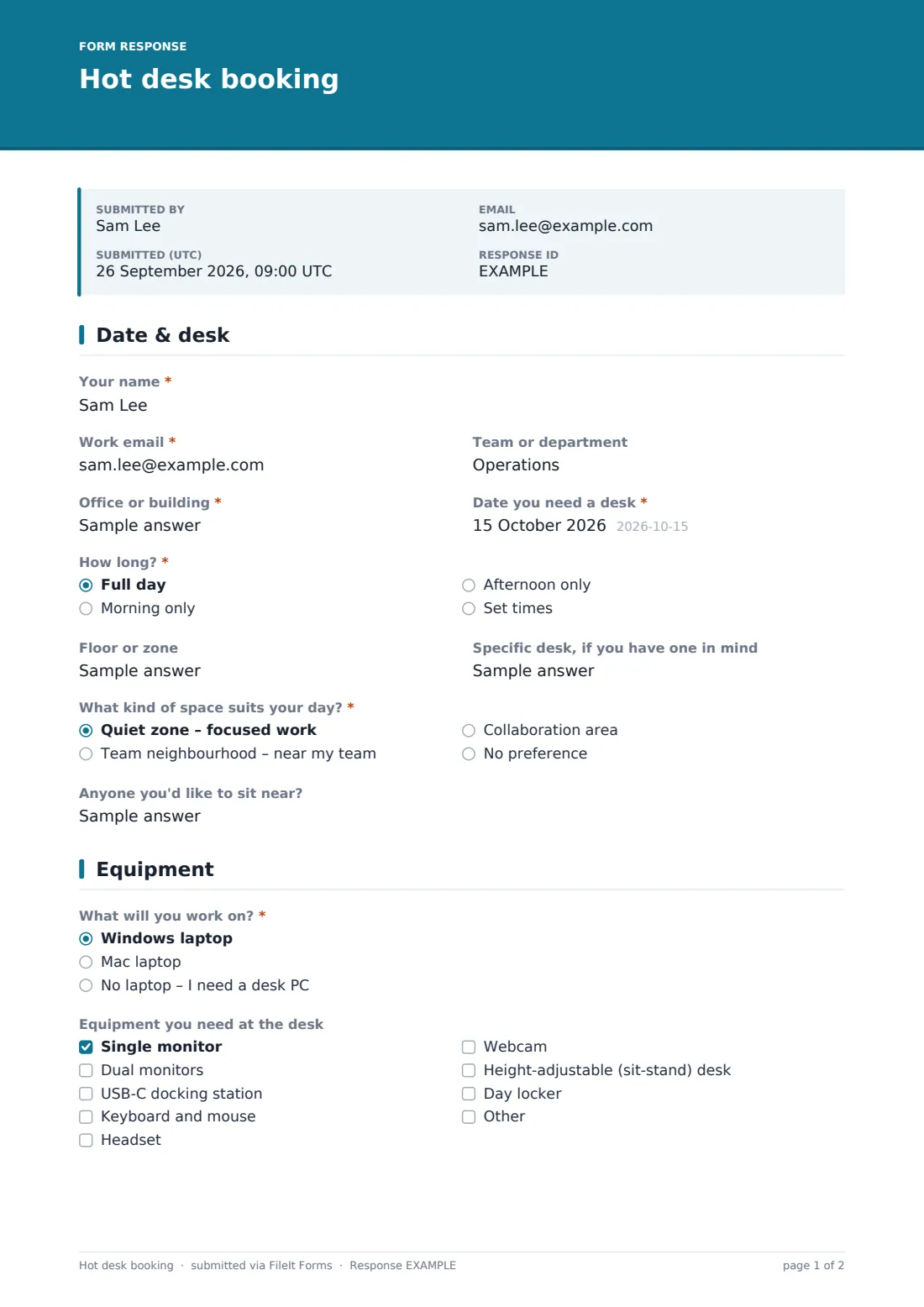
This hot desk booking form puts the request in one place. Staff choose the office and the date, a full day or set times, and the kind of space that suits their day — a quiet zone, their team's neighbourhood or a collaboration area. They tick the equipment they need, say whether they're on calls all day, and tell you about parking and any accessibility or workstation requirements before they arrive rather than after.
Every request is saved as a PDF in your FileIt vault and lands in the Responses table, where the desk team can sort by date and office. It isn't a live seat map — there's no automatic availability check — but it gives a small facilities team a clean, consistent queue of bookings to confirm.
- Best for
- Hybrid offices, co-working spaces and facilities teams without a dedicated desk-booking system
- Filled in by
- Employees or visiting staff who need a desk for the day
- Time to complete
- About 2 minutes
- Includes
- Set-time bookings, equipment checklist, parking with EV charging, accessibility requirements, cancellation agreement
Who uses a hot desk booking form?
- A hybrid team booking desks for their in-office days
- Staff from another site visiting the head office for a week
- A co-working space taking day-desk requests from members
- A facilities team managing a limited number of parking and EV charging bays
- Making sure sit-stand desks and accessible spaces go to the people who need them
- Grouping a project team in one neighbourhood for a planning day
Questions on this hot desk booking form
24 questions over 3 pages · includes conditional questions, multiple pages, consent checkbox.
1 Date & desk
- Your name*
- Work email*
- Team or department
- Office or building*
- Date you need a desk*
- How long?* Full day · Morning only · Afternoon only · Set times
- From* asked only when it applies
- Until* asked only when it applies
- Floor or zone
- Specific desk, if you have one in mind
- What kind of space suits your day?* Quiet zone – focused work · Team neighbourhood – near my team · Collaboration area · No preference
- Anyone you'd like to sit near?
2 Equipment
- What will you work on?* Windows laptop · Mac laptop · No laptop – I need a desk PC
- Equipment you need at the desk Single monitor · Dual monitors · USB-C docking station · Keyboard and mouse · Headset · Webcam · Height-adjustable (sit-stand) desk · Day locker
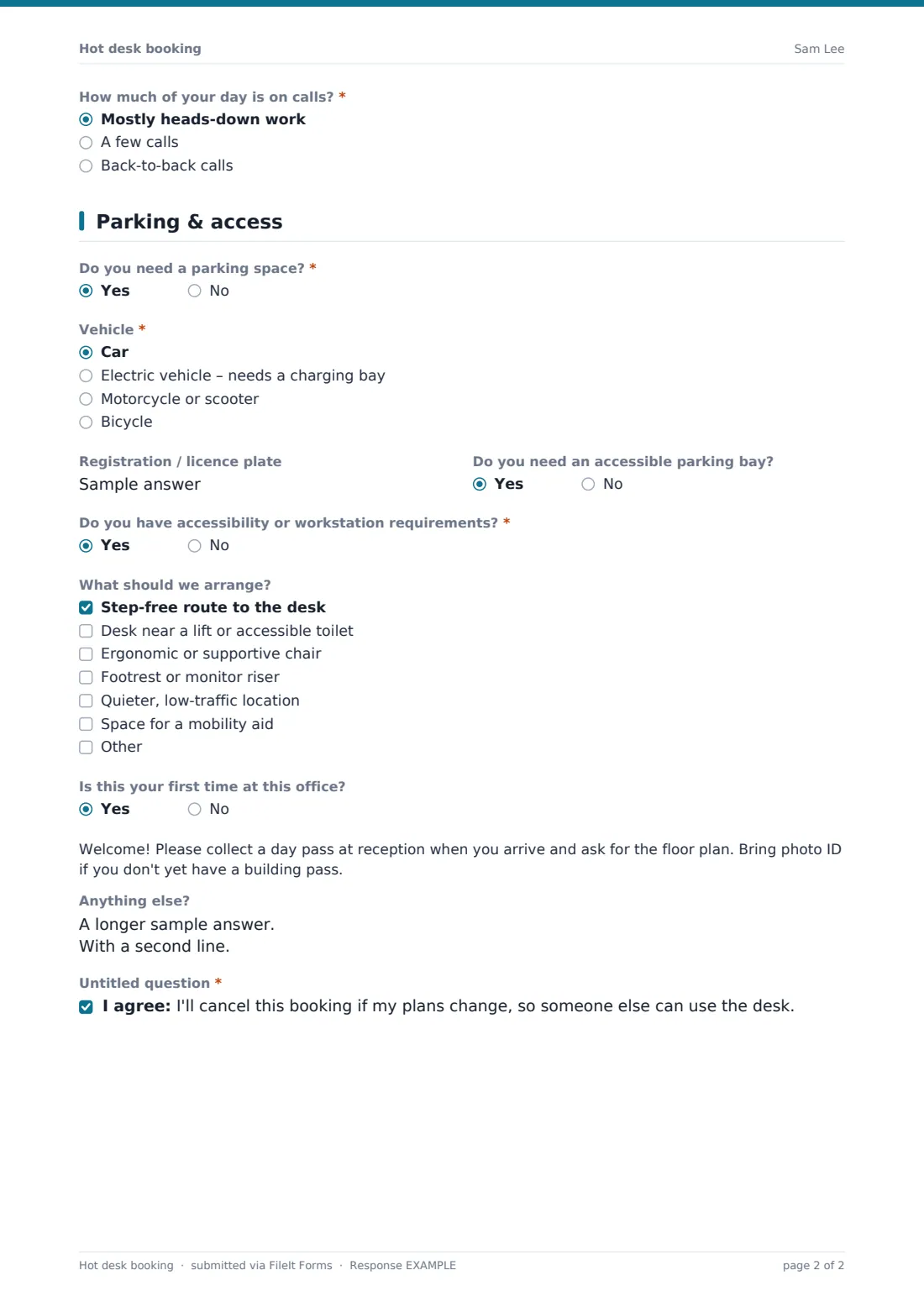
- How much of your day is on calls?* Mostly heads-down work · A few calls · Back-to-back calls
3 Parking & access
- Do you need a parking space?*
- Vehicle* asked only when it applies Car · Electric vehicle – needs a charging bay · Motorcycle or scooter · Bicycle
- Registration / licence plate asked only when it applies
- Do you need an accessible parking bay? asked only when it applies
- Do you have accessibility or workstation requirements?*
- What should we arrange? asked only when it applies Step-free route to the desk · Desk near a lift or accessible toilet · Ergonomic or supportive chair · Footrest or monitor riser · Quieter, low-traffic location · Space for a mobility aid
- Is this your first time at this office?
- Anything else?
- *
The hot desk booking form, page by page
1 Date & desk
The form opens with Your name, Work email and an optional Team or department, then the required Office or building and Date you need a desk. How long? offers a full day, a morning, an afternoon or Set times — choosing set times reveals From and Until time fields.
Floor or zone and Specific desk, if you have one in mind let regular visitors ask for a favourite spot. What kind of space suits your day? separates focused work in a quiet zone from sitting with your team or in a collaboration area, and an optional Anyone you'd like to sit near? helps the desk team group bookings.
2 Equipment
What will you work on? asks whether the person brings a Windows laptop, a Mac laptop or needs a desk PC — the difference matters when docks and adapters are limited. Equipment you need at the desk is a checklist covering a single monitor or dual monitors, a USB-C docking station, keyboard and mouse, headset, webcam, a height-adjustable desk and a day locker, with an Other option.
How much of your day is on calls? lets people say they're mostly heads-down or on back-to-back calls. Choosing back-to-back calls shows a short note suggesting a phone booth or meeting room as well, so neighbouring desks stay quiet.
3 Parking & access
Do you need a parking space? reveals Vehicle — car, an electric vehicle that needs a charging bay, motorcycle or scooter, or bicycle — plus Registration / licence plate and whether an accessible parking bay is needed.
Do you have accessibility or workstation requirements? opens a checklist for a step-free route, a desk near a lift or accessible toilet, an ergonomic chair, a footrest or monitor riser, a quieter location or space for a mobility aid. First-time visitors see a welcome note about collecting a day pass at reception. The form ends with Anything else? and a short agreement to cancel if plans change, so desks don't sit empty.
Make the template yours
- Replace the Office or building text field with a dropdown of your own sites
- Rename the zone options to match your floor plan, such as named neighbourhoods
- Remove the parking page if your office has no car park
- Edit the first-visit note with your reception's real opening hours and pass process
- Add the facilities inbox to notification emails so requests reach the whole desk team
- Change the confirmation message to say when bookings are confirmed, for example by 4pm the day before
Tips for a better hot desk booking form
- Share the form link in your team chat or intranet, with a QR code at reception for walk-ins
- Sort the Responses table by date each afternoon to plan the next day's desks
- Keep a few sit-stand desks back for people who list them as a workstation requirement
- Confirm EV charging bays first — they're usually the scarcest resource
- Review cancellations and no-shows monthly to see whether you need more or fewer desks
Every response becomes a PDF in your vault
Each booking request is filed as a PDF in the vault folder you choose, titled with the person's name and date. With owner notifications on, the facilities team is emailed straight away, and the person can receive a copy of their request.
In the Responses table you can filter requests by date, office or equipment and export them to CSV — handy for a weekly occupancy view or for checking how often parking and docking stations are requested.
- Start from this template. It opens in the FileIt Forms designer — change any question, add pages, set the rules for when questions appear.
- Share it. Turn on a public link, or send it to people by email, each with their own link. They don’t need a FileIt account.
- Get the answers as PDFs. Each response is saved as a PDF in the vault folder you choose, with uploaded files attached — and listed in a Responses table you can export to CSV.
Hot desk booking form: frequently asked questions
Is this hot desk booking form free?
Yes. It's a starter template in the FileIt Forms app, which is included on every account, including the free plan.
Does the form check whether a desk is available?
No. It collects booking requests; it doesn't show a live seat map or block double bookings. Your facilities team confirms each desk, usually by email.
Do staff need a FileIt account to book?
No. Anyone with the form's link can submit a request without signing up.
Can people book several days at once?
Each request covers one date. People can submit the form again for each day, which keeps every booking as its own record.
Is accessibility information kept private?
Responses are visible only to the form's owner and anyone they share the vault folder with. The help text asks people to share only what's needed to set up their space.
Can we close bookings for a holiday period?
Yes. You can set a closing date in the form's settings, or limit the total number of responses.