What is the dock appointment request form template?
Unplanned arrivals clog the yard and leave receiving teams either idle or overwhelmed. Booking dock appointments spreads the work out, but only if the request says how big the load is, whether it's floor-loaded, chilled or hazardous, and which purchase orders it covers.
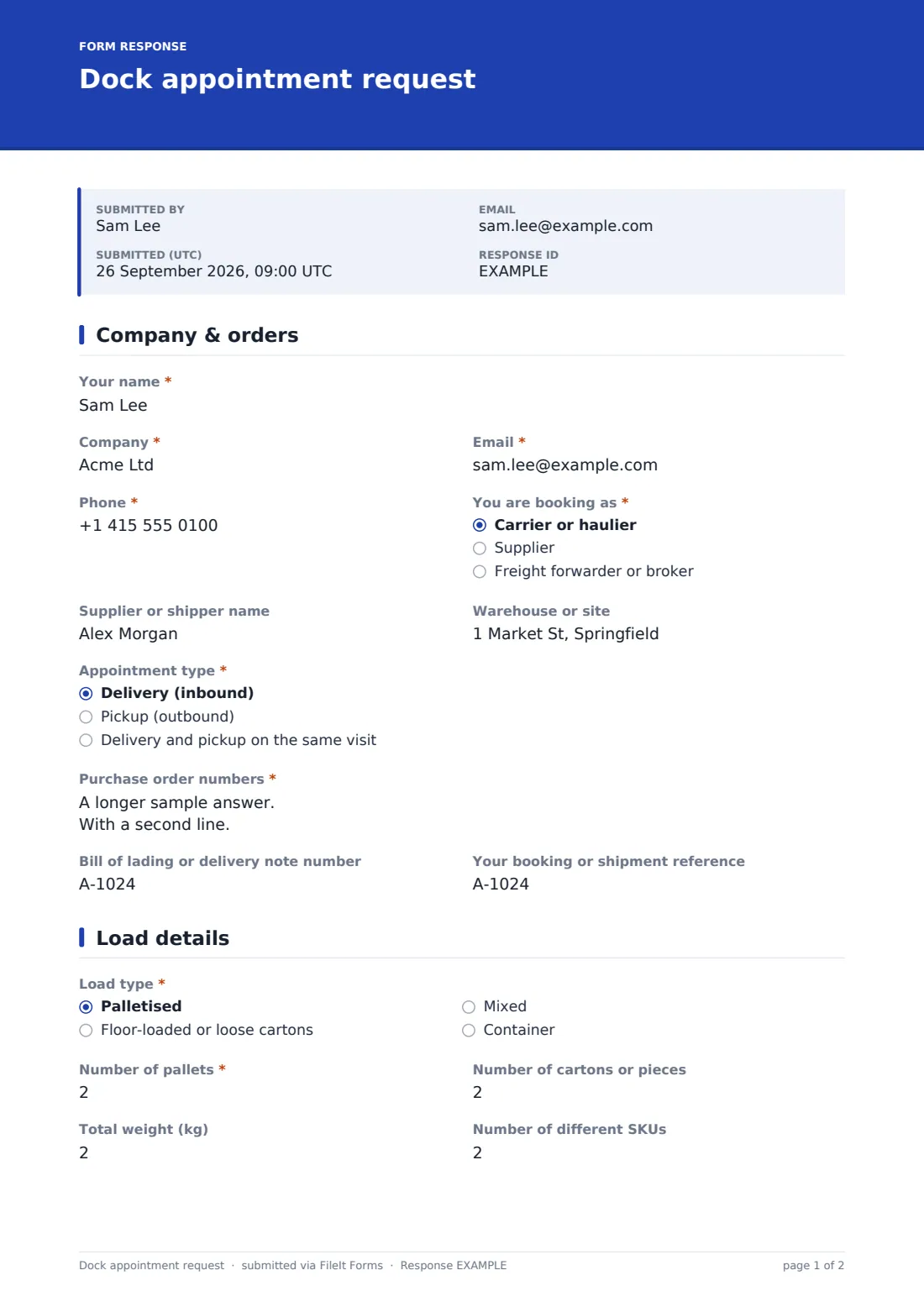
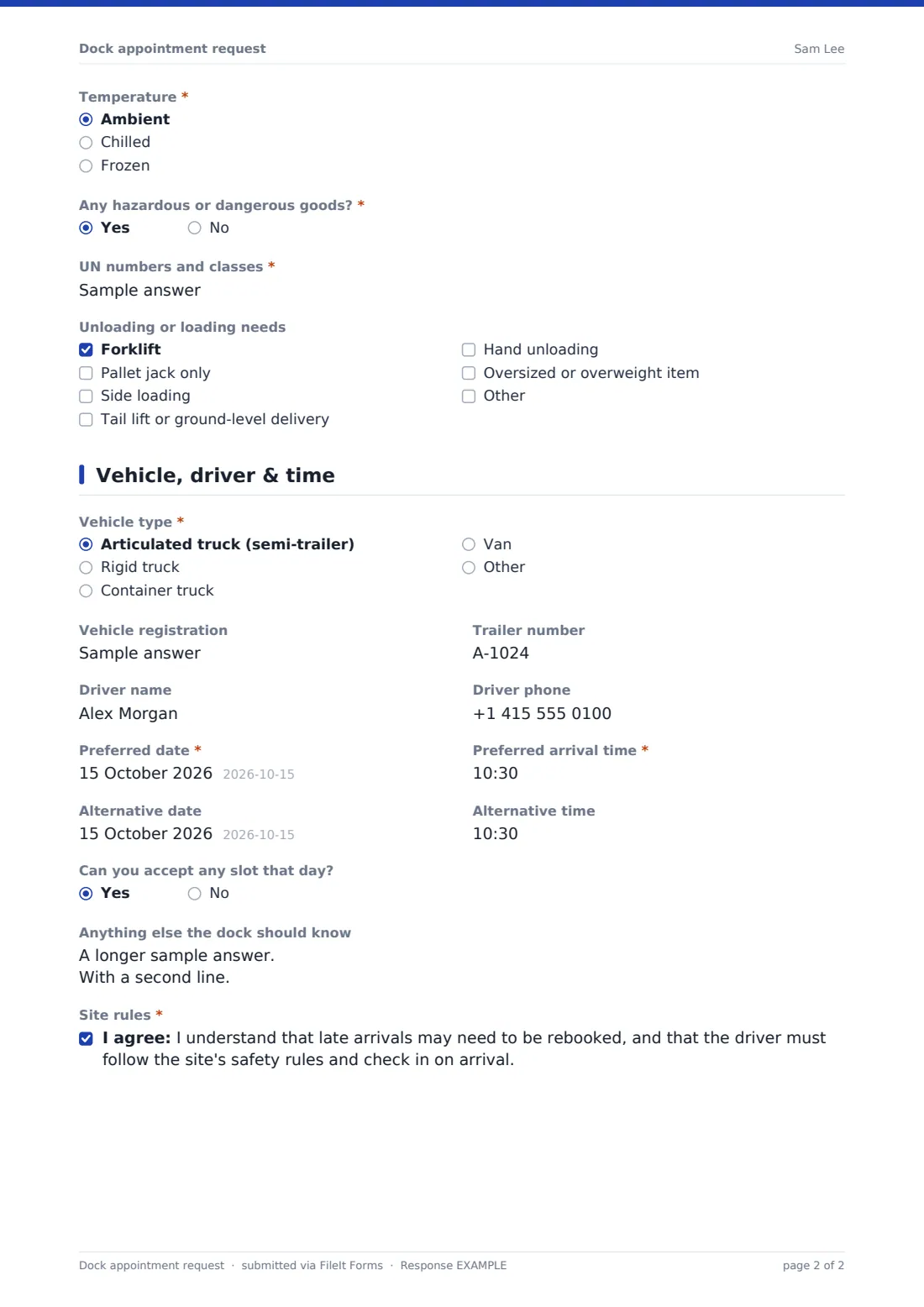
This form takes a booking request in three pages: who's booking and the purchase order or release numbers involved; load type, pallets, cartons, weight, SKUs, temperature, hazardous goods and handling needs; and the vehicle, driver and preferred and alternative arrival times. Containers add the container number and size.
Each request is filed as a PDF in your FileIt vault and emailed to your team if notifications are on. It's a request rather than an automatic booking: the warehouse confirms or offers another time by replying to the requester.
- Best for
- Warehouses, distribution centres and 3PLs that schedule inbound and outbound loads
- Filled in by
- Carriers, suppliers or freight forwarders
- Time to complete
- About 4 minutes
- Includes
- Delivery and pickup references, container and hazmat follow-ups, handling needs, preferred and alternative times, site rules acknowledgement
Who uses a dock appointment request form?
- Suppliers booking inbound deliveries against purchase orders
- Carriers booking outbound collections
- Container deliveries that need a long unloading slot
- Chilled or frozen loads that need a cold dock
- Small warehouses replacing phone and email bookings
- 3PLs taking bookings for several clients
Questions on this dock appointment request form
35 questions over 3 pages · includes conditional questions, multiple pages, consent checkbox.
1 Company & orders
- Your name*
- Company*
- Email*
- Phone*
- You are booking as* Carrier or haulier · Supplier · Freight forwarder or broker
- Supplier or shipper name
- Warehouse or site
- Appointment type* Delivery (inbound) · Pickup (outbound) · Delivery and pickup on the same visit
- Purchase order numbers* asked only when it applies
- Order, load or release numbers to collect* asked only when it applies
- Bill of lading or delivery note number
- Your booking or shipment reference
2 Load details
- Load type* Palletised · Floor-loaded or loose cartons · Mixed · Container
- Number of pallets* asked only when it applies
- Number of cartons or pieces
- Total weight (kg)
- Number of different SKUs
- Container number asked only when it applies
- Container size asked only when it applies 20 ft · 40 ft · 40 ft high cube · 45 ft · Other
- Temperature* Ambient · Chilled · Frozen
- Any hazardous or dangerous goods?*
- UN numbers and classes* asked only when it applies
- Unloading or loading needs Forklift · Pallet jack only · Side loading · Tail lift or ground-level delivery · Hand unloading · Oversized or overweight item
3 Vehicle, driver & time
- Vehicle type* Articulated truck (semi-trailer) · Rigid truck · Container truck · Van · Other
- Vehicle registration
- Trailer number
- Driver name
- Driver phone
- Preferred date*
- Preferred arrival time*
- Alternative date
- Alternative time
- Can you accept any slot that day?
- Anything else the dock should know
- Site rules*
The dock appointment request form, page by page
1 Company & orders
The contact's name, company, email and phone are required, along with whether they're booking as a carrier, supplier or forwarder. Supplier name and warehouse or site are optional.
Appointment type is delivery, pickup or both. Deliveries require the purchase order numbers and pickups require the order, load or release numbers to collect; choosing both asks for both. A bill of lading or delivery note number and the requester's own reference finish the page.
2 Load details
Load type is palletised, floor-loaded, mixed or container. Unless the load is floor-loaded, the number of pallets is required. Cartons, total weight and number of SKUs help the dock plan labour; a container adds its number and size.
Temperature (ambient, chilled or frozen) and whether there are hazardous goods are required, with UN numbers and classes for hazmat. Unloading needs cover forklift, pallet jack, side loading, tail lift, hand unloading and oversized items.
3 Vehicle, driver & time
Vehicle type is required, with registration, trailer number, driver name and phone. The preferred date and arrival time are required, with an optional alternative and whether any slot that day is acceptable. A notes box and a required acknowledgement of the site rules, covering late arrivals and checking in on arrival, finish the request.
Make the template yours
- Replace the Warehouse or site question with a dropdown of your sites
- Add your dock opening hours and cut-off times to the cover text
- Make the PO numbers field follow your PO format with a pattern
- Send notifications to the receiving or transport office inbox
- Set a confirmation message telling carriers when to expect a reply
Tips for a better dock appointment request form
- Ask suppliers to book at least a day ahead so labour can be planned
- Allow longer slots for floor-loaded and container deliveries
- Reply to every request with a confirmed time, even if it's the one they asked for
- Check PO numbers against open orders before confirming
- Keep a few unbooked slots for urgent or late loads
Every response becomes a PDF in your vault
Each request is saved as a PDF in your FileIt vault and, with notifications on, emailed to the people who manage the dock schedule. The requester gets a copy of what they submitted.
The Responses table lists requests by date, company and load type, and can be exported to CSV to build the day's dock schedule.
- Start from this template. It opens in the FileIt Forms designer — change any question, add pages, set the rules for when questions appear.
- Share it. Turn on a public link, or send it to people by email, each with their own link. They don’t need a FileIt account.
- Get the answers as PDFs. Each response is saved as a PDF in the vault folder you choose, with uploaded files attached — and listed in a Responses table you can export to CSV.
Dock appointment request form: frequently asked questions
Is this dock appointment request template free?
Yes. It's included in the FileIt Forms app on every account, including the free plan, and every question can be edited, removed or added to in the form designer.
Does the form book the slot automatically?
No. It collects the request; your team checks availability and replies with the confirmed time. The confirmation message tells requesters the booking isn't confirmed yet.
Can I show only our available slots?
Not within the form itself. You can list your dock hours in the cover text or help text so carriers pick a sensible time.
Can carriers book several deliveries in one request?
One request covers one vehicle visit, which can include several purchase orders. Separate vehicles need separate requests.
Do carriers need a FileIt account?
No. Anyone with the link can submit a request without an account.
Can we use it for both inbound and outbound?
Yes. Choose delivery, pickup or both, and the form asks for the right references.