What is the career fair candidate registration form template?
At a busy careers fair, recruiters collect paper CVs, scribbled email addresses and business cards with no context. By the time the team is back in the office, it's hard to remember who was interested in what, and some of the best conversations are lost.
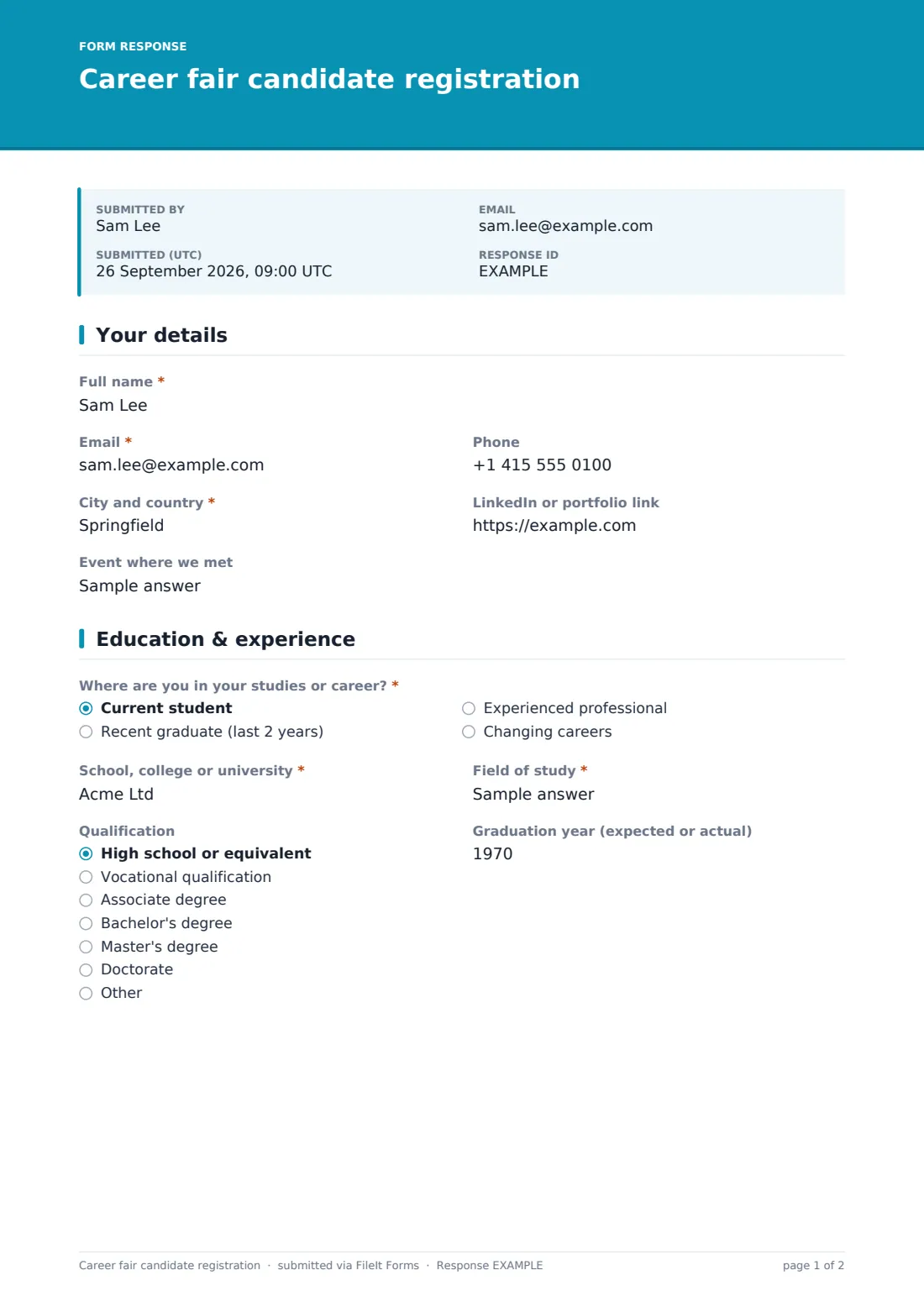
This template lets candidates register on their own phone or a tablet at the stand. They give their contact details, location, a LinkedIn or portfolio link and the event. They say where they are — student, recent graduate, experienced professional or career changer — with institution, field of study, qualification and graduation year, or years of experience and current role.
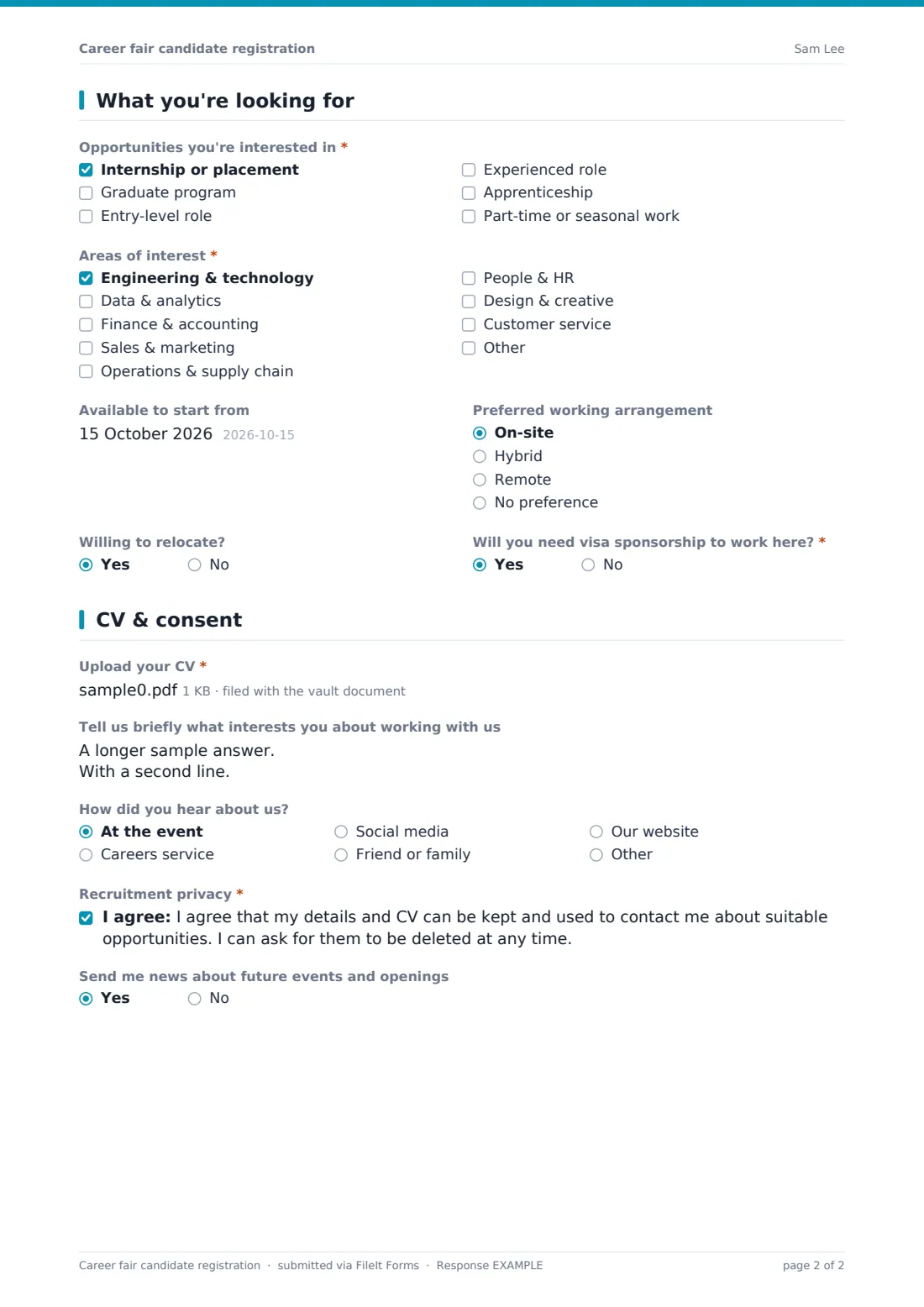
They choose the opportunities they want, up to three areas of interest, availability, working arrangement, willingness to relocate and whether they'll need visa sponsorship, then upload a CV and agree to recruitment privacy terms. Every registration is saved as a PDF with its CV in your FileIt vault.
- Best for
- Employers and recruiters at careers fairs and campus events
- Filled in by
- Candidates, on their phone or a tablet at the stand
- Time to complete
- About 3 minutes
- Includes
- Student and experienced paths, interest areas, CV upload, privacy consent and event updates opt-in
Who uses a career fair candidate registration form?
- A graduate recruiter at a university careers fair
- A company running a campus open evening
- A local employer at a community job fair
- Building a talent pool for next year's internship program
- A virtual careers event with a registration link in the chat
- A hospital or school recruiting at a sector-specific fair
Questions on this career fair candidate registration form
24 questions over 4 pages · includes file upload, conditional questions, multiple pages, consent checkbox.
1 Your details
- Full name*
- Email*
- Phone
- City and country*
- LinkedIn or portfolio link
- Event where we met
2 Education & experience
- Where are you in your studies or career?* Current student · Recent graduate (last 2 years) · Experienced professional · Changing careers
- School, college or university* asked only when it applies
- Field of study*
- Qualification High school or equivalent · Vocational qualification · Associate degree · Bachelor's degree · Master's degree · Doctorate · Other
- Graduation year (expected or actual)
- Years of work experience asked only when it applies
- Current job title asked only when it applies
3 What you're looking for
- Opportunities you're interested in* Internship or placement · Graduate program · Entry-level role · Experienced role · Apprenticeship · Part-time or seasonal work
- Areas of interest* Engineering & technology · Data & analytics · Finance & accounting · Sales & marketing · Operations & supply chain · People & HR · Design & creative · Customer service
- Available to start from
- Preferred working arrangement On-site · Hybrid · Remote · No preference
- Willing to relocate?
- Will you need visa sponsorship to work here?*
4 CV & consent
- Upload your CV*
- Tell us briefly what interests you about working with us
- How did you hear about us? At the event · Careers service · Social media · Friend or family · Our website
- Recruitment privacy*
- Send me news about future events and openings
The career fair candidate registration form, page by page
1 Your details
Candidates give their Full name, Email, Phone, City and country, a LinkedIn or portfolio link and the event where you met.
2 Education & experience
Where are you in your studies or career? offers current student, recent graduate, experienced professional or changing careers. Everyone except experienced professionals is asked for their school or university; everyone gives a field of study, qualification and graduation year. Experienced professionals also give years of experience and current job title.
3 What you're looking for
Candidates tick the opportunities they're interested in — internships, graduate programs, entry-level, experienced roles, apprenticeships or part-time work — and up to three areas of interest. Start date, working arrangement, willingness to relocate and whether they'll need visa sponsorship follow.
4 CV & consent
A CV upload is required, followed by an optional note on what interests them, how they heard about you, recruitment privacy consent and an optional opt-in for news about future events and openings.
Make the template yours
- Replace the areas of interest with your own teams or job families
- Pre-fill the event name before each fair
- Show a QR code for the form link on your stand
- Make the CV optional if candidates register on their phones
- Route registrations into a vault folder for each event
- Add the campus recruiting inbox to notifications
Tips for a better career fair candidate registration form
- Have a tablet at the stand for candidates who'd rather not use their phone
- Follow up within a week while the conversation is fresh
- Tell candidates how long you'll keep their details
- Tag strong conversations quickly in the Responses table after the event
- Don't make the sponsorship question a filter without checking your policy
- Use the event field to compare which fairs produce the best candidates
Every response becomes a PDF in your vault
Each registration is saved as a PDF in your vault with the candidate's CV attached, and the candidate gets an emailed copy.
Recruiters can filter registrations by event, stage or interest in the Responses table and export a CSV to follow up with everyone who registered.
- Start from this template. It opens in the FileIt Forms designer — change any question, add pages, set the rules for when questions appear.
- Share it. Turn on a public link, or send it to people by email, each with their own link. They don’t need a FileIt account.
- Get the answers as PDFs. Each response is saved as a PDF in the vault folder you choose, with uploaded files attached — and listed in a Responses table you can export to CSV.
Career fair candidate registration form: frequently asked questions
Is this career fair registration form free?
Yes. It's part of the FileIt Forms app on every plan, including the free plan.
Can candidates fill it in on their phone?
Yes. The form works on phones and tablets, and candidates don't need a FileIt account.
Is the CV required?
Yes, in this version. You can make it optional in the designer if many candidates register on their phones.
How do we keep track of which event someone came from?
The form asks for the event, and you can pre-fill it or keep a separate copy of the form per event.
Is this a job application?
No. It registers interest. Candidates can be invited to apply for a specific role afterwards.
Can candidates ask us to delete their details?
The privacy statement tells them they can. Delete the response and its files from FileIt when asked.