
What is the adventure park waiver form template?
Trampoline parks and ropes courses are busiest exactly when queues hurt most: weekends, school holidays and birthday parties. A waiver that families complete at home before they arrive means less clipboard time at the desk and a record you can find later. This template is built for the usual situation, where one adult signs for themselves and the children in their care.
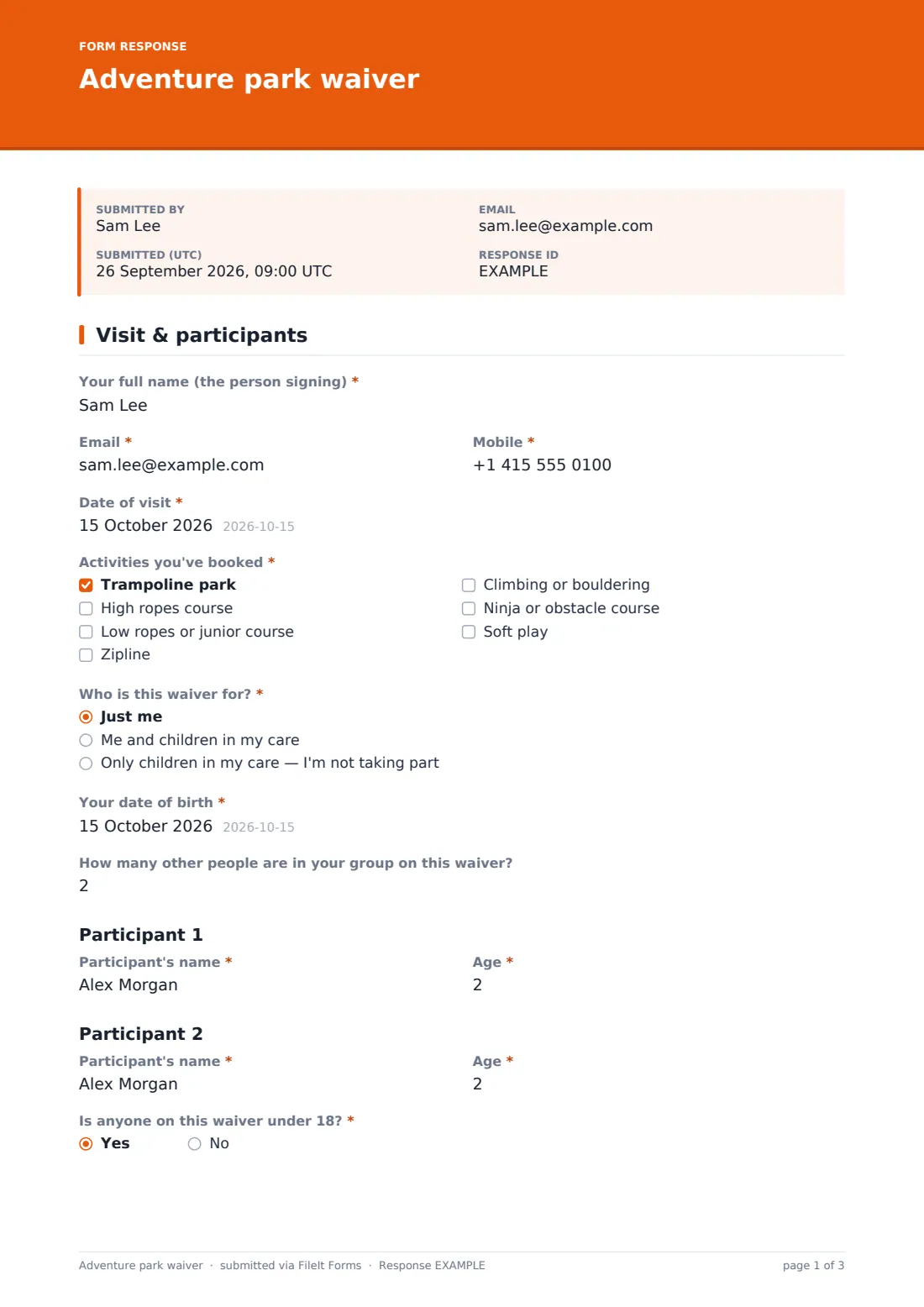
The first page asks for the signer's name and contact details, the date of the visit, and the activities booked: trampolines, high or junior ropes, zipline, climbing, ninja course or soft play. 'Who is this waiver for?' covers an adult on their own, an adult with children, or a parent who's only watching. 'How many other people are in your group on this waiver?' then shows a name and age row for each of up to six participants, and 'Is anyone on this waiver under 18?' decides whether the guardian section appears later.
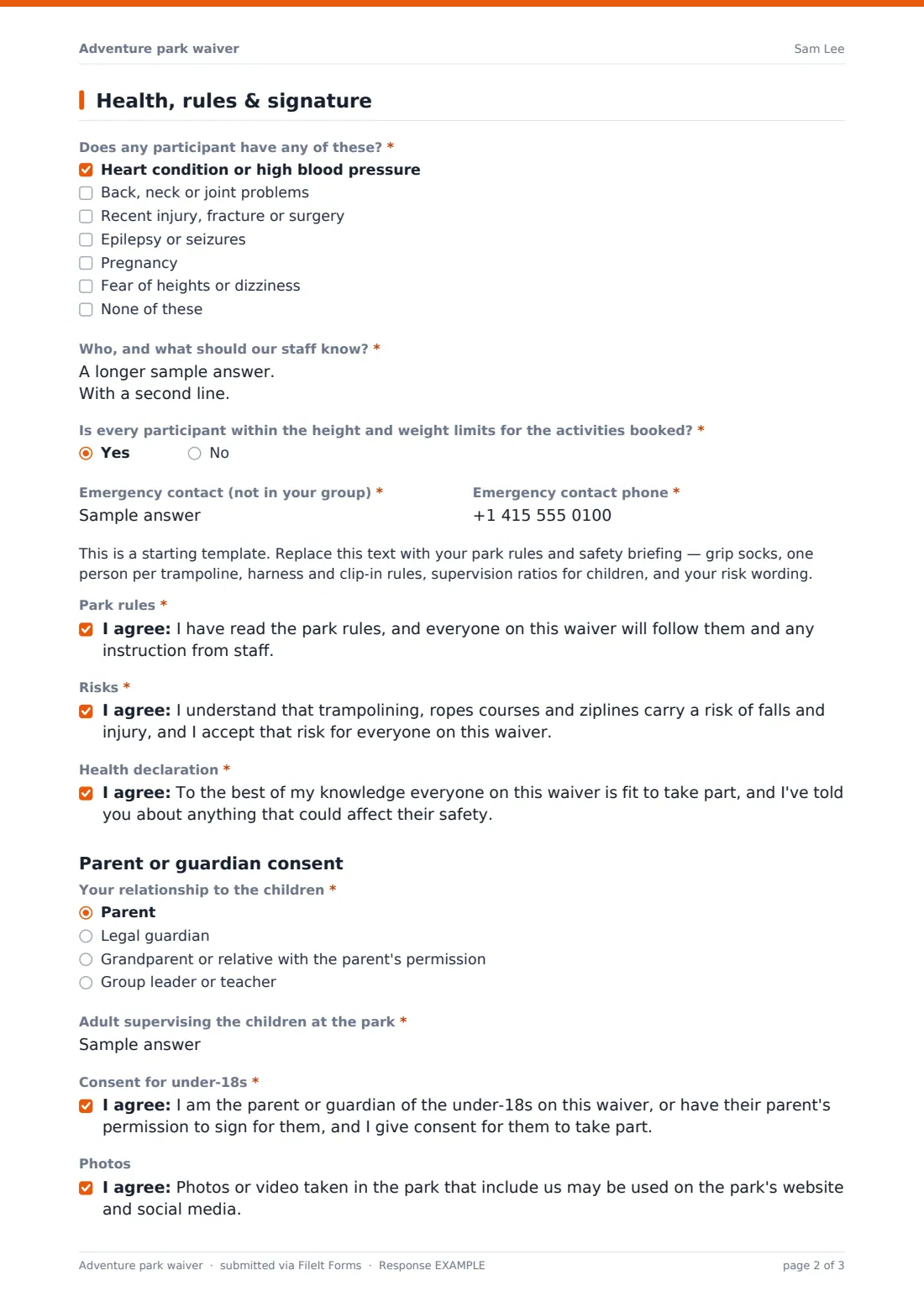
The second page is the health declaration, a check on height and weight limits, an emergency contact, your park rules and the consents. When there are under-18s on the waiver, a parent or guardian consent block asks for the signer's relationship to the children and who will supervise them on site. Every signed waiver is stored as a PDF in your FileIt vault, so the desk can look it up by name.
- Best for
- Trampoline parks, high ropes and zipline centres, ninja and adventure play venues
- Filled in by
- An adult visitor, signing for themselves and any children with them
- Time to complete
- About 3 minutes
- Includes
- Up to six named participants with ages, health checklist, limits check, guardian consent
Who uses a adventure park waiver form?
- A parent signs for three children before a Saturday trampoline session
- A birthday party host asks each family to complete a waiver before the party
- A group of adult friends each sign their own waiver before a zipline booking
- A teacher signs for a school group with the parents' permission
- A ropes course checks height limits before a junior session
- A park looks up last month's waiver after an incident report
Questions on this adventure park waiver form
35 questions over 2 pages · includes signature, conditional questions, multiple pages, consent checkbox.
1 Visit & participants
- Your full name (the person signing)*
- Email*
- Mobile*
- Date of visit*
- Activities you've booked* Trampoline park · High ropes course · Low ropes or junior course · Zipline · Climbing or bouldering · Ninja or obstacle course · Soft play
- Who is this waiver for?* Just me · Me and children in my care · Only children in my care — I'm not taking part
- Your date of birth* asked only when it applies
- How many other people are in your group on this waiver?
- Participant's name* asked only when it applies
- Age* asked only when it applies
- Participant's name* asked only when it applies
- Age* asked only when it applies
- Participant's name* asked only when it applies
- Age* asked only when it applies
- Participant's name* asked only when it applies
- Age* asked only when it applies
- Participant's name* asked only when it applies
- Age* asked only when it applies
- Participant's name* asked only when it applies
- Age* asked only when it applies
- Is anyone on this waiver under 18?*
2 Health, rules & signature
- Does any participant have any of these?* Heart condition or high blood pressure · Back, neck or joint problems · Recent injury, fracture or surgery · Epilepsy or seizures · Pregnancy · Fear of heights or dizziness · None of these
- Who, and what should our staff know?* asked only when it applies
- Is every participant within the height and weight limits for the activities booked?*
- Who isn't, and for which activity?* asked only when it applies
- Emergency contact (not in your group)*
- Emergency contact phone*
- Park rules*
- Risks*
- Health declaration*
- Your relationship to the children* asked only when it applies Parent · Legal guardian · Grandparent or relative with the parent's permission · Group leader or teacher
- Adult supervising the children at the park* asked only when it applies
- Consent for under-18s* asked only when it applies
- Photos
- Signature*
The adventure park waiver form, page by page
1 Visit & participants
'Your full name (the person signing)', email, mobile and 'Date of visit'. 'Activities you've booked' is a required checklist. 'Who is this waiver for?' asks for the signer's date of birth unless they're not taking part. The number of other people (0–6) shows a 'Participant's name' and 'Age' pair for each one, and 'Is anyone on this waiver under 18?' is required.
2 Health, rules & signature
A required health checklist (heart or blood pressure, back, neck or joint problems, recent injury, epilepsy, pregnancy, fear of heights) with details unless 'None of these' is ticked. A required question on height and weight limits asks who is outside them. An emergency contact, a placeholder for your rules, and required consents for park rules, risks and the health declaration. With under-18s: relationship, 'Adult supervising the children at the park' and the guardian consent. Optional photo consent and a signature.
Make the template yours
- Edit the activity list to match what your park offers
- Replace the rules placeholder with your own briefing and risk wording
- Add your age, height and weight limits to the help text of the limits question
- Change the six-participant limit by adding or removing participant rows
- Remove the group-leader relationship option if only parents may sign
- File waivers in a folder per month so the desk can find recent ones quickly
Tips for a better adventure park waiver form
- Put the waiver link in your booking confirmation email and on your party invitations
- Search the Responses table by name at check-in instead of asking families to fill it in again
- Check the limits answer before people reach the harness station
- Have your rules and risk wording reviewed by someone qualified for your country
- Keep a tablet at the desk with the public link open for walk-ins
Every response becomes a PDF in your vault
Each waiver is saved as a signed PDF in your vault, and the visitor receives a copy by email. You can turn owner notifications off on busy days if you don't need an email for every waiver.
Export to CSV to check the day's waivers against bookings, or open a response to see one family's health notes.
- Start from this template. It opens in the FileIt Forms designer — change any question, add pages, set the rules for when questions appear.
- Share it. Turn on a public link, or send it to people by email, each with their own link. They don’t need a FileIt account.
- Get the answers as PDFs. Each response is saved as a PDF in the vault folder you choose, with uploaded files attached — and listed in a Responses table you can export to CSV.
Adventure park waiver form: frequently asked questions
Is the adventure park waiver template free?
Yes. It's a starter template in the Forms app, included on every FileIt account, including the free plan.
Can one parent sign for several children?
Yes. The signer says how many other people are on the waiver and gives each one's name and age, up to six. If anyone is under 18, a parent or guardian consent section appears.
Should other adults sign their own waiver?
The template suggests it in the help text. Change that wording if your park's policy is different.
Is this waiver legally binding?
FileIt doesn't give legal advice. The rules and risk wording are placeholders. Replace them with wording that has been checked for your park and location.
Can visitors sign on a tablet at the desk?
Yes. The form works on phones, tablets and computers, and the signature is drawn or typed on screen.
Do visitors need a FileIt account?
No. They open the link, fill it in and sign.