
What is a clinical photography consent?
Dermatologists, cosmetic and aesthetic clinics, dentists, plastic surgeons and wound-care teams all photograph patients. A photo in the medical record is one thing; the same photo in a lecture, a journal or on the clinic's Instagram is another. Good practice is to ask separately for each use, and to make it easy to say no.
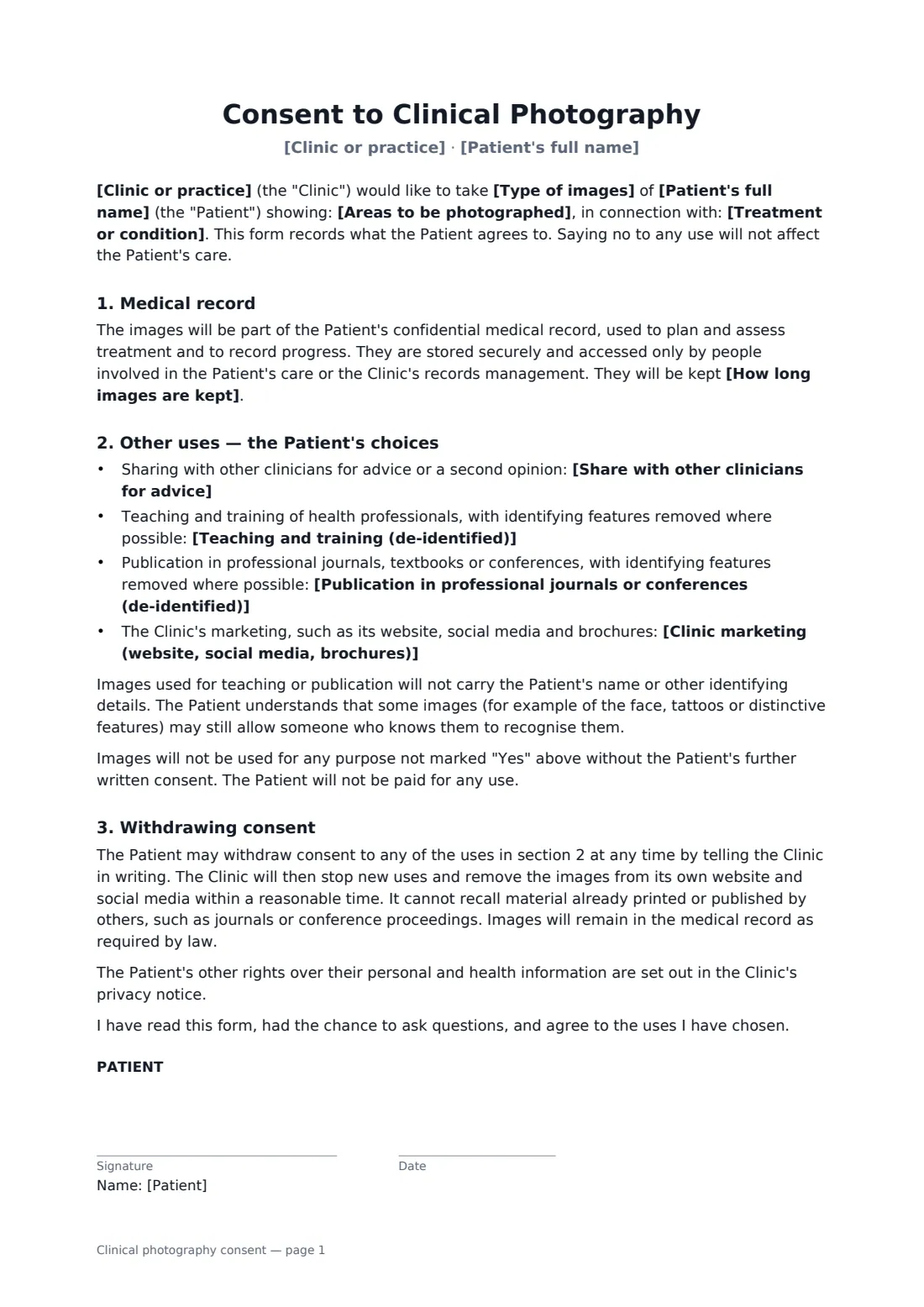
This form describes the treatment and the areas to be photographed, explains how images are kept in the medical record, and then gives the patient a separate yes/no choice for second opinions, teaching, publication and marketing — with marketing split between de-identified and recognisable images. It explains the limits of de-identification, how to withdraw consent and what can't be recalled once published. A parent, guardian or representative can sign for the patient.
- Best for
- Aesthetic and cosmetic clinics, dermatology, dentistry, plastic surgery, wound care
- Signed by
- The patient (or representative) and the clinic
- Choices
- Second opinion, teaching, publication, marketing (de-identified or recognisable)
- Length
- 2 pages
When to use a clinical photography consent
- Before-and-after photos for cosmetic treatment
- Tracking a skin condition or wound over time
- Orthodontic or restorative dental records
- Images for a case report or conference talk
- Clinic social media and website galleries
What you fill in
13 blanks, then the name and email of each person who signs: patient, clinic.
1 The clinic
- Clinic or practice*
2 The patient
- Patient's full name*
- Patient's date of birth
- Who signs* The patient · A parent, guardian or legal representative
- Representative's name and relationship
3 The photos
- Treatment or condition*
- Areas to be photographed*
- Type of images* photos · photos and video
4 Uses the patient agrees to
- Share with other clinicians for advice* Yes · No
- Teaching and training (de-identified)* Yes · No
- Publication in professional journals or conferences (de-identified)* Yes · No
- Clinic marketing (website, social media, brochures)* Yes — with face or identifying features hidden · Yes — including images in which I may be recognisable · No
5 Records
- How long images are kept*
6 Who signs
- Patient signature and date · The patient, or a parent, guardian or legal representative signing for them.
- Clinic signature and date, job title
What the clinical photography consent covers
- Medical record
- Other uses — the Patient's choices
- Withdrawing consent
Using the clinical photography consent, step by step
1 Describe the photography
Your clinic name fills in from your account. Enter the patient, the treatment or condition, the areas to be photographed and whether you'll take photos or video.
2 Agree each use
Go through the four uses with the patient and record their answer to each. Marketing defaults to "No" — only change it if the patient has said yes.
3 Set retention
Edit the retention wording to match your records policy if needed.
4 Sign before the photos
The patient signs on a tablet in the clinic or on their phone beforehand, you countersign, and the consent is filed in your FileIt vault.
Tips before you send it
- Ask for marketing consent separately from consent to treatment, and never make treatment conditional on it.
- Check your professional regulator's rules on before-and-after images in advertising.
- Record which images each consent covers, and check the consent before reusing any image.
- Act promptly when a patient withdraws marketing consent.
Sign it online in minutes
- Fill in the blanks. Names, dates and amounts go straight into the agreement — the preview shows exactly where.
- Name who signs. Tick “This is me” for your own part. FileIt builds the PDF with every signature, date box on the right line, and you can check or move anything before sending.
- Send it. Each signer gets a secure link and signs from any device — no account needed. The signed PDF, with an audit trail and a Certificate of Completion, is filed in your vault and emailed to everyone.
Clinical photography consent: frequently asked questions
Does a patient have to agree to marketing use?
No. Each use is a separate choice, and the form says that refusing any use won't affect their care.
Can a patient withdraw consent later?
Yes. The clinic stops new uses and removes images from its own website and social media within a reasonable time, but can't recall material already published by others. Images stay in the medical record as the law requires.
Does this replace consent to treatment?
No. It only covers photography. Use your usual treatment consent alongside it.
Can a parent sign for a child?
Yes. Choose the representative option and enter their name and relationship. Local rules on consent for minors and adults who can't consent apply.
Can patients sign electronically?
Yes. Patients don't need a FileIt account. FileIt adds an audit trail and a Certificate of Completion to the signed PDF.