What is Form W-4ME?
Form W-4ME is Maine's Employee's Withholding Allowance Certificate. You give it to your employer or payer so they can withhold the correct Maine income tax from your pay or pension. The federal Form W-4 doesn't set Maine withholding, and Maine doesn't follow the federal Step 4(b) deductions.
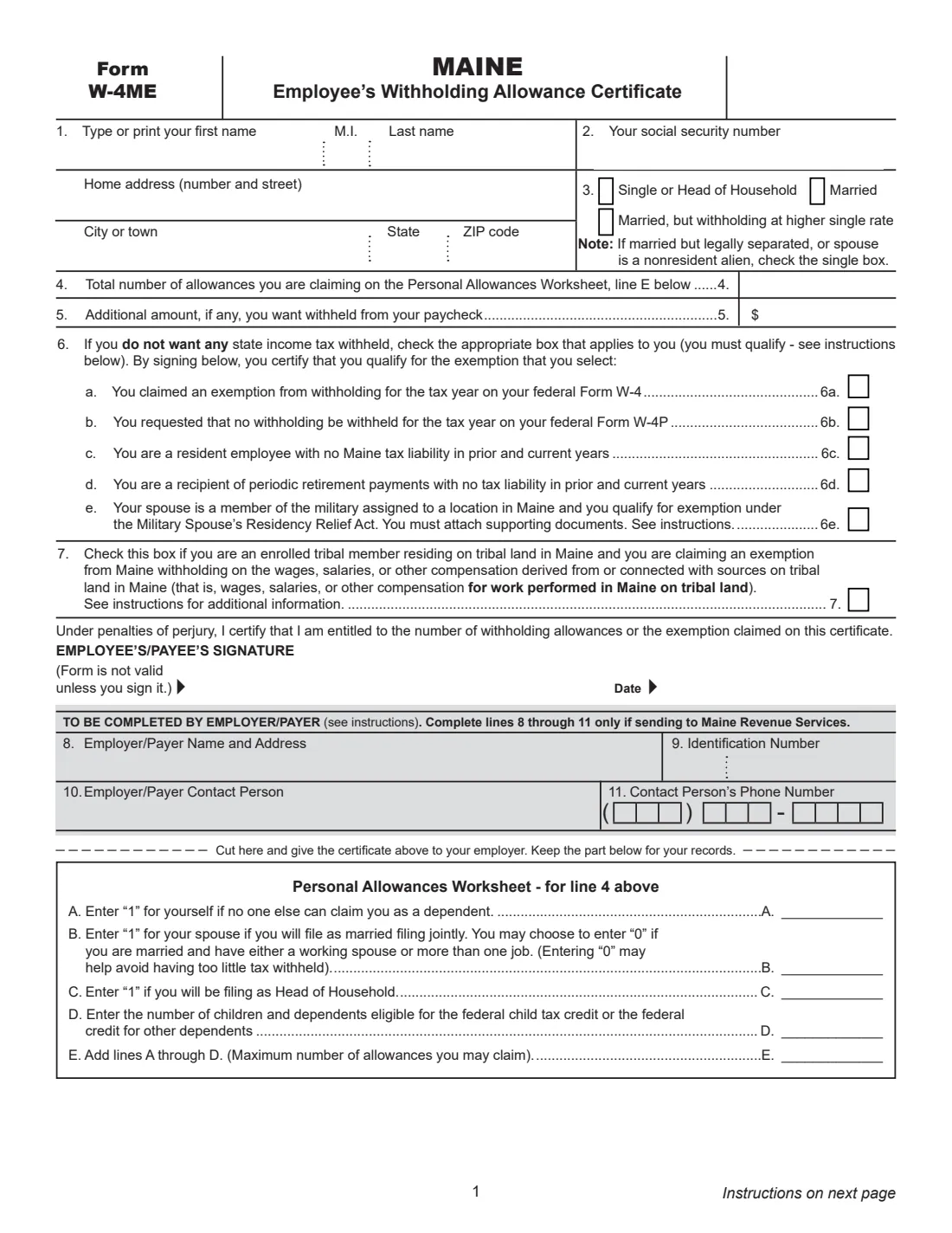
The certificate asks for your name, Social Security number, address and marital status, then the number of allowances from the Personal Allowances Worksheet (yourself, your spouse, head of household, and children and other dependents) and any extra amount per paycheck. Lines 6 and 7 are for people who want no Maine tax withheld: those exempt from federal withholding, residents with no Maine tax liability, some retirees, military spouses and enrolled tribal members working on tribal land.
With FileIt you fill out the W-4ME online in a guided form. FileIt pre-fills your name from the People records in your vault, adds up the worksheet, prints line E on line 4 (or fewer if you choose), and fills Maine Revenue Services' own PDF, including the employer lines when a copy goes to MRS. The finished form is saved in your vault and can be sent for e-signature. FileIt never submits it anywhere.
- Who fills it
- The employee or payee. The employer or payer completes lines 8 to 11 only when sending a copy to Maine Revenue Services.
- Given to
- Your employer or payer. Cut off and keep the worksheet part for your records.
- When
- When you start a job or pension, and whenever your situation changes; line 6c and 6e exemptions need a new form each year.
- Signatures
- The employee or payee signs and dates it; the form is not valid unless signed.
- Edition
- 2026 (revised December 2025).
- Cost
- Free to fill out on any FileIt account.
Who needs to fill out Form W-4ME?
- New employees whose employer withholds Maine income tax.
- People receiving pension or other retirement payments who want to set, or stop, Maine withholding.
- Employees and payees exempt from federal withholding who also want no Maine withholding (lines 6a and 6b).
- Maine residents with no Maine tax liability last year who expect none this year (line 6c).
- Spouses of military members assigned to Maine who share a domicile in another state (line 6e).
- Enrolled members of the Houlton Band of Maliseet Indians, the Passamaquoddy Tribe, the Penobscot Nation or the Mi'kmaq Nation who live and work on tribal land in Maine (line 7).
When to use Form W-4ME
- On your first days with a new employer, together with the federal Form W-4 and Form I-9, or when you start receiving retirement payments.
- Each year, as the instructions suggest, since your tax situation may change.
- For a new year when you claimed line 6c or 6e — those exemptions expire at the end of the year.
- When a tribal member's line 7 situation changes and the exemption is no longer valid.
What you need before you start
- Your name, Social Security number and home address.
- The marital status you chose on your federal Form W-4 (married filing separately and nonresident aliens use single).
- Whether someone else can claim you as a dependent, whether you will file jointly, and whether you will file as head of household.
- The number of children and dependents eligible for the federal child tax credit or the credit for other dependents.
- Any extra amount you want withheld from each paycheck.
- For line 6e: a copy of your spouse's latest Leave and Earnings Statement showing a Maine assignment, and your military ID.
- For lines 8–11 (employers): the employer's name, address, identification number, and a contact person and phone number.
What’s on Form W-4ME
The 2026 edition has 4 pages. FileIt asks for it in 4 parts, and it is signed by Employee:
- Lines 1–3: About youEmployee
- Lines 6–7: Exemptions from Maine withholdingEmployee
- Personal Allowances Worksheet and lines 4–5Employee
- Lines 8–11: Employer / payerEmployer
How to fill out Form W-4ME, step by step
1 Lines 1–3 — Name, SSN, address and marital status
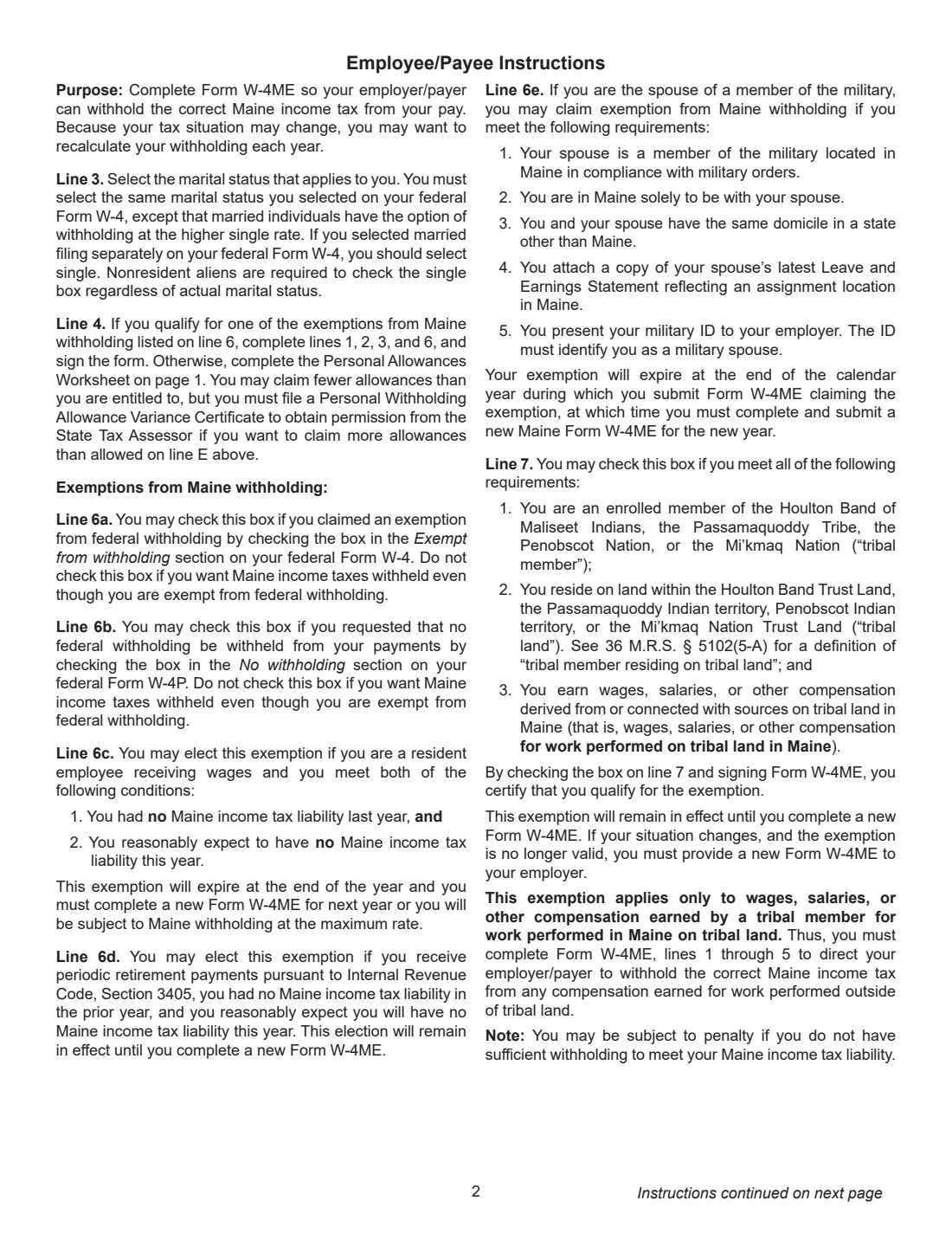
Enter your name, Social Security number and home address. On line 3 select the same marital status as on your federal W-4, except that married people may withhold at the higher single rate. If you chose married filing separately on the federal W-4, select single. Check single if you are married but legally separated, or your spouse is a nonresident alien; nonresident aliens always check single.
2 Personal Allowances Worksheet
A: 1 for yourself if no one else can claim you as a dependent. B: 1 for your spouse if you will file married filing jointly — you may enter 0 if you have a working spouse or more than one job, which may help avoid too little withholding. C: 1 if you will file as head of household. D: the number of children and dependents eligible for the federal child tax credit or the federal credit for other dependents. E adds A through D: the most allowances you may claim.
3 Lines 4–5 — Allowances and extra withholding
Line 4 is the number of allowances you claim, at most line E. You may claim fewer; to claim more you need a Personal Withholding Allowance Variance Certificate from the State Tax Assessor. Line 5 is any additional amount you want withheld from each paycheck.
4 Line 6 — Exemptions from Maine withholding
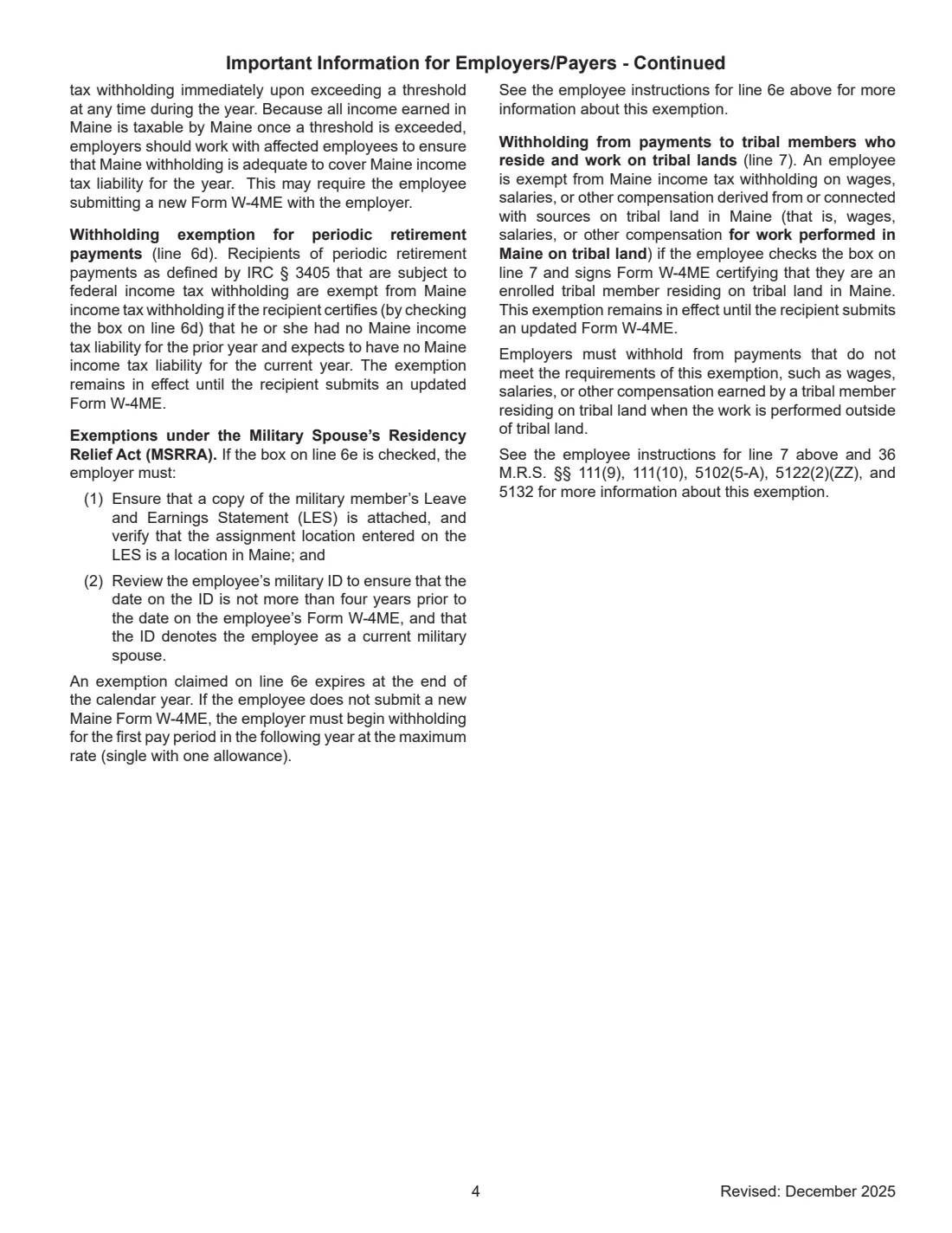
Check one box only if you qualify: 6a, you claimed exemption on your federal W-4; 6b, you asked for no withholding on your federal W-4P; 6c, you are a resident employee with no Maine tax liability last year and expect none this year (expires at the end of the year); 6d, you receive periodic retirement payments with no Maine liability last year or this year (stays until you file a new W-4ME); 6e, you are a military spouse who qualifies under the Military Spouse's Residency Relief Act (expires at the end of the calendar year; attach your spouse's latest LES and show your military ID). If you claim one, complete lines 1, 2, 3 and 6 and sign.
5 Line 7 — Tribal members
Enrolled members of the Houlton Band of Maliseet Indians, the Passamaquoddy Tribe, the Penobscot Nation or the Mi'kmaq Nation who live on their tribal land may check line 7 to stop Maine withholding on pay for work performed in Maine on tribal land. It doesn't cover pay for work elsewhere, so complete lines 1 to 5 as well.
6 Signature and employer lines
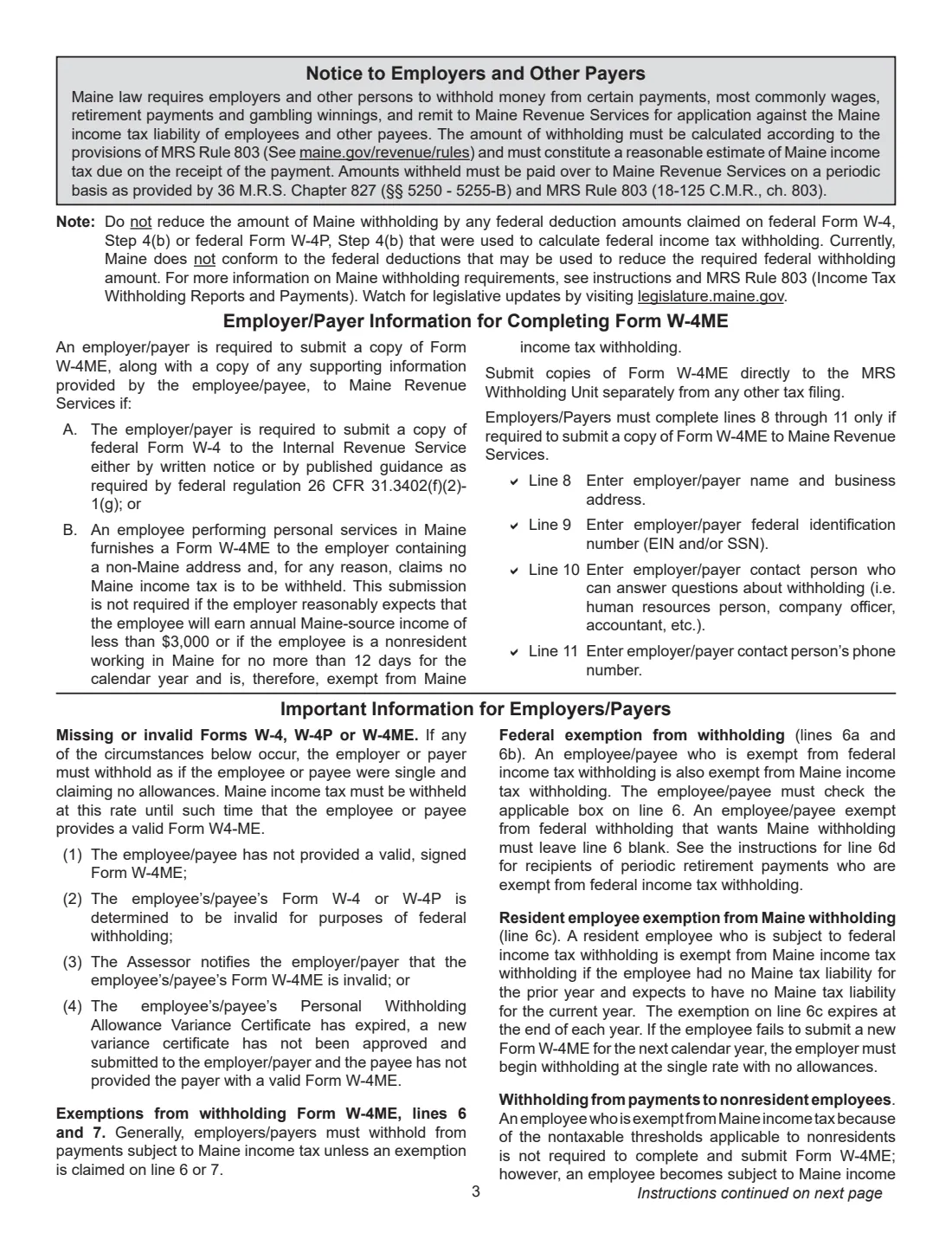
Sign and date: under penalties of perjury you certify you are entitled to the allowances or exemption claimed. The form is not valid unless you sign it. The employer or payer completes lines 8 to 11 (name and address, identification number, contact person and phone) only when it must send a copy to Maine Revenue Services.
Common mistakes to avoid
- Choosing a different marital status from your federal W-4 (other than married withholding at the higher single rate).
- Claiming more allowances than line E without a variance certificate.
- Both spouses entering 1 on line B when both work, which can leave too little tax withheld.
- Checking 6a or 6b when you still want Maine tax withheld — leave line 6 blank in that case.
- Forgetting that the 6c and 6e exemptions expire at the end of the year.
- Leaving the form unsigned — it is not valid unless you sign it.
After you fill it out
Sign and date the certificate, cut along the line and give the top part to your employer or payer; keep the worksheet for your records. FileIt saves the whole page in the person's vault folder, and you can send the PDF for e-signature if your employer accepts that.
Without a valid, signed W-4ME, the instructions say the employer or payer must withhold as if you were single with no allowances.
Employers send a copy, with any supporting documents, to the MRS Withholding Unit when the federal rules require a copy of the W-4 to go to the IRS, or when an employee working in Maine gives a non-Maine address and claims no Maine withholding (with the exceptions in the instructions).
Fill out Form W-4ME online with FileIt
- Pick the person. Choose someone from People and FileIt fills in their name, date of birth, address and other details it already knows.
- Answer plain-language questions. One part of the form at a time, with the official help text beside each question — 27 fields in all. Your answers save as you go.
- Check the live preview. Watch your answers land on the real Maine Revenue Services form, and let FileIt do any worksheet arithmetic.
- Generate the official PDF. FileIt prints your answers into the agency’s own PDF and files it in that person’s folder in your vault. Sign it, or send it for e-signature.
FileIt fills the form — it never files or submits anything for you. Deliver the finished form to whoever asked for it, the way the form’s instructions say.
Start Form W-4ME now — it’s freeForm W-4ME: frequently asked questions
Do I need a W-4ME if I filled out a federal W-4?
Yes, if your employer withholds Maine income tax. The W-4 covers federal withholding; Maine uses the W-4ME, and your marital status should match the federal form.
How many allowances can I claim on the W-4ME?
Up to line E of the Personal Allowances Worksheet: 1 for yourself, 1 for your spouse if filing jointly, 1 for head of household, plus your eligible children and other dependents. You may claim fewer.
How do I stop Maine withholding?
Check the line 6 box that applies — federal exemption on your W-4 or W-4P, no Maine liability as a resident, retirement payments with no Maine liability, or military spouse — and sign. Tribal members working on tribal land use line 7.
Does a line 6 exemption last forever?
No. 6c and 6e expire at the end of the year, so you need a new W-4ME for the next year. 6d stays in effect until you file a new form.
What happens if I don't give my employer a W-4ME?
The instructions say the employer must withhold as if you were single and claiming no allowances until you provide a valid W-4ME.
Can I fill out the W-4ME online?
Yes. FileIt walks you through the worksheet and each line, and prints your answers into Maine Revenue Services' fillable PDF, ready to sign.
Official sources
- Blank form (PDF), published by Maine Revenue Services: https://www.maine.gov/revenue/sites/maine.gov.revenue/files/inline-files/26_form_w-4me_fillable.pdf
- Official instructions and guidance: https://www.maine.gov/revenue/sites/maine.gov.revenue/files/inline-files/26_form_w-4me_fillable.pdf
- Edition shown on this page: 2026 (Revised December 2025) (checked 2026-09-28).
FileIt is not affiliated with or endorsed by Maine Revenue Services or any government. This page explains the form in general terms and is not legal, tax or immigration advice. Always read the official instructions, and check that you are using the edition the recipient accepts. Page last reviewed 2026-09-28.