What is Form SC W-4?
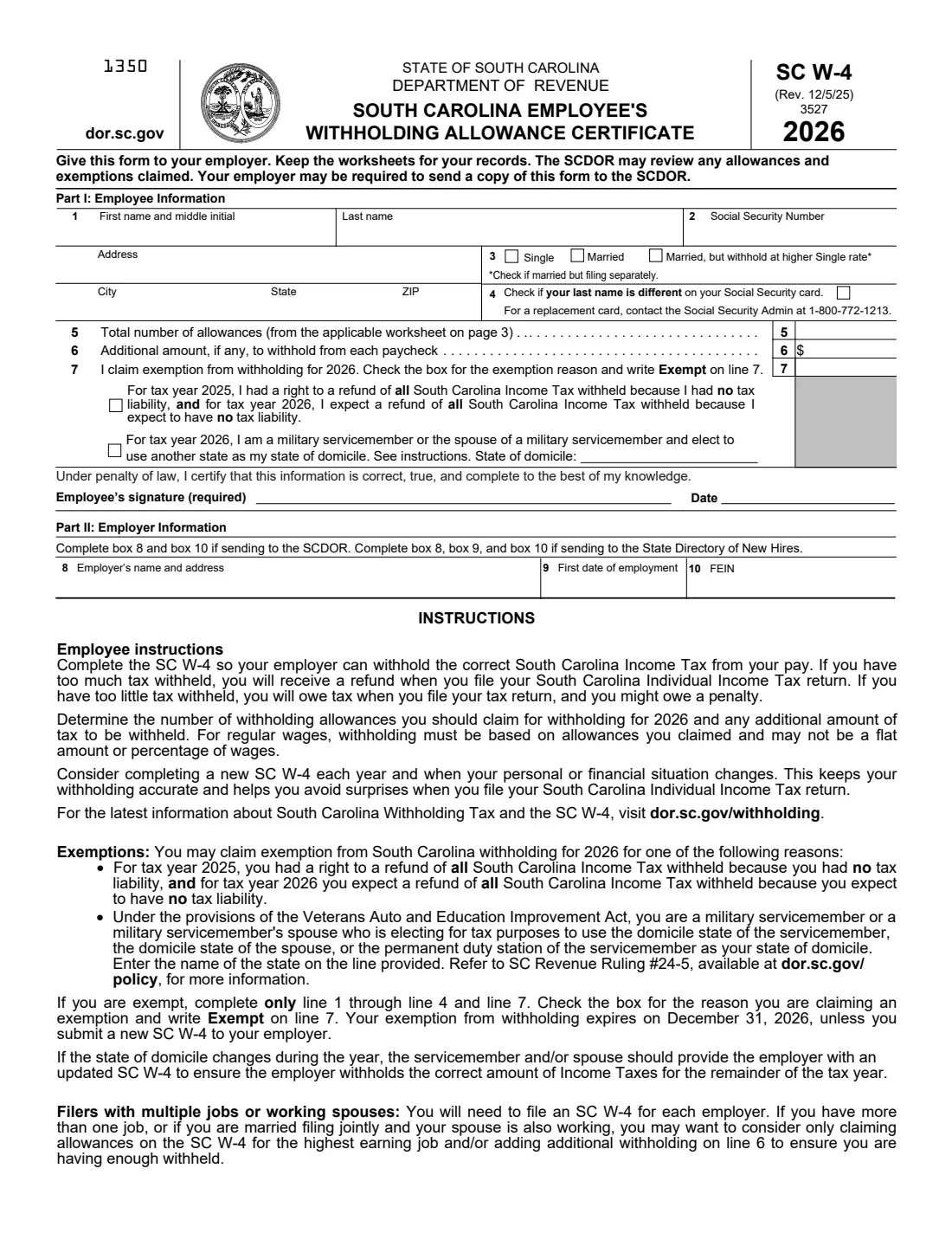
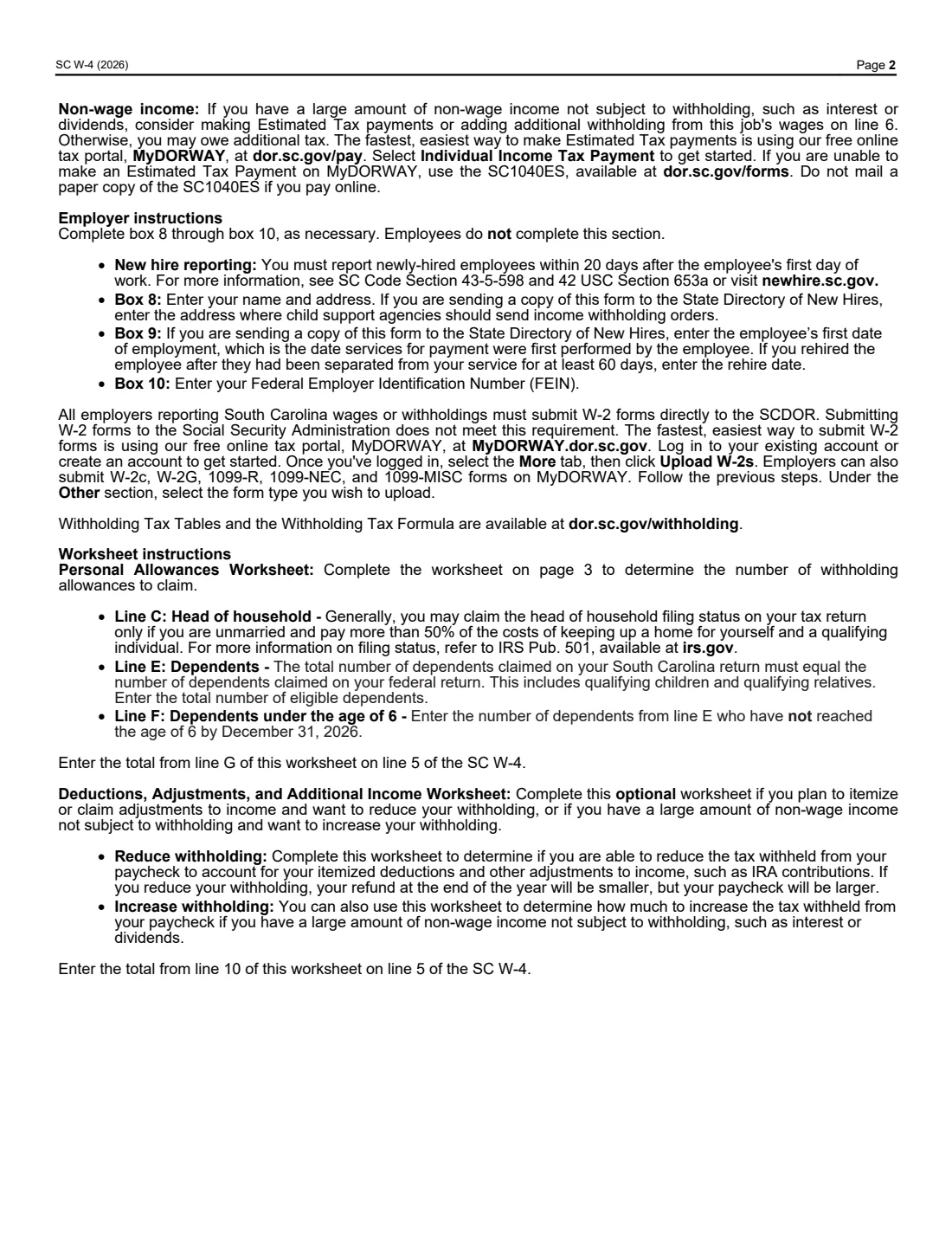
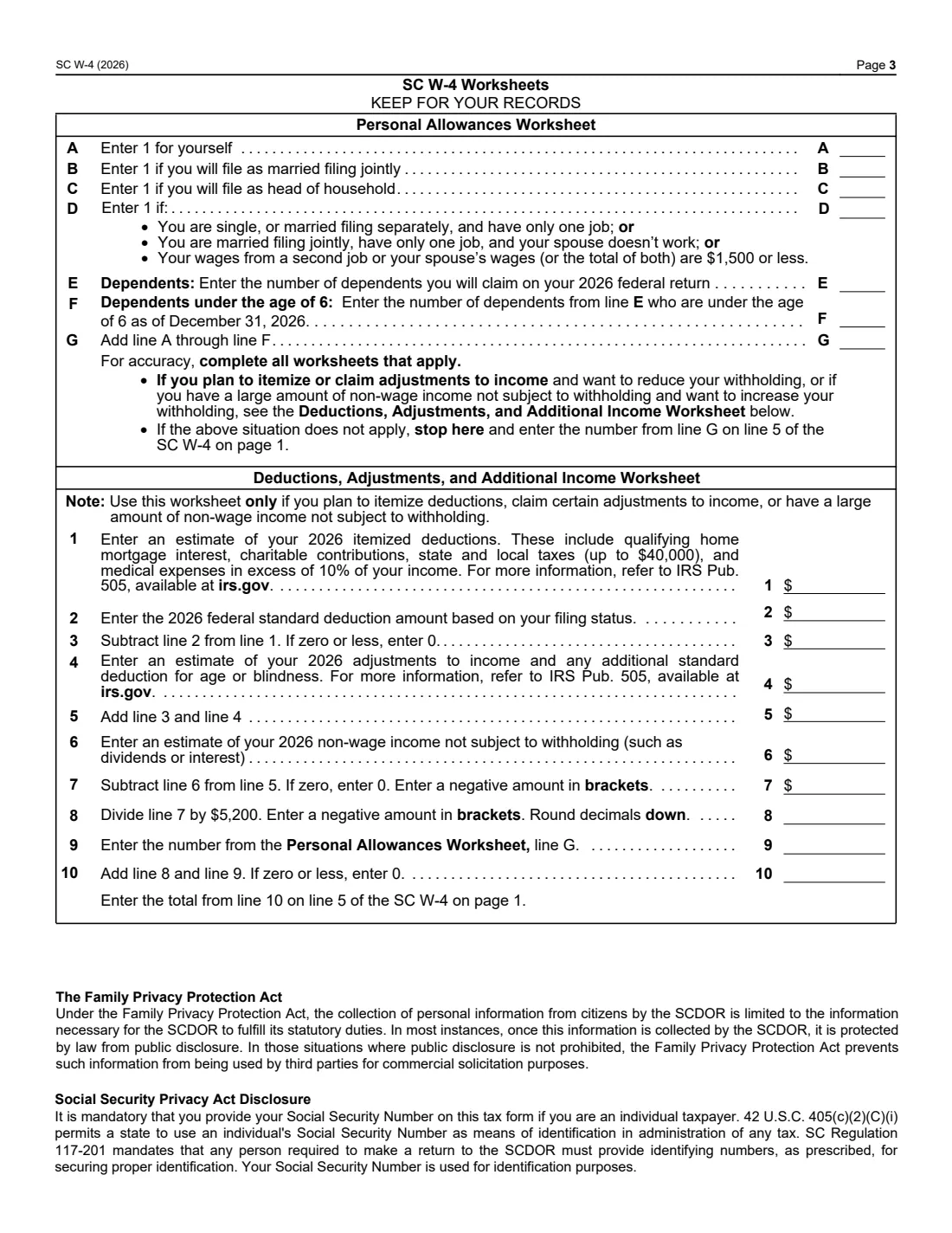
The SC W-4, the South Carolina Employee's Withholding Allowance Certificate, is how you tell your employer how much South Carolina income tax to withhold. It works alongside the federal Form W-4 but uses its own allowance system. The 2026 edition (Rev. 12/5/25) from the South Carolina Department of Revenue (SCDOR) is three pages: the certificate on page 1, instructions on page 2, and two worksheets on page 3.
Getting it right keeps you from a surprise at tax time. The form's own instructions put it simply: too much withheld means a refund when you file, too little means you'll owe tax and might owe a penalty. The Personal Allowances Worksheet counts your basic allowances, and the optional Deductions, Adjustments, and Additional Income Worksheet adjusts them for itemized deductions or non-wage income.
FileIt lets you fill out the SC W-4 online in a guided form. It pre-fills your name from the People records in your vault, does the page 3 worksheet arithmetic for you (including the divide-by-$5,200 step and the brackets for negative amounts), carries the result to line 5, writes "Exempt" on line 7 when you pick an exemption reason, and prints everything into the SCDOR's own official PDF. The finished form is saved in your vault and can be sent for e-signature. FileIt never submits anything to the SCDOR or your employer — you give the form to your employer yourself.
- Who fills it
- The employee completes Part I, the worksheets and signs; the employer completes Part II (boxes 8 to 10).
- Given to
- Your employer. The form says your employer may be required to send a copy to the SCDOR.
- When
- When you start a job, whenever your situation changes, and each year you want to claim exemption (an exemption expires on December 31, 2026).
- Signatures
- The employee's signature is required, under penalty of law.
- Edition
- SC W-4 (Rev. 12/5/25) for 2026.
- Cost
- Free to fill out on any FileIt account.
Who needs to fill out Form SC W-4?
- New employees whose wages are subject to South Carolina income tax withholding.
- Current employees whose personal or financial situation has changed — the form suggests a new SC W-4 each year and whenever that happens.
- People with more than one job, or married couples filing jointly where both spouses work — the form says you need an SC W-4 for each employer.
- Anyone who plans to itemize deductions or claim adjustments to income and wants to reduce withholding.
- Anyone with a large amount of non-wage income, such as interest or dividends, who wants more withheld.
- People who had no South Carolina tax liability for 2025 and expect none for 2026, and military servicemembers or spouses electing another state as their domicile.
When to use Form SC W-4
- When you're hired, together with the federal Form W-4 and Form I-9.
- At the start of each year, since the form suggests completing a new SC W-4 every year.
- After a change such as marriage, a new dependent, a second job or a spouse starting work.
- If you claim exemption: the 2026 exemption expires on December 31, 2026, unless you give your employer a new SC W-4.
- If you're a military servicemember or spouse and your state of domicile changes during the year — the form says to give your employer an updated SC W-4.
What you need before you start
- Your name, Social Security number and address.
- Whether you'll be withheld as Single, Married, or Married but at the higher Single rate (the box to use if you're married but filing separately).
- The number of dependents you'll claim on your 2026 federal return, and how many of them will be under 6 on December 31, 2026.
- Whether you or your spouse have a second job, and roughly what it pays (the worksheet's $1,500 test).
- For the deductions worksheet: an estimate of your 2026 itemized deductions, adjustments to income, any additional standard deduction for age or blindness, and non-wage income.
- Your 2026 federal standard deduction for your filing status (FileIt offers the figures printed on the 2026 federal Form W-4).
- If you're claiming the military domicile election, the name of the state you elect.
- For the employer: name and address, the employee's first date of employment and the FEIN.
What’s on Form SC W-4
The 2026 edition has 3 pages. FileIt asks for it in 7 parts, and it is signed by Employee:
- Part I: Employee informationEmployee
- Lines 5–6: Allowances and additional withholdingEmployee
- Line 7: Exemption from withholdingEmployee
- SignatureEmployee
- Part II: Employer informationEmployer
- Personal Allowances Worksheet (page 3)Employee
- Deductions, Adjustments, and Additional Income Worksheet (page 3)Employee
How to fill out Form SC W-4, step by step
1 Part I, lines 1–4: Employee Information
Enter your first name and middle initial, last name, address, city, state and ZIP (line 1), your Social Security number (line 2), and your withholding status (line 3): Single, Married, or Married, but withhold at higher Single rate. The form's asterisk note says to check that last box if you're married but filing separately.
Line 4 is a checkbox for when your last name is different from the one on your Social Security card; the form points you to the Social Security Administration for a replacement card.
2 Line 5: Total number of allowances
Enter the number from the applicable worksheet on page 3 — line G of the Personal Allowances Worksheet, or line 10 of the Deductions, Adjustments, and Additional Income Worksheet if you complete that one too. FileIt carries the right number across for you.
The instructions note that, for regular wages, withholding must be based on the allowances you claim, not a flat amount or percentage of wages.
3 Line 6: Additional amount
Enter any extra amount you want withheld from each paycheck. The instructions suggest this if you have more than one job, a working spouse on a joint return, or a large amount of non-wage income such as interest or dividends. Another option they mention for non-wage income is making estimated tax payments.
4 Line 7: Exemption
You can claim exemption from South Carolina withholding for 2026 for one of two printed reasons. The first: for 2025 you had a right to a refund of all South Carolina income tax withheld because you had no tax liability, and for 2026 you expect the same. The second: under the Veterans Auto and Education Improvement Act, you're a military servicemember or spouse electing the servicemember's domicile state, the spouse's domicile state, or the servicemember's permanent duty station as your state of domicile — enter that state's name on the line provided.
If you're exempt, complete only lines 1 to 4 and line 7, check the box for your reason and write "Exempt" on line 7 (FileIt writes it for you). The exemption expires on December 31, 2026.
5 Signature and date
Sign and date the certificate. You certify under penalty of law that the information is correct, true and complete to the best of your knowledge, and the signature is required. FileIt prints the date; you can sign on paper or with the optional e-signature step if your employer accepts it.
6 Part II: Employer Information (boxes 8–10)
The employer completes this part — employees don't. Box 8 is the employer's name and address, box 9 the first date of employment, and box 10 the FEIN. The form says to complete boxes 8 and 10 if sending the form to the SCDOR, and boxes 8, 9 and 10 if sending it to the State Directory of New Hires. Newly hired employees must be reported within 20 days after their first day of work.
7 Personal Allowances Worksheet (page 3)
Line A is 1 for yourself. Add 1 on line B if you'll file as married filing jointly, 1 on line C if you'll file as head of household, and 1 on line D if you're single or married filing separately with only one job, married filing jointly with one job and a non-working spouse, or your second job or spouse's wages total $1,500 or less. Line E is the number of dependents on your 2026 federal return, and line F is how many of them will be under 6 on December 31, 2026 — so young children count twice.
Line G adds lines A through F. If you're not itemizing and don't have large non-wage income, that's your line 5 number.
8 Deductions, Adjustments, and Additional Income Worksheet (page 3)
Use this only if you plan to itemize deductions, claim certain adjustments to income, or have a large amount of non-wage income. Enter your estimated 2026 itemized deductions (line 1; the form mentions mortgage interest, charitable gifts, state and local taxes up to $40,000 and medical expenses over 10% of income), subtract the 2026 federal standard deduction (line 2), add adjustments and any additional standard deduction for age or blindness (line 4), and subtract non-wage income (line 6).
Line 8 divides line 7 by $5,200 and rounds down; negative amounts go in brackets. Line 9 is your line G, and line 10 adds lines 8 and 9 (never below zero) — that goes on line 5. FileIt does every step and shows negatives in brackets as the form asks.
Common mistakes to avoid
- Leaving line 5 blank or guessing instead of using the page 3 worksheets.
- Claiming full allowances at every job. With more than one job or a working spouse, the form suggests claiming allowances only on the highest-earning job and/or adding an amount on line 6.
- Counting a young child only once — dependents under 6 are counted on both line E and line F.
- Claiming exempt and still filling in lines 5 and 6. If you're exempt, complete only lines 1 to 4 and line 7.
- Forgetting to name the state of domicile when you claim the military election.
- Letting an exemption lapse — it expires on December 31, 2026 unless you give your employer a new SC W-4.
- Handing in the worksheet page. The form says to give the certificate to your employer and keep the worksheets for your records.
After you fill it out
Sign and date page 1 and give it to your employer. Keep the worksheets for your records, as the form instructs. The SCDOR may review any allowances and exemptions claimed, and your employer may be required to send it a copy.
FileIt saves the finished, flattened PDF — certificate and worksheets — in your vault folder, so you can see how you reached your allowance number if you need to revisit it.
Review it each year and whenever your situation changes. If you claimed exemption, remember it ends on December 31, 2026, and you'll need a new SC W-4 to keep it for the next year.
Fill out Form SC W-4 online with FileIt
- Pick the person. Choose someone from People and FileIt fills in their name, date of birth, address and other details it already knows.
- Answer plain-language questions. One part of the form at a time, with the official help text beside each question — 38 fields in all. Your answers save as you go.
- Check the live preview. Watch your answers land on the real South Carolina Department of Revenue (SCDOR) form, and let FileIt do any worksheet arithmetic.
- Generate the official PDF. FileIt prints your answers into the agency’s own PDF and files it in that person’s folder in your vault. Sign it, or send it for e-signature.
FileIt fills the form — it never files or submits anything for you. Deliver the finished form to whoever asked for it, the way the form’s instructions say.
Start Form SC W-4 now — it’s freeForm SC W-4: frequently asked questions
What is the SC W-4?
It is the South Carolina Employee's Withholding Allowance Certificate from the South Carolina Department of Revenue. It tells your employer how many allowances you claim, any additional amount to withhold, or that you're exempt, so the right South Carolina income tax comes out of your pay.
How many allowances should I claim on the SC W-4?
Use the Personal Allowances Worksheet on page 3: 1 for yourself, plus 1 each if you'll file jointly or as head of household, 1 if the one-job test on line D applies, and your dependents, with an extra count for each dependent under 6. If you itemize or have large non-wage income, the second worksheet adjusts that number.
Can I claim exempt from South Carolina withholding?
Only for one of the two printed reasons: no South Carolina tax liability for 2025 and none expected for 2026, or the military servicemember or spouse domicile election. The 2026 exemption expires on December 31, 2026.
Do I need a separate SC W-4 for each job?
Yes. The form says you need to file an SC W-4 for each employer, and suggests claiming allowances only on the highest-earning job and/or adding extra withholding on line 6.
Where do I send the SC W-4?
Give it to your employer. Your employer may be required to send a copy to the SCDOR, and employers report new hires to the State Directory of New Hires. You keep the worksheets.
Can I fill out the SC W-4 online?
Yes. FileIt guides you through Part I and the page 3 worksheets, does the arithmetic and prints everything into the official SCDOR PDF. The finished form is saved in your vault and can be sent for e-signature; you give it to your employer yourself — FileIt doesn't submit it.
What goes on worksheet line 2?
The 2026 federal standard deduction for your filing status. The SC form doesn't print the amounts; FileIt offers the figures printed on the 2026 federal Form W-4, or you can enter your own.
Is the SC W-4 the same as the federal W-4?
No. The federal W-4 no longer uses allowances, while the SC W-4 does. You need both if you work in South Carolina: the federal form for federal tax and the SC W-4 for South Carolina tax.
Official sources
- Blank form (PDF), published by South Carolina Department of Revenue (SCDOR): https://dor.sc.gov/sites/dor/files/forms/SCW4_2026.pdf
- Official instructions and guidance: https://dor.sc.gov/withholding
- Edition shown on this page: SC W-4 (Rev. 12/5/25) 3527, for 2026 (checked 2026-09-26).
FileIt is not affiliated with or endorsed by South Carolina Department of Revenue (SCDOR) or any government. This page explains the form in general terms and is not legal, tax or immigration advice. Always read the official instructions, and check that you are using the edition the recipient accepts. Page last reviewed 2026-09-26.