What is Form G-4?
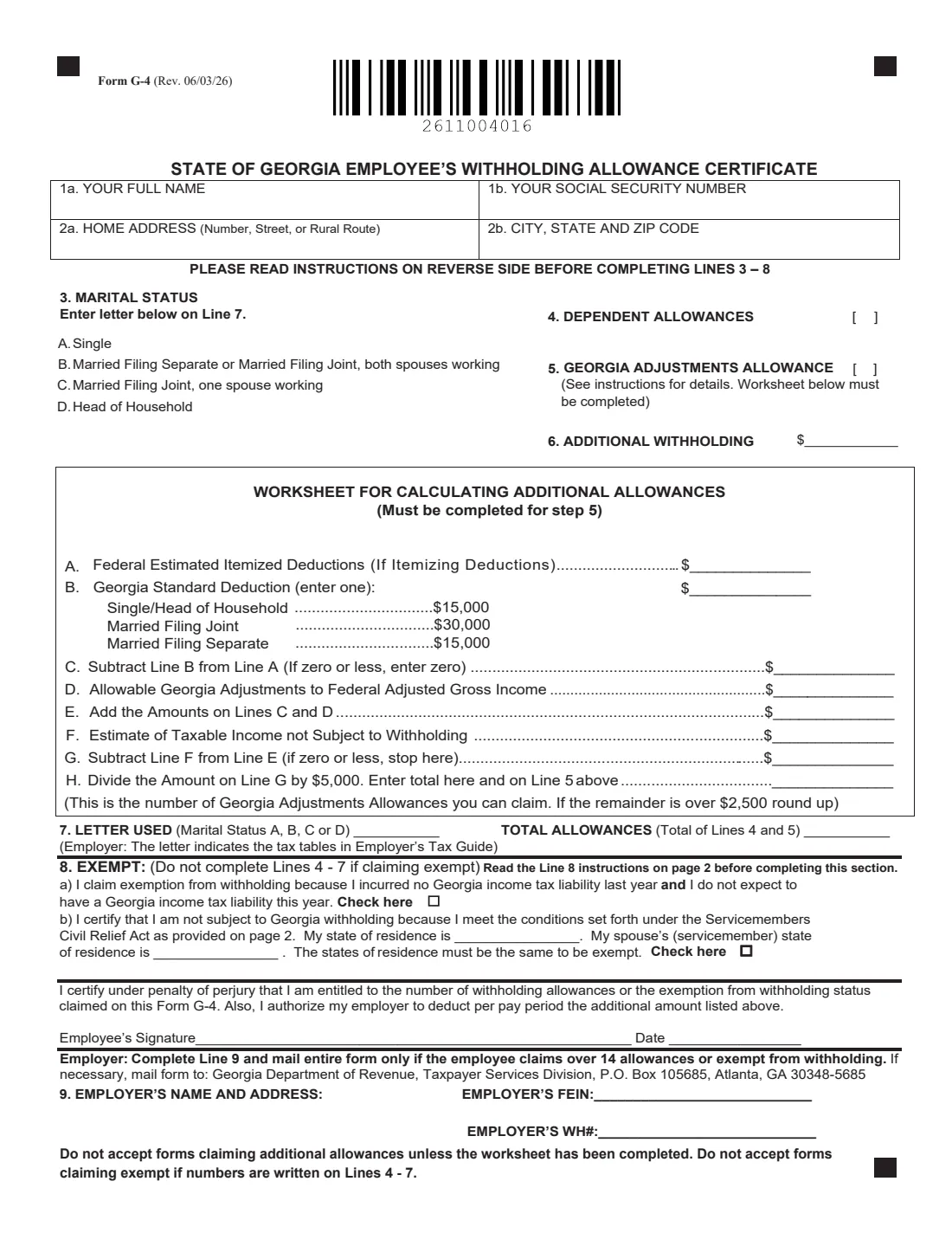
Form G-4 is Georgia's state withholding certificate. Your federal Form W-4 only controls federal income tax, so a Georgia employer also needs a G-4 to know your marital status letter, how many allowances you claim, and whether you want extra tax taken out or are exempt. The current edition is Form G-4 (Rev. 06/03/26), published by the Georgia Department of Revenue (GA DOR).
It matters because the form itself says that if you don't hand in a properly completed G-4, your employer withholds as though you are single with zero allowances. For many people, especially married couples with one earner or parents with dependents, that means more tax withheld than necessary. Claim too much, though, and you may owe Georgia tax when you file your return.
With FileIt you can fill out the G-4 online in a guided form. FileIt pre-fills your name and details from the People records in your vault, turns your marital status into the right letter for line 7, adds up your total allowances, and does the worksheet math for line 5, including the rule that a remainder over $2,500 rounds up. Your answers are printed into the Department's own official PDF, saved in your vault folder, and you can send it for e-signature if you want. FileIt never submits anything to the Department of Revenue or to your employer — you give the finished form to your employer yourself.
- Who fills it
- The employee (lines 1–8 and signature). The employer completes line 9 only when it has to mail the form to the Department.
- Given to
- Your employer. The employer mails it to the Georgia Department of Revenue only if you claim over 14 allowances or exempt from withholding.
- When
- When you start a job with Georgia withholding, and whenever your marital status, dependents or deductions change.
- Signatures
- The employee signs and dates it under penalty of perjury.
- Edition
- Form G-4 (Rev. 06/03/26).
- Cost
- Free to fill out on any FileIt account.
Who needs to fill out Form G-4?
- New employees starting a job where Georgia income tax will be withheld from their wages.
- Current employees in Georgia who want to change their withholding after a change in marital status, dependents or deductions.
- Married couples where only one spouse works, who can use letter C (Married Filing Joint, one spouse working) instead of the default single rate.
- Employees with large itemized deductions or Georgia adjustments, such as the retirement income exclusion, who want extra allowances through the worksheet.
- People who had no Georgia income tax liability last year, filed a Georgia return, and expect none this year, and want to claim exempt on line 8(a).
- Military spouses working in Georgia who share their servicemember spouse's state of residence and qualify under the Servicemembers Civil Relief Act (line 8(b)).
When to use Form G-4
- During onboarding with a Georgia employer, alongside the federal Form W-4 and Form I-9.
- After marriage, divorce, the birth or adoption of a child, or any change in the number of dependents you can claim.
- When your spouse starts or stops working, since that changes whether letter B or C applies.
- If you start itemizing deductions or claiming Georgia adjustments to income and want to reduce withholding through the worksheet.
- Each year if you claim exempt: the Department's instructions say such forms remain in effect only until February 15 of the following year.
- Any time you want your employer to take out an additional dollar amount each pay period (line 6).
What you need before you start
- Your full name, Social Security number and home address.
- Your expected Georgia filing status, so you can pick the right marital status letter (A, B, C or D).
- The number of dependents you can claim under the Internal Revenue Code definition.
- If you use the worksheet: an estimate of your federal itemized deductions, your Georgia adjustments to federal adjusted gross income, and any taxable income not subject to withholding.
- Last year's Georgia Form 500, if you are thinking of claiming exempt — the instructions refer to line 16 (your tax liability).
- For a military spouse exemption: your state of residence and your servicemember spouse's state of residence.
- The dollar amount of any additional withholding you want per pay period.
What’s on Form G-4
The 2026 edition has 2 pages. FileIt asks for it in 6 parts, and it is signed by Employee:
- Lines 1–2: Your name, Social Security number and addressEmployee
- Lines 3–7: Marital status and allowancesEmployee
- Worksheet for calculating additional allowances (line 5)Employee
- Line 8: Exempt from withholdingEmployee
- CertificationEmployee
- Line 9: Employer's name and addressEmployer
How to fill out Form G-4, step by step
1 Lines 1a–2b: Name, Social Security number and address
Enter your full name, your Social Security number, your home address, and your city, state and ZIP code in the four boxes at the top.
FileIt fills these from the person's record in your vault and combines city, state and ZIP into the single 2b box for you.
2 Line 3: Marital status
Line 3 lists four statuses, each with a letter: A (Single), B (Married Filing Separate, or Married Filing Joint with both spouses working), C (Married Filing Joint, one spouse working) and D (Head of Household). There are no boxes to tick here — the letter goes on line 7, and your employer uses it to pick the tax table.
In FileIt you just choose the status, and the letter is printed on line 7 for you.
3 Line 4: Dependent allowances
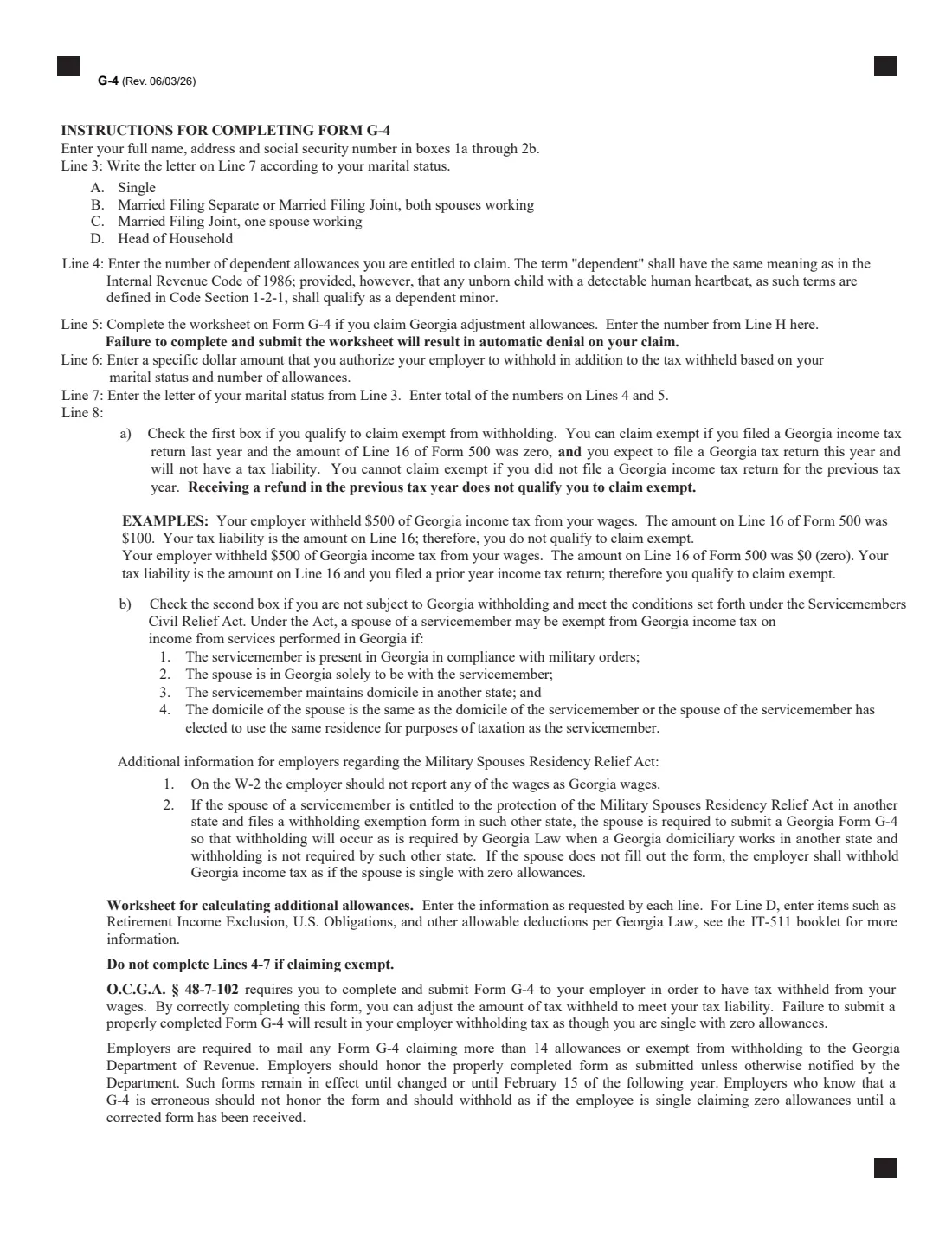
Enter the number of dependent allowances you are entitled to claim. The form says "dependent" has the same meaning as in the Internal Revenue Code, and adds that under Georgia law an unborn child with a detectable human heartbeat also qualifies as a dependent minor.
4 Line 5: Georgia adjustments allowance
Line 5 is for extra allowances based on large deductions or Georgia adjustments. The form is strict: you must complete the worksheet on the G-4, and the instructions warn that failing to complete and submit it results in automatic denial of the claim. Employers are told not to accept forms claiming additional allowances without the worksheet.
That's why FileIt only fills line 5 from the worksheet's line H.
5 Line 6: Additional withholding
Enter a specific dollar amount you want withheld each pay period on top of the tax based on your marital status and allowances. Signing the form authorizes your employer to deduct it. This is a simple way to cover tax on side income or to avoid a balance due.
6 Worksheet for calculating additional allowances (lines A–H)
Line A is your estimated federal itemized deductions, if you itemize. Line B is the Georgia standard deduction printed on this edition: $15,000 for Single or Head of Household, $30,000 for Married Filing Joint and $15,000 for Married Filing Separate. Line C is A minus B (not below zero). Line D is your allowable Georgia adjustments to federal AGI — the instructions mention items such as the retirement income exclusion and U.S. obligations, and point to the IT-511 booklet. Line E adds C and D; line F is taxable income not subject to withholding; line G is E minus F.
Line H divides G by $5,000 — that's the number of allowances for line 5 — and a remainder over $2,500 rounds up. FileIt does every step and carries the result to lines 5 and 7.
7 Line 7: Letter used and total allowances
Line 7 repeats the marital status letter from line 3 and shows your total allowances, which is line 4 plus line 5. FileIt fills both automatically. If you claim exempt, lines 4 through 7 must be left empty.
8 Line 8: Exempt
Line 8(a) is for people who had no Georgia income tax liability last year and expect none this year. The instructions are specific: you must have filed a Georgia return last year with zero on line 16 of Form 500, a refund alone does not qualify you, and you can't claim it if you didn't file last year.
Line 8(b) is for military spouses under the Servicemembers Civil Relief Act: your spouse is in Georgia under military orders, you are here solely to be with them, they keep their domicile in another state, and you share the same state of residence. You write both states and check the box; the states must match.
9 Signature and date
You certify under penalty of perjury that you are entitled to the allowances or exempt status claimed, and you authorize the line 6 deduction. FileIt prints the date; you sign on the line, by hand or through FileIt's e-signature.
10 Line 9: Employer's name and address, FEIN and WH#
This part is for the employer, and only when the employee claims over 14 allowances or exempt from withholding. The employer then adds its name, address, federal employer identification number and Georgia withholding number and mails the entire form to the Department at the address printed on the form.
Common mistakes to avoid
- Claiming allowances on line 5 without completing the worksheet — the form says such a claim is automatically denied.
- Writing numbers on lines 4–7 while also claiming exempt on line 8. Employers are told not to accept such forms.
- Choosing letter C when both spouses work — C is only for Married Filing Joint with one spouse working.
- Claiming exempt because you got a refund last year. The instructions say a refund doesn't qualify you; your line 16 tax liability on Form 500 must have been zero.
- Claiming the military spouse exemption with a different state of residence from your servicemember spouse's — the states must be the same.
- Forgetting to renew an exempt G-4: exempt forms stay in effect only until February 15 of the following year.
- Not handing in a G-4 at all, which means withholding as single with zero allowances.
After you fill it out
Sign and date the G-4 and give it to your employer, usually to payroll or HR. Don't send it to the Department of Revenue yourself — the form says the employer mails it only when you claim more than 14 allowances or exempt.
Keep a copy. FileIt saves the finished PDF in the person's folder in your vault, so you can check what you claimed when you file your Georgia return or update your withholding.
Review your G-4 whenever your family or income changes, and look at your first pay stubs to confirm Georgia tax is being withheld the way you expected. If you claim exempt, plan to file a new form each year.
Fill out Form G-4 online with FileIt
- Pick the person. Choose someone from People and FileIt fills in their name, date of birth, address and other details it already knows.
- Answer plain-language questions. One part of the form at a time, with the official help text beside each question — 31 fields in all. Your answers save as you go.
- Check the live preview. Watch your answers land on the real Georgia Department of Revenue (GA DOR) form, and let FileIt do any worksheet arithmetic.
- Generate the official PDF. FileIt prints your answers into the agency’s own PDF and files it in that person’s folder in your vault. Sign it, or send it for e-signature.
FileIt fills the form — it never files or submits anything for you. Deliver the finished form to whoever asked for it, the way the form’s instructions say.
Start Form G-4 now — it’s freeForm G-4: frequently asked questions
What is Form G-4 used for?
Form G-4 tells your employer how much Georgia state income tax to withhold from your paycheck. It records your marital status letter, dependent and adjustment allowances, any additional withholding, or an exemption claim. It's separate from the federal Form W-4.
Can I fill out the Georgia G-4 online?
Yes. FileIt lets you fill out Form G-4 online free: it pre-fills your details from your vault, does the worksheet math, and prints your answers into the official Department of Revenue PDF. You can download it, sign it by hand or send it for e-signature.
Where do I send my G-4?
Give it to your employer. The employer keeps it, and mails it to the Georgia Department of Revenue only if you claim more than 14 allowances or exempt from withholding. FileIt never sends the form anywhere for you.
What happens if I don't fill out a G-4?
The form says your employer must withhold tax as though you are single with zero allowances. That usually means more Georgia tax is taken out than if you had claimed the allowances you are entitled to.
What marital status letter should I use?
A is Single, B is Married Filing Separate or Married Filing Joint with both spouses working, C is Married Filing Joint with one spouse working, and D is Head of Household. The letter goes on line 7 and tells your employer which tax table to use.
How do I calculate the Georgia adjustments allowance?
Use the worksheet on the form: itemized deductions minus the Georgia standard deduction, plus Georgia adjustments, minus taxable income not subject to withholding. Divide the result by $5,000 for the number of allowances, rounding up when the remainder is over $2,500. FileIt does this for you.
Can I claim exempt from Georgia withholding?
Only if you meet line 8's conditions. For 8(a) you must have filed a Georgia return last year showing no tax liability and expect none this year. For 8(b) you must be a military spouse meeting the Servicemembers Civil Relief Act conditions with the same state of residence as your spouse.
How long does a G-4 stay in effect?
A G-4 stays in effect until you change it. The instructions say forms sent to the Department (over 14 allowances or exempt) remain in effect until changed or until February 15 of the following year.
Can I sign the G-4 electronically?
FileIt can send the completed G-4 to you for e-signature. Whether your employer accepts an electronically signed form is up to your employer; you can always print it and sign by hand instead.
Official sources
- Blank form (PDF), published by Georgia Department of Revenue (GA DOR): https://dor.georgia.gov/document/form/tsdemployeeswithholdingallowancecertificateg-4pdf/download
- Official instructions and guidance: https://dor.georgia.gov/g-4-employee-withholding
- Edition shown on this page: Form G-4 (Rev. 06/03/26) (checked 2026-09-26).
FileIt is not affiliated with or endorsed by Georgia Department of Revenue (GA DOR) or any government. This page explains the form in general terms and is not legal, tax or immigration advice. Always read the official instructions, and check that you are using the edition the recipient accepts. Page last reviewed 2026-09-26.