What is Ohio Form IT 4?
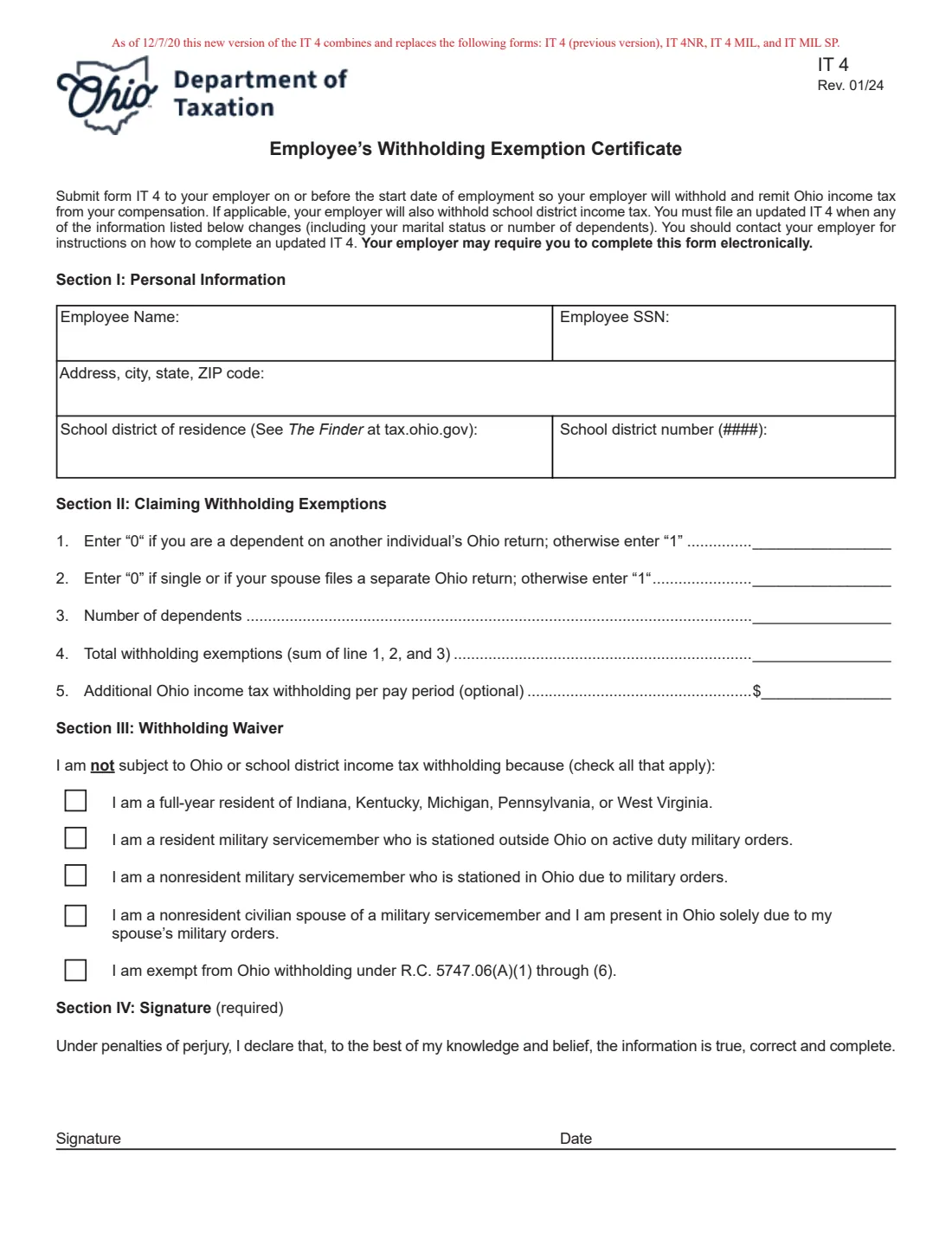
Form IT 4 is Ohio's Employee's Withholding Exemption Certificate. Your federal Form W-4 only covers federal withholding, so an employer that has an office or does business in Ohio also needs an IT 4 to withhold the right amount of Ohio income tax and, if you live in a taxing school district, school district income tax. The current edition is IT 4 (Rev. 01/24).
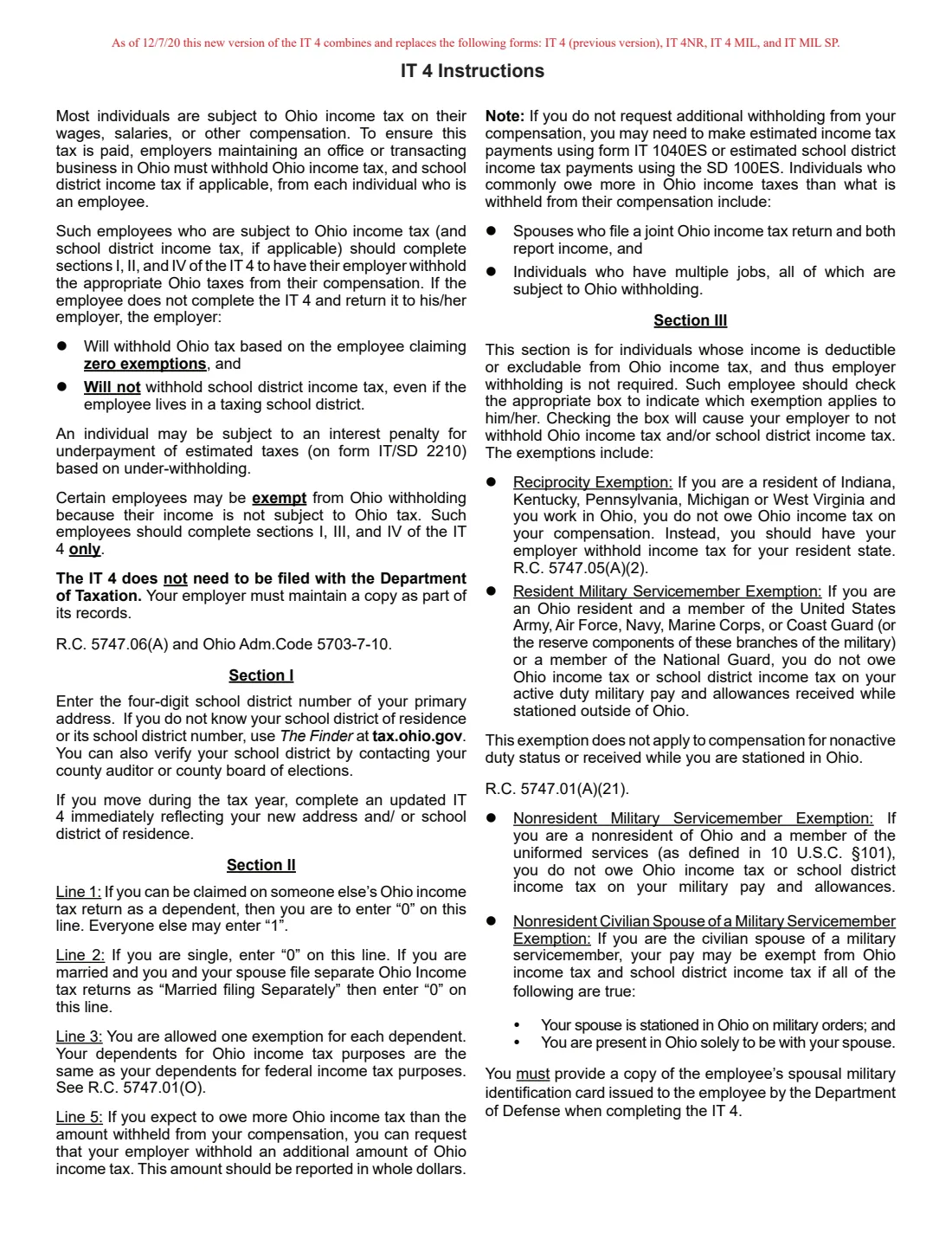
Since 7 December 2020 one IT 4 combines and replaces four older forms: the previous IT 4, the IT 4NR (residency in a reciprocity state), the IT 4 MIL and the IT MIL SP for military servicemembers and their spouses. Most employees complete sections I, II and IV to claim their exemptions. Employees whose pay isn't subject to Ohio withholding complete sections I, III and IV instead.
FileIt lets you fill out the IT 4 online. It pre-fills your name from the People records in your vault, works out lines 1, 2 and 4 from your answers, and prints everything onto the Ohio Department of Taxation's own PDF. The finished form is saved in your vault, and you can send it for e-signature. FileIt never submits anything: you give the signed IT 4 to your employer yourself.
- Who fills it
- The employee. There is no employer section.
- Given to
- Your employer, who keeps it with its records. The IT 4 is not filed with the Department of Taxation.
- When
- On or before your start date, and again whenever the information on it changes, such as your marital status, dependents, address or school district.
- If you don't file one
- Your employer withholds Ohio tax as if you claimed zero exemptions and withholds no school district income tax.
- Signatures
- You sign and date Section IV. The signature is required.
- Edition
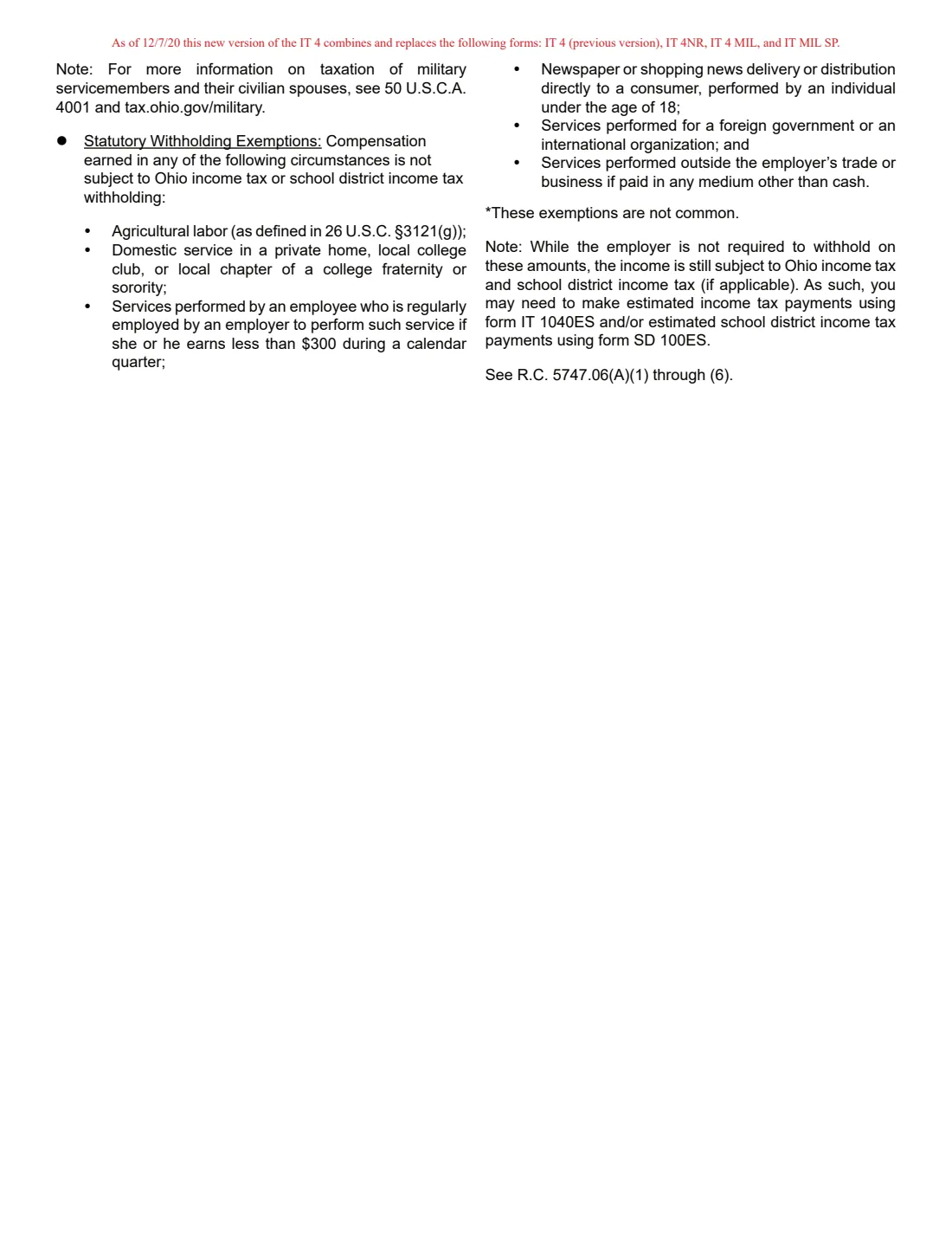
- IT 4 (Rev. 01/24): the certificate on page 1, instructions on pages 2 and 3.
Who needs to fill out Ohio Form IT 4?
- Employees of an employer that has an office or does business in Ohio.
- New hires, who should hand it in on or before their first day.
- Employees whose marital status, number of dependents, address or school district has changed.
- Full-year residents of Indiana, Kentucky, Michigan, Pennsylvania or West Virginia who work in Ohio and claim the reciprocity exemption.
- Military servicemembers and their civilian spouses who qualify for a withholding waiver.
- Workers whose pay is exempt from Ohio withholding under R.C. 5747.06(A)(1) through (6), such as agricultural labor or domestic service in a private home.
When to use Ohio Form IT 4
- When you start a new job with an Ohio employer.
- When you marry, divorce or your spouse starts filing a separate Ohio return.
- When you gain or lose a dependent.
- Immediately after you move, so your employer has your new address and school district.
- When you want extra Ohio tax withheld each pay period, for example because you and your spouse both work or you have more than one job.
What you need before you start
- Your full name, Social Security number and home address.
- Your public school district of residence and its four-digit number, from The Finder at tax.ohio.gov, your county auditor or your county board of elections.
- Whether anyone can claim you as a dependent on their Ohio return.
- Whether you are married and file a joint Ohio return.
- The number of dependents you claim for federal income tax purposes.
- Any additional amount you want withheld each pay period, in whole dollars.
- If you claim a waiver: which of the five reasons in Section III applies to you.
What’s on Ohio Form IT 4
The 2024 edition has 3 pages. FileIt asks for it in 5 parts, and it is signed by Employee:
- Section I: Personal informationEmployee
- Withholding or waiverEmployee
- Section II: Claiming withholding exemptionsEmployee
- Section III: Withholding waiverEmployee
- Section IV: SignatureEmployee
How to fill out Ohio Form IT 4, step by step
1 Section I: Personal information
Enter your name, Social Security number and your address, city, state and ZIP code. Then add your school district of residence and its four-digit number. If you don't know them, use The Finder at tax.ohio.gov. Your school district decides whether your employer also withholds school district income tax. If you move during the year, the instructions say to file an updated IT 4 immediately.
2 Section II, lines 1 and 2: You and your spouse
Line 1 is 0 if someone else can claim you as a dependent on their Ohio return, and 1 for everyone else. Line 2 is 0 if you are single, or married with each spouse filing a separate Ohio return, and 1 otherwise. FileIt asks the two questions and fills in the numbers.
3 Section II, lines 3 and 4: Dependents and total
Line 3 is the number of dependents. Your dependents for Ohio are the same as your dependents for federal income tax purposes. Line 4 adds lines 1, 2 and 3 to give your total withholding exemptions, and FileIt does that sum for you.
4 Section II, line 5: Additional withholding
If you expect to owe more Ohio tax than is withheld, enter an additional amount to be withheld each pay period, in whole dollars. The instructions point out that spouses who file jointly and both have income, and people with several jobs subject to Ohio withholding, commonly owe more. Without extra withholding you may need to make estimated payments on IT 1040ES or SD 100ES.
5 Section III: Withholding waiver
Complete this section instead of Section II only if your pay is not subject to Ohio withholding. Tick each reason that applies: you are a full-year resident of Indiana, Kentucky, Michigan, Pennsylvania or West Virginia; you are a resident servicemember stationed outside Ohio on active duty orders; you are a nonresident servicemember stationed in Ohio; you are the nonresident civilian spouse of a servicemember and in Ohio only because of your spouse's orders; or your pay is exempt under R.C. 5747.06(A)(1) through (6).
6 Section IV: Signature
Sign and date the form. You declare, under penalties of perjury, that the information is true, correct and complete. FileIt prints the date; sign on paper or through FileIt's optional e-signature, if your employer accepts it.
Common mistakes to avoid
- Sending the IT 4 to the Department of Taxation. It goes to your employer, who keeps it.
- Leaving out the school district, so no school district income tax is withheld when it should be.
- Entering 1 on line 2 when you and your spouse file separate Ohio returns.
- Completing both Section II and Section III. Use Section II to claim exemptions, or Section III if you are not subject to Ohio withholding.
- Not filing an updated IT 4 after moving or after your family situation changes.
- Entering cents on line 5. The instructions ask for whole dollars.
- Forgetting to sign. The signature is required.
After you fill it out
Sign and date the form, on paper or through FileIt's e-signature if your employer accepts it, and give it to your employer on or before your start date. Your employer may instead ask you to complete it electronically.
Your employer keeps the IT 4 as part of its records. It is not sent to the Department of Taxation.
FileIt saves the filled PDF in your vault folder. Check it again when you move, marry, gain or lose a dependent, or take a second job, and file an updated IT 4.
Fill out Ohio Form IT 4 online with FileIt
- Pick the person. Choose someone from People and FileIt fills in their name, date of birth, address and other details it already knows.
- Answer plain-language questions. One part of the form at a time, with the official help text beside each question — 22 fields in all. Your answers save as you go.
- Check the live preview. Watch your answers land on the real Ohio Department of Taxation form, and let FileIt do any worksheet arithmetic.
- Generate the official PDF. FileIt prints your answers into the agency’s own PDF and files it in that person’s folder in your vault. Sign it, or send it for e-signature.
FileIt fills the form — it never files or submits anything for you. Deliver the finished form to whoever asked for it, the way the form’s instructions say.
Start Ohio Form IT 4 now — it’s freeOhio Form IT 4: frequently asked questions
Do I need an IT 4 if I already filled out a federal W-4?
Yes, if your employer withholds Ohio income tax. The federal W-4 only covers federal withholding. Without an IT 4, your employer withholds Ohio tax as if you claimed zero exemptions and doesn't withhold school district income tax.
Where do I send Form IT 4?
To your employer. The instructions say the IT 4 does not need to be filed with the Department of Taxation; your employer keeps a copy with its records.
What happened to Forms IT 4NR, IT 4 MIL and IT MIL SP?
From 7 December 2020 they were combined into the IT 4. Reciprocity-state residents and military servicemembers and spouses now use Section III of the IT 4 to claim a withholding waiver.
How do I find my school district number?
Use The Finder at tax.ohio.gov, or contact your county auditor or county board of elections. The number has four digits.
I live in Indiana and work in Ohio. Does Ohio withhold from my pay?
If you are a full-year resident of Indiana, Kentucky, Michigan, Pennsylvania or West Virginia, tick the first box in Section III and your employer will not withhold Ohio income tax. Complete sections I, III and IV.
Can I fill out the IT 4 online?
Yes. FileIt fills it out online, works out lines 1, 2 and 4, and prints your answers onto the official PDF. You then sign it and give it to your employer yourself. FileIt does not submit it anywhere.
How do I have more Ohio tax withheld?
Enter an additional amount per pay period, in whole dollars, on line 5 of Section II.
Official sources
- Blank form (PDF), published by Ohio Department of Taxation: https://dam.assets.ohio.gov/image/upload/tax.ohio.gov/forms/employer_withholding/generic/wth-it4-combined.pdf
- Official instructions and guidance: https://tax.ohio.gov/business/ohio-business-taxes/employer-withholding
- Edition shown on this page: IT 4 (Rev. 01/24) (checked 2026-10-01).
FileIt is not affiliated with or endorsed by Ohio Department of Taxation or any government. This page explains the form in general terms and is not legal, tax or immigration advice. Always read the official instructions, and check that you are using the edition the recipient accepts. Page last reviewed 2026-10-01.