What is Form DS-3053?
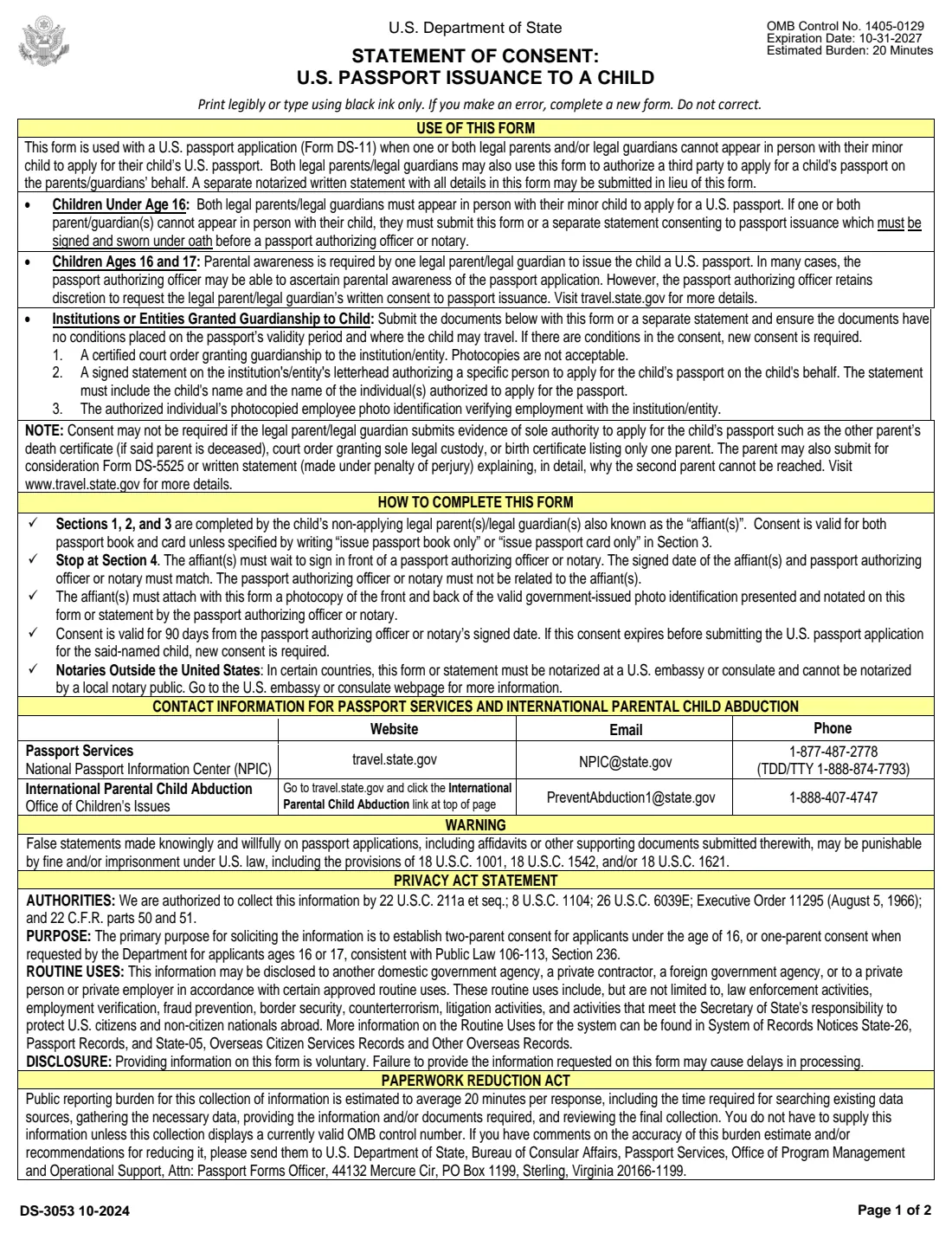
Form DS-3053, Statement of Consent: U.S. Passport Issuance to a Child, is how a parent or legal guardian says yes to a child's U.S. passport without being at the appointment. For a child under 16, both parents or guardians are normally expected to appear in person with the child and the Form DS-11. When one of them — or both — can't be there, the absent parent completes the DS-3053, swears to it in front of a notary or passport authorizing officer, and it goes with the child's application.
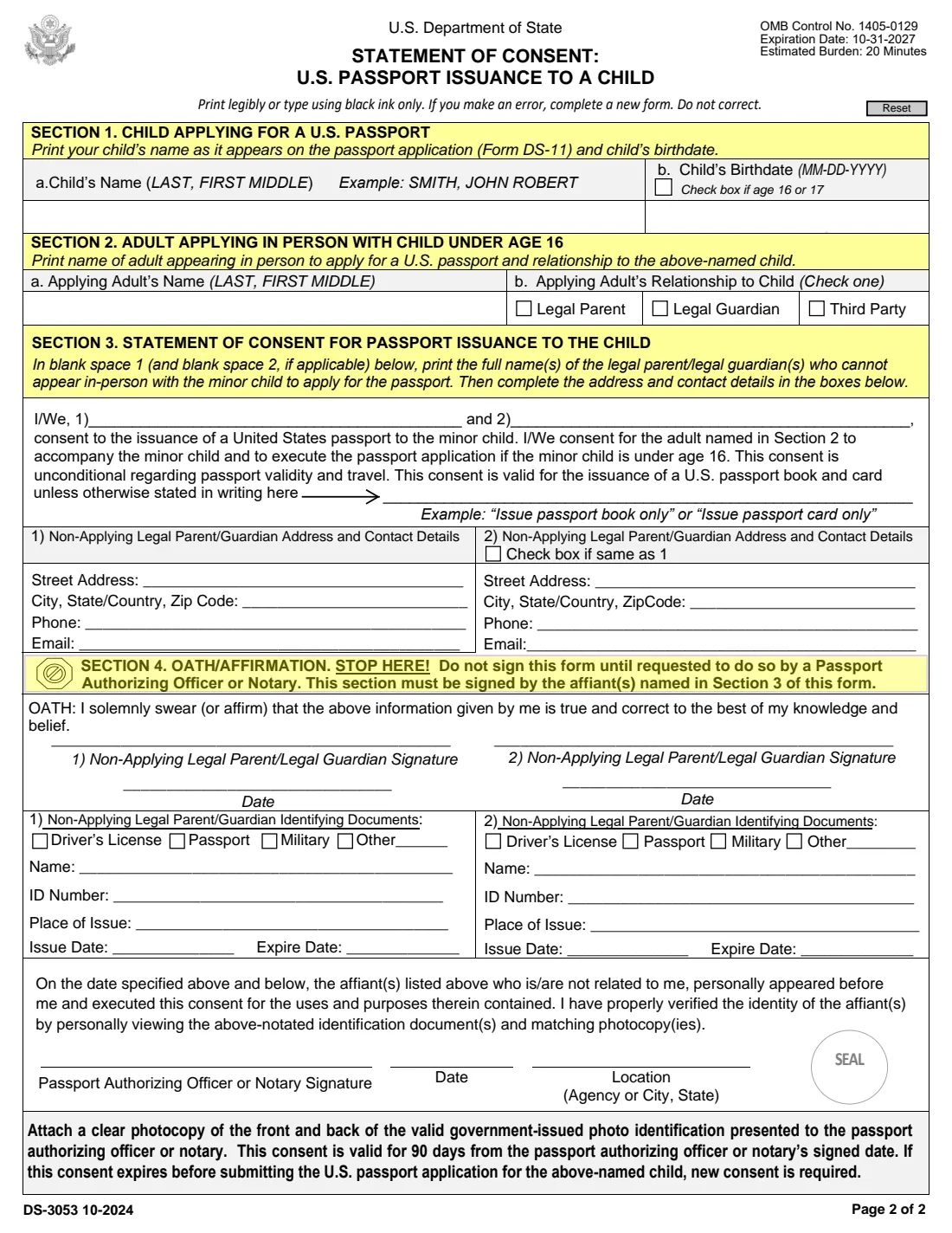
The form is short: one page of instructions and one page to fill in. Section 1 names the child, Section 2 names the adult who will bring the child to the appointment, and Section 3 is the consent itself, with each non-applying parent's name, address and contact details. Section 4 is the oath, which must be signed only in front of the notary or officer. Both parents can also use it together to authorize a third party, such as a grandparent, to apply for the child.
FileIt walks you through Sections 1 to 3 and prints the answers onto the State Department's own DS-3053 PDF, with names in the LAST, FIRST MIDDLE format the form asks for. It pre-fills the child's name and birthdate from the People records in your vault, ticks the "age 16 or 17" box from the birthdate, and saves the finished PDF to the child's vault folder. FileIt never submits anything and never fills in the oath or notary sections — you sign in person, then the form goes with the child's application.
- Who fills it
- The non-applying parent(s) or legal guardian(s) — the "affiants" — complete Sections 1, 2 and 3.
- Given to
- Submitted with the child's Form DS-11 at the passport appointment.
- When
- When a parent or guardian can't appear in person for a child under 16, or when the passport officer asks for consent for a 16- or 17-year-old.
- Signatures
- Signed under oath in front of a passport authorizing officer or notary, who must not be related to the affiant.
- Valid for
- 90 days from the passport authorizing officer's or notary's signed date.
- Edition
- DS-3053 10-2024 (OMB 1405-0129, expires 10-31-2027)
Who needs to fill out Form DS-3053?
- A parent or legal guardian of a child under 16 who can't go to the child's passport appointment.
- Both parents or guardians, when neither can attend and a third party (for example a grandparent or family friend) will take the child to apply.
- A parent of a 16- or 17-year-old, when the passport authorizing officer asks for written consent.
- Parents living in different places, where one parent handles the appointment and the other consents from home or abroad.
- Institutions or entities with guardianship of a child, which submit this form or a statement together with the court order and authorization described on the form.
When to use Form DS-3053
- Before the child's DS-11 appointment, leaving time to find a notary or passport authorizing officer and to get the signed form to the parent attending.
- Within 90 days of the appointment: the consent is valid for 90 days from the notary's or officer's signed date, and a new one is needed if it expires.
- When you want to limit the consent to a passport book only or a passport card only — otherwise it covers both.
- Not when you can show sole authority instead, such as a court order granting sole legal custody, the other parent's death certificate, or a birth certificate listing only one parent.
- If the other parent can't be reached at all, the form mentions Form DS-5525 or a written statement explaining why, rather than this consent.
What you need before you start
- The child's full name as it appears on their passport application (Form DS-11), and their birthdate.
- The full name of the adult who will appear in person with the child, and their relationship to the child: legal parent, legal guardian or third party.
- The full name, street address, city, state or country, ZIP code, phone and email of each non-applying parent or guardian.
- A valid government-issued photo ID for each affiant — such as a driver's license, passport or military ID — to show the notary or officer.
- A clear photocopy of the front and back of that ID, attached to the form.
- Access to a notary or passport authorizing officer who is not related to you; abroad, some countries require a U.S. embassy or consulate instead of a local notary.
What’s on Form DS-3053
The 2024 edition has 2 pages. FileIt asks for it in 4 parts:
- Section 1: Child applying for a U.S. passportParent / guardian (affiant)
- Section 2: Adult applying in person with a child under 16Parent / guardian (affiant)
- Section 3: Statement of consent — first parent/guardianParent / guardian (affiant)
- Section 3: Second non-applying parent/guardianParent / guardian (affiant)
How to fill out Form DS-3053, step by step
1 Section 1: Child applying for a U.S. passport
Print the child's name as it appears on the passport application, in the order LAST, FIRST MIDDLE — the form's example is SMITH, JOHN ROBERT — and the child's birthdate as MM-DD-YYYY.
Tick the box if the child is 16 or 17. For children that age, one parent's awareness is usually enough and the officer may not need written consent at all; FileIt ticks this box for you from the birthdate.
2 Section 2: Adult applying in person with child under age 16
Name the adult who will take the child to apply, in LAST, FIRST MIDDLE order, and tick their relationship to the child: legal parent, legal guardian or third party.
This is usually the other parent. If both parents are completing the DS-3053 to send someone else, tick Third Party and enter that person's name.
3 Section 3: Statement of consent for passport issuance to the child
In blank space 1 (and blank space 2, if both parents are consenting on this form), print the full name of each legal parent or guardian who can't appear in person. The printed statement says you consent to the child's passport, and to the adult in Section 2 accompanying the child and executing the application if the child is under 16. The consent is unconditional regarding passport validity and travel.
It covers both a passport book and a passport card unless you write a limitation on the line provided — the form's examples are "Issue passport book only" or "Issue passport card only".
4 Address and contact details for each non-applying parent/guardian
Below the consent, box 1 takes the first affiant's street address, city, state or country and ZIP code, phone and email. Box 2 does the same for a second affiant, or you can tick "Check box if same as 1" when both live at the same address.
5 Section 4: Oath/Affirmation
Stop here. The form says not to sign until a passport authorizing officer or notary asks you to. Each affiant named in Section 3 signs and dates the oath in front of them, and the signing date must match the officer's or notary's date. FileIt leaves this section blank.
6 Identifying documents and the notary's certification
The officer or notary notes which ID each affiant showed (driver's license, passport, military or other), with the name, ID number, place of issue and dates, then signs, dates, gives their location and applies a seal. The instructions say these entries are made by the passport authorizing officer or notary, so FileIt leaves them blank too.
Common mistakes to avoid
- Signing Section 4 before you are in front of the notary or passport authorizing officer — the signature must be witnessed.
- Using a notary who is related to you. The form says the officer or notary must not be related to the affiant(s).
- Forgetting the photocopy of the front and back of the ID you showed the notary.
- Letting the consent expire: it is valid for 90 days from the notary's signed date.
- Writing the child's name differently from the DS-11 application, or not in LAST, FIRST MIDDLE order.
- Correcting mistakes on the form. The form says to complete a new one instead — easy when you can print a fresh copy from FileIt.
- Using a local notary in a country where the form must be notarized at a U.S. embassy or consulate. Check the embassy's webpage first.
- Adding conditions to the consent other than a book-only or card-only limitation; the consent is meant to be unconditional regarding validity and travel.
After you fill it out
Print the form and take it, unsigned, to a notary public or passport authorizing officer with your original photo ID and a photocopy of its front and back. Sign Section 4 when asked; the notary or officer completes the identification block, signs, dates and seals it. If you live outside the United States, check the U.S. embassy or consulate's webpage, since some countries require the consent to be notarized there.
Give the signed original and your ID photocopy to the adult named in Section 2, who brings it to the child's appointment with the child's Form DS-11, the child's evidence of citizenship, proof of the parental relationship and the photo. The consent must still be within its 90 days on the day of the appointment.
FileIt keeps a copy of the completed consent in the child's vault folder, next to their DS-11. When the passport arrives, add it to the vault too, so the family's passports are kept together.
Fill out Form DS-3053 online with FileIt
- Pick the person. Choose someone from People and FileIt fills in their name, date of birth, address and other details it already knows.
- Answer plain-language questions. One part of the form at a time, with the official help text beside each question — 25 fields in all. Your answers save as you go.
- Check the live preview. Watch your answers land on the real U.S. Department of State form, and let FileIt do any worksheet arithmetic.
- Generate the official PDF. FileIt prints your answers into the agency’s own PDF and files it in that person’s folder in your vault.
FileIt fills the form — it never files or submits anything for you. Deliver the finished form to whoever asked for it, the way the form’s instructions say.
Start Form DS-3053 now — it’s freeForm DS-3053: frequently asked questions
Can I fill out the DS-3053 online?
Yes. FileIt guides you through Sections 1 to 3 and prints the answers on the official DS-3053 PDF. You then print it and sign it in front of a notary or passport authorizing officer. Filling forms is available on every FileIt account, including the free plan.
Does the DS-3053 have to be notarized?
Yes. It is a sworn statement: each non-applying parent or guardian signs the oath in front of a passport authorizing officer or a notary, who must not be related to them, and whose signed date must match the affiant's.
Where do I send the DS-3053?
You don't mail it to the State Department on its own. It goes with the child's Form DS-11, which the adult named in Section 2 takes to the passport appointment.
How long is a DS-3053 valid?
90 days from the date the passport authorizing officer or notary signed it. If it expires before the child's application is submitted, a new consent is required.
Do both parents need to sign the DS-3053?
Only the parent(s) or guardian(s) who can't attend in person. If one parent goes to the appointment, the other completes the form. If neither can attend, both sign it to authorize a third party.
Is the DS-3053 needed for a 16- or 17-year-old?
Usually not. For ages 16 and 17 the form says parental awareness by one parent is required, and the officer can often confirm it; they may still ask for written consent, which this form provides.
What if the other parent can't be found?
The form says consent may not be required if you submit evidence of sole authority, such as a court order granting sole legal custody. Otherwise you can submit Form DS-5525 or a written statement, made under penalty of perjury, explaining in detail why the second parent can't be reached.
Can I limit my consent to a passport card only?
Yes. The consent covers both a passport book and a card unless you write a limitation in Section 3, such as "Issue passport book only" or "Issue passport card only".
Can I write my own consent letter instead?
The form says a separate notarized written statement with all the details in the form may be submitted in lieu of the DS-3053. Using the form makes sure nothing is missed.
Official sources
- Blank form (PDF), published by U.S. Department of State: https://eforms.state.gov/Forms/ds3053.pdf
- Official instructions and guidance: https://travel.state.gov/content/travel/en/passports/need-passport/under-16.html
- Edition shown on this page: DS-3053 10-2024 (OMB 1405-0129, expires 10-31-2027) (checked 2026-09-26).
FileIt is not affiliated with or endorsed by U.S. Department of State or any government. This page explains the form in general terms and is not legal, tax or immigration advice. Always read the official instructions, and check that you are using the edition the recipient accepts. Page last reviewed 2026-09-26.