What is Form DS-5504?
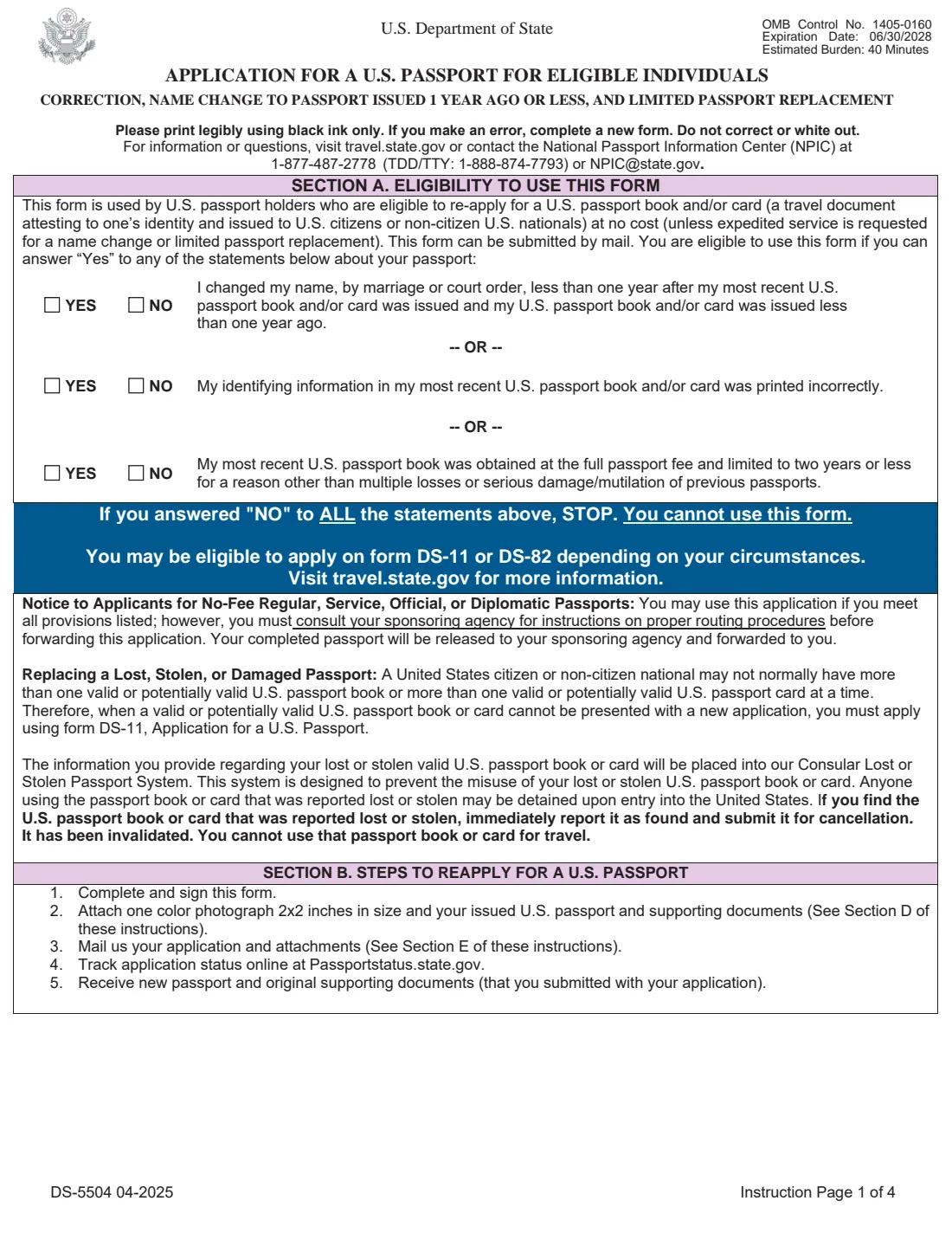
Form DS-5504, the Application for a U.S. Passport for Eligible Individuals: Correction, Name Change to Passport Issued 1 Year Ago or Less, and Limited Passport Replacement, covers three situations. You changed your name by marriage or court order less than a year after your passport was issued, and the passport is still less than a year old. Your passport was printed with a mistake in your identifying information. Or your passport book was issued at the full fee but limited to two years or less for a reason other than multiple losses or serious damage.
It is a mail-in form: you sign it yourself and send it with the passport being replaced. There is no fee to use it unless you ask for expedited service or 1-2 day delivery for a name change or limited passport replacement, and a passport with a data or printing error is corrected at no cost while it is still valid. The two application pages look much like the DS-82 renewal form, with three extra questions at the end that explain why you're applying.
FileIt guides you through every item and fills your answers straight into the fields of the State Department's official DS-5504 PDF. It pre-fills names, dates of birth and email from the People records in your vault, ticks the matching eligibility boxes on the first instruction page from your answers, checks things like whether a name change falls within the one-year window, and saves the finished PDF to the person's vault folder. FileIt never mails or submits the application — you print it, sign it in ink and send it yourself.
- Who fills it
- U.S. passport holders with a recent name change, a printing or data error, or a limited-validity passport book; a parent or guardian also signs for a minor.
- Given to
- Mailed to the National Passport Processing Center address on instruction page 3; applicants outside the U.S. and Canada follow their embassy or consulate's instructions.
- When
- Within a year of issue for a name change; as soon as you notice a printing or data error; for a limited book, while it has not expired.
- Signatures
- Signed and dated in ink on Application Page 1 before mailing — no witness or notary.
- Fee
- None, unless you request expedited service or 1-2 day delivery for a name change or limited passport replacement.
- Edition
- DS-5504 04-2025 (OMB 1405-0160, expires 06/30/2028)
Who needs to fill out Form DS-5504?
- Newlyweds whose passport was issued less than a year ago and whose name changed by marriage less than a year after it was issued.
- Anyone who changed their name by court order within that same one-year window.
- Passport holders whose name, date of birth, sex marker or place of birth was printed incorrectly.
- People whose passport has a printing defect, such as missing data on the biographical page, discoloration or crooked printing.
- Holders of a passport book that was issued at the full fee but limited to two years or less, for example because the evidence of citizenship or identity wasn't sufficient at the time.
- Parents or guardians of a minor in any of these situations, who sign the form alongside or on behalf of the child.
When to use Form DS-5504
- As soon as possible after a marriage or court-ordered name change, if your passport is less than a year old — after that, the name change is done by renewal (Form DS-82) or in person (Form DS-11).
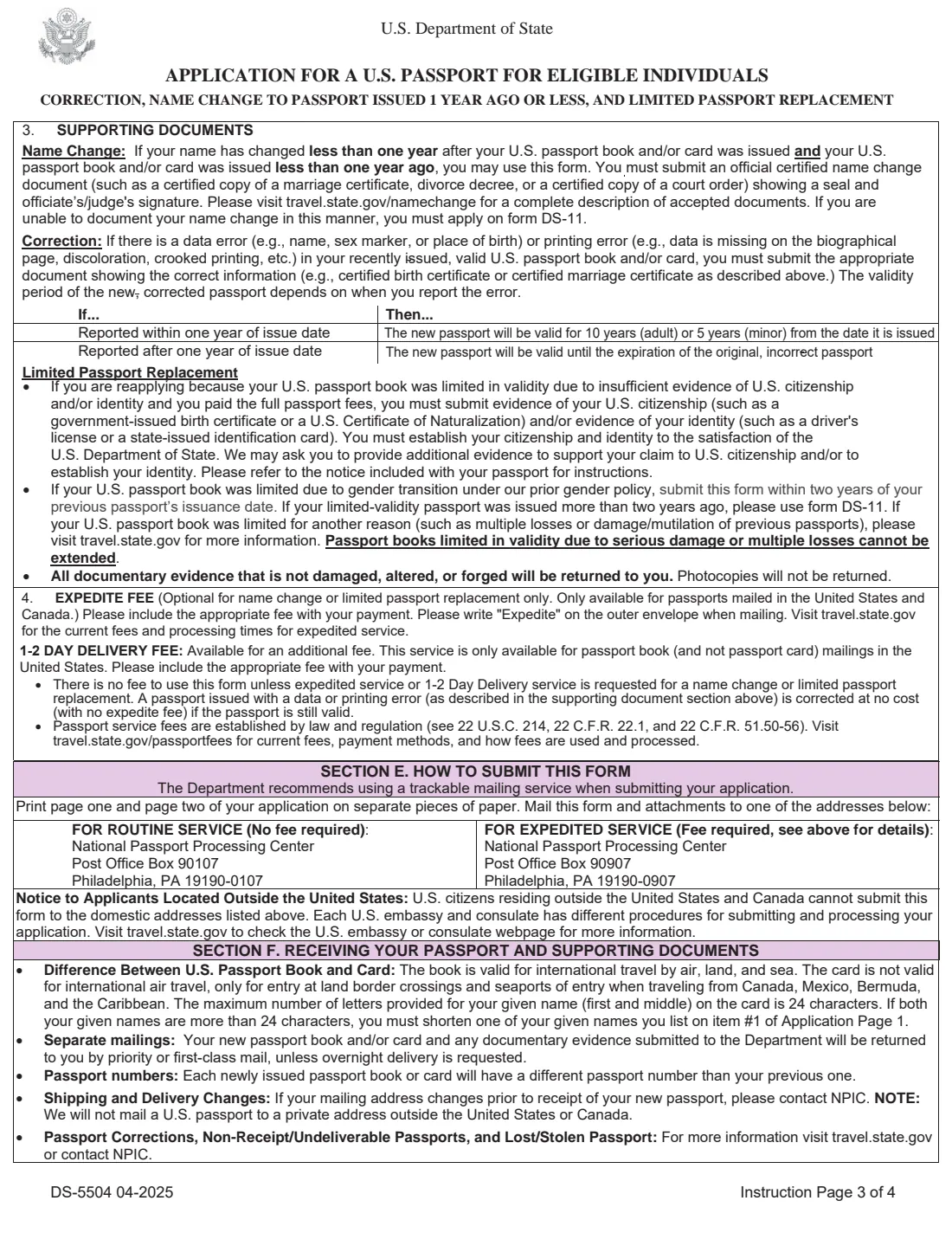
- As soon as you notice an error. The form says a correction reported within one year of the issue date gives a new passport valid for 10 years (adult) or 5 years (minor); reported later, the new passport is valid only until the original, incorrect one would have expired.
- For a limited passport book replacement, before the book expires — the form says your submitted book must not be expired.
- Not when your passport has been mutilated, damaged, or reported lost or stolen: the form says to apply in person on Form DS-11 instead.
- Not when none of the three situations applies — the form says you may be eligible to use Form DS-11 or DS-82 depending on your circumstances.
What you need before you start
- Your most recently issued U.S. passport book and/or card — the one with the error, the old name or the limited validity.
- One color photo, 2x2 inches, taken in the last six months, meeting the State Department's photo rules.
- For a name change: an official certified name change document, such as a certified marriage certificate, divorce decree or court order, showing a seal and the officiant's or judge's signature.
- For a correction: a document showing the correct information, such as a certified birth certificate or certified marriage certificate.
- For a limited book replacement: evidence of U.S. citizenship (such as a birth certificate or naturalization certificate) and/or identity (such as a driver's license or state ID).
- Your passport book and/or card number and issue date, and the name exactly as printed in it.
- Your Social Security number, if one has ever been issued to you.
- Your height, hair and eye color, occupation, and an emergency contact who is not traveling with you.
- Payment only if you want expedited service or 1-2 day delivery; check travel.state.gov for current fees.
What’s on Form DS-5504
The 2025 edition has 6 pages. FileIt asks for it in 10 parts:
- Why are you using the DS-5504? (items 20, 22 and 23)Applicant
- Document(s) you're applying forApplicant
- Items 1–9: About youApplicant
- Item 10: Your most recent U.S. passportApplicant
- Items 11–16: Description, occupation and contact numbersApplicant
- Item 17: Permanent addressApplicant
- Item 18: Your emergency contactApplicant
- Item 19: Travel plansApplicant
- Item 21: Your new nameApplicant
- Item 22: Information printed incorrectlyApplicant
How to fill out Form DS-5504, step by step
1 Section A: Eligibility to use this form
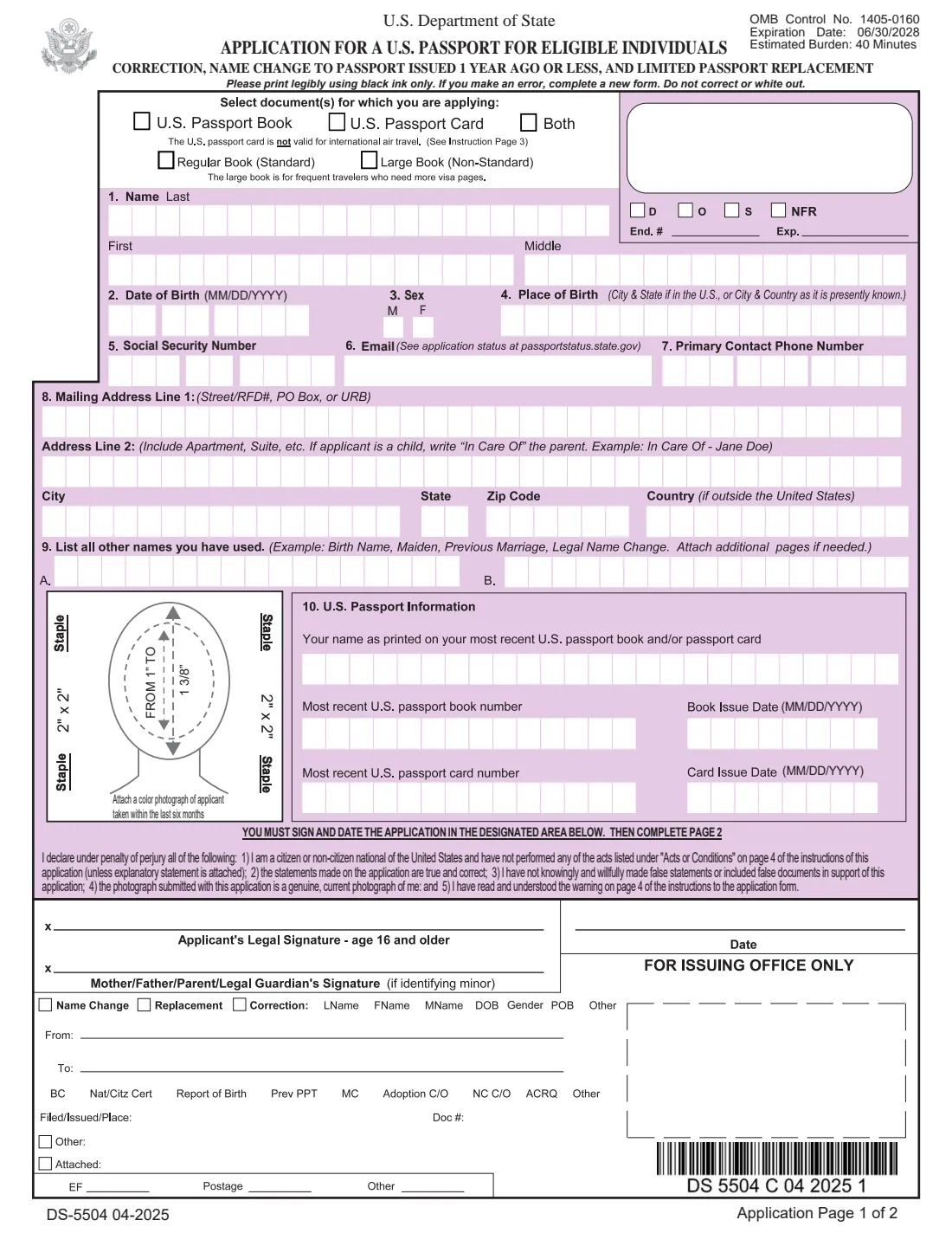
Instruction page 1 has three YES/NO statements: your name changed by marriage or court order less than a year after your passport was issued and it was issued less than a year ago; your identifying information was printed incorrectly; or your passport book was issued at the full fee and limited to two years or less for a reason other than multiple losses or serious damage. You can use the DS-5504 if at least one is Yes.
These match questions 20, 22 and 23 on Application Page 2, so FileIt asks them once and ticks both places.
2 Select document(s) for which you are applying
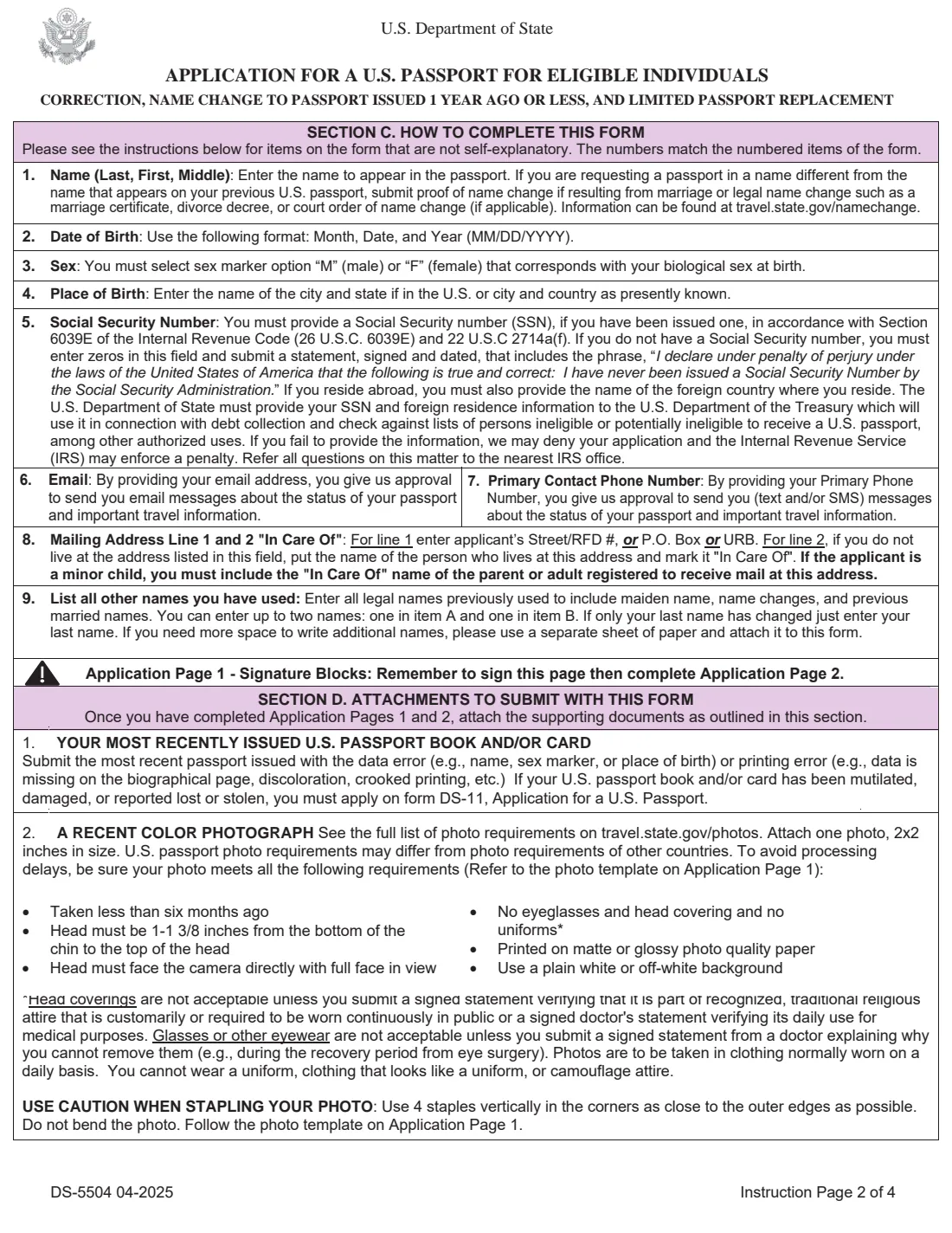
Tick a passport book, a passport card, or both, and if you want a book, the regular or large size. The card is not valid for international air travel — only for land border crossings and seaports of entry from Canada, Mexico, Bermuda and the Caribbean.
3 Items 1–9: Name, date of birth, sex, place of birth, SSN, email, phone, mailing address and other names
Enter the name to appear in the new passport, one letter per box. If it differs from your previous passport, you must include the name change document. Choose the M or F sex marker that, as the form states, corresponds with your biological sex at birth, and give your place of birth as city and state or city and country.
The SSN rules are the same as on other passport forms: enter it if you have one, or zeros plus the signed statement if you have never been issued one. For a child, write "In Care Of" the parent on address line 2. Item 9 takes up to two other legal names you have used.
4 Item 10: U.S. passport information
Write the name exactly as printed on your most recent passport book and/or card, with the book number and issue date and/or the card number and issue date. This is the passport you enclose with the form.
5 Signatures (Application Page 1)
An applicant aged 16 or older signs on the first line; for a minor, a mother, father, parent or legal guardian signs on the second line. Write the date and sign in ink before mailing. The 'For Issuing Office Only' block is for the State Department.
6 Items 11–19: Description, occupation, contact numbers, permanent address, emergency contact and travel plans
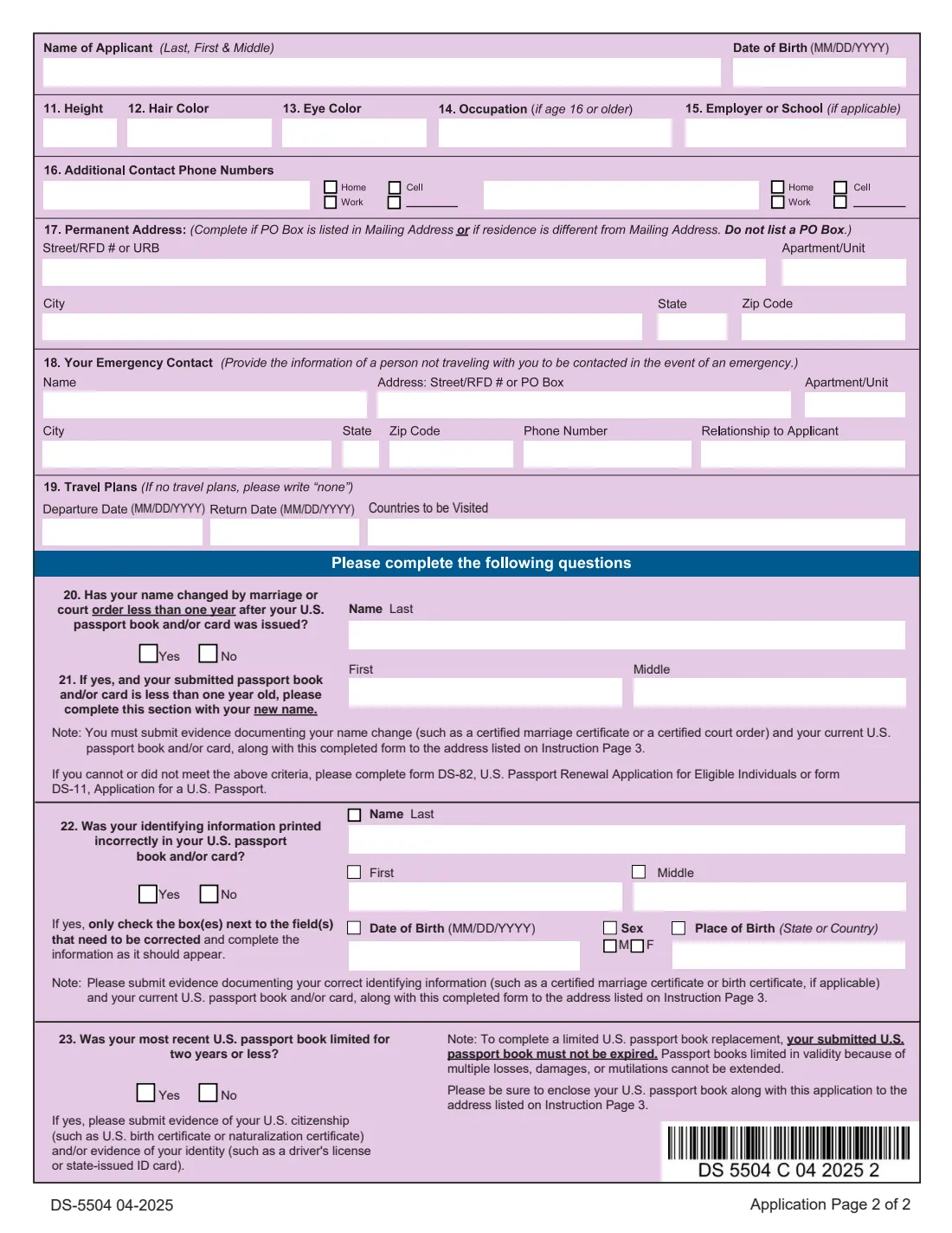
Application Page 2 repeats your name and date of birth, then asks for your height, hair and eye color, occupation (if 16 or older), employer or school, up to two additional phone numbers, a permanent address if your mailing address is a P.O. Box or you live elsewhere, an emergency contact who isn't traveling with you, and your travel dates and countries (write "none" if you have no plans).
7 Items 20–21: Name change
Question 20 asks whether your name changed by marriage or court order less than one year after your passport was issued. If yes, and your passport is less than one year old, item 21 takes your new last, first and middle name. Send the certified name change document and your current passport with the form. If you don't meet these criteria, the form says to use Form DS-82 or DS-11 instead.
8 Item 22: Information printed incorrectly
If your passport has a data error, answer Yes and tick only the boxes next to the fields that need correcting — last, first or middle name, date of birth, sex or place of birth — then enter each as it should appear. Include evidence of the correct information, such as a certified birth or marriage certificate.
9 Item 23: Limited passport book
Answer Yes if your most recent passport book was limited to two years or less. Include evidence of your citizenship and/or identity. The form notes the book must not be expired, and that books limited because of multiple losses, damage or mutilation cannot be extended.
Common mistakes to avoid
- Using the DS-5504 for a name change on a passport more than a year old — that is a renewal on Form DS-82 (or an in-person DS-11).
- Sending a photocopy or an uncertified document. Name changes need an official certified document showing a seal and the officiant's or judge's signature.
- Ticking every box in item 22. Only tick the field(s) that were actually printed incorrectly.
- Waiting too long to report a printing error: after one year from the issue date, the corrected passport is valid only until the original would have expired.
- Forgetting to enclose the passport being corrected, changed or replaced.
- Using the form for a damaged, lost or stolen passport — those need an in-person Form DS-11.
- Printing both application pages on one sheet, or forgetting to sign and date Application Page 1.
- Paying a fee for a correction you don't need to pay for — a valid passport with a data or printing error is corrected at no cost.
After you fill it out
Print Application Pages 1 and 2 on separate sheets, attach your photo, and sign and date Page 1 in ink (a parent or guardian signs too for a minor). Enclose your most recent passport and the supporting documents for your situation. Mail everything to the National Passport Processing Center address on instruction page 3: one address for routine service with no fee, another for expedited service with the fee (write "Expedite" on the envelope). Applicants living outside the United States and Canada follow their U.S. embassy or consulate's procedures instead. A trackable mailing service is recommended.
You can track your application at passportstatus.state.gov. The form says your new passport and any documents you sent are returned by priority or first-class mail unless overnight delivery is requested, and the new passport will have a different number from the old one.
FileIt keeps the completed application in the person's vault folder. When the new passport arrives, add it to the vault, and update the person's name in FileIt if it changed, so future forms are pre-filled correctly.
Fill out Form DS-5504 online with FileIt
- Pick the person. Choose someone from People and FileIt fills in their name, date of birth, address and other details it already knows.
- Answer plain-language questions. One part of the form at a time, with the official help text beside each question — 70 fields in all. Your answers save as you go.
- Check the live preview. Watch your answers land on the real U.S. Department of State form, and let FileIt do any worksheet arithmetic.
- Generate the official PDF. FileIt prints your answers into the agency’s own PDF and files it in that person’s folder in your vault.
FileIt fills the form — it never files or submits anything for you. Deliver the finished form to whoever asked for it, the way the form’s instructions say.
Start Form DS-5504 now — it’s freeForm DS-5504: frequently asked questions
Can I fill out the DS-5504 online?
Yes. FileIt guides you through each item and fills your answers into the official DS-5504 PDF, which you print, sign and mail. Filling forms is available on every FileIt account, including the free plan.
Where do I mail the DS-5504?
To the National Passport Processing Center P.O. Box in Philadelphia printed on instruction page 3 — there is one address for routine service (no fee) and another for expedited service. If you live outside the United States and Canada, check your U.S. embassy or consulate's website.
Is there a fee to change my name on my passport?
Not with the DS-5504, as long as you qualify: the form says there is no fee unless you request expedited service or 1-2 day delivery for a name change or limited passport replacement. Check travel.state.gov for current fees for those extras.
My passport is more than a year old and I got married. Can I use the DS-5504?
No. The name change option needs a passport issued less than one year ago, with the name change happening less than a year after issue. Otherwise the form points you to Form DS-82 (renewal by mail) or DS-11.
How do I correct a mistake on my U.S. passport?
Answer Yes to question 22, tick only the fields printed incorrectly and write them as they should appear. Send the passport with a document showing the correct information, such as a certified birth certificate. A valid passport with a data or printing error is corrected at no cost.
How long will my corrected passport be valid?
If you report the error within one year of the issue date, the new passport is valid for 10 years for an adult or 5 years for a minor. Reported later, it is valid until the original, incorrect passport would have expired.
What is a limited passport book replacement?
If your passport book was issued at the full fee but limited to two years or less — for example because your evidence of citizenship or identity wasn't sufficient — you can use the DS-5504 to get a full-validity book by sending the required evidence. It can't be used for books limited because of multiple losses or damage, and your book must not be expired.
What is the difference between the DS-5504 and the DS-82?
The DS-82 renews a passport issued less than 15 years ago, for a fee. The DS-5504 is for passports that need a name change within their first year, a data or printing correction, or a limited book replacement, usually without a fee.
Does someone need to witness my signature?
No. You sign and date Application Page 1 yourself before mailing. For an applicant under 16, a parent or legal guardian signs on the second signature line.
Official sources
- Blank form (PDF), published by U.S. Department of State: https://eforms.state.gov/Forms/ds5504_pdf.pdf
- Official instructions and guidance: https://travel.state.gov/content/travel/en/passports/have-passport/change-correct.html
- Edition shown on this page: DS-5504 04-2025 (OMB 1405-0160, expires 06/30/2028) (checked 2026-09-26).
FileIt is not affiliated with or endorsed by U.S. Department of State or any government. This page explains the form in general terms and is not legal, tax or immigration advice. Always read the official instructions, and check that you are using the edition the recipient accepts. Page last reviewed 2026-09-26.