What is Arizona Form 285?
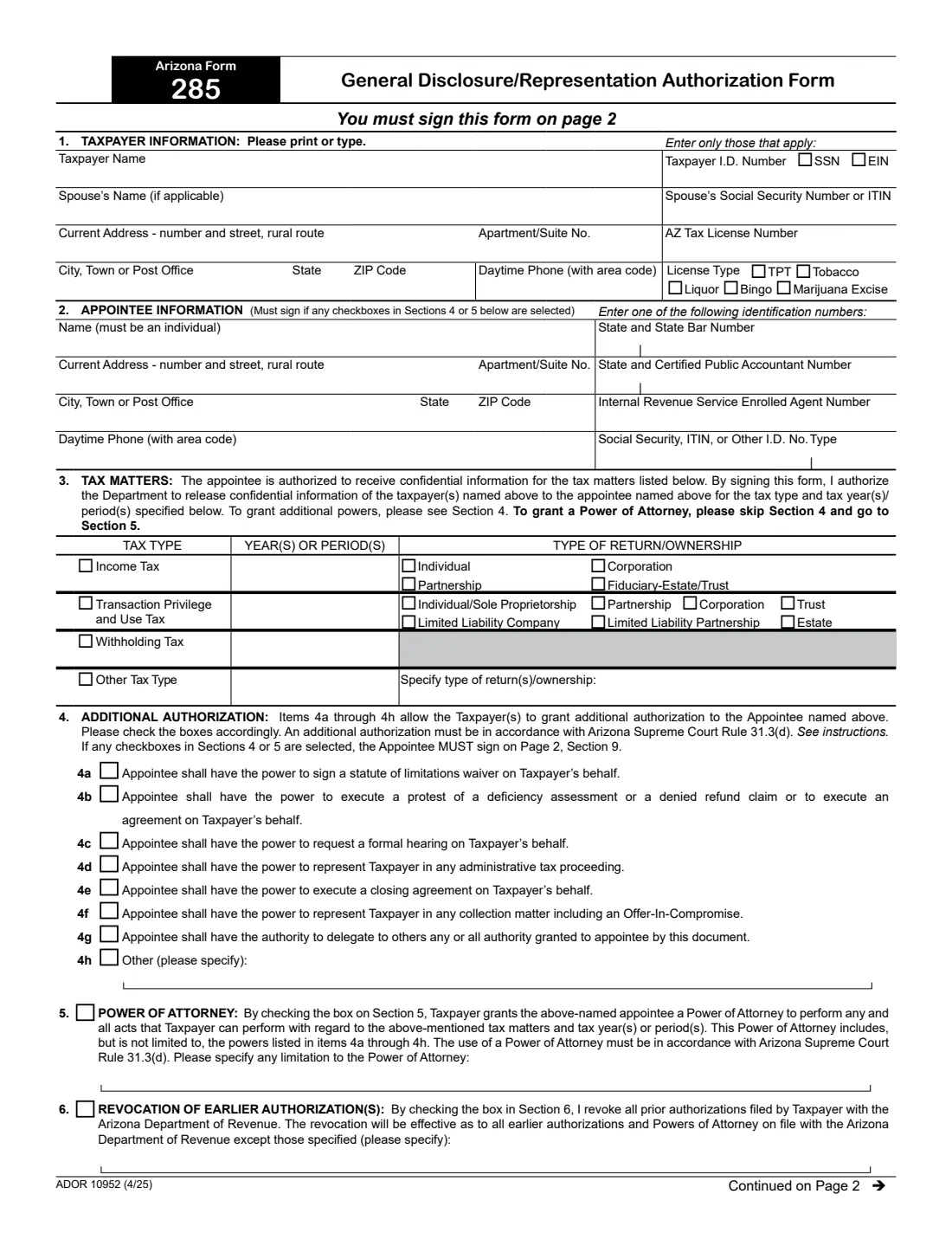
Arizona Form 285, the General Disclosure/Representation Authorization Form, authorizes the Arizona Department of Revenue (ADOR) to release a taxpayer's confidential tax information to an appointee. The appointee must be an individual. On its own, the form lets that person receive information and discuss your tax matters with the Department. You can also grant specific extra powers (Section 4), such as protesting an assessment, requesting a formal hearing or handling a collection matter, or a full power of attorney (Section 5).
It covers income tax, transaction privilege and use tax (TPT), withholding tax and other tax types such as tobacco or liquor luxury tax, bingo tax or marijuana excise tax, for the years or periods you list. Individuals, joint filers, sole proprietors, corporations, partnerships, LLCs, estates, trusts and government agencies can use it. The current edition is ADOR 10952 (4/25). Its September 2024 update added check boxes for the AZ tax license types (TPT, Liquor, Bingo, Tobacco and Marijuana Excise).
FileIt takes you through Form 285 section by section in plain English and prints your answers into ADOR's own PDF. It keeps the appointee's ID number, the tax matters, the extra powers and the appointee's declaration together, and checks the rules the form states. It saves the finished PDF to your vault. You then send it to ADOR yourself: FileIt never files anything with the Department.
- Who fills it
- The taxpayer (Sections 1 to 8). The appointee completes the Section 9 declaration when given authority under Section 4 or 5.
- Given to
- The Arizona Department of Revenue, by email to [email protected], fax to (602) 716-6008, or mail to ATTN: Power of Attorney, PO Box 29086, Phoenix, AZ 85038-9086. If an ADOR employee asked for it, send it where they say.
- Signatures
- The taxpayer signs and dates Section 8 on page 2 (both spouses for joint filers). The appointee signs Section 9 if Section 4 or 5 is ticked.
- Appointee
- Must be an individual, identified by a unique number such as a state bar, CPA or enrolled agent number, or an SSN, ITIN or other government ID.
- Edition
- ADOR 10952 (4/25)
- Agency
- Arizona Department of Revenue (ADOR)
Who needs to fill out Arizona Form 285?
- Individuals and joint filers who want an accountant, attorney or relative to be able to discuss their Arizona income tax with ADOR.
- Businesses that want a bookkeeper or adviser to handle transaction privilege tax (TPT) or withholding tax questions.
- Taxpayers facing an Arizona audit, assessment or collection matter who want a representative to act for them.
- Parent corporations that want an appointee to receive information about their controlled subsidiaries (Section 7).
- License holders (TPT, liquor, bingo, tobacco or marijuana excise) who want their license covered.
When to use Arizona Form 285
- When someone should be able to receive your confidential Arizona tax information and talk to ADOR about it.
- When you want to give that person specific powers, such as signing a statute of limitations waiver, protesting a deficiency assessment or representing you in a collection matter.
- When you want to grant a full power of attorney for Arizona tax matters.
- When you want to revoke earlier authorizations filed with ADOR (Section 6).
- Not for a fiduciary (trustee, executor, administrator, receiver or guardian) acting for the taxpayer: the instructions say a fiduciary stands in the taxpayer's place and should not file Form 285.
What you need before you start
- The taxpayer's name, address, daytime phone and taxpayer ID number (SSN or ITIN for an individual, EIN for an entity and for withholding tax).
- Your spouse's name and SSN or ITIN, if you file jointly and both want the same appointee.
- Your AZ tax license type and number, if the authorization covers a license.
- The appointee's name, address, phone and one identification number unique to them.
- The tax types and specific years or periods to cover, and the taxpayer's type of return or ownership.
- For a corporation with controlled subsidiaries: the names, EINs and years of any subsidiaries to exclude.
What’s on Arizona Form 285
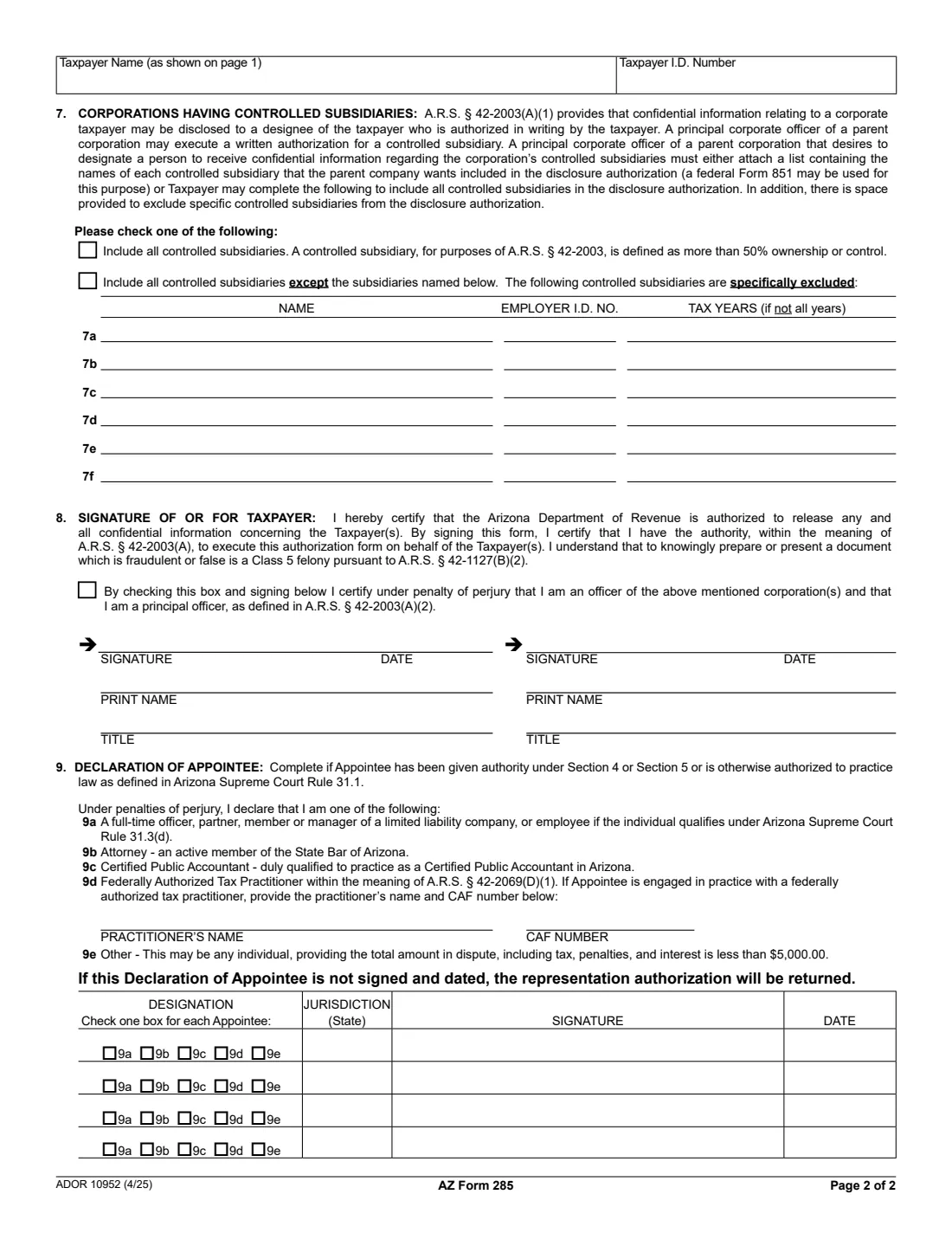
The 2025 edition has 2 pages. FileIt asks for it in 11 parts, and it is signed by Taxpayer and Spouse / second signer and Appointee:
- Section 1: Taxpayer informationTaxpayer
- Section 1: Spouse (joint filers)Spouse / second signer
- Section 2: Appointee informationAppointee
- Section 3: Tax mattersTaxpayer
- Section 4: Additional authorizationTaxpayer
- Section 5: Power of attorneyTaxpayer
- Section 6: Revocation of earlier authorizationsTaxpayer
- Section 7: Corporations having controlled subsidiariesTaxpayer
- Section 8: Signature of or for taxpayerTaxpayer
- Section 8: Second signerSpouse / second signer
- Section 9: Declaration of appointeeAppointee
How to fill out Arizona Form 285, step by step
1 Section 1: Taxpayer information
Enter the taxpayer's name, taxpayer ID number (tick SSN or EIN), address and daytime phone, plus the spouse's name and SSN or ITIN for joint filers. If the authorization covers an AZ tax license, tick the license type and give the number. For more than one license, attach a sheet listing each number and location, or give the business's EIN to cover every location.
2 Section 2: Appointee information
Name one individual (not a firm) with their address and phone, and one identification number: a state bar number, a CPA number, an IRS enrolled agent number, or an SSN, ITIN or other ID with its type. The number must be different for each appointee, because they give it when they contact the Department. Attach a sheet for more appointees.
3 Section 3: Tax matters
Tick each tax type (income, transaction privilege and use, withholding, or other), give the years or periods, and tick the type of return or ownership. Signing authorizes ADOR to release confidential information to the appointee for those matters.
4 Sections 4 and 5: Extra powers or power of attorney
Section 4 lets you grant specific powers, 4a to 4h. For a full power of attorney, skip Section 4 and tick Section 5, adding any limitation. Either way the appointee must meet Arizona Supreme Court Rule 31.3(d) (see the instructions) and sign the Section 9 declaration.
5 Sections 6 and 7: Revocation and subsidiaries
Tick Section 6 to revoke all earlier authorizations and powers of attorney on file with ADOR, listing any that should stay in effect. A parent corporation can use Section 7 to include all its controlled subsidiaries, or all except the ones it names.
6 Sections 8 and 9: Signatures
The taxpayer, or the person entitled to sign for the entity, signs and dates Section 8 with their printed name and title. A corporate officer whose title isn't one of those listed in the instructions ticks the principal-officer box. The appointee chooses a designation (9a to 9e), gives the jurisdiction, and signs and dates Section 9.
Common mistakes to avoid
- Naming a firm as the appointee. The appointee must be an individual.
- Giving the same identification number for two appointees. Each needs their own unique number.
- Ticking Section 4 or 5 but leaving the Section 9 declaration unsigned. The form says the representation authorization is then returned.
- Filling in Section 4 when you mean to grant a full power of attorney. Skip Section 4 and use Section 5.
- Forgetting the page-2 signature. The form says you must sign it on page 2.
- Using Form 285 as a fiduciary. A trustee, executor, administrator, receiver or guardian acts as the taxpayer and shouldn't file it.
After you fill it out
Sign and date Section 8, and have the appointee sign Section 9 if they were given representation authority. FileIt can place signature and date boxes with its optional e-signature, or you can print and sign by hand.
Send the completed form to ADOR by email ([email protected]), fax ((602) 716-6008) or mail (Arizona Department of Revenue, ATTN: Power of Attorney, PO Box 29086, Phoenix, AZ 85038-9086), or to the ADOR employee who asked for it. FileIt doesn't send it.
Keep a copy: the finished PDF stays in your vault folder, a record of who can act for you and on which tax matters.
Fill out Arizona Form 285 online with FileIt
- Pick the person. Choose someone from People and FileIt fills in their name, date of birth, address and other details it already knows.
- Answer plain-language questions. One part of the form at a time, with the official help text beside each question — 81 fields in all. Your answers save as you go.
- Check the live preview. Watch your answers land on the real Arizona Department of Revenue form, and let FileIt do any worksheet arithmetic.
- Generate the official PDF. FileIt prints your answers into the agency’s own PDF and files it in that person’s folder in your vault. Sign it, or send it for e-signature.
FileIt fills the form — it never files or submits anything for you. Deliver the finished form to whoever asked for it, the way the form’s instructions say.
Start Arizona Form 285 now — it’s freeArizona Form 285: frequently asked questions
Can I fill out Arizona Form 285 online?
Yes. FileIt asks each question in plain English and prints your answers into ADOR's official Form 285 PDF, which you then sign and send to the Department yourself.
Is Form 285 a power of attorney?
It can be. On its own it authorizes ADOR to disclose confidential information to your appointee. Section 4 adds specific powers, and ticking Section 5 grants a full power of attorney for the tax matters and periods you list.
Who can be my appointee?
Any individual can receive information. To represent you in an administrative matter, the appointee must be an Arizona attorney or meet Arizona Supreme Court Rule 31.3(d): for example any individual when the total in dispute is under $5,000, a qualifying officer or employee of an entity, an Arizona CPA, or a federally authorized tax practitioner such as an enrolled agent.
How do I submit Form 285?
By email to [email protected], by fax to (602) 716-6008, or by mail to Arizona Department of Revenue, ATTN: Power of Attorney, PO Box 29086, Phoenix, AZ 85038-9086. If an ADOR employee asked for the form, send it to the address they give you.
Does a new Form 285 cancel my old one?
Only if you tick Section 6, which revokes all earlier authorizations and powers of attorney on file with ADOR except any you list there.
Does the appointee have to sign Form 285?
Only if they were given authority under Section 4 or Section 5, or are otherwise practising law as defined in Arizona Supreme Court Rule 31.1. Then they choose a designation, give the jurisdiction, and sign and date the Section 9 declaration.
Official sources
- Blank form (PDF), published by Arizona Department of Revenue: https://azdor.gov/sites/default/files/2023-03/FORMS_POA_10952-f.pdf
- Official instructions and guidance: https://azdor.gov/forms/poa-and-disclosure-forms/general-disclosurerepresentation-authorization-form
- Edition shown on this page: ADOR 10952 (4/25) (checked 2026-09-28).
FileIt is not affiliated with or endorsed by Arizona Department of Revenue or any government. This page explains the form in general terms and is not legal, tax or immigration advice. Always read the official instructions, and check that you are using the edition the recipient accepts. Page last reviewed 2026-09-28.